Just like the computer that you are reading this blog post on, your web server has a lot of software installed to keep it running. And like all software, it needs to be kept up to date to avoid security issues. Web server security is an enormous topic with many moving parts, many which are often uncomprehendable to the non-teckie.
Seriously though who is updating your web server software?
Your web developer? Unlikely, often web developers have very limited knowledge of the underlying technologies of web servers.
Your web hosting company? Possibly, but unlikely unless you’re paying them to do so.
Your IT team? Unlikely, your IT team is often focused around the computers, laptops and devices around the office and often believe that it is the web developer’s or web hosting company’s job to do this.
As a business owner it is your responsibility to be asking these questions and making sure that you have this part of your cybersecurity looked after. If you don’t know who is looking after this for you, you need to find out. Get in touch if you find out that this is not being looked after, as I suspect is the case for most people reading this blog post. As with all software, it is essential that your web server software is kept up to date to avoid potential cyber attacks.
This is what one small part of updating server software actually looks like to the teckies managing this for you, no pretty user interface, it’s primarily command line management;
If it ain’t broke, don’t fix it, right? Wrong. This is the belief system of inexperienced software developers and businesses owners who are, in some cases rightfully so, worried about what problems any changes may cause. The reality though is that as a business owners, development manager or other, you need to make sure every aspect of software you are running is up to date at all times. Any outdated technologies in use can cause problems, likely have known vulnerabilities and security issues and will ultimately result in a situation whereby you are afraid of making any changes for fear of the entire system imploding on itself.
Ok, now I’ve got that out of the way, I assume you are now also of the belief system that all software needs to be kept up to date at all times without exception. If you are not convinced, then as a developer you need to come to terms with this quickly, or as a business owner you have not been in a situation yet which has resulted in a laissez-faire attitude to software updates costing you tens of thousands of pounds to remedy, much more expensive than pro-active updates and regular maintenance.
The biggest challenge software developers face at the coal face of the build process is the inherent unpredictability of software development. As a business owner or user of a software application, whether that is an online portal of some form, a web application, a mobile app, a website or something in between, what you see as a user is the absolute tip of the iceberg, the icing on the cake and this can paint completely false pictures about the underlying technology.
Anyone who has heard me speak on software development and technologies in the past will have no doubt heard my usual passionate exchange of words along the lines of using the right technology, investing seriously and stop trying to scrimp on costs. The reason I am always talking to businesses about this is not as part of a sales process designed to fleece someone of their hard earned money. No. The reason I talk passionately about this is because when businesses take on board the advice, this saves them a significant amount of money in the long run.
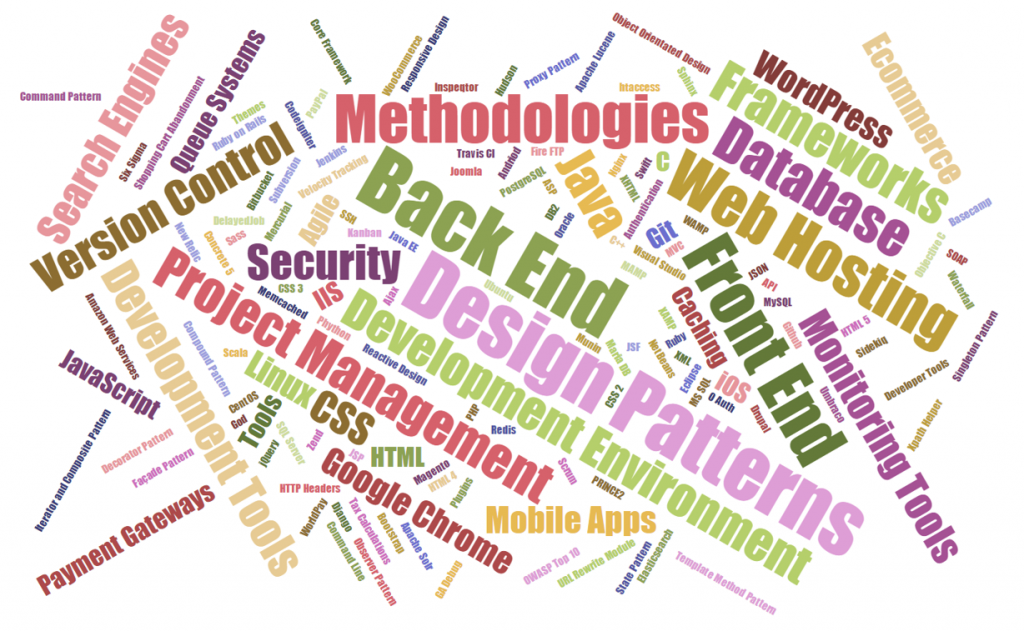
To build leading software products that your business relies on for revenue you need to be using the best underlying technology possible. And here lies the challenge. Any software product or online platform is built using a plethora of individual technologies that are working together seamlessly – at least in well-built systems. Below is just a very small sample of the individual technologies, frameworks, methodologies and systems that are often working together in the background to make a software product function as you experience as the end user.
What this means though is that when something goes wrong, this often starts a chain reaction which impacts the entire system. This is the point when a user often likes to point out that “It doesn’t work” or “This {insert feature here} is broke”. And the reason something doesn’t work is often related to either a poor choice of technology in the first place or some form of incompatibility or conflict between different technologies.
To put this into a metaphor that is easier to digest, imagine an Olympic relay team. Now instead of having 4 people in this team, there were 30-50 people in this team. The team in this analogy is the software with the individual people being the pieces of software and technologies that make the software work. Now picture this. An outdated piece of technology as part of the team is the equivalent of having an athlete from 20 years ago who was once top of their game, but hasn’t trained in the last 20 years. They have put on a lot of weight, their fitness level is virtually zero and they can’t integrate as part of the team and generally have no idea what they should be doing. This is the same thing that happens with technologies. Ask yourself the question, would you really want this person as part of the team if you were relying on them to make your team the winning team at the Olympics? The answer is no. The same applies with software development.
Now to take the analogy one step further. Imagine that every member of the relay team is at a completely different level of fitness and experience. Each member of the team is interacting with different parts of the system, but often not all of the system at once. What this means is that when one of the athletes decides to seriously up their game and improve their performance, i.e. a piece of technology gets updated as part of the system, then this impacts other parts of the system in different ways. The reality of software development is that nothing is as linear as a relay team where person 1 passes the baton to person 2 and so on. The reality of software development is that often various pieces of technology will impact on many other pieces of technology and vice versa and often in a way that you cannot predict until an issue crops up.
So bringing this analogy back to software development in the real world. What this means is that when a new update comes out, for example, an update to the core Apple iOS operating system, for which all mobile applications rely on, then this update can cause problems if a key piece of technology is no longer supported for whatever reason. This seemingly small update from version 9.0 to 9.2 for example could actually result in a catastrophic failure which needs to be rectified for the mobile application to continue to work.
Here lies the challenge. As a business owner, IT manager or software developer, you have a choice. To update or not to update. To update leads you down the path of short term pain and costs to enhance the application with the long term benefits of a completely up to date piece of software. To hold off on updating leads you down the path of short term gain of not having to update anything with the long term implications being that over time as more and more technologies are updated your application is getting left in the digital dark ages, meaning that what would have been a simple upgrade previously has now resulted in a situation whereby a full or major rebuild of the application is the only way to go forward to bring the application back into the modern world. Remember the film Demolition Man with Wesley Snipes and Sylvester Stallone, when they stayed frozen in time for 36 years and how much the world had changed around them? If you haven’t seen the film, go and watch the 1993 classic, it will be a well spent 1 hr 55 mins of your time.
The number of interconnecting pieces powering any software product in the background is enormous and without serious planned maintenance and improvements things will start to go wrong, seemingly randomly, but in fact being caused by some form of automatic update somewhere along the lines. Just imagine a children’s playground at school if this was left unattended for 12 months with no form of teacher around to keep everything under control. The results would be utter chaos within no time. This is your software project. As a business owner, IT manager or software developer you need a conductor behind your software projects to ensure they are continually maintained and continue to function as you expect. It is a system and just like all systems of nature, they tend to prefer to eventually lead towards a system of chaos rather than order. There is a special branch of mathematics called Chaos Theory which talks about this in great depth should you wish to read into the topic.
As a final summary about the inherent unpredictability of software development. Everything needs to be kept up to date and a continual improvement process and development plan is essential that your software doesn’t get left behind. A stagnant software product in an ever changing digital world soon becomes out of date and needs a significant overhaul. What this does also lead to is the highly unpredictable topic of timelines and deliverables when dealing with so many unknown, unplanned and unpredictable changes that will be required as a continual series of improvements are worked through. What I can say is that any form of continual improvement is always far better than sitting back and leaving a system to work away. For any business owner who is reading this, when a software project is delayed, this is generally why. The world of software development is an ever moving and unpredictable goal post which requires your understanding. Good things come to those who wait.
Naturally working on a lot of web application projects in multiple languages from Java EE to PHP to websites to mobile applications, one common thing that we see time and time again is the lack of thought that goes into design patterns for websites and web applications. Often having to pick up projects at this point, generally when they have already gone seriously wrong, we can’t but help think that there must be a better way to prevent these issues we see through sharing best practices to ensure scalable web applications are built and can be maintained with ease. Specifically for this blog post we are going to look at the Model View Controller MVC design pattern.
If you are working in any form of software development, website development or web application development, I’d argue that this is one of the most powerful design patterns to get your head around as when you fully understand the relatively simple approach behind the MVC design pattern this allows you to think about the structure of your code and project before jumping in and writing a single line of code. By taking this time up front, I can absolutely guarantee that this will save you an unbelievable amount of time working on your application over time and most importantly, for the businesses you are working with this will help to ensure bugs, features, functionality improvements and tweaks can be delivered much faster with fewer errors.
What is the Model View Controller MVC Design Pattern
So let’s just take things back a step as if you haven’t been working away on larger web application projects previously, you may not even be aware of the MVC design pattern, hopefully you are away of what design patterns actually are if you are working in web application development though, if not, then I recommend going on a date with Amazon to learn about design patterns.
The MVC design pattern is a way of structuring your code to break up the key elements of your web application which includes;
Model: These are the bits of code that actually do things
View: These are the bits of code that make the things look pretty
Controller: These are the bits of code that control what happens when someone requests a resource such as a page on your website, the business logic of your web application
Ok, so it’s a little more complex than that in the background, but that is MVC explained in the simplest way. I’m not going to talk about the theory of MVC to the n’th degree, instead I’m going to look at the practicalities of MVC while dabbling into the Single Responsibility Principle design pattern and how the two link together extremely well.
For the purposes of this blog post, we are going to focus on Java as the programming language to highlight this concept as Java is better than PHP. Fact (in my opinion). 😉 (cue the haters…). On a serious note though the reason why we’re looking at Java for this example is because it is more suited to using a structured MVC design pattern for projects than PHP is, on the whole, which is due to the separation of the Model (Java classes), the View (JSPs) and the Controller (Java Servlets) which link in nicely together. For the same MVC setup in PHP you will probably be looking at something like the Zend Framework which has been designed to focus around an MVC architecture. With that understanding, let’s look at the practicalities of MVC and why this is such an awesome design pattern that you really need to be using.
Benefits of the MVC Design Pattern
Before we jump into a few simple examples of using the Model View Controller MVC design pattern, lets first just look at why this is such an awesome design pattern and why you should seriously consider using this for a variety of the web application projects you are working on.
Separation of Concerns
Being able to separate the key parts of your web application into the Model, the View and the Controller is an extremely efficient way of working. Being able to separate out the key functionality within your application from the business logic from your application and separating the visual and layout side of your application means that you can clearly focus on the task at hand and work effectively throughout your code.
Focused Developers and Niche Sill Sets
By breaking out your web application into key aspects this allows individual developers within the team to be highly specialised and focus on the areas that they are good in without worrying about other skill sets that are likely outside of their expertise. For example, front end developers who are extremely proficient in HTML, Javascript and CSS are likely to be a little confused by back end technologies such as Java Servlets, database connectivity and APIs. Likewise, developers focusing on the business logic of an application are likely more well suited to this opposed to writing the key functionality and connecting with external APIs and more.
This also allows updates to various points within your web application without impacting the other aspects. For example, you can quite simply make changes to your user interface without impacting the business logic within your application. This is an extremely powerful setup to allow your web application to be modified with ease.
Parallel Development across Multiple Teams
As your web applications grows, multiple teams of developers will be working on your application code base to enhance features and functionality. By using a true MVC design pattern, this allows multiple people to work on your code base with ease.
As your web application grows using a non-MVC design pattern, you will soon reach the point whereby developers are struggling to work on a project without impacting the work of another developer, to the point whereby this may actually restrict the amount of work that can be completed during any given time scale. This is not a good position to be in and if you reach this point, you will soon see how much more efficient the MVC design pattern really is.
MVC in Practice
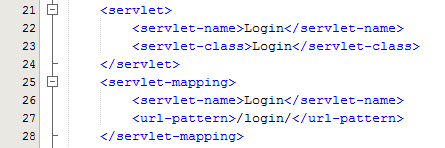
Within Java, you have your deployment descriptor which is designed to control how requests are handled when a user types in a URL on your website. For example, when someone visits www.example.com/login/ the web.xml file will send the request on to the Controller file named Login.java in this example;
The Controller – Login.java
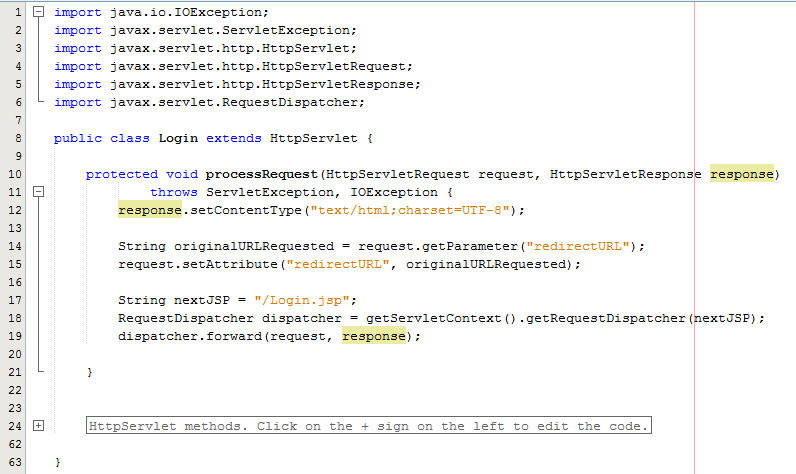
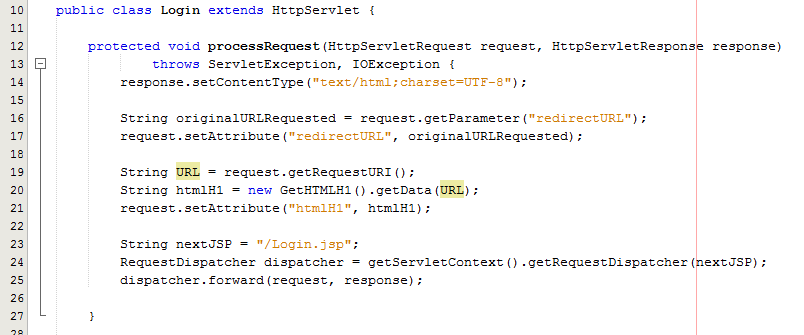
Taking this example, the Controller is just a standard Java Servlet which is designed to handle the incoming request and control whatever you want to do with these requests. For example, and keeping things basic, on a login page a user may have been redirected to this page after trying to access a restricted resource and it would be nice to redirect the user back to the page they were trying to access instead of to a generic login landing page;
The concept of the Controller is designed to take care of the business logic part of the web application so you can build in the logic you require whilst keeping the key functionality separate. This is hugely important as this means that as the development team grows one team can be working on the business logic while another team can be working on the key functionality without impacting the workflow of either team. The above example is purely the Controller which then forwards the request onto the JSP to provide the View aspect of the process, but we have missed one key aspect, the Model. In the example above there are no calls to and Model classes designed to pull in key data, so let’s look at an example where the Model is used before we look at the View part of the process.
The Model
So let’s imagine that whenever somebody accesses the login page, an email is sent to someone. You would never do this in practice as this is just pointless, but this highlights the concept of the Model. In the same context and looking at something more practical, you would use the Model to retrieve some data from the database such as a snippet of text for example which is controlled by a content management system type setup. Never the less, we’ll use this as an example.
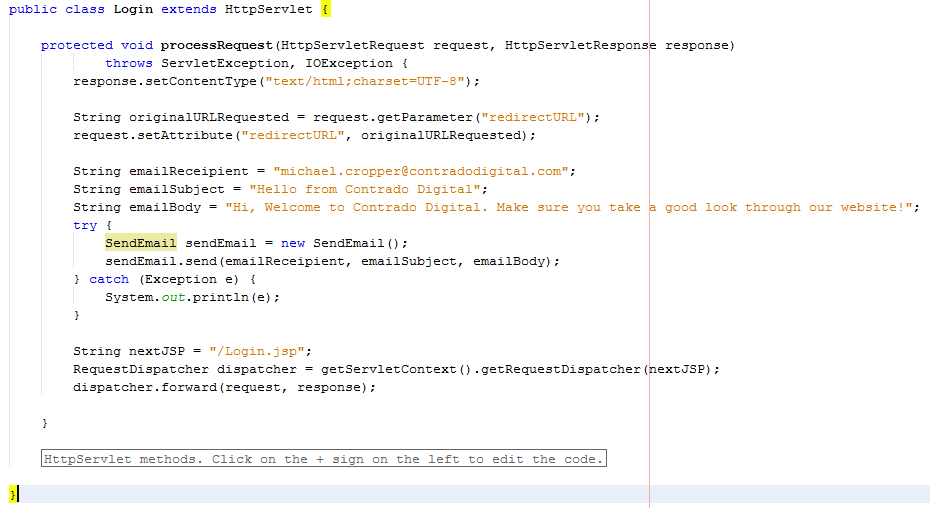
The functionality to send an email has been broken out into its own class designed to break out the business logic which is “When someone views the login page, send an email” from the actual functionality for sending an email.
The Model – SendEmail.java
Looking specifically at the Model class, this is designed to actually implement the core functionality that you require. In this example send an email. From here, you can control specific functionality and separate this functionality completely away from the business logic of the application. Here helps you to work more efficiently by building up a solid and scalable library of core functionality that drives your web application rather than just simply working with a system which contains highly coupled code.
Taking this example beyond the simple SendEmail() functionality which is purely focused on completing a specific action in the background, another more specific example would be to collect data from the database which is then sent on to the View which is for the user to see who has requested the original resource. For example, taking the MVC web application to the perfect situation whereby every single aspect of content is purely database driven, the result would be a Model class along the lines of getMetaTitle(url) which is designed for the Controller to generate the correct meta data for the page that has been requested.
The Model classes are where the real power lies within your web application. Here lies the true power of how your web application implements the cool features and functionality throughout the entire system. The Controller allows you to do exactly that, control how the Models are pieced together when a specific URL is requested which allows you to create the fantastic experience for your website visitors.
The View – Login.jsp
So let’s look at a more practical example whereby you have used a Model class to retrieve some data from the database for what the HTML H1 should be. Once you have received this data in the Controller Servlet you need to then add this data to the Request object so that this can then be retrieved by the View JSP;
As can be seen in the code above from the Controller Servlet, setting the attribute for the data that you wish to pass to the View is the next step in the process. From here, now let’s look at the View part of the MVC design pattern to look at how to retrieve this data in a safe way.
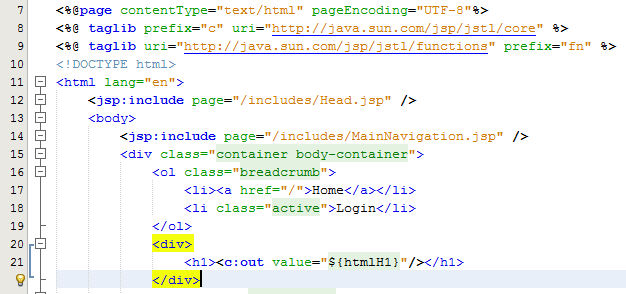
Here we can take a look at the View, login.jsp, which is designed to handle the visual side of the web application. From here you have the ability to retrieve data passed to the View from the Controller and there are several ways of doing this.
At the most basic level, you can use a small scriptlet such as;
<%= request.getAttribute(“htmlH1”) %>
Which is will output the data contained within the stored attribute named “htmlH1”. So if you wanted to wrap this in a H1 tag then this would look as follows within the JSP;
<h1><%= request.getAttribute(“htmlH1”) %></h1>
Simple and effective. The problem here though is that as your web application scales, particularly on an international level, this isn’t the best approach to take as there can be a variety of differences for different locales such as time and date formatting along with currency formatting etc. So lets look at how best to handle requesting data from the Request object and displaying this within the View JSP through the use of the Java Standard Tag Library, JSTL.
JSTL has been designed to be a more user friendly way of displaying content within the JSP without the need for using scriptlets which should never really be used if possible. With JSTL the tags used will look very similar to any web developer who has been using HTML for a while. They follow the same logic with tags and attributes, the difference being is that JSTL is designed to apply common activities to JSPs such as simple items including displaying some content such as the HTML H1 tag content or something more advanced such as a For or While loop. Below follows on form the basic example given already, with the use of displaying the HTML H1 tag on the page;
Here there are a few things to point out to understand what is happening. Firstly, there are two lines at the top which allow you to use the full power of JSTL which are;
The first line is for using the Core JSTL functionality, while the second line is to use the JSTL functions for things such as data manipulation. In this example, we’re only going to need the core functionality. So is you notice the section for displaying the HTML H1 tag is as follows;
<h1><c:out value=”${htmlH1}”/></h1>
The <c: prefix in the code above is telling the JSP to use the JSTL Core functionality which was referenced previously in the page. Next this is telling JSTL to display the contents contained within the attribute named “htmlH1” which we set previously in the Controller Servlet. So that when you look at this on the original Login page you just requested then you see this information as you would expect;
Sounds simple, right? Well, yes, it actually is extremely simple to use a Model View Controller MVC design pattern when you think through the structure of your code instead of just jumping in and writing code. The difference being is that when you stop to think about the design pattern that you are using within your web application that you can quite easily make huge improvements both now and in the future. The Model View Controller MVC design patter is just one of many extremely powerful design patterns that you should seriously consider using to make your code easier to create, scale and maintain in the future.
Summary of the Model View Controller MVC Design Pattern
Hopefully this covers the Model View Controller MVC design pattern in enough detail to understand why this is such a powerful design pattern to use when developing your web applications and also looks at the practicalities of implementing such a design pattern. Sure, you will certainly be writing more lines of code to implement such a design pattern although I can guarantee that you will be creating a much more efficient system overall and a system that is easier to scale and maintain in the future.
The key to implementing a great MVC design pattern throughout your web application comes down to planning. You need to be planning this design pattern extremely well and to make sure that your entire development team is working towards the same goals. It is important to discuss these things on a regular basis as this will ensure that everyone is developing code with this design pattern in mind.
We’ve spotted a trend recently with many website developers utilising technologies that make it difficult for search engines to crawl and index the website. Meaning that when search engines find it difficult to understand the content of your website, that you are in a position whereby Google may either penalise your website for spammy behaviours or simply losing a significant portion of the traffic to your website and ultimately revenue too. Clearly for websites that are generating a lot of visits from search engines, if this suddenly dropped off, how much revenue would you lose out on?
The trend we have spotted is around using JavaScript technologies which are inhibiting search engines from crawling websites. So while a new website may look flashy and all-singing-all-dancing, but if the new website cannot be easily crawled by search engines then quite simply you are going to be losing a lot of organic traffic to your website and ultimately sales / enquiries. Don’t make the same mistake that so many website developers do and use the latest technology without thinking through the consequences of what this means for your overall digital marketing strategy.
Common Problems
The common problems we are seeing more frequently at the minute are with developers using JavaScript technology which often looks nice for users. From a search engines perspective, JavaScript technology is difficult to crawl which can confuse the search engines and would always be recommended to avoid.
As a prime example, a local business recently re-launched their ecommerce website which certainly looked pretty but when viewing the website with JavaScript turned off (as Google would see it), then there is no content to display at all;
A website that looks good but can’t be indexed to Google is the equivalent of having a beautiful shop on the high street and keeping your doors locked at all times – you aren’t going to be generating any sales. For this business specifically, they have been notified of the issue and are working to fix the problem. Let’s be clear though, this is the exact reason why it is important that you are working with the right digital agency who understands how each piece of the digital marketing jigsaw fits together. A good looking website is often not the same as a good performing website. Good performing websites think about usability, functionality, SEO, PPC, Email Marketing, Conversion Rate Optimisation and more.
Why this is a problem for search engines
Developers love to use new technology, but this isn’t always the right decision to make. As a nice comparison, if a new website removed the traditional login username and password and instead replaced this with fingerprint scanning technology to access the website, which is possible. Sounds like a fun and exciting thing to play around with, right? But when you dig a little deeper, this means that only those with the latest Samsung Galaxy phones and certain specialist laptops would be able to use this technology, forcing everyone else away.
There is always a place for new technology and we would always encourage people to experiment with new technology to lead the way in their industry. That being said, you cannot do this at the expense of forcing people to use this technology if they don’t have the means to do so.
The same is true for Google. Search engines cannot easily index content that is powered by JavaScript. Which means that all pages on your website need to be accessible when JavaScript is turned off. Google recently updated their official guidelines on the topic which states that websites should be developed using Progressive Enhancement. So while some of your JavaScript based content may be being found by Google, it would always be recommended to follow Google’s guidelines on the topic to improve the chances of benefitting the website in terms of SEO;
So what exactly is progressive enhancement? Well it comes down to creating a website (or mobile app) that can be run on all devices easily with basic functionality. Then if a certain device has a specific piece of functionality or technology, then you can enhance the usability of the website based on this technology. Most importantly, don’t assume that everyone accessing your website has all of the technology available that you think they do.
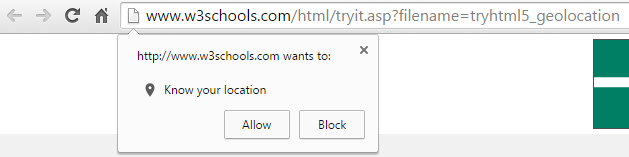
For example, how many times have you been prompted when accessing a website from your laptop which asks if it is OK if this website uses your location?
While this technology can certainly work on website, it is often rather inaccurate due to the way your location is essentially guessed based on several factors. Compared with the GPS signal from your mobile phone which is accurate to within a few feet of your location. This is a prime example of when progressive enhancement would be used, with a baseline set of website features not using the Geolocation and only asking the user if you can use their location when they are accessing from a mobile device. People accessing services through their mobile device are used to giving websites their location in return for some form of added features or functionality. As an obvious example, Google Maps clearly needs your location to help you get from A to B.
From a search engines perspective, it is important to use progressive enhancement at all times to ensure that they can easily crawl and index your website and content. Far too often are JavaScript based websites (and Flash websites back in the day!) are built without thinking about how Google is going to be able to crawl them. When using progressive enhancement, this ensures that the baseline website is still accessible to Google when JavaScript is turned off.
Progressive enhancement is not only recommended by Google, but it is also recommended by the wider community opposed to the older approach of graceful degradation. The reason behind this is because it provides a much better user experience when people are accessing a website from a variety of devices with multiple technologies.
As a simple summary of the above, all modern smartphones come built with GPS, accelerometers, gyroscopes, compasses, barometers and more. Whereas most laptops and desktop computers don’t have any of these technologies built in by default. Any website that depends on technology for key features or functionality that not everyone has is doomed to fail.
How to Test
To check your own website is displaying correctly for Google, turn JavaScript off in your web browser and navigate around your website. If you can’t easily access all parts of your website with JavaScript turned off, then the chances are that search engines are also having difficulty. While it is true that Google does attempt to index JavaScript based content, they do still find it difficult which is why they recommend progressive enhancement their self.
Removing any ambiguity from your website means that Google will be able to crawl and index your website with ease. It is easy for Google to assume that you are showing one version of content to the user and another version of content to search engines – for which websites can be penalised for this behaviour. Always use progressive enhancement as a way to develop websites effectively.
If you need any tips, advice or pointers related to the technology your website is using then get in touch. We have a range of services to support your individual needs, from starter Digital Lifeline support packages to our high end consultancy packages designed to be tailored to your every need.
Being part of Manchester Digital, we get access to exclusive events talking about the serious changes in digital and current trends. We recently attended an event talking about online fraud and cybercrime, and honestly, this is much more serious threat that most businesses even realise.
At the event we heard from DC David Stott from Cheshire Police force and Raoul Charlett, a Complex Fraud and Corruption Investigator. Talking about cybercrime and fraud proofing your ecommerce business. Also speaking was Gareth Williams from Metapack who covered various tips and advice about how businesses can protect their-self online.
Traditional Business Fraud
Some of the more common business related fraud relate to long term frauds within organisations, invoice diversions and even internal fraud related to BACS, accounting and false invoices being processed. These clearly have serious consequences for businesses beyond the obvious monetary costs. From data loss, disruption within your business, the branding and PR nightmare if this information gets released and more.
What is more worrying is around the lack of capability for a lot of digital fraud to be investigated. As you know, the UK has borders and so does the capabilities of the law enforcement organisations who can pursuit such fraud. Typically speaking, a lot of digital fraud is instigated overseas which means that the efforts involved in bringing criminals to justice required a lot of work and often never actually happen. This is a huge issue for businesses, particularly those running ecommerce websites as you can lose a lot of money in the process with little chance of getting this back.
Data Commissioners Office
One point reiterated at the event was about how all organisations storing personal information that is used for specific purposes must register at the Information Commissioners Office. If you aren’t sure if you need to register, then it is recommended to complete the self-assessment on the website, and if you do need to register this is only a nominal fee of £35 per year.
With data breaches on the rise, it is essential that businesses treat data security seriously as it is a criminal offence if you don’t do this and are required to do so. Over recent years we have seen literally billions of customer details stolen from only a small handful of companies storing personal information for their customers.
Digital Fraud and Cybercrime
Moving onto some of the more modern frauds that happen, it is often the ones you may not even have thought about, yet are a serious problem for businesses. We are increasingly speaking with clients and other businesses about how to mitigate the risk for their businesses related to cybercrime and we are able to provide key recommendations on this topic.
Intellectual Property Theft
How secure is your intellectual property within your business? As a digital organisation, your intellectual property isn’t likely to be in the form of manufacturing processes, secret recipes, physical designs or some of the other traditional areas that you would generally relate to intellectual property theft.
When looking at digital businesses, how secure is your data, your databases, your software code and other sensitive information about your business, your customers, products and services? In our experience, for many small to medium sized businesses, there is often quite a significant opportunity for fraudulent activities and cybercrime to take place due to lack of procedures, understanding and internal training.
Hardware Security
This is way beyond our level of expertise at Contrado Digital, although we like to keep our ears open to the news related to hardware security. Specifically around open source and freely available software called Reaver which is designed specifically to hack into WiFi routers using WPS, WPA and WPA2 passwords using a brute force style attack.
To keep this into perspective, once someone accesses your internal network, they often have access to a wide range of other data within your business if your data isn’t locked down and secured well. This is beyond simply having a more secure password on your router, this comes down to how you and your staff access the files, data and systems within your organisation. To the point that you not only have the internal security of only allowing access to data from an internal IP address, but also only allowing access to data for staff who have the authority to view this data, regardless if they are within the internal office IP or not.
Systems Prevention
There are a lot of technical ways and some common sense methods which you can use to protect your business from cybercrime and online fraud. Have a think about some of these questions to see how they relate to your own business;
What is your fraud policy?
How are individual members of staff managed in terms of the data they can access?
Do your staff understand how Trojans, malware and phishing scams work, specifically related to clicking links and opening emails from unknown sources?
How do you mitigate risks from updating your accounts, specifically related to invoice fraud?
How do you investigate new customers to check that they are genuine? A note on this topic is that you can be legally responsible and open to jail time if you have not performed detailed enough checks and your customer ends up being identified as part of a criminal organisation. This could have serious implications for your business
How do you thoroughly vet new and existing members of staff? This sounds obvious, but have you spoken to their references?
A note on background checks related to companies is rather interesting, as the data that you will often be researching on freely available company check websites and companies house is only as accurate as the data that is entered by the company. This is really important to understand because this data does not state that the data is accurate, the information you see on these services states that this is what the company has said is accurate. This can be significantly different, particularly when online fraud and cybercrime is taken into account. Do you honestly believe a companies that is not legitimate would submit legitimate data? The same applies when another company could be created with a very similar name to your business which could confuse people trading with you, or you viewing another company.
An interesting service that was recommended included WebFiling Protected Online Fraud (PROOF) which helps companies, i.e. yourself, safeguard your information and protect against corporate identity theft and fraudulent filings. The short video below explains this in more detail;
Another check point discussed was The Gazette which allows you to check company information from an official source. When checking details of a company you are either working with currently or about to work with, it is essential to check through as many sources as possible to get a good understanding of who you are working with.
Hackers for Hire
Thinking hacking and cybercrime isn’t that much of a threat? Think again. There are services popping up such as HackersList which allows you to actually rent hackers for a specific project and pay for their services. And this is just the public face of what is happening. Within the underground there is an awful lot more happening that most people simply aren’t aware of.
Hacking is always seen as this big bad term, yet often hacking isn’t that difficult. Hacking can be extremely simple, particularly when companies employ sloppy web developers and leave their customer details wide open for anyone to access. This isn’t difficult for anyone to access with half a brain cell and a small bit of technical knowledge. This isn’t cyber criminals working away, this can be simply equated to finding a hidden link on a page that happens to be the same colour as the background. The technicalities behind this aren’t much more complex than that.
London Met Fraud Advice
The London Metropolitan Police are very much leading the way when it comes to cybercrime and security prevention in an official sense and have a very valuable website on the topic to help individuals and companies protect their-self. If you aren’t too familiar with some of the basics of protecting yourself and your business, I’d suggest you spend a bit of time researching this and understand what you can do within your own business.
MetaPack
MetaPack is a service designed to track ecommerce deliveries from end to end while looking to reduce fraud at every step of the process by using smart technology. Interestingly, 80 of the top 100 online UK retailers use MetaPack which managed around 50% of the online orders in 2014 (excluding Amazon).
Another interesting fact is that between 1-3% of sales are classified as Goods Lost in Transit (GLIT) which is actually an extremely high amount when you think about the scale of online orders within the UK, some of the highest per capita in the world. Some of the common problems related to this simply comes down to different departments within larger organisations simply not talking to each other, whether this is people or systems, think sales, website, warehouse all using different spreadsheets, databases and platforms with no centralised system.
A prime example of this is for items with a higher value which is often simply not worth the ecommerce retailer collecting the item from the customers. Imagine, as a fraudster, ordering a bathroom suite, 5 items, from 5 companies (bath, toilet, bidet, tiles and basin). When each arrives, calling each company to inform them that the item has arrived damaged. Then when they ask if you would like another item delivering, you say no and they simply issue a refund without ever collecting the apparently damaged item from you because it is too expensive to collect or verify. This is clearly an issue if you don’t have the correct procedures in place for your business and happens more than you could imagine.
Officials
While I hate to say this, the authorities are too slow to adapt to the changes within digital to keep up with the ever changing technologies, threats, knowledge and information with an ever decreasing budget for public services. When you compare the resources and knowledge the official sources have on cyber security and online fraud in comparison to what is actually happening, this is worrying. To the point whereby Stuxnet managed to go unnoticed for quite some time. If you haven’t heard about this, read up on it if you don’t want to sleep at night.
This is going to change over time within the authorities, although as a business you need to take responsibility and protect yourself to avoid any serious issues within your business.
Website Security
Online fraud and cybersecurity covers a lot of topics from user behaviour, training, IT hardware, physical security and more. This blog post isn’t designed to be a resource covering all of these topics, instead more of a warning to companies to take online fraud, cybercrime and security seriously.
We do our part related to website security which is why we offer services designed specifically to help businesses manage their online security through our WordPress Security and Maintenance packages along with providing industry leading web hosting solutions for small to medium sized businesses.
Summary
Online fraud, cybercrime and security needs to be taken seriously by businesses within the small to medium sized range. Do not take the threat lightly and assume that it will not happen to you. Cyber criminals will be targeting non-corporate businesses as these are the businesses who often have the least security policies in places throughout their website and internal procedures.
If you would like to talk through how business could be impacted, get in touch to discuss your specific business needs and how we can help protect your business.
You may have heard about how Google has been dishing out unnatural link warnings over the past couple of years as they released their algorithm update, Google Penguin. We recently had the pleasure of resolving a resolving one of these warnings for a client who came to us with this problem – which had been generated as a result of previous shoddy work from an old supplier. Here is what we have learnt from this process and how these warnings often aren’t actually as bad to resolve as one may initially think, if you understand how Google is thinking. Firstly though, let’s take a look at what Google Penguin is and where these unnatural link warnings come about.
Google Penguin
So Google Penguin is an algorithm update that Google announced a couple of yea
rs ago. The algorithm was brought about to penalise websites who were building links from low quality websites to their own website with the aim of increasing their visibility within the search engines. Basically to manipulate their SEO efforts.
Google is determined to stop people and businesses gaming their algorithm and instead looks to reward websites who generate high quality and natural links from relevant websites. There is a clear reason why businesses have attempted this previously and that is because more visibility in the search engines ultimately leads to more traffic and sales.
After Google launched their Penguin algorithm, they started to send webmasters notifications and warnings via Google Webmaster Tools informing them that they needed to clear up their act. In a lot of cases, this was accompanied by a penalty in the search results leading to less visibility, less traffic and ultimately less sales. Yes, in the online world it seems that Google is indeed the judge, jury and executioner.
Unnatural Link Warnings
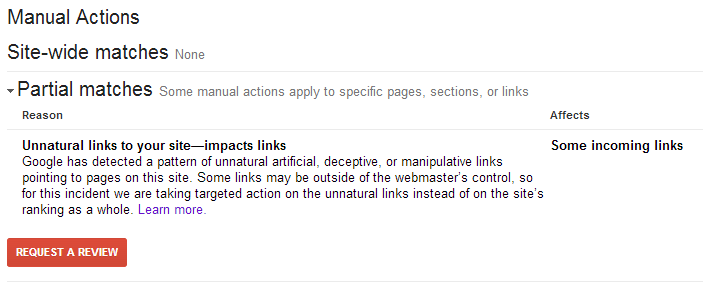
Well at least Google was kind enough to let people know which links pointing to their website were deemed to be low quality and causing the penalty and link warning, right? Well, no. That would be too easy! Google was a pain and gave virtually zero guidance as to what was causing the problem. So we had to investigate and start digging deep. We were looking for links that would be deemed to be seen as low quality by Google. Digging deep through thousands of backlinks across a large number of domains was the time consuming solution in this case. Below is the type of message you will see within Google Webmaster Tools if this problem is happening on your website;
Google officially recommends that you manually email each of the website owners where the low quality links are present and ask nicely if they could remove the link from their website. This is great in theory, but in practice this is absolute nonsense. Website owners of low quality websites are simply not interested in doing anything of the sort and any attempt at doing so is a waste of time. But let’s stick with this train of thought for now though, as this is what Google wants people to do.
Unnatural Link Warning Investigations
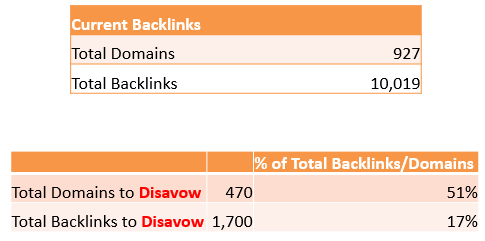
For the website in question, we identified all of the websites on the internet that were linking to the site and all of the pages. In total, this was almost 1000 domains and over 10,000 pages. Quite a few websites to crawl through to identify if the website would be deemed as ‘low quality’ by Google.
Google kindly put together a Disavow tool which is designed to inform Google which of the websites that are linking to you should be ignored during their ranking algorithm. For example, there is absolutely nothing stopping any single website owner on the planet linking to your website without your sign off. This is how the internet works, always has and always will. So the fact that Google introduced a penalty designed to penalise websites based on other peoples’ actions is a little odd to say the least and quite frankly is nothing more than Google admitting that their ‘all-knowing-algorithm’ isn’t actually as good at determining quality as they like to think, which is why they needed to enlist the help of thousands of website owners around the world. That said, it was introduced to target specific websites that were actively either selling links to websites, target low quality directory websites which offer no value to anyone along with other pointless websites on the internet that have no value to anyone.
Back to the investigation though. What we found for the client we were investigating this for was that over 51% of the websites (domains) that were linking to their website would be deemed as low quality by Google, which in total accounted for 17% of their total backlinks. This is quite a significant percentage of their backlinks that was causing the penalty. On further investigations we did find that these had clearly been built by a previous person who was aiming to game Google’s algorithm into making the client websites more visible on Google. Hence why you should never look to game Google and also why we don’t go out and build links for clients, it simply isn’t the right approach and hasn’t been for a good number of years now.
Ok, so remember that Google’s official guidelines are that you should go out and contact everyone who is linking to you and ask for that link to be removed, before submitting a Disavow file and a reconsideration request. Well, you don’t really need to do that. Just tell Google you did.
As a quick overview of the types of links we found that we needed to tell Google that they are low quality, via the Disavow file and reconsideration request. This included paid links (a big no-no), directory websites, thin affiliate websites, unrelated guest blog posts on other websites, low quality articles and even a few hacked websites. There are many other types of low quality websites that you really don’t want to be having links from, but this gives you an idea.
So once you have identified all of the websites that are linking to you that are deemed to be low quality, then Google recommends that you identify the specific pages of that website and add them into the Disavow file. Again, the reality of this is that this is a waste of time. If you have the time, energy and inclination to crawl through 10x the number of links then feel free, and while you are at it feel free to visit and make me a brew with all of the free time you have. Personally though, I like to take a more streamlined approach to achieve results. So here, we just Disavowed the whole domain.
Disavow Files and Reconsideration Requests
Knowing many other businesses who have gone through this same process, it was clear that Google very rarely used the information you gave them first time round and were generally quite unhelpful during the process. So we went through their recommendations and followed their guidelines anyway with this in mind.
Attempt 1
We created a Disavow file, submitted it to Google Webmaster Tools then wrote a lovely reconsideration request with all of the details about the history of the work and how this would never happen again to this client as they are working with a great company now (aka. us). Sob-story and all. We also told them that we had painstakingly taken weeks to contact each any every website owner to remove the links and they simply hadn’t got back to us (we hadn’t actually done this, they just needed to hear this).
Result? No surprise, they gave the helpful information that “there are still some low quality backlinks that you need to remove”. We were expecting this. Thanks Google, very helpful.
Attempt 2
So we added a few more domains (around 20) into the Disavow file, followed the same process as before.
Result? Same again. Nothing.
Attempt 3
So we added a few more (around 5) into the Disavow file for a third time, repeated the process including the ‘begging letter’ aka the Reconsideration Request. This time talking about how we had spent an awful lot of time to do this costing a considerable amount of resources to go and how they weren’t being that useful.
One thing to note is that we did leave a week or two in between each time so that it would at least appear to Google that we had been working very hard between submitting the reconsideration requests.
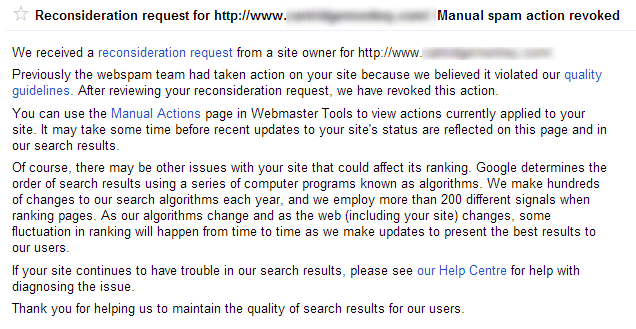
Result? Yes! We had this lovely message from Google;
So what did we learn?
Be patient. Tell Google what they want to hear. Don’t waste your time on contacting website owners. Disavow the whole domain if it looks suspicious, life is too short to worry about individual pages.
Not sure if your current SEO activities are working? Then get in touch and speak with one of our professionals who will be able to help support the growth of your business online for the long term. Working with the Disavow file and reconsideration requests within Google Webmaster Tools can be a risky business if you don’t know what you are doing. You could end up telling Google to ignore some very powerful links to your website which would do even more harm, lower your visibility on Google and decrease your sales. Don’t play around with this unless you are confident about what you are doing. Better yet, leave it to the experts, get in touch to find out more.