by Michael Cropper | Aug 12, 2016 | Developer |
The same questions come up time and time again online about how to debug WordPress problems. The challenge with WordPress and the web servers they live on is that there are an awful lot of moving parts, of which one or more of these moving parts can be the root cause of the problem. Unfortunately there is no handy traffic light system which says what is working well and what is causing problems as problems can be intermittent, appear random or only occur under specific circumstances. This being said, there is always a logical way to debug WordPress problems to identify what the root cause of the problem actually is.
Identify What is Actually Happening and When
This is extremely important as this will help you to understand where the problem actually lies. Is what you are experiencing really a WordPress problem or something web hosting related or something email related or something else completely?
Check your Server Raw Access Logs
See what is happening on your web server when you are experiencing the issues. This will help to identify if there are any other external items that could be the potential cause of the issues or if this is indeed an isolated incident.
Check your Server Error Logs
Has anything been resulting in a recorded error on your web server that can help you identify the problem that is happening? Have a good rummage around here to see if you can spot anything and tie this back to the times and dates when the problems are occurring.
Check your Server Monitoring Software
Tools such as Munin and New Relic are invaluable when debugging issues, they can help you identify what is currently happening on your web server. This enables you to see if the problem is indeed WordPress related or an issue that is being caused elsewhere.
Check your Server Firewall
Make sure your IP address isn’t being blocked for some reason. This can sometimes be triggered when you have entered an incorrect password on multiple occasions.
Check your Cloud Based Firewall
As above.
Check your WordPress Firewall
If you have a WordPress level firewall installed, then it is possible that your IP address / user account is being blocked here too. You’ll likely need to check via phpMyAdmin to view this data to see if you can find your IP address in the database for locked users or accounts. Depending on the plugin you are using for this, this data could be anywhere. Check the documents for the plugin you are using to figure out where this information could be. If your IP address is being blocked, it’s usually safe to delete this row and you should regain access. Again, make sure you know what you are doing before you go deleting things though as you may delete a whole host of incorrect things depending on how everything has been set up.
Check if the Problem is Just You
http://isup.me will tell you if your website is up or if it is just you experiencing the problem.
Check in Another Web Browser
Often issues can be browser specific, so check on a different web browser that you have installed.
Check on Another IP Address
Use your mobile phone, with WiFi turned off, to access the website. Is the issue still being caused now?
Check Google Analytics
Is there anything happening at the time when the issues are occurring? This could help you narrow down where the issue lies, for example if you suddenly receive a large spike in traffic which would show on the Real Time reports or on the hourly reports which could show out of the ordinary behaviour on the website.
Check Google Chrome Developer Tools
If the problem is occurring when you are either viewing a specific page or when you are logged in as a user or administrator, open the Google Chrome Developer Tools to see if any issues are being flagged in the console window. If there are any error being flagged here, this should give you an idea of where the problem may be coming from.
Compose Yourself
So far you have been gathering data about what is happening so you can make an informed decision about if you are certain the problem actually lies with WordPress or if it is somewhere else. Assuming you have identified that the problem is indeed WordPress related then continue reading.
Enable WP_Debug
Turn on wp_debug by adding the following line of code to your wp-config.php file;
define( 'WP_DEBUG', true );
Once turned on, this will flag any errors that are being caused by the themes, plugins or PHP files which need addressing. When you turn this setting on, both you and everyone using your website will be able to see the errors. So if you must do this on a live website, do it quickly and turn if off again by setting the value to false.
define( 'WP_DEBUG', false );
On poorly built WordPress websites with plugins purchased from theme market places and other less salubrious sources, this will flag up a whole host of errors. Take note of where these errors are being caused as this will help you to identify where the problem lies and ultimately what you need to do about resolving the issue.
While the WP_Debug option is great, it doesn’t do everything for you. Particularly on custom built systems with lots of custom code and functionality, you need something extra. This is the WordPress Debug Log. Firstly, add the following code to your functions.php file;
if (!function_exists('write_log')) {
function write_log ( $log )  {
if ( true === WP_DEBUG ) {
if ( is_array( $log ) || is_object( $log ) ) {
error_log( print_r( $log, true ) );
} else {
error_log( $log );
}
}
}
}
Then where ever in your code you feel that a problem lies, add the following code to check that this part of the code is actually being called;
write_log('THIS IS THE START OF MY CUSTOM DEBUG');
You’ll also need to make sure that you have the following settings turned on in your wp-config.php file;
define( 'WP_DEBUG', true );

define( 'WP_DEBUG_DISPLAY', false );

define( 'WP_DEBUG_LOG', true );
Then when you start running through your system to check which bits are and aren’t working, you can view the data that is output into the debug.log file which is added to your Document Root for your WordPress installation.
Backup Your Setup
A full backup including database and files. So you can restore the site to it’s current broken, but functional, state if the following debugging ends up breaking things even more. This can happen when WordPress websites haven’t been built particularly well, so make sure you have a full backup. Even better, use a backup plugin which allows you to easily restore everything should you need to. It is a lot easier to restore backups when part of the task is automated.
Update Everything
WordPress Core, Themes and Plugins. Make sure absolutely everything is running the latest versions. Often problems are caused by outdated plugins which are either using deprecated PHP functions or making calls to 3rd party systems which have been updated since they were installed, or even conflicts between other Plugins, Themes or WordPress core that needs resolving. When you have updated everything, at least you know that everything should in theory be working correctly, assuming you are using well respected Themes and Plugins for WordPress and not poorly developed ones.
Disable All Plugins and Themes
This one is the one that on-one ever wants to do, particularly when debugging issues that are only happening on a live website and not on a development server. Unfortunately this is a required step in the process as this will help to identify what is causing the problem.
Firstly switch your Theme back to the latest version of the core WordPress theme such as 2016 and soon to be 2017. These themes have been built as near perfect examples of how Themes should be build, meaning that there are no issues contained within these themes which could be causing the issue. If the issue disappears when you do this, the problem lies with your theme. Contact the theme author to get it resolved so they can push an update out. It is important to note that on occasions, if your website has been built or customised incorrectly then it is possible that any custom CSS (for example if you have stored this in the JetPack plugin Edit CSS area) or other customisations you have made can actually disappear completely, which if this is a large website, then it’s going to take either yourself a good amount of time to resolve, or it’s going to cost you a lot of money to resolve paying someone to re-implement the different aspects properly.
If this doesn’t solve the problem, next, disable all plugins on your website. See if this solves the problem. If so, then it is one of the plugins you’re using which is causing the problem. Systematically re-activate the plugins you are using and check to see when the problem starts to happen again. As mentioned previously, some plugins will delete and customisations when they are deactivated which is annoying and causes more problems to resolve which can often take some time to re-implement some of the customisations. Good plugins don’t do this, bad plugins often do.
Check Server PHP Settings
As part of the process outlined above, on occasions the error lies with the web server, specifically the php.ini settings and configurations. There are various settings which are often causing the problems which include;
- Max_execution_time
- Memory_limit
- Upload_max_filesize
- Post_max_size
Check your WordPress PHP Memory Limit
In addition to the server settings, it is also possible to configure memory limits within WordPress itself. Check within the wp-config.php file to see if any arbitrary memory limits have been added which could be causing scripts to time out and produce errors. The line will look like the example below, likely with a different number included;
define(‘WP_MEMORY_LIMIT’, ‘64M’)
WordPress Debugging Plugins
There are also a few handy WordPress debugging plugins which can provide additional information including WordPress Query Monitor and WordPress P3 Plugin Performance Profiler. When you install these there are various debugging tools included which can help to identify where the root cause of the problem lies.
Check your .htaccess File
Sometimes this can become corrupted, either by someone who has access to the site messing around without knowing what they are doing, or, a plugin may have altered the file which is then causing problems.
Check your Database is Correct
You will at some point when working with WordPress come across the “Error establishing database connection” error which can be caused by multiple things. One thing is clear though, it’s an error connecting with the database.
Firstly, check your database credentials within the wp-config.php file to make sure they are correct.
Secondly, make sure that the MySQL daemon is running on your web server. Sometimes this can get a bit tangled in a knot and need a restart.
Thirdly, sometimes your WordPress database gets corrupted and needs to be fixed. To fix this, when you visit yourwebsite.com/wp-admin, you will see a message that your database needs to be repaired. Sometimes, you can go ahead and implement this straight away. Other times, you need to add the following code to your wp-config.php file;
define('WP_ALLOW_REPAIR', true);
Then visit yoursite.com/wp-admin/maint/repair.php to start the repair process. Be sure to remove this line of code once you have completed the process to prevent others from accessing the URL.
Should none of this work, speak with your web hosting company. On occasions, the maximum size of the database may have been reached or there is something gone really wrong with your database that WordPress cannot restore. All kinds of crazy things can happen and they will be able to identify the root cause of the issue.
Check File Permissions
If your issue appears to be related to file permissions, i.e. you cannot upload a plugin maybe or you’re having trouble uploading an image for example. Then check the file permissions on your web server to make sure that they are set correctly. And make sure to check the owner of the files too. For example, if you have restored a backup via SSH using a root user account, then the files you copy to a cPanel account for example will belong to that user and not the cPanel account user, meaning that you technically don’t have permission to do anything with them when you are trying to do so via your WordPress interface. This is rare, but worth checking.
Check that Maintenance Mode Hasn’t Got Stuck
If you have been updating WordPress core, Plugins or Themes and your maintenance mode has got stuck, it is likely that it has timed out and not been able to complete. What this means is that you’ll first need to identify why this has happened in the first place, check your error logs for details.
To get you back up and running though, login to your server via FTP, make sure hidden files . [dot] files are showing and you’ll likely see a .maintainence file. This is the file that WordPress adds when it is doing maintenance, which is then deleted at the end of the process. So if the process timed out, it didn’t complete and the file is still there which causes the message to appear for everyone. Delete this file and you should be back up an running.
Re-Save your Permalinks
Bizarre things can happen related to permalinks which cause strange issues around the site such as 404 errors showing and more. Even when they look correct when you view them in the settings page, just re-save them. Often this can fix random errors which you haven’t been able to identify yet.
Check your PHP Version
WordPress websites are hosted on a variety of PHP versions. What this means is that with newer and older versions of PHP, certain functions are not available that your Plugins or Themes may be trying to use. There is no easy way of debugging issues like this and as such, this is a last record for identifying issues, so rebuild you web server with different versions of PHP to see if this solves the issue. One recently I came across related to email not being sent via a plugin due to a specific version of PHP that was being used. The lower version of PHP did work but broke something else, the newest version didn’t work but the other thing was fixed, the middle version broke something, etc. In the end the solution was to upgrade to a newer version and fix on of the bugs that was being caused elsewhere. No simple solution to these types of problems.
Check WordPress User Permissions
Sometimes issues can relate to what permissions a specific WordPress user has. Set up the Members WordPress plugin to see if the issue relates to a specific user group as to why they can or cannot do something.
Monitor What WordPress Users are Doing
When multiple administrators have access to the website, all with varying levels of skill, it is impossible to know what people are changing and when. Install a plugin such as Stream which can log all of this information which can come in handy for debugging issues next time around.
Summary
Following the above process systematically can identify the root cause of the majority of WordPress problems. Often identifying is a completely different thing than fixing the problem. Often during this process you will realise that your website has been built fairly poorly and requires a significant overhaul. Should you require any support debugging your WordPress problems, get in touch and we’ll happily help.
by Michael Cropper | Jul 25, 2016 | Client Friendly, Security |
Beware of the latest phishing email scam that is going around imitating a PayPal policy update. While PayPal often do send out similar emails, their terms and conditions are written as such that any updates are accepted by default so you never have to accept any new terms and conditions they announce.
The email;

While this email looks genuine on quick glance, when you hover over the links, you notice that they do not go to www.paypal.com or www.paypal.co.uk, instead they go elsewhere to a phishing website. Thankfully if you did click the link in the email accidentally, if you are using a modern web browser, you are alerted to this attack;
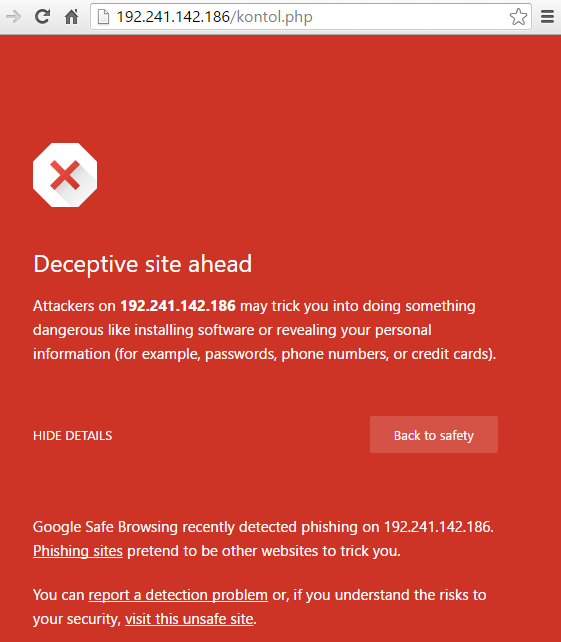
Another key aspect to notice in the original email is the recipient details which clearly don’t look genuine. While many aspects of this data can be easily faked, when the scammer hasn’t bothered to fake this data, it is easy to spot these kind of attacks;

As always, never click on suspicious links in emails and instead visit the website directly where you will find a notification if this is a genuine email.
by Michael Cropper | Jul 5, 2016 | Developer, WordPress |
By default, WooCommerce displays Product Category content above the products which are listed. Which is fine in many cases, although when you want to add in more than a couple of hundred words here, the Product Category page on WooCommerce soon pushes all of the actual products below the fold which isn’t that useful for a user. As such, you may want to add more content beneath the product listings to allow you to add more content to the page for users.
Firstly, whenever you are editing WooCommerce template files, make sure you are doing this correctly via your Child Theme to override WooCommerce template files. The file you need to edit (at the time of writing, this may change…) is archive-product.php. Copy this file from your /Plugins/WooCommece/Templates/ folder into your /Theme-Child/woocommerce/ folder.
Add Custom Field
To start with, the first thing to do is to use the Advanced Custom Fields plugin to add a custom field which is triggered only when: Taxonomy Term, is equal to, Product Categories. See the ‘Location’ heading when adding the custom fields. Let’s assume you’ve added a WYSYWIG editor for the purposes of this guide. You can add any type of field you like here which is handy.
Once set this Custom Field up correctly, you will now see this field display in the Product Category admin screen where you can add additional content to this section. Once you have added content here, the next step is to display this content to the user on the front end of the website.
Display Custom Field Content – archive-product.php
Back to the archive-product.php file. Add the following piece of code beneath where you see the code;
<?php

/*** woocommerce_after_shop_loop hook.

** @hooked woocommerce_pagination - 10

*/

do_action( 'woocommerce_after_shop_loop' );

?>
Add this code to display the custom field;
<?php

$term_id = get_queried_object()->term_id;

$post_id = 'product_cat_'.$term_id;

$custom_field = get_field('woocommerce_product_category_page_bottom_description', $post_id); // My Advanced Custom Field Variable

?>

<br>

<div><?php echo $custom_field; ?> </div> <?php // Get Advanced Custom Field Value ?>
The ‘woocommerce_product_category_page_bottom_description’ text above is what your Custom Field is named as that you created previously. If you have used a different name, replace this here.
Display Custom Field Content – functions.php
Alternatively if you would prefer not to edit child-WooCommerce files, then you can add the following code to your function.php in your Child Theme which will add the following action onto the ‘woocommerce_after_shop_loop’ hook;
function action_woocommerce_after_shop_loop() {

$term_id = get_queried_object()->term_id;

$post_id = 'product_cat_'.$term_id;

$custom_field = get_field('woocommerce_product_category_page_bottom_description', $post_id); // My Advanced Custom Field Variable

echo $custom_field;

};

add_action( 'woocommerce_after_shop_loop', 'action_woocommerce_after_shop_loop', 10, 2 );
Display
View the Product Category page and you’ll soon have added this extra piece of information to your Product Category page which you can use as you like. This will display the content beneath the paginated links. Place the above content elsewhere to suit your needs if you want something different.
by Michael Cropper | Jul 1, 2016 | Client Friendly, WordPress |
Most WordPress websites that come our way do so in quite a bad state, for many different reasons. The process that we often then begin is one of getting everything working properly as it should. Part of this process is replacing the often extremely poorly built theme that is currently in place with one of the market leading options available. I can count on one hand the number of Theme companies I would trust to develop a high quality theme that is suitable for business use, and none of them are from Theme marketplaces. But let’s look at Divi first.
Divi is a Theme created by Elegant Themes and is currently the market leading WordPress Theme for a number of reasons;
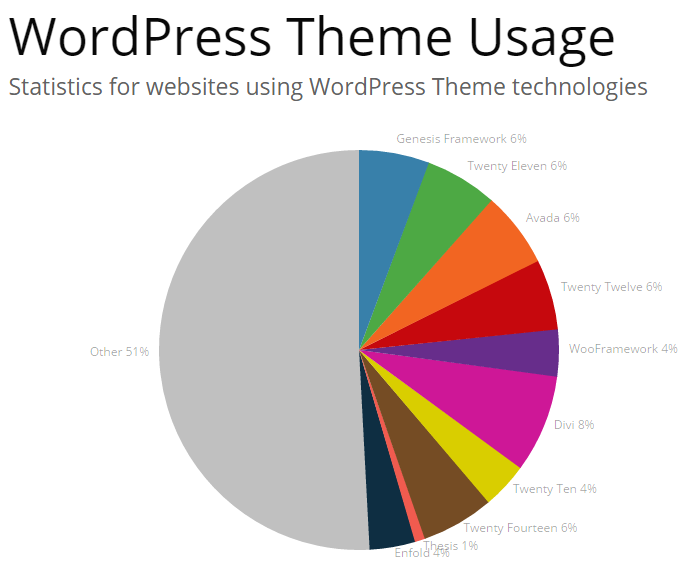
Remembering that the WordPress platform powers over 25% of websites on the entire internet, the fact that Divi powers 8% of WordPress websites just goes to show it’s popularity, it is the single leading Theme in use on WordPress to date. But why is it so popular? We’ll let’s take a look at why we recommend Divi to businesses for the majority of projects.
Ease of Use, Flexibility & Fully Responsive
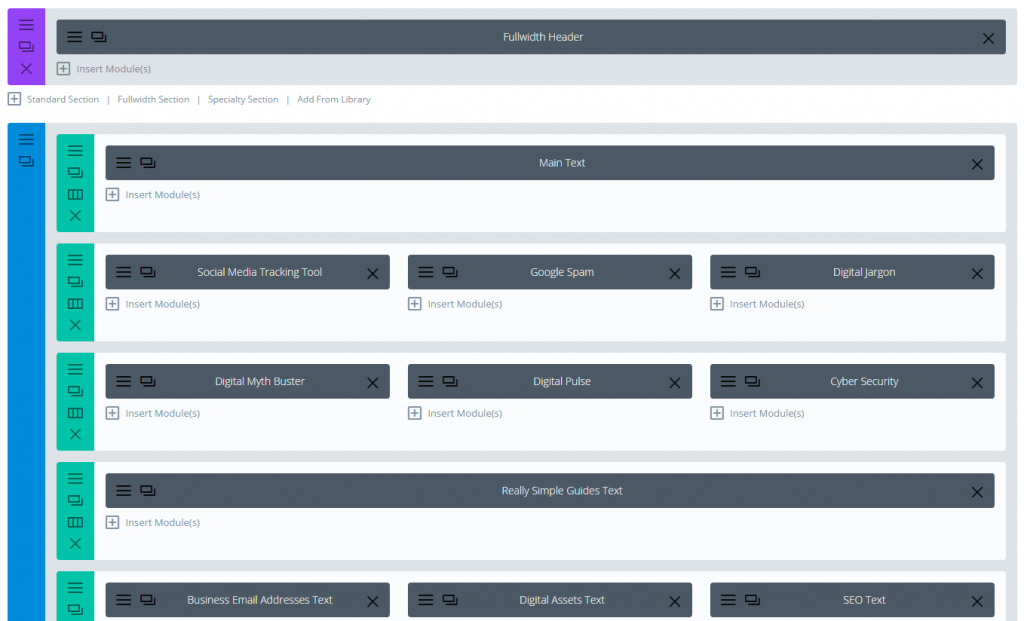
Divi is simply awesome. The flexibility to control the destiny of your website once set up correctly is immense. Not only is it possible to customise the look and feel of your website with a myriad of options, this is all fully responsive so every aspect of your website works across devices seamlessly.
Quality Code Base & Regular Updates
This is one of the biggest reasons why Divi is a popular choice for us, it is built extremely well. What this means in practice is that it is extensible, secure and it maintained on a regular basis. When Themes have been built extremely poorly (sure they may look nice, but if they haven’t been built well..) then you have a serious problem as you run into problem after problem after problem. Using an industry leading theme such as Divi means that you essentially have a team of developers working behind the scenes for you continually improving your website which is awesome. New features and bug fixes are released on a very regular basis at least monthly and often more.
Putting Businesses in Control
Most importantly though Divi gives you control of your own website as a business. Most WordPress themes are so inflexible for a user or require a developer to make even the simplest of changes that this can be a costly exercise for businesses to keep paying for updates. Once set up correctly, you have full control over virtually every aspect of your website with ease which can be extended as needed over time with additional content, features & functionality without the endless costs involved paying someone to keep updating your website.
All of this allows you to run your business as you choose without relying on a web developer for everything and slowing you down. Quite frankly too, we don’t particularly want to be making small tweaks on your website that you should really be doing yourself. It is not a cost effective method for you and it isn’t exactly a challenging task for us to do, we prefer to be working on the more advanced aspects of building your business further by integrating more technology to boost your revenue. When you work with industry leading technology, things just start to work for you and give you the flexibility to take your business in any direction you choose.
Is Divi perfect? Not by a long shot, there are many niggles which are annoying as there are with all technologies in one way or another. Is Divi the right choice for all projects? Certainly not. Divi works extremely well in many situations, although has its limits based on what you may be trying to achieve.
by Michael Cropper | Jun 27, 2016 | Client Friendly, Future |
Productivity is a key challenge within the UK. Only last year UK productivity widened to the worst since records began. UK workers produce significantly less per hour than the G7 average. Based on the results of the recent EU referendum, the productivity gap should be more of a concern to businesses than ever before. To compete on a global scale, now more than ever, businesses need to assess their own levels of productivity and seek to improve every aspect of their business. Digital technologies, automation and smart systems can significantly help businesses of all spaces, sizes and industries to enormously improve productivity. Essentially, achieve significantly more with less.
Below are our top 5 tips to boost the productivity of your business with digital technologies.
Boost the Productivity of your Social Media
Most businesses employ a junior member of staff to manage their social media channels for their businesses, or even teams of people or even external social media agencies to manage their social media. In this day and age, this is an extremely costly and inefficient way of managing your social media channels. Technology could automate many aspects of your social media activities while remaining relevant for your audience and continually increasing your engagement levels over time.
Firstly, start to automate a significant amount of your social media activities using a suite of technology solutions. We help organisations automate their social media activities so that it takes no longer than 60 seconds per day to manage. Stop wasting time manually posting content to social media and instead boost your productivity through automation technology.
Boost the Productivity of your Website
Most businesses are still using out of date technology for their website which is inefficient, inflexible and insecure. This ultimately results in your activities surrounding your website being more focused around firefighting opposed to building and growing the strength of your digital presence.
Firstly, start to get the right technology in place as a solid foundation for growth. These days, there are a small few recommended options for your website technologies to provide a solid foundation for growth. If your website is either a static system you build over 2 years ago and haven’t touched or it is more of a pain than a pleasure to work with, then you need to get the right technology foundations in place for your business to begin to boost productivity within your organisation.
Boost the Productivity of your Sales & Marketing
Are you still employing teams of sales people, travelling around the country to sell your products and services to potential customers? This is an extremely inefficient and expensive way to do things. In the internet age, potential customers get extremely turned off by pushy sales people. Instead, potential customers want to work with industry leading organisations who are using digital technologies throughout their organisation.
Firstly, start to change the way your sales and marketing processes work. Still printing glossy brochures which end up as a foot stool under someone’s desk? Then start to engage with your potential customers through your website with content they are interested in reading. It is this type of content that is highly valuable throughout the sales process and can add a unique twist when marketing your businesses to stand out from the crowd. Using digital platforms throughout your sales & marketing processes will significantly help to boost the productivity within your business.
Boost the Productivity of your Office Activities
What are you doing on a day to day basis that is taking you time to do? Manually inputting data from one system to another, or dare I say, from paper? Automate it. Struggling to find information between multiple systems? Bring them all together under a single unified system with technology. Still using paper based forms within your businesses? Digitise them.
Firstly, start to take some time and critically think about what you are doing throughout the day. If you are doing a task more than once, then ask an expert about how you could automate this task. You will save yourself enormous amounts of time on a daily basis, freeing you up to do even more productive activities.
Boost the Productivity of your Legacy Systems
Many businesses are still shackled to legacy systems throughout their organisation. Whether this is technology focused or systems/processes focused based on ‘how things are done around here’. The reality is that you need to bring all of your legacy systems up to date using the right underlying technologies. If you don’t you risk not simply getting left behind, but becoming obsolete as a business.
Technology startups around the world are popping up on a daily basis which are replacing entire industries. Xero has made traditional accountancy practices obsolete. TendoJobs.com is revolutionising the recruitment world by putting the power back in the hands of employers and job hunters. Along with the usual suspects including Uber, Airbnb, etc. The point being, that once your systems are up to date, it is now time to start truly innovating within your businesses to boost productivity enormously.
Summary
Boosting productivity within your organisation is an extremely efficient way to utilise the resources within your organisation in the best possible way. It is only through effective use of digital technologies that your businesses will be able to compete over the next few years, so the sooner you start the better. If you are unsure where to begin, get in touch and one of our digital experts will happily guide you through the process and show you how your organisation can begin to truly transform and embrace digital technologies.
by Michael Cropper | Jun 23, 2016 | Client Friendly, Security |
Another phishing email pretending to be from Amazon for customers who have apparently ordered a “Fire TV Print HD at £89.97”. This is a scam trying to make people click on the link which says “Click Here” which takes you to your Amazon account, or so you think.
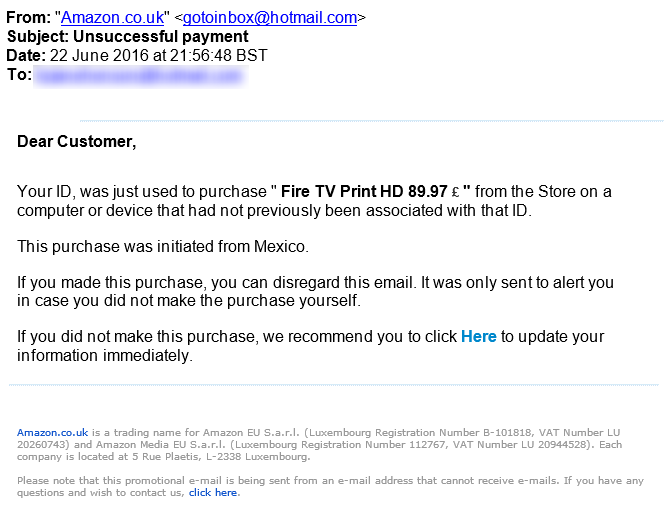
The Click Here link actually takes you through to one website,
http://www.example.de/images/stories//simpleslideshow/connect.php
Which then redirects you through to a hacked website at,
http://www.hacked-website.com/media/system/js/amazon/ap/signin/5241578b7731d8059db390278df93858/login.php?/ap/signin_encoding=UTF8-URL=https://www.amazon.com
The above two main domain names have been masked for security purposes and the hacked website owner has been contacted.
When a user ends up on the hacked website, they are presented with the usual looking Amazon sign-in page which could easily catch a few users out;
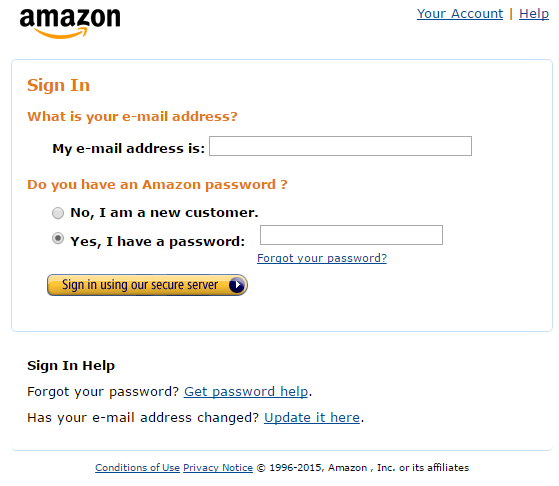
Be aware that phishing attacks like this can take many forms. The from email address in this instance (while this can be easily spoofed) is wrong and it set to a Hotmail address. Likewise, the £ sign in the price is at the wrong end, clearly the phishing attackers have never visited the UK as we have the currency symbol before the numbers. And finally, the most important point, is that the link behind the “Click Here” link is not going to Amazon.co.uk or Amazon.com. And to Amazon, you are more than a “Customer” you have a first and last name which they will always address you with.
Whenever you receive emails like this, you are always best to visit the account directly through your web browser and do not click on any links in the emails. If the email is genuine, you will also have a notification waiting in your account too which you can action from there.
by Michael Cropper | Jun 7, 2016 | Client Friendly, Thoughts |
An interesting discussion was born on LinkedIn after a comment from a digital leader I know which I thought was worth expanding into a blog post on the matter. The discussion went as follows;
Dave Thackeray
“I’m absolutely fascinated by what constitutes roles in the creative sector. Heading the digital fortunes of a leading health charity here in the UK I find myself crafting Google AdWords campaigns one minute, and forging ahead with a pattern library strategy for our boundless array of websites the next. Coaching social media will be next on my plate, followed by figuring out a forthright partnership initiative with influencers in Yorkshire who can help us develop further the success of our new adventure centre for families. Being a master juggler is a prerequisite for every role today.”
Me
Agreed. And I’d go as far to argue that anyone who is an apparent specialist in a single field is missing the point entirely. In the digital world, it is so important to understand so many aspects and how they all fit together as part of a wider strategy. Sure, be an expert in something, or many things, but don’t be so blinkered to only do those things.
Dave Thackeray
But because of the choice paradox perhaps we DO need to specialise. Because you can’t do everything well. If you know where your audience lives (predominantly) then become a master of that platform or communications channel and surprise and delight them there, constantly. Otherwise you’re in perpetual chase mode trying to win with the latest shiny thing. I rarely see success accomplished leveraging this strategy.
Me
Isn’t digital marketing / the online world a specialism in itself though? Are we being too specialist by focusing purely on a single channel which may or may not exist in a few years with how fast things change? For example, people who classify their self purely as a social media specialist, I’d argue that most 90% of people who work in digital could be a social media specialist too if they wanted to go down that route. I’ve even seen people in the past being so specialised that they only work with a single platform within a channel, i.e. Google+ – and we all know what happened to that. Rarely a day goes by when I don’t have to learn a new skill or implement something in a different way that hasn’t been done before, that’s just the nature of digital. I see being too specialist as avoiding these challenges i.e. ‘sorry that’s not my job, let’s get a {insert tech here} specialist in to do this’ when in fact, given a few hours of research, these people could probably do this their self to an adequate level. I’m not saying don’t specialise, what I am saying is that to specialise only is a bit of a dead end as there are so many overlaps in digital that you need an awful lot of skills to maintain relevance in this ever changing market.
Dave Thackeray
Here’s where it gets muddied. In your first comment you said “anyone who is an apparent specialist in a single field is missing the point entirely” but in your last, “Isn’t digital marketing / the online world a specialism in itself though?” So are you saying specialising in digital marketing is missing the point? Because you can’t specialise in something so diverse as digital marketing, and consider yourself anything but a generalist! I don’t think there’s an answer here.
Me
It’s a fine line indeed. It depends on the level of specialism. Personally I classify myself as a specialist in many areas of digital marketing / technology. Does that mean I’m a generalist or multi-specialist? Its an academic discussion but gets people thinking about options. Knowing you, I’d also classify you as a multi-specialist. IMO a generalist knows a little about a lot but can’t really do anything well. A multi-specialist can do a lot of things well on their own. I think I need to do a blog post on the differences to explain better 🙂
Specialist or Generalist or Multi-Specialist in Digital
So what should you be, as someone working in the digital sector? Well here’s the thing about digital, when you work in digital, from the client’s eye you are expected to know everything about everything. That is what they are paying you for and hence why I use the term above about being a multi-specialist. To specialise in any specific area, I believe, is simply too limiting for what is required on a day to day basis when working in the field. It is just not possible to limit yourself to such as narrow field of expertise such as SEO or PPC or Email Marketing or WordPress etc. etc. You need to know all of the above. And herein lies the challenge.
All of these aspects of digital marketing are indeed specialisms which take a great deal to master, yet they are possible to master when you’re working in the digital sector. Just as it’s a lot easier to learn a 3rd and 4th language after you have learnt your 2nd one. Looking at myself as a prime example here, it has taken over a decade of daily improvements in skills, knowledge and experience which has led me to this point today. Each individual skill takes years to master and requires you to continually keep up to date with changes as you need them. And this point is important which I’ll come back to in a minute. Here are a few examples of what I would classify myself personally an expert in and a few details about why to put this into context;
- SEO: Years of experience and achieving awesome results
- PPC: I’m Google AdWords qualified, worked in teams spending £ millions per month on AdWords
- Google Analytics: I’m Google Analytics qualified and have implemented some pretty cool analytics tracking setups
- WordPress: I co-organised WordCamp in Manchester in 2015, regularly speak at WordPress events on various topics and have worked with WordPress for years, I know the ins-and-outs about how everything fits together and how to get things done
- Java: I built https://www.tendojobs.com, from scratch along with other Java based setups.
- Digital Strategy: Years of experience and achieving awesome results and being recognised in highly prestigious awards for these results.
- And many more
The above headings are just the categories really, the finer details is around the underlying technologies and specialisms beneath here. The type of work that we do, and I would argue most people working in the digital world do, is extremely diverse and requires an ever growing skill set. Hence why I believe that you can no longer be a specialist in just a single area of expertise but you must become a multi-specialist to stay relevant.
Keeping up to date with changes in digital can be a full time job in itself. So how much time do you spend doing this when you are a multi-specialist? Well, that depends on your choices and what you actually need to know right now. The amount of information created on a daily basis these days is so unbelievably massive that it is impossible to know everything and understand everything before everyone else does. That’s what Google is for and knowing where to look when you need to know something precisely. You’ll have all seen the image below about knowledge VS experience.
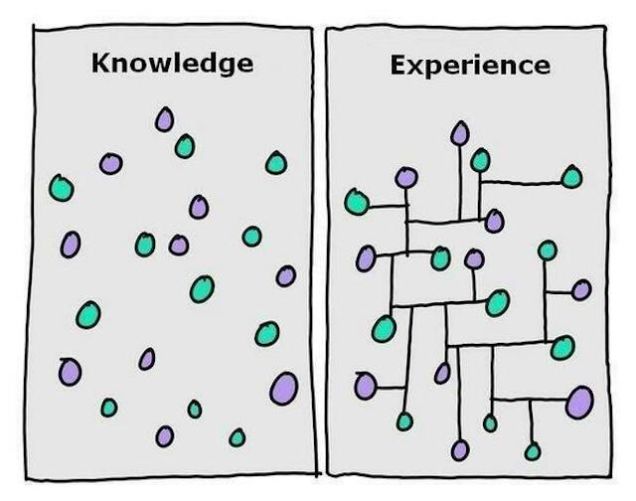
Source: http://lifehacker.com/the-difference-between-knowledge-and-experience-1516486966
The difference being that in a digital interconnected world, it is impossible to have all of this information in your head. There is just too much information for any one person to store. This is where the skill comes in to identify the detailed information when you need to know it. To be able to do this effectively though requires you to be aware of the changes, not necessarily the finer details, but the headlines which is why I rarely read articles in full these days until I actually need to. This isn’t the same as what an inexperienced person will do and just Google for answers and not have any idea of what they are looking at. No. This is about knowing exactly what to look for, quickly digesting the finer details when you need them and using this to implement effectively and quickly because of the years of experience and knowing how to digest this quickly. The same is true for development related work, no-one on this earth can memorise the API documents for the variety of languages and platforms they use, they use this as a reference point to implement what they need.
I believe that being too specialised in the digital world is far too restricting and can blinker people from the wider strategic view for how everything joins together. Sure, in your early career you are always going to specialise in something to get your feet in the door to places. As you progress throughout your career though, you soon become a multi-specialist and are extremely proficient at many aspects in the digital world. And I would argue this is more beneficial for organisations than using a lot of very narrow specialists to achieve the same goal. In my experience, those people who are highly specialised in very specific areas with little knowledge outside of this field often miss the bigger picture about why things are being done and instead focus too much on the extremely fine detail, which in the grand scheme of things really doesn’t matter.
Whatever your position is on the specialist VS generalist vs multi-specialist is, leave a comment below. It’s an interesting discussion and there is no right or wrong position to be in as everything depends on what you need right now and in the foreseeable future.
by Michael Cropper | Jun 2, 2016 | Client Friendly, Digital Marketing, Digital Strategy, Thoughts |
For those of you who haven’t seen the film, The Matrix, firstly, go out and buy a copy and watch it, it’s an awesome film. The first in any series is always the best. Now you understand the title of this blog post. Let’s put this into perspective;
Spoon boy: Do not try and bend the spoon. That’s impossible. Instead… only try to realize the truth.
Neo: What truth?
Spoon boy: There is no spoon.
Neo: There is no spoon?
Spoon boy: Then you’ll see, that it is not the spoon that bends, it is only yourself.
I sometimes feel like talking in riddles like this when speaking with people about how to grow an ecommerce business as the underlying problems stunting growth are rarely technology focused. Sure, technology may be an issue and need improving, but technology didn’t get there by itself.
You see, the challenges most businesses face when it comes to growth is actually nothing to do with technology or understanding or anything external for that matter. Information is free, if you have the time you can learn anything from cooking to rocket science from the many MOOCs that are available from Universities around the world. Likewise, the problem doesn’t lie with budgets either as I can guarantee that if for every £1 you gave me, I would give you £2 back, you would bite my hand off and empty your wallet without question.
The underlying problem is what Spoon Boy (he really needs another name doesn’t he!) was talking about. It’s about perspective, specifically how you perceive things VS how they actually are. It is how you perceive the challenge and how you deal with the problem which ultimately decides your fate. Do I go to McDonalds or go to the gym? It’s all a choice. And choices start in your head.
There are a few good books that I always recommend people to read, firstly because they are awesome and will help to expand your mind, but also because these types of books help you to think differently about a problem. Instead of seeing everything as a challenge with a never ending amount of barriers stopping you from progressing, instead, think differently about the problem and solutions will manifest. When you have already decided on a solution before you have articulated the challenge or problem, you’ve already lost. Outline where you are going, what you want to achieve and let the team of experts you surround yourself with recommend the best solution. It is your job to allow this process to happen, or not.
Happy reading;
by Michael Cropper | May 25, 2016 | Client Friendly, Digital Marketing, Digital Strategy, Security, Technical, Thoughts, WordPress |
As a business owner or marketing manager you are likely extremely swayed about website design and development based on how it looks. I am here to explain to you why this is no-where near as important as you think it is. This is not to say that this isn’t important, it is, but it isn’t the be-all and end-all. When making decisions around technology, what you really need to be asking the questions about is technology, frameworks, scalability and adaptability. All of the technical aspects you probably would prefer not to get too involved with as this is what you pay the web guys to take care of, right?
Unfortunately, the reality is that when you ignore these key aspects you end up with an all fur coat no knickers solution which is going to cause you tremendous pain in the long run. Trust me. It is often at this point where we pick up projects, when they have gone seriously wrong in the past when these aspects have been ignored, often because you asked for a pretty looking website or made a decision based purely on how something looks or made a cost-based decision. Here is when we pick things up and straighten things out which is a costly process.
Below we’re going to talk through many of the aspects you need to be asking questions about before you even start to think about the design of your website. When you get the below aspects right from the outset, you can make your website look any way you desire. And most importantly, you can chop and change the look of your website on a daily basis should you wish as you have the flexibility to do so without being restrained by poor technologies.
Platform and Content Management System
It is essential that your website is powered by a leading Content Management System. A platform which allows you to control most of the aspects of your website yourself, without requiring a developer to implement changes. For 99% of businesses out there you have two choices really, WordPress or Magento.
Web Hosting
Poor quality web hosting is going to harm the success of your business. It’s cheap for a reason, it’s restrictive and not that good. Leading web hosting has security built in, is regularly maintained and is backed up in a remote location should anything go wrong.
Website Security
I can promise you that if you don’t take cyber security seriously, your website will be hacked into at some point. A pretty looking website which can be hacked, deleted and changed by an unauthorised person trying to do your website harm is no good to anyone.
Back End Frameworks
A framework is essentially a set of rules for how things are implemented. A back end framework is all around how the server side code is implemented to ensure the code is easy to maintain, easy to extend and easy to work with in general. Think of a back end framework as a separation of concerns, read up about MVC if you’re really interested. Using the correct back end framework for your website ultimately determines how successful your website project will be or how many problems you will face in the future.
Front End Frameworks
Just like back end frameworks, front end frameworks deal specifically with how your website looks on the front end. Just as with all frameworks, you need to work within the limits of the framework which is why getting this part wrong can result in simple changes not actually being so simple in the end. Discuss this with your web developer about how things are built to understand the potential pitfalls further down the line.
Plugins, Themes & 3rd Party Solutions
When using any kind of 3rd party solutions as part of core functionality on your website, it is absolutely essential to make sure these are chosen with quality in mind. Cheap and free is like this for a reason, it’s likely absolutely awful and will cause you many problems down the line.
Website Speed
To a certain extent, the speed of your website is determined by how much you are paying for your web hosting. You cannot expect the speed that you experience on Google, Facebook and Twitter when paying budget web hosting. It’s just like buying a car, the more you pay, the faster it goes. Sure, there are optimisations and tweaks that can be made at the server level to further improve performance, although in the grand scheme of things these are a bit like spoilers and go-faster stripes on cars, they help, but aren’t going to do much on a Peugeot 205.
Control and Flexibility
You want to be able to edit as much as possible on the website, right? Well this hugely depends on the technology you’re using. Certain frameworks will give you more control for you to edit things yourself, others will restrict that control meaning that you have to pay a web developer every time you need to make a change. A costly process over time.
Responsive
You want your website to work seamlessly across all devices, right? Well this again doesn’t just happen by magic. This is a conscious decision and requires strategic planning to make sure that your website performs in the way that your customers expect.
User Experience
Only now do we start to think about the user experience on the website. Why are people using your website? What are they aiming to achieve? How easy is your website to navigate? What do people like about your website? What do people dislike about your website? How can things be improved on a regular basis to improve performance? It’s all of these questions you need to start asking about your website and business as a whole.
Content
Once you know what your website visitors are looking to achieve, how are you meeting their needs through the content that is available on your website? Are you still dealing with common queries for products and services over the phone? It is this type of content that at the very basic level could be handled by a more sophisticated setup on your website. Think differently about content. Content is not for Google and SEO, content is for your users.
Branding
Now we come onto the branding aspect. Once you have all of these aspects above in place, now it is time to start looking at how your website actually looks. At this point, once you have all of the above items in place, you can make the website look and feel any way you like. Get any of the above items wrong and you will extremely restricted based on what you can or can’t do at this point. You see, the branding aspect is the icing on the cake for website design. No matter how good your website looks, if your key ingredients are rotten, your website isn’t going to perform and your website visitors are going to be able to see straight through that.
Summary
There is a lot more to website design and development that you may first think. Never assume that your web development team is going to be doing everything right. If you ask for a pretty website, that’s what you’ll get, a pretty website that has been built poorly and doesn’t perform. When you ask a web development team for a website that achieves your business goals, you’ll get a well-built platform for you to work towards your goals much faster. The choice is yours, never skip over asking the difficult questions about website technologies.
by Michael Cropper | May 23, 2016 | Developer |
If you’re a developer who likes to use the Windows platform when building software, you’ll no doubt be using MySQL at some point along the way and an IDE such as Eclipse, NetBeans or something else. For the more basic activities you’ll be doing within your application when interacting with your MySQL database, there will be nothing much to worry about. Whereas with other work you’ll be doing, it is essential to take a backup of your MySQL database with ease, to make sure that you don’t lose all of your test data in the database when you make a mistake in one of your SQL commands.
When you installed MySQL in the first place, you’ll likely have installed this somewhere such as;
C:\Program Files\MySQL\MySQL Server x.x
So open command prompt and navigate to the folder that your MySQL version is installed in, then inside the bin folder;
CD C:\Program Files\MySQL\MySQL Server x.x\bin
Next you need to run the following command. Make sure you personalise the details according to the database you created in the first instance;
Mysqldump –u yourusername –p databasename > C:\Users\YourUsername\databasebackup.sql
Note, if you try to save the file to C:\ for example, then this will result in an access denied error message. The reason for this is because you need Administrator privileges to do this, just like when you’re installing a new piece of software. So instead, make sure you save the file within your current user account that you are logged into Windows with.
Then if you ever need to restore the database, run the following command;
mysql -u yourusername -p databasename < C:\Users\YourUsername\databasebackup.sql
Simples. Yet often can be a little more challenging in practice depending on the details you have configured. Hope this is a useful starting point for when you need to do this.