by Michael Cropper | Jun 7, 2016 | Client Friendly, Thoughts |
An interesting discussion was born on LinkedIn after a comment from a digital leader I know which I thought was worth expanding into a blog post on the matter. The discussion went as follows;
Dave Thackeray
“I’m absolutely fascinated by what constitutes roles in the creative sector. Heading the digital fortunes of a leading health charity here in the UK I find myself crafting Google AdWords campaigns one minute, and forging ahead with a pattern library strategy for our boundless array of websites the next. Coaching social media will be next on my plate, followed by figuring out a forthright partnership initiative with influencers in Yorkshire who can help us develop further the success of our new adventure centre for families. Being a master juggler is a prerequisite for every role today.”
Me
Agreed. And I’d go as far to argue that anyone who is an apparent specialist in a single field is missing the point entirely. In the digital world, it is so important to understand so many aspects and how they all fit together as part of a wider strategy. Sure, be an expert in something, or many things, but don’t be so blinkered to only do those things.
Dave Thackeray
But because of the choice paradox perhaps we DO need to specialise. Because you can’t do everything well. If you know where your audience lives (predominantly) then become a master of that platform or communications channel and surprise and delight them there, constantly. Otherwise you’re in perpetual chase mode trying to win with the latest shiny thing. I rarely see success accomplished leveraging this strategy.
Me
Isn’t digital marketing / the online world a specialism in itself though? Are we being too specialist by focusing purely on a single channel which may or may not exist in a few years with how fast things change? For example, people who classify their self purely as a social media specialist, I’d argue that most 90% of people who work in digital could be a social media specialist too if they wanted to go down that route. I’ve even seen people in the past being so specialised that they only work with a single platform within a channel, i.e. Google+ – and we all know what happened to that. Rarely a day goes by when I don’t have to learn a new skill or implement something in a different way that hasn’t been done before, that’s just the nature of digital. I see being too specialist as avoiding these challenges i.e. ‘sorry that’s not my job, let’s get a {insert tech here} specialist in to do this’ when in fact, given a few hours of research, these people could probably do this their self to an adequate level. I’m not saying don’t specialise, what I am saying is that to specialise only is a bit of a dead end as there are so many overlaps in digital that you need an awful lot of skills to maintain relevance in this ever changing market.
Dave Thackeray
Here’s where it gets muddied. In your first comment you said “anyone who is an apparent specialist in a single field is missing the point entirely” but in your last, “Isn’t digital marketing / the online world a specialism in itself though?” So are you saying specialising in digital marketing is missing the point? Because you can’t specialise in something so diverse as digital marketing, and consider yourself anything but a generalist! I don’t think there’s an answer here.
Me
It’s a fine line indeed. It depends on the level of specialism. Personally I classify myself as a specialist in many areas of digital marketing / technology. Does that mean I’m a generalist or multi-specialist? Its an academic discussion but gets people thinking about options. Knowing you, I’d also classify you as a multi-specialist. IMO a generalist knows a little about a lot but can’t really do anything well. A multi-specialist can do a lot of things well on their own. I think I need to do a blog post on the differences to explain better 🙂
Specialist or Generalist or Multi-Specialist in Digital
So what should you be, as someone working in the digital sector? Well here’s the thing about digital, when you work in digital, from the client’s eye you are expected to know everything about everything. That is what they are paying you for and hence why I use the term above about being a multi-specialist. To specialise in any specific area, I believe, is simply too limiting for what is required on a day to day basis when working in the field. It is just not possible to limit yourself to such as narrow field of expertise such as SEO or PPC or Email Marketing or WordPress etc. etc. You need to know all of the above. And herein lies the challenge.
All of these aspects of digital marketing are indeed specialisms which take a great deal to master, yet they are possible to master when you’re working in the digital sector. Just as it’s a lot easier to learn a 3rd and 4th language after you have learnt your 2nd one. Looking at myself as a prime example here, it has taken over a decade of daily improvements in skills, knowledge and experience which has led me to this point today. Each individual skill takes years to master and requires you to continually keep up to date with changes as you need them. And this point is important which I’ll come back to in a minute. Here are a few examples of what I would classify myself personally an expert in and a few details about why to put this into context;
- SEO: Years of experience and achieving awesome results
- PPC: I’m Google AdWords qualified, worked in teams spending £ millions per month on AdWords
- Google Analytics: I’m Google Analytics qualified and have implemented some pretty cool analytics tracking setups
- WordPress: I co-organised WordCamp in Manchester in 2015, regularly speak at WordPress events on various topics and have worked with WordPress for years, I know the ins-and-outs about how everything fits together and how to get things done
- Java: I built https://www.tendojobs.com, from scratch along with other Java based setups.
- Digital Strategy: Years of experience and achieving awesome results and being recognised in highly prestigious awards for these results.
- And many more
The above headings are just the categories really, the finer details is around the underlying technologies and specialisms beneath here. The type of work that we do, and I would argue most people working in the digital world do, is extremely diverse and requires an ever growing skill set. Hence why I believe that you can no longer be a specialist in just a single area of expertise but you must become a multi-specialist to stay relevant.
Keeping up to date with changes in digital can be a full time job in itself. So how much time do you spend doing this when you are a multi-specialist? Well, that depends on your choices and what you actually need to know right now. The amount of information created on a daily basis these days is so unbelievably massive that it is impossible to know everything and understand everything before everyone else does. That’s what Google is for and knowing where to look when you need to know something precisely. You’ll have all seen the image below about knowledge VS experience.
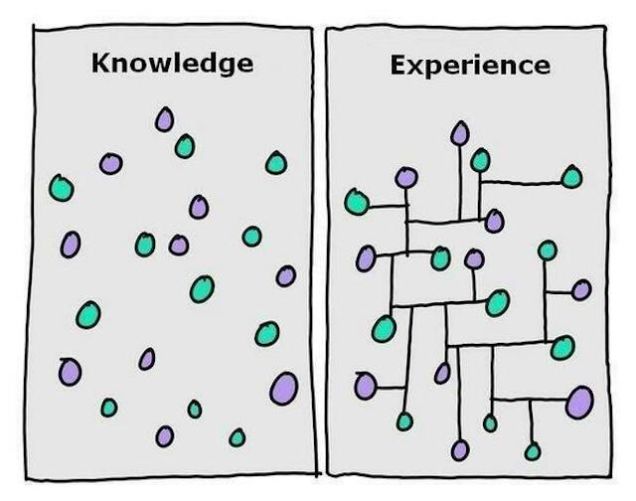
Source: http://lifehacker.com/the-difference-between-knowledge-and-experience-1516486966
The difference being that in a digital interconnected world, it is impossible to have all of this information in your head. There is just too much information for any one person to store. This is where the skill comes in to identify the detailed information when you need to know it. To be able to do this effectively though requires you to be aware of the changes, not necessarily the finer details, but the headlines which is why I rarely read articles in full these days until I actually need to. This isn’t the same as what an inexperienced person will do and just Google for answers and not have any idea of what they are looking at. No. This is about knowing exactly what to look for, quickly digesting the finer details when you need them and using this to implement effectively and quickly because of the years of experience and knowing how to digest this quickly. The same is true for development related work, no-one on this earth can memorise the API documents for the variety of languages and platforms they use, they use this as a reference point to implement what they need.
I believe that being too specialised in the digital world is far too restricting and can blinker people from the wider strategic view for how everything joins together. Sure, in your early career you are always going to specialise in something to get your feet in the door to places. As you progress throughout your career though, you soon become a multi-specialist and are extremely proficient at many aspects in the digital world. And I would argue this is more beneficial for organisations than using a lot of very narrow specialists to achieve the same goal. In my experience, those people who are highly specialised in very specific areas with little knowledge outside of this field often miss the bigger picture about why things are being done and instead focus too much on the extremely fine detail, which in the grand scheme of things really doesn’t matter.
Whatever your position is on the specialist VS generalist vs multi-specialist is, leave a comment below. It’s an interesting discussion and there is no right or wrong position to be in as everything depends on what you need right now and in the foreseeable future.
by Michael Cropper | Jun 2, 2016 | Client Friendly, Digital Marketing, Digital Strategy, Thoughts |
For those of you who haven’t seen the film, The Matrix, firstly, go out and buy a copy and watch it, it’s an awesome film. The first in any series is always the best. Now you understand the title of this blog post. Let’s put this into perspective;
Spoon boy: Do not try and bend the spoon. That’s impossible. Instead… only try to realize the truth.
Neo: What truth?
Spoon boy: There is no spoon.
Neo: There is no spoon?
Spoon boy: Then you’ll see, that it is not the spoon that bends, it is only yourself.
I sometimes feel like talking in riddles like this when speaking with people about how to grow an ecommerce business as the underlying problems stunting growth are rarely technology focused. Sure, technology may be an issue and need improving, but technology didn’t get there by itself.
You see, the challenges most businesses face when it comes to growth is actually nothing to do with technology or understanding or anything external for that matter. Information is free, if you have the time you can learn anything from cooking to rocket science from the many MOOCs that are available from Universities around the world. Likewise, the problem doesn’t lie with budgets either as I can guarantee that if for every £1 you gave me, I would give you £2 back, you would bite my hand off and empty your wallet without question.
The underlying problem is what Spoon Boy (he really needs another name doesn’t he!) was talking about. It’s about perspective, specifically how you perceive things VS how they actually are. It is how you perceive the challenge and how you deal with the problem which ultimately decides your fate. Do I go to McDonalds or go to the gym? It’s all a choice. And choices start in your head.
There are a few good books that I always recommend people to read, firstly because they are awesome and will help to expand your mind, but also because these types of books help you to think differently about a problem. Instead of seeing everything as a challenge with a never ending amount of barriers stopping you from progressing, instead, think differently about the problem and solutions will manifest. When you have already decided on a solution before you have articulated the challenge or problem, you’ve already lost. Outline where you are going, what you want to achieve and let the team of experts you surround yourself with recommend the best solution. It is your job to allow this process to happen, or not.
Happy reading;
by Michael Cropper | May 25, 2016 | Client Friendly, Digital Marketing, Digital Strategy, Security, Technical, Thoughts, WordPress |
As a business owner or marketing manager you are likely extremely swayed about website design and development based on how it looks. I am here to explain to you why this is no-where near as important as you think it is. This is not to say that this isn’t important, it is, but it isn’t the be-all and end-all. When making decisions around technology, what you really need to be asking the questions about is technology, frameworks, scalability and adaptability. All of the technical aspects you probably would prefer not to get too involved with as this is what you pay the web guys to take care of, right?
Unfortunately, the reality is that when you ignore these key aspects you end up with an all fur coat no knickers solution which is going to cause you tremendous pain in the long run. Trust me. It is often at this point where we pick up projects, when they have gone seriously wrong in the past when these aspects have been ignored, often because you asked for a pretty looking website or made a decision based purely on how something looks or made a cost-based decision. Here is when we pick things up and straighten things out which is a costly process.
Below we’re going to talk through many of the aspects you need to be asking questions about before you even start to think about the design of your website. When you get the below aspects right from the outset, you can make your website look any way you desire. And most importantly, you can chop and change the look of your website on a daily basis should you wish as you have the flexibility to do so without being restrained by poor technologies.
Platform and Content Management System
It is essential that your website is powered by a leading Content Management System. A platform which allows you to control most of the aspects of your website yourself, without requiring a developer to implement changes. For 99% of businesses out there you have two choices really, WordPress or Magento.
Web Hosting
Poor quality web hosting is going to harm the success of your business. It’s cheap for a reason, it’s restrictive and not that good. Leading web hosting has security built in, is regularly maintained and is backed up in a remote location should anything go wrong.
Website Security
I can promise you that if you don’t take cyber security seriously, your website will be hacked into at some point. A pretty looking website which can be hacked, deleted and changed by an unauthorised person trying to do your website harm is no good to anyone.
Back End Frameworks
A framework is essentially a set of rules for how things are implemented. A back end framework is all around how the server side code is implemented to ensure the code is easy to maintain, easy to extend and easy to work with in general. Think of a back end framework as a separation of concerns, read up about MVC if you’re really interested. Using the correct back end framework for your website ultimately determines how successful your website project will be or how many problems you will face in the future.
Front End Frameworks
Just like back end frameworks, front end frameworks deal specifically with how your website looks on the front end. Just as with all frameworks, you need to work within the limits of the framework which is why getting this part wrong can result in simple changes not actually being so simple in the end. Discuss this with your web developer about how things are built to understand the potential pitfalls further down the line.
Plugins, Themes & 3rd Party Solutions
When using any kind of 3rd party solutions as part of core functionality on your website, it is absolutely essential to make sure these are chosen with quality in mind. Cheap and free is like this for a reason, it’s likely absolutely awful and will cause you many problems down the line.
Website Speed
To a certain extent, the speed of your website is determined by how much you are paying for your web hosting. You cannot expect the speed that you experience on Google, Facebook and Twitter when paying budget web hosting. It’s just like buying a car, the more you pay, the faster it goes. Sure, there are optimisations and tweaks that can be made at the server level to further improve performance, although in the grand scheme of things these are a bit like spoilers and go-faster stripes on cars, they help, but aren’t going to do much on a Peugeot 205.
Control and Flexibility
You want to be able to edit as much as possible on the website, right? Well this hugely depends on the technology you’re using. Certain frameworks will give you more control for you to edit things yourself, others will restrict that control meaning that you have to pay a web developer every time you need to make a change. A costly process over time.
Responsive
You want your website to work seamlessly across all devices, right? Well this again doesn’t just happen by magic. This is a conscious decision and requires strategic planning to make sure that your website performs in the way that your customers expect.
User Experience
Only now do we start to think about the user experience on the website. Why are people using your website? What are they aiming to achieve? How easy is your website to navigate? What do people like about your website? What do people dislike about your website? How can things be improved on a regular basis to improve performance? It’s all of these questions you need to start asking about your website and business as a whole.
Content
Once you know what your website visitors are looking to achieve, how are you meeting their needs through the content that is available on your website? Are you still dealing with common queries for products and services over the phone? It is this type of content that at the very basic level could be handled by a more sophisticated setup on your website. Think differently about content. Content is not for Google and SEO, content is for your users.
Branding
Now we come onto the branding aspect. Once you have all of these aspects above in place, now it is time to start looking at how your website actually looks. At this point, once you have all of the above items in place, you can make the website look and feel any way you like. Get any of the above items wrong and you will extremely restricted based on what you can or can’t do at this point. You see, the branding aspect is the icing on the cake for website design. No matter how good your website looks, if your key ingredients are rotten, your website isn’t going to perform and your website visitors are going to be able to see straight through that.
Summary
There is a lot more to website design and development that you may first think. Never assume that your web development team is going to be doing everything right. If you ask for a pretty website, that’s what you’ll get, a pretty website that has been built poorly and doesn’t perform. When you ask a web development team for a website that achieves your business goals, you’ll get a well-built platform for you to work towards your goals much faster. The choice is yours, never skip over asking the difficult questions about website technologies.
by Michael Cropper | May 23, 2016 | Developer |
If you’re a developer who likes to use the Windows platform when building software, you’ll no doubt be using MySQL at some point along the way and an IDE such as Eclipse, NetBeans or something else. For the more basic activities you’ll be doing within your application when interacting with your MySQL database, there will be nothing much to worry about. Whereas with other work you’ll be doing, it is essential to take a backup of your MySQL database with ease, to make sure that you don’t lose all of your test data in the database when you make a mistake in one of your SQL commands.
When you installed MySQL in the first place, you’ll likely have installed this somewhere such as;
C:\Program Files\MySQL\MySQL Server x.x
So open command prompt and navigate to the folder that your MySQL version is installed in, then inside the bin folder;
CD C:\Program Files\MySQL\MySQL Server x.x\bin
Next you need to run the following command. Make sure you personalise the details according to the database you created in the first instance;
Mysqldump –u yourusername –p databasename > C:\Users\YourUsername\databasebackup.sql
Note, if you try to save the file to C:\ for example, then this will result in an access denied error message. The reason for this is because you need Administrator privileges to do this, just like when you’re installing a new piece of software. So instead, make sure you save the file within your current user account that you are logged into Windows with.
Then if you ever need to restore the database, run the following command;
mysql -u yourusername -p databasename < C:\Users\YourUsername\databasebackup.sql
Simples. Yet often can be a little more challenging in practice depending on the details you have configured. Hope this is a useful starting point for when you need to do this.
by Michael Cropper | May 14, 2016 | Developer, Security, Technical, WordPress |
A web developer or digital agency has built our website, so surely they must have backed it up, right? Probably not. Well ok, we have a web hosting company, and surely they back things up, right? Probably not. Some of the many assumptions that business owners make about their website and backups. I can honestly say that for the average business, your backups are probably woefully inadequate for your needs and should anything go wrong, which again I can guarantee that it will do at some point, you will be left up ‘the’ creek without a paddle.
Going one step further there is no magic ‘backup’ solution, it’s not like buying a lemon from the supermarket. A lemon is a lemon, there is nothing else it can be. Instead, backups are a bit like Apples. You can have many different types of apples, all with their different purposes based on your requirements. You wouldn’t put a cooking apple in a lunch box unless is was baked into apple pie. Likewise you wouldn’t put a custard apple in an apple pie, seriously these things exist and have an interesting taste. I digress.
Back to backups. There are many different types of backup technologies which give you differing levels of security as a business and hence are either easier or harder to restore when something does go wrong. Again, it will go wrong at some point, trust me, it always does, this is technology we’re talking about. With unscrupulous cybercriminals targeting websites running certain technologies at scale, fully automated. Do not think that you are off someone’s radar.
So let’s take a look at a couple of the different website backup technologies and what they both mean. This is by no means a definitive list but hopefully this should get you thinking about what you need to be investing in as a business.
Server Level Backups
Surely my web host runs server level backups? Maybe, but are you paying them to do that? Backups use server resources, CPU, RAM, Hard Drive space and bandwidth on the network, which all cost money to run. Unless you are paying your web hosting company specifically for backups, it is unlikely that they will be running server level backups for you.
Server level backups are great and are essential to have in place for any business. If you are unsure if you have this in place, then contact your web hosting company to check or get in touch and we can have a quick check to see what you have or haven’t got and advise accordingly.
Your server level backups are designed for one thing, restoring the entire server should anything go wrong with the hardware or similar. They are often run daily and stored for a period of time with multiple restoration points for added levels of protection. This is great if you’re on your own dedicated web server with just your own website as this means that restoring a backup can be much faster than if you are on a shared web server of sorts.
If you are on any kind of shared web server, where there is multiple websites hosted on the server, then this is where things get tricky. The likelihood is that if you are on any kind of shared web server or similar, i.e. if you don’t have as a minimum your own Virtual Private Server (VPS), then this applies to you. What this means is that your website is on the same web server as other websites, then should anything go wrong with your individual website, then restoring just this part is much more time consuming and costly for you to do.
You see, the server level backups are designed to protect everything on the web server should anything go wrong at the web server level, they aren’t designed to protect against a single issue on a single website for example if your website was hacked into and deleted. This means that if this did happen, it is not easy to simply restore your individual website as the backups have to be combed through and reinstated which is a fiddly job for the technical team to do and hence costly.
Server level backups are designed for keeping backups of things like any server settings that have been implemented specific to the needs of the websites hosted along with any control panel settings which may be in place. They are designed to be used as a single setup which can then be restored as a whole, not parts of the whole.
So yes, server level backups are extremely important and if you don’t have these in place now, then you need to get these in place.
Website Level Backups
The next type of backup to make sure you have in place is a website level backup. This is where your website setup as a whole, which sits on your web server, is backed up in its entirety. Far too often, the website backup technologies that people have in place are woefully inadequate.
Your website level backups need to be fully automated, so if you have to manually set this running, then this is no good. Your website level backups need to include everything on your website, files and databases to ensure that the data can be easily restored. Your website backups also need to be stored in a remote location, so not on your web server. A backup sitting in the same place as the main system means that when the main system goes down, you have potentially lost your backup too.
WordPress makes the website level backups reasonably straight forward which means that when you invest in WordPress Security & Backups, the backups and security side of things are taken care of for you. This also means that when you have the right website level backups in place, when things do go wrong, as they always do, then restoring this backups is far faster and hence much cheaper for you. Make sure you have adequate levels of website level backups in place suitable for your needs. If you are in any doubt, then get in touch and we’ll happily review your current setup for free and advise accordingly.
Restoring a Backup and Responsibilities
Surely if anything happens it is the responsibility of your web developer, digital agency or web hosting company to restore any kinds of backups for free? No. Restoring any kind of backups takes time to implement, and depending on the level of backups you have chosen to invest in previously, this determines the ultimate cost involved for restoring any backups.
As explained previously, if you are on a shared web hosting environment of any kind, then this is going to cost you a lot more to restore the backups as they have to be unpicked form the whole server level backups and reinstated. Opposed to using website level backups alongside server level backups, these are far easier to restore and hence cheaper for you in the long run.
As a business owner you are responsible if your website is hacked, not the service provider, it will cost you either way. It’s your choice to pay a small amount every month or a large amount when things go pear shaped. We would always recommend regular maintenance, security updates and automated backup technologies being implemented as we have seen time and time again how this saves companies money in the long run.
If you are worried about the level of backups you have in place within your organisation for your website technologies, then get in touch and we’ll review your current setup and recommend relevant solutions that can be implemented.
