by Michael Cropper | May 14, 2016 | Developer, Security, Technical, WordPress |
A web developer or digital agency has built our website, so surely they must have backed it up, right? Probably not. Well ok, we have a web hosting company, and surely they back things up, right? Probably not. Some of the many assumptions that business owners make about their website and backups. I can honestly say that for the average business, your backups are probably woefully inadequate for your needs and should anything go wrong, which again I can guarantee that it will do at some point, you will be left up ‘the’ creek without a paddle.
Going one step further there is no magic ‘backup’ solution, it’s not like buying a lemon from the supermarket. A lemon is a lemon, there is nothing else it can be. Instead, backups are a bit like Apples. You can have many different types of apples, all with their different purposes based on your requirements. You wouldn’t put a cooking apple in a lunch box unless is was baked into apple pie. Likewise you wouldn’t put a custard apple in an apple pie, seriously these things exist and have an interesting taste. I digress.
Back to backups. There are many different types of backup technologies which give you differing levels of security as a business and hence are either easier or harder to restore when something does go wrong. Again, it will go wrong at some point, trust me, it always does, this is technology we’re talking about. With unscrupulous cybercriminals targeting websites running certain technologies at scale, fully automated. Do not think that you are off someone’s radar.
So let’s take a look at a couple of the different website backup technologies and what they both mean. This is by no means a definitive list but hopefully this should get you thinking about what you need to be investing in as a business.
Server Level Backups
Surely my web host runs server level backups? Maybe, but are you paying them to do that? Backups use server resources, CPU, RAM, Hard Drive space and bandwidth on the network, which all cost money to run. Unless you are paying your web hosting company specifically for backups, it is unlikely that they will be running server level backups for you.
Server level backups are great and are essential to have in place for any business. If you are unsure if you have this in place, then contact your web hosting company to check or get in touch and we can have a quick check to see what you have or haven’t got and advise accordingly.
Your server level backups are designed for one thing, restoring the entire server should anything go wrong with the hardware or similar. They are often run daily and stored for a period of time with multiple restoration points for added levels of protection. This is great if you’re on your own dedicated web server with just your own website as this means that restoring a backup can be much faster than if you are on a shared web server of sorts.
If you are on any kind of shared web server, where there is multiple websites hosted on the server, then this is where things get tricky. The likelihood is that if you are on any kind of shared web server or similar, i.e. if you don’t have as a minimum your own Virtual Private Server (VPS), then this applies to you. What this means is that your website is on the same web server as other websites, then should anything go wrong with your individual website, then restoring just this part is much more time consuming and costly for you to do.
You see, the server level backups are designed to protect everything on the web server should anything go wrong at the web server level, they aren’t designed to protect against a single issue on a single website for example if your website was hacked into and deleted. This means that if this did happen, it is not easy to simply restore your individual website as the backups have to be combed through and reinstated which is a fiddly job for the technical team to do and hence costly.
Server level backups are designed for keeping backups of things like any server settings that have been implemented specific to the needs of the websites hosted along with any control panel settings which may be in place. They are designed to be used as a single setup which can then be restored as a whole, not parts of the whole.
So yes, server level backups are extremely important and if you don’t have these in place now, then you need to get these in place.
Website Level Backups
The next type of backup to make sure you have in place is a website level backup. This is where your website setup as a whole, which sits on your web server, is backed up in its entirety. Far too often, the website backup technologies that people have in place are woefully inadequate.
Your website level backups need to be fully automated, so if you have to manually set this running, then this is no good. Your website level backups need to include everything on your website, files and databases to ensure that the data can be easily restored. Your website backups also need to be stored in a remote location, so not on your web server. A backup sitting in the same place as the main system means that when the main system goes down, you have potentially lost your backup too.
WordPress makes the website level backups reasonably straight forward which means that when you invest in WordPress Security & Backups, the backups and security side of things are taken care of for you. This also means that when you have the right website level backups in place, when things do go wrong, as they always do, then restoring this backups is far faster and hence much cheaper for you. Make sure you have adequate levels of website level backups in place suitable for your needs. If you are in any doubt, then get in touch and we’ll happily review your current setup for free and advise accordingly.
Restoring a Backup and Responsibilities
Surely if anything happens it is the responsibility of your web developer, digital agency or web hosting company to restore any kinds of backups for free? No. Restoring any kind of backups takes time to implement, and depending on the level of backups you have chosen to invest in previously, this determines the ultimate cost involved for restoring any backups.
As explained previously, if you are on a shared web hosting environment of any kind, then this is going to cost you a lot more to restore the backups as they have to be unpicked form the whole server level backups and reinstated. Opposed to using website level backups alongside server level backups, these are far easier to restore and hence cheaper for you in the long run.
As a business owner you are responsible if your website is hacked, not the service provider, it will cost you either way. It’s your choice to pay a small amount every month or a large amount when things go pear shaped. We would always recommend regular maintenance, security updates and automated backup technologies being implemented as we have seen time and time again how this saves companies money in the long run.
If you are worried about the level of backups you have in place within your organisation for your website technologies, then get in touch and we’ll review your current setup and recommend relevant solutions that can be implemented.
by Michael Cropper | May 11, 2016 | Client Friendly, Security |
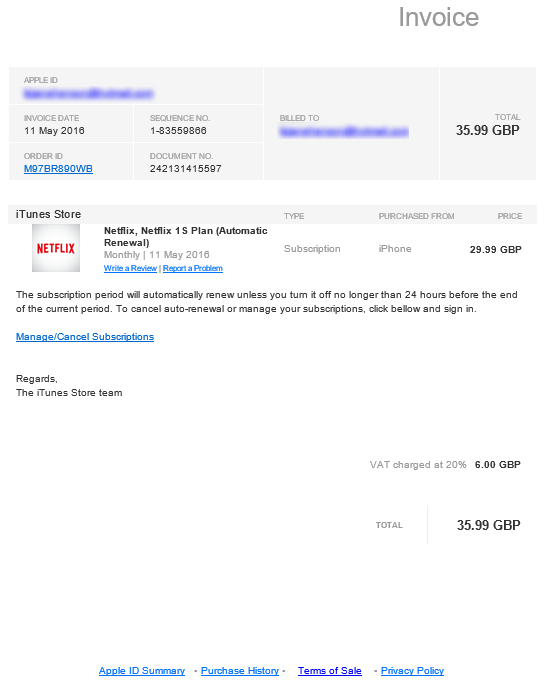
Another scam email to be aware of if you receive something similar. You can tell the email is a scam by hovering over, not clicking, on one of the links in the email, it doesn’t link to Apple. If you are ever in any doubt, always make sure you open the website in question in your browser by typing in the address, never click on any links in the emails. For any services like this, you will have a notification waiting in your account if this is genuine.
by Michael Cropper | May 9, 2016 | Developer, Technical, WordPress |
Accelerated Mobile Pages, AMP for short, is an open source project designed to make the web faster. For people accessing web content on mobile devices, speed is a challenge for many users and with over 50% of content accessed on the web via mobile devices, this is more important now than ever.
The concept of Accelerated Mobile Pages is all about stripping out irrelevant styling and fancy JavaScript technologies to make the page load much faster, with the most important aspect, the content, loading virtually instantly.
If you’re interested in the finer details behind the project, have a read all about it here, https://www.ampproject.org/. The technical aspects behind the project are quite significant as are the underlying details about how your web browser loads content as standard.
Accelerated Mobile Pages AMP Speed Test
So we thought we’d put AMP to the test to see just how much faster it really is for WordPress in comparison to a rather bloated website which requires a bit of TLC, like most WordPress websites on the whole. The results below we repeated on the same website multiple times and cannot believe the performance increases we saw. The Accelerated Mobile Pages plugin for WordPress is available for download from the WordPress repository. A note on the plugin at the time of writing, it only supports Posts in WordPress, i.e. your blog posts. Pages and Ecommerce Products aren’t supported currently.
Blog Post Loaded As Normal

Blog Post Loaded with Accelerated Mobile Pages APM Technology

Awesome! Try loading this page you are viewing now as an Accelerated Mobile Page here to see how this looks: https://www.contradodigital.com/2016/05/09/wordpress-accelerated-mobile-pages-amp-speed-test/amp/
As a footnote. Yes, 30 seconds is darn slow for a website to fully load. Yes, tools like Pingdom are not perfect as many users are more interested in the time when the website appears to have completed to load opposed to when the last byte has arrived. And yes, this is only a single site as a comparison. Get involved and give this a go on your own website to see how this performs for you. Every website is significantly different and ever web server has been configured differently based on your individual needs.
by Michael Cropper | May 9, 2016 | Developer, Security, Technical |
Just like the computer that you are reading this blog post on, your web server has a lot of software installed to keep it running. And like all software, it needs to be kept up to date to avoid security issues. Web server security is an enormous topic with many moving parts, many which are often uncomprehendable to the non-teckie.
Seriously though who is updating your web server software?
Your web developer? Unlikely, often web developers have very limited knowledge of the underlying technologies of web servers.
Your web hosting company? Possibly, but unlikely unless you’re paying them to do so.
Your IT team? Unlikely, your IT team is often focused around the computers, laptops and devices around the office and often believe that it is the web developer’s or web hosting company’s job to do this.
As a business owner it is your responsibility to be asking these questions and making sure that you have this part of your cybersecurity looked after. If you don’t know who is looking after this for you, you need to find out. Get in touch if you find out that this is not being looked after, as I suspect is the case for most people reading this blog post. As with all software, it is essential that your web server software is kept up to date to avoid potential cyber attacks.
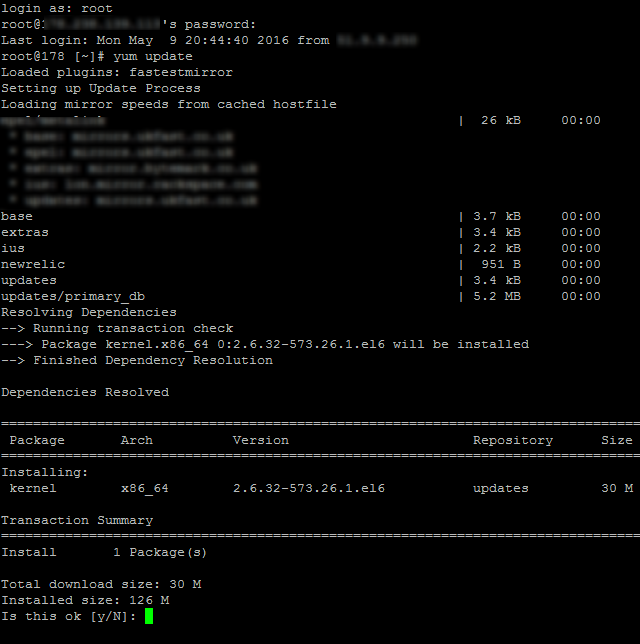
This is what one small part of updating server software actually looks like to the teckies managing this for you, no pretty user interface, it’s primarily command line management;
by Michael Cropper | May 9, 2016 | Security, WordPress |
Another day, another hacked website. This time, thankfully due to the security and backup solutions in place, restoring this backup was relatively straight forward and much cheaper than if these security solutions and automated backups weren’t in place.
Usually we get businesses running to us when things have gone wrong and they have failed to plan accordingly for when this happens. Thankfully, whichever way you look at this, this business had been hacked before and since then had additional levels of security and automatic backup solutions in place to reduce the risk and help to resolve issues when they do go wrong. This being said, on this occasion, no amount of technology can protect against basic human error and weak passwords.
Below is a brief outline about what happened. It’s only a rough guide but does go to show how something as simple as a weak password can even bypass the additional security. And most importantly, this highlights the reason why you should always be planning for the worst and expecting the best. Naturally, all of the sensitive information is blocked out of the screenshots, as is information about the hackers as they deserve no additional praise for the work they have done.
Website takeover
Server Logs
The website isn’t hosted with ourselves, so by the time we investigated this we couldn’t access the server logs as web server had already been rebooted, so the error logs lost.
WordPress Access Logs
Show that the user ‘Admin’ logged in on 08-05-2016 at 8:55 am;

From the IP address 41.111.14.83 which is based in Algeria, Africa;
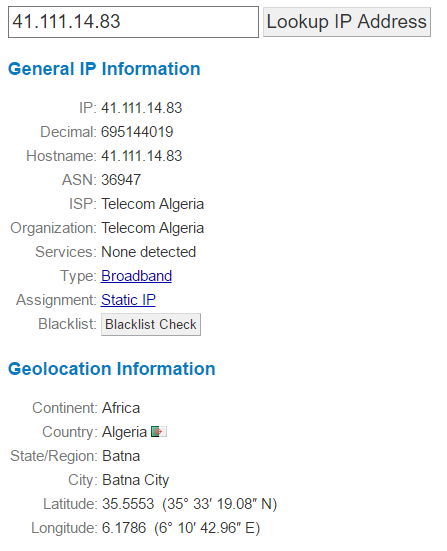
This username belonged to a member of staff at the web hosting company whose account was compromised and used to initiate the attack;

Which when looking at the access logs on the date, there weren’t many failed login attempts which suggests that their password was rather weak;
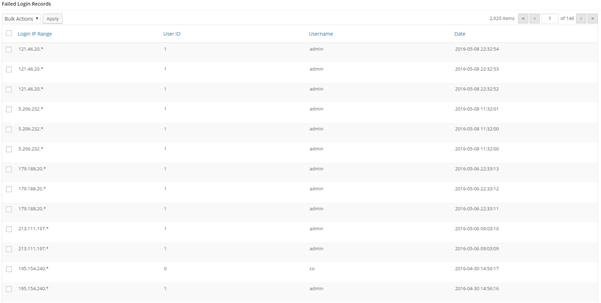
Plugin Uploaded
Now the hackers had Administrator access to the site, they uploaded a plugin which allowed them to upload a script to the site and run this script via the command line;

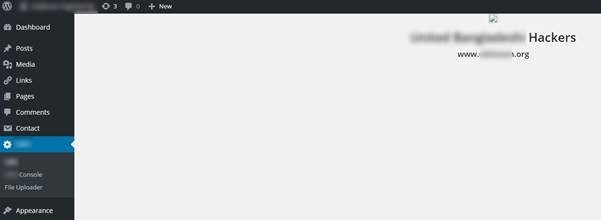
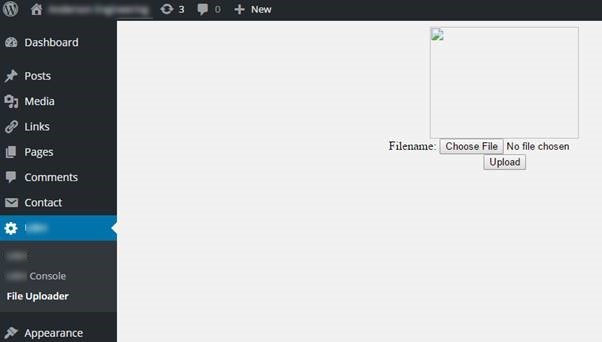
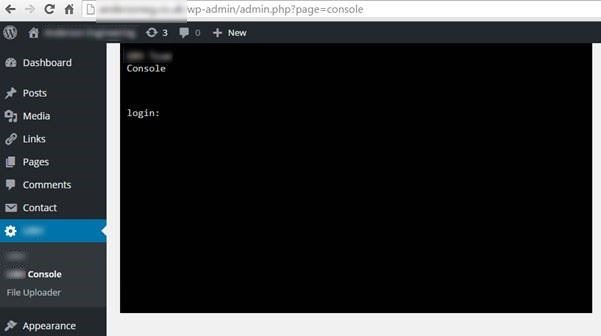
This plugin & script allowed the hackers to take over control of the whole site and display the messages.
Summary
While this does seem like an extremely simple thing, essentially guessing someone’s password. This does highlight the importance of being able to trace exactly what happened when a hack occurs. Being able to track the path the hackers took to exploit the website ultimately led to the root cause of the problem being able to be fixed to prevent this from happening again.
If you don’t have website security and automated backups in place, then get in touch. Seriously, get in place what you need to before you get hacked. Do not think that this will not happen to you. As we have just shown, even with added levels of security in place, a hack can be as simple as a weak password. Make sure you have the right technology in place to be able to identify the root causes of problems when they do occur to save yourself significant time and money dealing with things when the inevitable does happen. No-one wants to get hacked and everyone believes they will never be a target. The reality is that most businesses will get hacked at least once in their lifetime. It is only the large businesses that we often hear about in the news. In this instance, this is a story of a small business, less than 10 staff, for whom this kind of issue is something that they would prefer not to have to deal with.
In this example, we were able to respond to the issue, identify the affected areas of the website, identify the root cause & patch all within a morning. All for the cost of the price of a coffee per day. You have to ask yourself, if you don’t have the right technologies in place to deal with situations like this, how long would your website have been offline for? A day or two? A week? More? I can’t stress enough that preparation is key when dealing with cybercrime. Your digital back door is probably wide open, waiting for someone to walk by and exploit it, you just probably aren’t aware as it’s not something you can physically touch and feel.
