
by Michael Cropper | Nov 11, 2016 | Client Friendly, Security |
You may have seen the news about a Linux vulnerability branded ‘Dirty COW’, which affects many Linux servers. An overview of the vulnerability is below and what you need to do.
What is Dirty COW?
Dirty COW is a new Linux vulnerability referred to technically as CVE-2016-5195. The name came from the fact that it exploits a mechanism called ‘copy-on-write’ and is known as a privilege escalation bug. This means that if attackers manage to get a foot inside your system they can then use Dirty COW to take total control, so it’s crucial to protect yourself. The bug has only recently came to fruition but has been around for nine years – which means it’s likely that many Linux servers have been affected.
What do you need to do?
Install the latest Linux patches available on your Linux web server. Speak to your web hosting company to get this updated. Clients hosting with us, our web servers have been patched as soon as the vulnerability was made public.
We strongly recommend running a manual server check if an automatic patch isn’t available to you. If you have any questions regarding the vulnerability or your solution please contact me and I can talk you through the solution.
For those interested in the more technical details behind the exploit, read all about Dirty COW.
by Michael Cropper | Nov 8, 2016 | Client Friendly, Security |
Unless you have been living in a cave over these last couple of weeks, you’ll probably have heard about the cyberattack that broke the internet for a few hours on several occasions. So what actually happened? It all starts with the DNS.
DNS stands for Domain Name System, in non-technical terms this is the technology that turns www.contradodigital.com into the servers IP address where your website files are hosted, for example, 178.238.139.113. There are many providers of DNS technology in use on the internet, with many providers using managed services of larger companies who have invested millions in the underlying hardware and infrastructure which enables the internet to work seamlessly. One of these companies providing DNS is called Dyn and here is where the cyberattack happened.
When the attack was happening, internet users in the following areas highlighted in the image below were unable to access many popular websites including websites like Twitter, SoundCloud, Spotify, Shopify and many more.
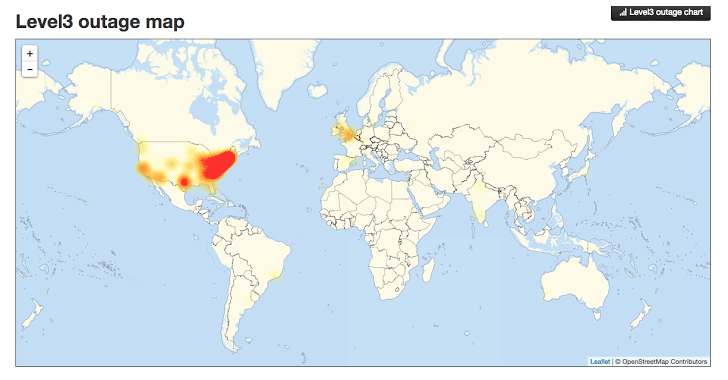
Image source: http://thehackernews.com/2016/10/dyn-dns-ddos.html
This is a significant part of the US and UK when customers and businesses could not access websites, meaning a significant drop in ecommerce sales for many organisations and a huge drop in productivity for those companies working in digital. For a system as large as the internet, which has been build with redundancy in mind, an attack of this scale is one of the worst we have seen to date and the seriousness of this means that businesses need to really step up in their cyber security efforts both large and small.
To read up more about the specifics of what a DDoS attack is and how this all happened, visit the Dyn website who have provided a write up on what happened.
Ultimately this attack was caused by hackers exploiting internet connected smart devices such as web cams and the likes. With the enormous rise in smart and internet connected devices available on the consumer market now, it is devices like this which are being exploited by hackers. When the software has been designed badly or built with un-updatable code or has been built with security holes in the code, it is this what is being exploited. Specifically using the Mirai software.
Distributed Denial of Service attacks are notoriously difficult to protect against, particularly on this scale with over 300,000 devices attacking a system. This is on the macro scale though and this really does just go to show that no matter how big you are attacks can happen to anyone. The even more worrying aspect is that this code has now been released open source so that the code is available to anyone wanting to exploit the same loophole.
The reality is that smaller and medium sized businesses are never reported on in the news. We deal with several hacked websites per month when businesses have failed to protect their self against cyberattacks. As a business owner you need to take cybersecurity seriously, and that means more than simply installing an antivirus and firewall on your laptops.
Picture this. You own a hotel. Imagine every door, windows, emergency exit and air vents into the building are ways of an attacker getting in. Not imagine your antivirus and firewall are your receptionists, blocking unwanted visitors in the building by locking the front door. Now imagine that all of the other doors, windows and vents in the entire building are left wide open for attackers to exploit. This is the reality that most businesses are dealing with without even realising. The software equivalent of this is that websites and web servers run outdated code, aren’t updated and active add security holes through using inefficient technologies and people to build systems. I cannot stress this enough, take cyber security seriously before you become the next victim. Sticking your head in the sand thinking that you will be fine will ultimately result in your business becoming the next headline. Be proactive.
Take advantage of our Free Digital Disaster Recovery Audit and test yourself on our Digital Evolution Score Card to see how advanced you are as an organisation and hence capable of dealing with problems. Better still, get in touch and we’ll talk you through the various options available for protecting your business, website and digital assets from cyberattacks.
by Michael Cropper | Oct 19, 2016 | Developer |
This question comes up a lot about how to redirect an entire website from HTTP to HTTPS on WordPress. It’s actually quite simple to do within the .htaccess file too. Before we jump into the solution, firstly, don’t go playing around with this unless you know what you are doing. Getting anything wrong in your .htaccess file can bring your entire website down. We’ve a whole host of guides on how to implement SSL yourself if you know what you are doing, so take a look at our guide on how to Claim your Free SSL Certificate. Ok, so let’s take a look at the simple task of redirecting your entire website from HTTP to HTTPS on WordPress.
Simply add the following two lines of code to your .htaccess file;
RewriteCond %{SERVER_PORT} 80

RewriteRule ^(.*)$ https://www.contradodigital.com/$1 [R=301,L]
Obviously make sure you change the domain name above to your own domain where you want to make the change.
Specifically add them here;
# BEGIN WordPress

<IfModule mod_rewrite.c>

RewriteEngine On

RewriteBase /

RewriteCond %{SERVER_PORT} 80

RewriteRule ^(.*)$ https://www.contradodigital.com/$1 [R=301,L]

RewriteRule ^index\.php$ - [L]

RewriteCond %{REQUEST_FILENAME} !-f

RewriteCond %{REQUEST_FILENAME} !-d

RewriteRule . /index.php [L]

</IfModule>

# END WordPress
The RewriteRule is redirecting anything on HTTP, i.e. Port 80, to HTTPS, i.e. Port 443. This will guarantee that should anyone access your website using HTTP then they will automatically be redirected to the secure version of your website on HTTPS which is the best practice thing to do.
Struggling with implementing HTTPS on your own website? Get in touch and I’m sure it’s something we can help with. As of January 2017, Google is going to be flagging websites as “insecure” that aren’t using HTTPS, so make sure you’ve implemented this in plenty of time to avoid any potential issues.
by Michael Cropper | Oct 6, 2016 | Developer, Thoughts |
Last night I gave a talk at a developer meetup group in Liverpool after being asked to speak at the event. The developer group was full of extremely amazing developers who are far more knowledgeable than myself about the finer workings of high end technology. Hats off to them.
After listening to another speaker at the event before me, it was extremely clear that I had just sat through a talk for an hour and I honestly couldn’t tell you anything about what I just listened to. It was very abstract and quite frankly, way over my head. This is not a criticism of the speaker, he was great and the audience loved it. Here’s the thing though, I like to classify myself as a very knowledgeable person working with various technologies on a daily basis, I’m certainly no-where near as smart at tech as many of the people in the room which is a great position to be in as you can learn from them.
So anyway, I jumped up to do my talk titled “Venturing into the Unknown Building TendoJobs.com” which was designed to be an overview of building a tech startup from scratch while bootstrapping everything from day 1. I do a lot of talks to businesses, companies, conferences, events and so on, I enjoy doing them and sharing my thoughts with those interested. This one was different though, it was clear that the audience was so unbelievably amazing at various technologies that for those in the audience listening to me the content of the presentation must have been similar to a University Professor attending nursery to learn about something. It was fun doing the talk that’s for sure and it was truly a baptism of fire. What struck me most though was the array of endless questions at the end of the presentation. Rarely do you end up answering questions for a good 15-20 minutes at the end of a presentation, but they kept coming, which was great as it got people thinking.
As the old saying goes, to a man with a hammer, the solution to every problem is a nail. And this couldn’t be truer than within the developer community across all platforms and languages. The problem I see time and time again from developers and technology startups that I speak to on a regular basis is that they keep adding technology to solve a problem when actually you don’t need to add technology. At the development level, technology adds complexity to every project which adds time and money to what is being done. It’s time as developers we step back a little and start to ask ourselves what we are really trying to do.
To put this into perspective, here are just a few of the questions that came from the bemused audience last night;
- So what tools / technology do you use for your release and deployment process?…. i.e. expecting the sophisticated answer for something like Jenkins…….We use SFTP (for the non-teckies reading this, picture the process being viewed as a stone age person using a flint bow and arrow to catch an animal. It’s functional and it works. )
- When you make a change within the code, how do you know that it doesn’t break anything else?….. i.e. expecting the ‘best practice’ answer that every single unit of code has unit tests wrapped around them and we run these tests before we push code live…… We just build the code well and remove virtually all dependencies throughout the various classes (for the non-teckies reading this, imagine that you’ve baked a cake. Wonderful. Now your unit tests can be loosely thought of as checks at the end to make sure what you’ve made is correct. So in this random example, you’d line up all the raw ingredients next to your baked cake and confirm that they are present within said cake. This needs you to buy two sets of ingredients to test that the cake contains them all. Thus doubling the cost of the cake baking project)
- When you added this form to the website in the first instance, why didn’t you build in validation checks at every step from the outset?…. i.e. expecting that it was something we simply forgot to do….. We actively avoided doing this because we would have been building features and functionality that people may or may not have needed. Instead, we let the data tell us what validation checks we needed to add in as and when people started using the platform (for the non-teckies, this is talking about the ‘you must enter your First Name’ type notifications that you see on websites)
- So what frameworks did you use to build the platform? ….. i.e. expecting a cool and sophisticated answer about one of the endless technology frameworks available to choose from today….. We didn’t use any. We just used solid Model View Controller design patterns to structure our code well so that it is maintainable, easy to manage and release changes. (For the non-teckies, think about this as following a recipe. When you have your raw ingredients in the kitchen, which cookbook do you choose and which recipe do you select from them? We simply threw it all in the pan and it turned out beautiful)
- Why aren’t you streaming your file uploads via Amazon S3 and automatically resizing images as needed within the applications? ….. I.e. expecting to hear that this is in the pipeline to do so….. Because that is simply too much work involved to do and virtually all employers can manage to upload their logo within the guidelines provided. It’s needless work.
Above is just a small selection of the questions that were asked and discussed after the presentation. It was really interesting discussing the whole tech startup process with a group of highly experienced developers. I was certainly the caveman in the room without a doubt when it comes to tech which was really interesting.
The key message from the presentation though was all around Keep It Simply Stupid. You see, when you add complexity into any project, is it any wonder the costs of said project goes up when you then have to spend 50%+ more time developing the project, and is it any wonder that you cannot find the right talent within your organisation who has 5 years experience using technology X. You’re adding complexity out of striving to continually improve development techniques. I’ve seen this on many occasions in very large organisations where the organisation simply revolves around the digital technology hamster wheel to keep rebuilding technology and adding new and different processes into the system instead of truly stopping and thinking about what they are actually doing. Ultimately achieving nothing while working at 150% of capacity continually wondering why nothing is being achieved.
Ultimately the product or service is here for the user of the end user, the customer. You have to ask yourself that when you are looking to implement technology X or process Y within your application, does the end customer really care and are they even going to notice? If the answer is no, then honestly, what are you wasting time even doing it? Seriously. Sure, if you’ve an endless budget and lots of free time to do this, great, you probably work at Facebook or Google. For the rest of us though, let’s bring these dreams down into the practicalities of the day to day.
To put this into perspective, let’s just take a look at one of the largest developer surveys that takes place each year from Stackoverflow, here are some of the most popular technologies in use today;
.NET, ABAP, Android, Android Studio, Angular, AngularJS, Arduino / Raspberry Pi, Arrays, ASP.NET, Atom, aurelia, Bash, C, C#, C++, Cassandra, Clojure, Cloud, Cloud (AWS, GAE, Azure, etc.), Coda, CoffeeScript, ColdFusion, Cordova, Count, CSS, D, Dart, Delphi, Django, Drupal, Eclipse, Elasticsearch, Elixir, Elm, Emacs, Erlang, F#, Fortran, Git, Go, Groovy, Hadoop, Haskell, HTML, HTML, CSS, IntelliJ, iOS, IPython / Jupyter, Java, JavaScript, JQuery, JSON, Julia, Komodo, Kotlin, LAMP, Lighttable, Linux, Lisp, Lua, Matlab, Meteor, MongoDB, MySQL, NetBeans, Node.js, Notepad++, Objective C, Objective-C, OCaml, Other, Perl, PHP, PhpStorm, PL/SQL, PostgreSQL, PowerShell, PyCharm, Python, R, Raspberry Pi, React, Redis, Regex, RStudio, Ruby, Ruby on Rails, RubyMine, Rust, Salesforce, Scala, Sharepoint, Smalltalk, Spark, SQL, SQL (or SQL Server), SQL Server, SQL Server & SQL, String, Sublime Text, Swift, TextMate, TypeScript, Unity, VBA, Vim, Visual Basic, Visual Studio, Visual Studio Code, Windows Phone, WordPress, Xamarin, Xcode, Zend.
The above really is just the tip of the iceberg when it comes to technology choices. Within each of the technologies above, there are equally as many variations, technologies, frameworks and best practice ways of doing things. Technology quite simply is a minefield. I work with technology on a daily basis and I’ve only ever heard of around 50% of these technologies, let alone had the time and inclination to explore them.
Look, I’m not saying that all of these best practice things aren’t something to work towards. They all have their benefits. But let’s be realistic here, every single project is limited based on time and money which ultimately determines the output at the end. You cannot, and I’d argue should not, implement best practice from day 1 for anything, unless that thing is as simple to implement best practice as it is not to. Keep things simple, use solid continual development and agile processes to build on solid functional foundations.
Adding complexity to any project is a risky route to go down and one that I’d always recommend steering away from. Keep your projects as simple as possible instead of keep trying to add in new technologies into the system endlessly just because you can.
A couple of comments from the questions on the evening put this into perspective which include “You had some balls to stand up and do a talk like that in front of a group of specialist developers” and “Your ideas are certainly…. Interesting”, which is a polity way of saying they are a bit “out there”.
One final thought I’d like to leave you with. Technology projects, systems and organisations are as complex as you make them. You cannot then wonder how you’ve got into this position and complain about how difficult things are. Take a staged approach with developing and continually improving any technology system instead of simply bolting on as many pieces of technology as you can just because they are cool to do or are deemed best practice. Save yourself endless hours, weeks and months of time building things that ultimately adds no value to the project, adds cost and makes everything difficult to maintain.
Great talk, great group of people, great discussions. Food for thought from a different perspective. See everyone at a future event.
by Michael Cropper | Sep 22, 2016 | Client Friendly |
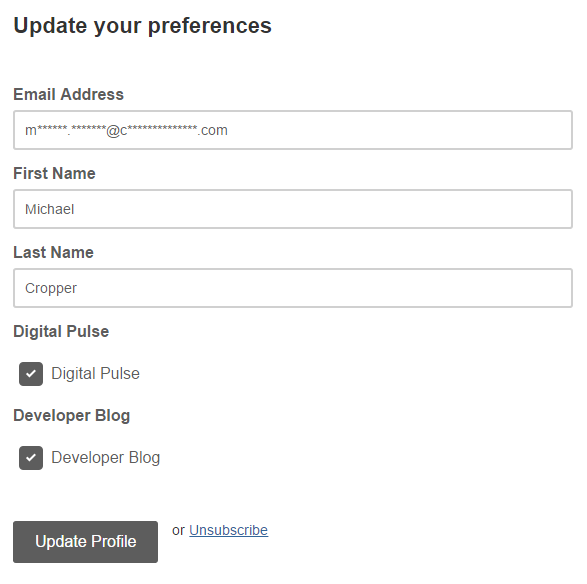
Click “Update Preferences” at the bottom of this email.
You’ve been receiving email newsletters from us for some time now which is great to see you enjoying them so much. We’ve a lot more content on the website that we tend not to email out to most people as it would be information overload or far too technical.
That’s why we’ve just built the capability for those of you interested in more regular or technical content to subscribe to these newsletters alongside the main one so you can receive useful updates should you wish.
Digital Pulse
We’ve had the Digital Pulse for quite some time which is a group of updates from official sources in the digital world to keep you updated every single day. For those of you who view this on a regular basis, you’ll be well aware of how fast the digital world changes and most importantly, what you need to be doing about these changes.
For those of you who don’t have the time to visit the Digital Pulse daily, then you’ll often miss the important updates that are being announced. That’s why you can now subscribe to the Digital Pulse newsletter too.
Simply click the “Update Preferences” link at the bottom of this email and you can update your profile to receive daily updates about what has happened in the digital world over the last 24 hours that you need to be aware of.
The majority of this news is non-technical which is great. There may be a few technical bits thrown in here too now and again, but it’s mainly understandable designed for everyone to read.
Developer Blog
For those of you who are more technical who are subscribed to the newsletter you can now subscribe to our Developer Blog too which is a place where we get really technical about how to implement certain aspects of digital technologies or share results of tests we’ve been doing and what we’ve been experimenting with recently. This is all the content that is cutting edge that can help you implement similar items within your own organisation.
Simply click the “Update Preferences” link at the bottom of this email and you can update your profile to receive monthly updates about we’ve been up to with lots of helpful tips and guides along the way.
Summary
As we’ve automated our entire email marketing platform now, this frees up a significant amount of time every month so we can continue to bring you more exciting news, updates and relevant information that is happening in the world of digital. Stay tuned for more exciting news! You’ll also be glad to know that the updates will be much more regular now too as we never have to remember to send you an email newsletter, it happens automatically.
If you aren’t interested in getting deep involved with digital or you are putting your head in the sand about how the world is changing, unsubscribe now as you will be receiving more emails about what you need to be doing. You can either adapt to these changes or ignore them and hope they go away. They won’t go away. The world is changing at such a fast pace today that we’re stepping up the communication to share with you all of the core changes that you need to be aware of and what you need to be planning for.
And if you’re interested in how we did all of this in the background and how you can do this yourself, take a look at how you too can automate your email marketing campaigns with WordPress and MailChimp.