by Michael Cropper | Apr 13, 2017 | Client Friendly, Developer |
Blogging, content marketing, SEO, Google, brand building and more – We’re all told that blogging helps with all of these things, and it really does. But what if we want to turn blogging into a lead generating machine that you can highly target to your key audiences with different messages, all automatically? Imagine a mini-website-footer, that is fully customised to each of your target sectors and audiences that is filled with the key information to drive them to take the action you want on top of simply reading the blog post. Sounds pretty cool right? Well, yes, it is. And most importantly, it’s not actually that difficult to implement.
How WordPress Works
So, I’m going to assume you’re using WordPress for your blogging activities. If you’re not, have a word with yourself and get onto WordPress, seriously. There is rarely a reason to use anything other than WordPress for blogging activities in this day and age.
WordPress works in a very, well, WordPress way. So it is important to understand this in the first instance so you can understand what is actually possible. In essence, the end result for what we’re looking for is to add a bit of content at the end of every blog post, or every blog post within a specific category, or even every page on yourself. The options are virtually endless and allows you to customise what is important to you.
To get a feeling for the end result for what I’m about to show you, take a look at this blog post about How Travel Companies Can Stand Out on Googles Search Results Using Review Rich Snippets and most importantly, what you’ll notice at the end of the blog post is a small lead generation area that is designed to turn blog post readers into engaged people and potential customers at some point in the future.

Specifically what you’re seeing above, is the last paragraph of the blog post, followed by the lead generation section, followed by the author section. And you’ll also notice that this section is not present on this blog post you’re reading right now, because this post belongs to a different target market, primarily developers like yourself reading this.
So, back to WordPress. WordPress works in sections. What you see is not simply a full page of content that is being generated in a single go, what is actually happening in the background when a blog posts loads for a user is that WordPress goes away and gets the header, the main navigation, the blog post content, the author information, the footer and many more things. In the background WordPress then pieces all of this information together which is then presented to the user in what they see as just another blog post on the website.
What is important to understand here is that you can interrupt this process and do additional things which is super handy. This is when you can listen out for Hooks and apply Actions and Filters to these Hooks. In essence, an Action does something, and a Filter changes some data in transit. It’s not always quite as straight forward as that in the background, but you get the idea.
If you’re a non-technical person reading this blog post, skim over the code and don’t worry about the finer details. Simple see the type of customisations that can be added to your WordPress blog posts to target your key target markets and generate leads.
Adding Lead Generation Content to the_content()
As mentioned above, there are many Hooks throughout the WordPress codebase. One of these is called the_content() which provides, you guessed it, the content on the page. In this specific example, the blog post content. And because this Hook exists, it is possible to manipulate the data, for example by adding additional information at the start or the end of the blog post content.
What is interesting too though is that every blog post belongs to a specific Category, which again can be used to show different information at the bottom of blog posts that belong to different categories. For example, if you wanted to share different information with people reading technical information VS non-technical information or share different information to people within your different target markets, this is all possible and this is exactly what we’ve done on our website.
So, let’s jump straight in and look at the code and I’ll explain everything in a moment.
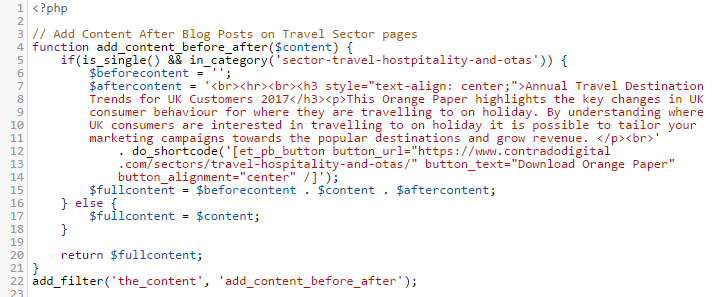
The above code is contained within the functions.php file within our Child Theme. In essence what the code is doing is listening out for whenever the_content() Hook is triggered by WordPress, i.e. when someone is looking to read a blog post, then before this information is sent to the user, it is being altered slightly. As the_content() Hook is triggered for both Posts and Pages, the if(is_single()) part is saying that only apply this lead generation content on Blog Posts, not Pages. And likewise, the in_category() part is saying only display this information within this specific category which is the URL slug of the category, not the name of the category.
The $content variable is where all the information for the content is stored. So we want to add data to the start and end of this. In this example, we’ve only added data to the end, although both have been contained to show you the logic of how to add content either before or after the_content() part. Reading through the code should be relatively self-explanatory when you compare with what you can see on the main image at the top for how this is displaying. The only thing to point out specifically is the additional do_shortcode() function which is also called which allows us to output shortcodes from here too rather than just plain text. This can be really handy if you want to add things like buttons and forms before or after the content. When you do this, note the single VS double quotes. Make sure you don’t get these in the wrong order or it won’t work.
And it really is as simple as that. Turn your blog posts and content marketing activities into lead generating machines without manually adding this information at the bottom of every blog post you write, which is extremely time consuming to change in the future as you fine tune your marketing campaigns.
by Michael Cropper | Apr 13, 2017 | Client Friendly, Sector - Travel, Hostpitality and OTAs, SEO |
Travel is a competitive market, so it is important that your brand stands out from your competitors when customers are searching on Google for queries such as “Holidays to Kefalonia” and similar review type queries. Rich snippets are a great way to highlight your brand amongst your competitors which can generate additional traffic to your website from Google, leading to increased sales and enquiries.
So what are Review Rich Snippets and when do they show?
Rich Snippets are a form of structured data that simply helps Google to understand what the content on your website is about. There are Rich Snippets for a variety of areas and the one we are going to cover today is specific to highlighting review information on Google. What this means in practice is that when customers are searching for queries such as “Holidays to Kefalonia” or “Holidays to Kefalonia Reviews” there is a greater chance that Google will highlight your website with stars next to your listing as can be seen in the image below;

As you can see here, your eyes are instantly drawn to the listing that stands out from the others with the star ratings. In essence Review Rich Snippets require each individual Review to be marked up along with aggregating this data into an overall review based on all the review data. This information can be from your previous customers who have been on one of your holiday packages, so it is essential to be collecting this data from your customers at the earliest available opportunity.
How to Mark Up Review Rich Snippets
There are many ways to marl up Review Rich Snippet content which gets rather technical, so we’re only going to skim over this information as we don’t want to bamboozle you with the finer technical details. For the purposes of this blog post we’ll use the Greeka.com website as an example and take a look at what they have done to implement Review Rich Snippets on their travel website.
Firstly what you’ll notice when you visit their website is a listing of review information as you would expect to see as a user;
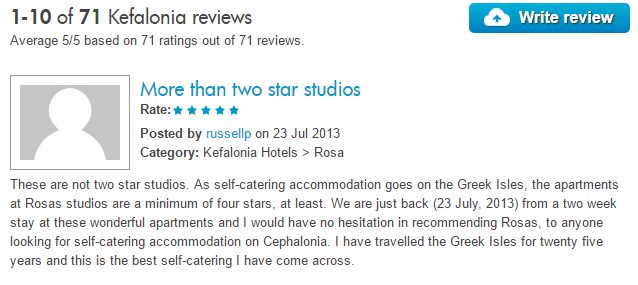
What’s important to note here is two pieces of information. Firstly, you will see the overall reviews listing at the very top which states that there are 71 reviews in total with the average being 5/5 for the reviews that have been left. Then beneath that you’ll notice an individual review that has been left by a customer. As a user, you’ll never notice Review Rich Snippets are there which is exactly why they exist. Review Rich Snippets for travel websites are in the code in the background which is telling Google that there are reviews associated with this specific item such as a holiday package, a resort, a restaurant or a specific hotel for example.
Here’s what this looks like in the background, the code below relates to the aggregate reviews which are what is showing on Google;

What you’ll notice is that there has been specific pieces of code wrapped around the content on the page which state that the destination has an average review of 5/5 from 71 people. When you read through the code you’ll notice there are specific pieces of information such as ‘best’ and ‘average’ and ‘votes’ etc. It is this information and more that Google is using to generate the visible star ratings on the Google search results that customers see when they are searching for travel companies.
Likewise you’ll also notice when reading through the code on the page that each individual review also has specific Review Rich Snippet data marked up around it too as you can see in the image below;
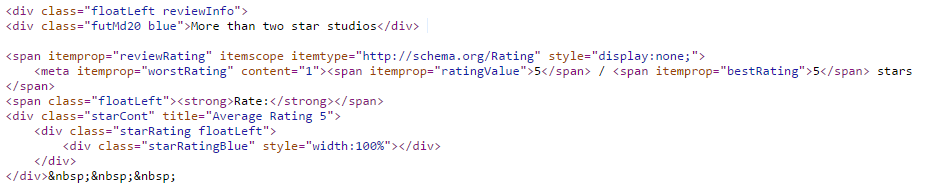
With information such as ‘reviewRating’ and ‘worstRating’ and ‘ratingValue’ for example being some of the key pieces of information Google requires to be able to see how the overall review ratings have been calculated.
Ok, that’s enough code for now. In essence, to get Review Rich Snippets and star ratings showing on Google it is important that you implement the code correctly which ties in closely with the technology that is powering your website. There is no one-size-fits-all approach here as every website is different.
If you’d like to implement Review Rich Snippets on your travel company website then get in touch and we’ll work closely with you to implement Review Rich Snippets so you can stand out from your competitors and boost website traffic and sales.
by Michael Cropper | Apr 7, 2017 | Developer, Technical |
By default MySQL FULLTEXT search will not search for words that are less than 4 characters in length. For many things this can be great as many words less than 4 characters are generally stop words such and often aren’t valuable, for example words such as, the, and, if, on, etc. Although this isn’t always the case and in certain circumstances small words are actually really important. For example, let’s say you’re looking for a new developer job using any of the following technologies, ios, php, C#, .Net, ASP, etc. In these cases, the default MySQL FULLTEXT search default minimum characters actually prohibit results being found, which isn’t a great user experience. As such, you may want to update your MySQL FULLTEXT search functionality to enable smaller words to be searched for while quality results are being identified.
Edit My.cnf File
The my.cnf file on your web server generally sits under /etc/my.cnf and allows you to customise your MySQL configuration. You can edit this file by logging into your web server using SSH, navigate to the correct folder and run the command pico my.cnf which will allow you to edit the file.
Now you need to add the following line of code at the bottom of the fie which will allow MySQL FULLTEXT search to search for words with a minimum word length of 2 characters, ft_min_word_len=2
Once you have completed this, save the file.
Restart MySQL
Next you need to restart the MySQL service using the following command, service mysql restart which will ensure that the MySQL service will use the new configuration data once it has restarted. Should you experience a problem restarting MySQL, then remove the code you just added in the my.cnf file or comment out the code with a # at the start of the line. If you’re not aware, the following commands also exist which can come in handy should the MySQL service not restart smoothly, service mysql stop and service mysql start.
Rebuild All MySQL FULLTEXT Indexes
Finally you need to rebuild all your MySQL FULLTEXT indexes that you are using on your database. If you only need the smaller words to be searched on specific tables, then you clearly don’t need to rebuild the ones that aren’t relevant, although it can be handy as this could save you hours of debugging further down the line if different tables are using different minimum word lengths. Login to your phpMyAdmin if you’re running this on your web server to access the MySQL database then run the following command on which ever table you want to update, REPAIR TABLE <TableName> QUICK;
All done! Now your MySQL FULLTEXT Search will be able to search on smaller words than previously.
Some additional resources that can come in handy include official documentation about how to fine tune MySQL FULLTEXT searches.
by Michael Cropper | Mar 28, 2017 | Client Friendly, News |
Digital technologies, online marketing and cyber security is at the forefront of the world we live in for businesses looking to connect with their customers, grow their market share and keep customer data secure from cyber criminals. What this means is that many of the services we offer can often be confusing to businesses who aren’t heavily involved in this work on a day to day basis. That’s why we’ve hugely simplified our service offering to help businesses like yourself understand what we actually do and most importantly, how we can help your business grow.
Sectors We Help
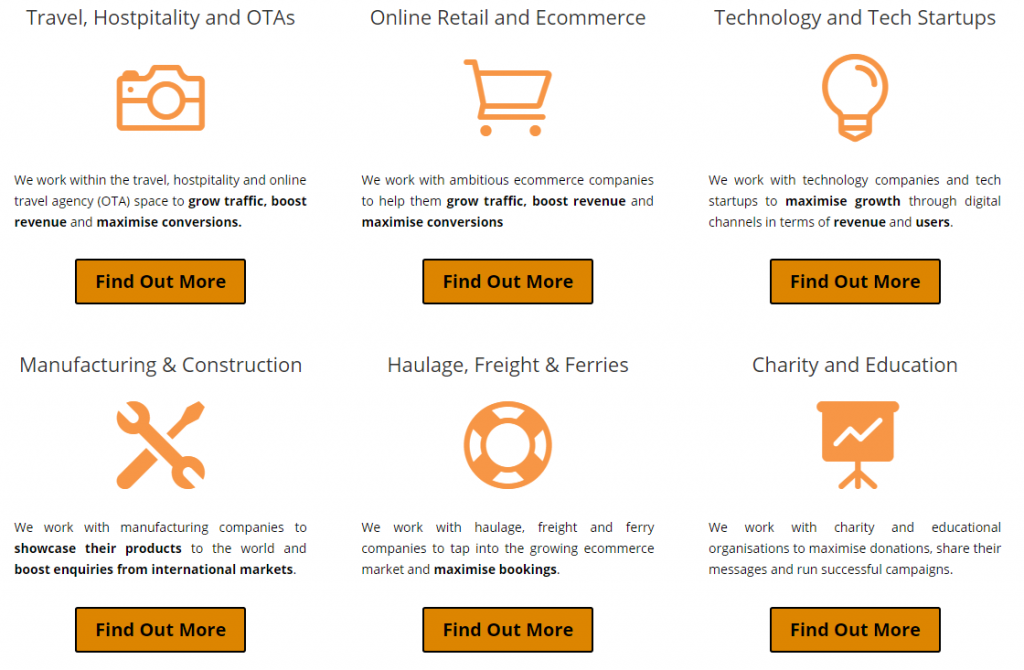
We work with businesses of many varying shapes and sizes. We understand the following industries through and through which means that if you are working in one of these industries, then we can help your company with digital services;
What We Actually Do
In essence, we do three core activities, we build things, we make them perform with digital marketing and we keep your customers data secure online.

Quality Services
As can be seen as you browse around the website, high quality work with a results driven focus is at the forefront of what we do as we work in partnership with companies like yourselves who are ready to take your business to the next level. We don’t built cheap websites and we don’t offer cheap discount services because quite simply, you get what you pay for when working with cutting edge technology for your business. We pick up a lot of projects when others have failed to deliver.
Ready to take your business to the next level? Then drop me an email directly, michael.cropper@contradodigital.com. I’d be happy to meet for a no obligation consultation and talk through where you are looking to take your business over the next 12 months and how we can help you along that journey.
Speak soon
Michael Cropper
Managing Director
by Michael Cropper | Feb 17, 2017 | Security |
For those of you using Microsoft Exchange for your email platform, be aware of the latest phishing email going around telling you that you;
“Your email have exceeded maximum disk quota allocated, we require re-activation to continue using mail service…. Our system will automatically purge out mail that have exceeded quota, to avoid this please kindly follow our instruction.”
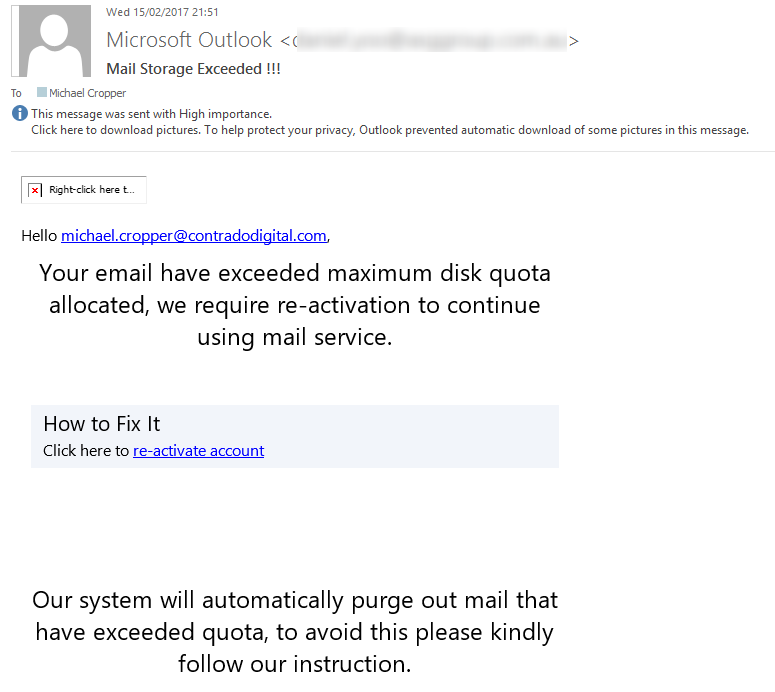
As always, if any email looks suspicious, never click on any links that you see. In this particular case, the email ‘from’ address which has been blurred out above is clearly not from Microsoft, it was from an IT company based in Australia. It is likely they have been hacked their self then their web server was used as a way to attack more businesses. While the ‘from’ email address can be easily faked, when the from email address is clearly not from where you would expect, this is a clear sign that this email is fake. In addition to this, when you hover over the link in the email, the link URL is to a strange website with a lot of random characters which is another clear sign that this email is a phishing scam.
Always keep an eye out for phishing scams like this
by Michael Cropper | Feb 14, 2017 | Client Friendly, Security, SEO, WordPress |
You may have recently received an email from Google Search Console warning you that your website is being flagged as Non-Secure Collection of Passwords as can be seen below;
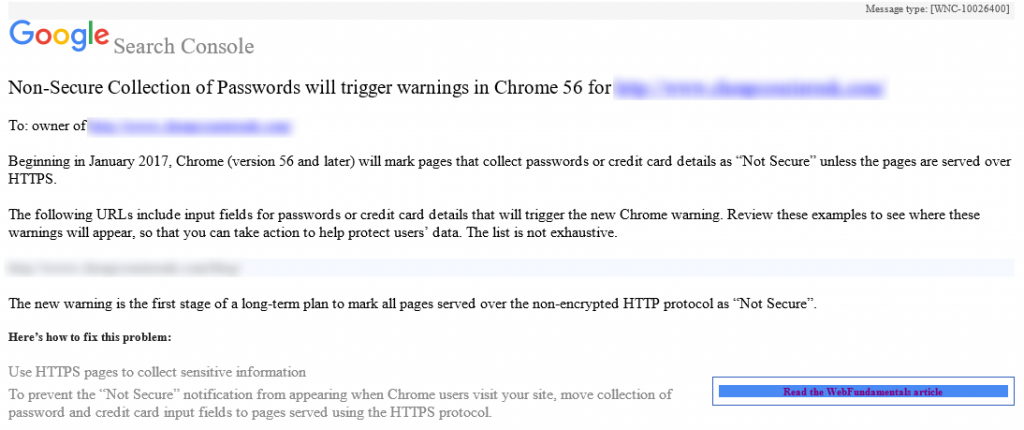
If you have been sent a message like this, you need to act before it is too late. You have received this message because your website is running over HTTP instead of HTTPS on pages that you collect sensitive information. Whenever either you or your users enter sensitive information on any website using HTTP, i.e. http://www.contradodigital.com/wp-login.php then this information can be seen in transit by anyone listening in on the network.
What you need to do
The solution to resolving these warnings is actually relatively simple. If you want to have a go at this yourself, then make sure you claim your free SSL certificate and update your website accordingly. If you need any help implementing this then get in touch and we can help you with the process.
by Michael Cropper | Feb 9, 2017 | Client Friendly, Security, WordPress |
Google Search Console, formerly called Google Webmaster Tools, has started to inform WordPress website owners when security updates are available. This is a great effort by Google to help website owners and businesses keep their websites safe and secure with regular WordPress security maintenance.
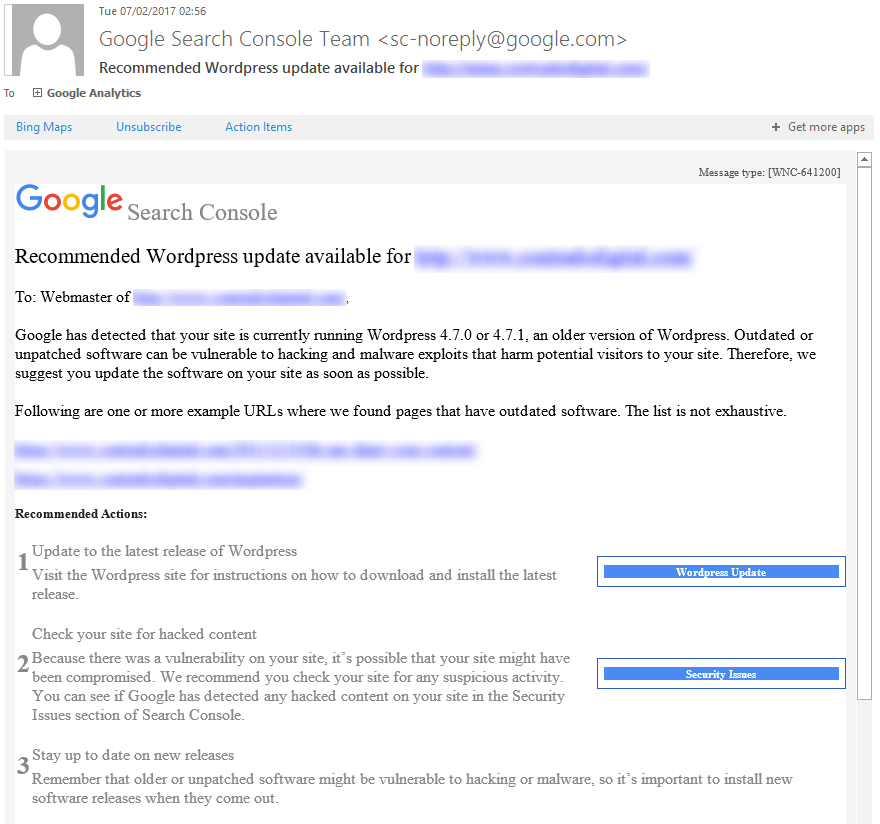
While this is a great step forward, as a business owner you must not wait until you see these kinds of messages from Google until you take action to update your WordPress website. These messages are purely focused at the WordPress Core files, which is only a small part of WordPress security. If you think of security like you would with a building, imagine WordPress Core files being your front door. Just because your front door is locked, it doesn’t mean that you haven’t left your windows, back doors, side doors and garage unlocked and open. It is the same concept with WordPress security. You must be taking proactive measures to protect your website against hackers.
If you aren’t sure how to go about dealing with WordPress security, then fear not, drop us an email and we can talk you through the options available.

by Michael Cropper | Feb 9, 2017 | Client Friendly, Security, WordPress |
WordPress 4.7.2 is now available. This is a security release for all previous versions and we strongly encourage you to update your sites immediately. If you are unsure how to deal with WordPress security updates, get in touch and we can manage your WordPress security updates for you.
WordPress versions 4.7.1 and earlier are affected by three security issues:
- The user interface for assigning taxonomy terms in Press This is shown to users who do not have permissions to use it. Reported by David Herrera of Alley Interactive.
WP_Query is vulnerable to a SQL injection (SQLi) when passing unsafe data. WordPress core is not directly vulnerable to this issue, but we’ve added hardening to prevent plugins and themes from accidentally causing a vulnerability. Reported by Mo Jangda (batmoo).- A cross-site scripting (XSS) vulnerability was discovered in the posts list table. Reported by Ian Dunn of the WordPress Security Team.
- An unauthenticated privilege escalation vulnerability was discovered in a REST API endpoint. Reported by Marc-Alexandre Montpas of Sucuri Security. *
Thank you to the reporters of these issues for practicing responsible disclosure.
Download WordPress 4.7.2 or venture over to Dashboard → Updates and simply click “Update Now.” Sites that support automatic background updates are already beginning to update to WordPress 4.7.2.
Thanks to everyone who contributed to 4.7.2.
* Update: An additional serious vulnerability was fixed in this release and public disclosure was delayed. For more information on this vulnerability, additional mitigation steps taken, and an explanation for why disclosure was delayed, please read Disclosure of Additional Security Fix in WordPress 4.7.2.
by Michael Cropper | Dec 3, 2016 | Developer |
This can be a fun one to deal with, particularly when working with scalable web applications. To keep things simple, remember that according to the W3C standards, the ID attribute on any element on a page should always be unique. This enables you to refer to this specific element whenever you want which is handy. This is perfect on simple web applications as you can just name everything as you wish. When working with scalable web applications, this becomes a little more challenging. Let’s keep things simple and use Twitter as an example. At any one point in time when a user searches for “Show me Twitter Accounts Matching ‘Michael'” for example. This will return an unknown number of results and the front end will loop through each of these accordingly. As part of this process, you are going to want to add relevant actions to each of the user accounts, such as Follow Account or Unfollow Account etc. Most scalable web applications these days will use jQuery to perform these kinds of actions on the front end which is perfect as within jQuery you can update the page content when a user does something such as clicking a button. And here’s the snag, the way all of this works is on the ID attribute for the relevant element.
So we need to implement a bit of clever technology to deal with unknown IDs to firstly identify the relevant ID that has been clicked, for example, and then use that ID to update something based on what the user has done. Let’s break this code down and provide a working example for how to do this;
$(document).ready(function () {
       //This line of code is telling jQuery to handle any actions when a user Clicks on an element
       //that has an ID attribute which starts with 'api-follow-button', i.e. 'api-follow-button-user-account-id-123'

       $(document).on('click', '[id^="api-follow-button"]', function followButton(e) {

                //This line of code prevents the element performing its default action, such as a link being clicked for example
                e.preventDefault();

                //This line below ensures that you can then use the ID selector to update the relevant part of the HTML as needed
                //This code is identifying the full ID attribute for the element that has been clicked
                var buttonID = $(this).attr("id");

                var buttonText = "Unfollow";
                var currentState = "Following";

                //Update Links
                //This line of code is allowing you to use a Variable in JavaScript to update the element using jQuery
                $("button[id=" + buttonID + "]")
                        .html(buttonText)
                        .attr("currentState", currentState);
       });
});
by Michael Cropper | Nov 29, 2016 | Client Friendly, Thoughts |
This is a question that has been bugging me for a while, and you know what, I still don’t have the answer to this fully. You see, working with technology and user experience on a daily basis while improving digital platforms for companies, I can’t help but get used to continually improving all aspects of a business. Yet when I look around at most companies, I see the same old companies doing the same old things time and time again, often getting busier and busier without being more efficient or growing. Now here’s the thing, it is not like there is a barrier to entry to using technology throughout a business. Costs have come down quite considerably over the last few years and there is now more than ever an enormous pool of digital expertise to tap into. Albeit, there is a hugely varying quality of digital expertise, but there is a lot available never the less. So why is it that companies fail to innovate?
I decided to write this blog post after seeing another “Look at how amazing our new website is, let us know what you think…” post on LinkedIn by a proud owner of a business. So I decided to chip in. The site was WordPress based, so far so good. Then it all kind of went to the usual problems, not using Child Themes and not using HTTPS, both of which are an absolute minimum when building WordPress websites. Yet still, the business owner shrugged off the feedback stating that they are working with a “world leading company, I’m sure they know what they are doing”. And in this case, I can honestly only say that this is purely ignorance that is leading this particular company not to innovate. Look, I’m not saying that building a website is in any way innovative, but it does tell you a lot about a company based on the way their website is built. Firstly, in this instance I can tell you that this website was put together on the cheap in an “all fur coat and no knickers” type of way. I see this a lot, and we generally work with companies around 2-3 years after they have gone down this route and realised that it doesn’t work. And what that tells me about companies who go down this approach is that they are still very much in the mindset of cost over value. Purchasing anything based on cost is a losing battle and one that will cause you no ends of problems in the long run, businesses who eventually realise this start to enormously innovate throughout their organisation which starts them on a path to significant growth as an organisation.
This is by no means a lone example though. I’d argue that most organisations fail to innovate throughout their organisation. And this is not because the innovative technology, processes or systems are either not available or expensive. I’d argue that it is because people are so busy doing what they have always done or busy talking about how busy they are that they fail to realise the opportunity that sits right next to them as a solution to their many problems. This clearly is not a technology problem, it is a people problem. It is the decisions that people make on a day to day and minute by minute basis which prevent their own organisation from innovating by keeping their self busy doing the same old same old. This is by no means a unique situation though, this is what is known as the productivity problem in the UK and something which the UK government is looking at as a priority to grow the economy. Businesses need to step up and as what one minister said “Stop being lazy”.
For anyone who is too busy to look at new opportunities, I wish you well, but for those smart enough to stop and take 5 minutes to look at new opportunities, you will be amazed about what is available when you open your mind a little and speak with companies who can help your organisation significant improve throughout. Happier, leaner and more innovative companies are the companies that people like to work with. What is clear to me on a regional basis is that cities like London and Manchester are clearly leading the way when it comes to implementing innovative solutions throughout their organisations, whereas non-city regions and counties are often much slower to adapt. I’ve come to the conclusion that this is due to the majority of businesses being run by small teams and/or families that they struggle to think differently because they make decisions purely based on their own personal past experiences, which limits their thinking. As the quote goes, “To the man with a hammer, the solution to every problem is a nail”. Often true innovation comes from talking with people who are significantly different to you, even if you completely disagree with their way of working and their beliefs. I know that personally, some of the more innovative solutions that we have implemented have been a direct result of the random conversations I have had with people who I normally wouldn’t connect with. Instead these ideas have come based on making time to speak with different people and learn from their experiences. You can learn an awful lot from others when you stop and think about a problem together.
Innovation is key throughout every aspect of your business and the more businesses I speak with I can guarantee that I could walk into any organisation and improve their efficiencies throughout their organisation, whether that is through digital solutions or process improvements. This is not being over confident, this is based on seeing so many problem which are blatantly obvious to me that never seem to get fixed or improved. Often its the simple things that make the biggest difference. The challenge is always getting companies to change. As they say, you can lead a horse to water…. To finish, I’d like to open this invitation to any businesses who is stuck in their ways and unsure what to do to grab a coffee with me. Let’s look at how we can re-shape your organisation to become more efficient whether that is through digital technologies or otherwise. We can’t do this for you, but we can help you open your mind. Let’s chat.
We’re working on exciting projects with forward thinking companies as always. Becoming a forward thinking company is simply a mindset change required from those at the top of the organisation.