by Michael Cropper | Apr 13, 2017 | Client Friendly, Sector - Travel, Hostpitality and OTAs, SEO |
Travel is a competitive market, so it is important that your brand stands out from your competitors when customers are searching on Google for queries such as “Holidays to Kefalonia” and similar review type queries. Rich snippets are a great way to highlight your brand amongst your competitors which can generate additional traffic to your website from Google, leading to increased sales and enquiries.
So what are Review Rich Snippets and when do they show?
Rich Snippets are a form of structured data that simply helps Google to understand what the content on your website is about. There are Rich Snippets for a variety of areas and the one we are going to cover today is specific to highlighting review information on Google. What this means in practice is that when customers are searching for queries such as “Holidays to Kefalonia” or “Holidays to Kefalonia Reviews” there is a greater chance that Google will highlight your website with stars next to your listing as can be seen in the image below;
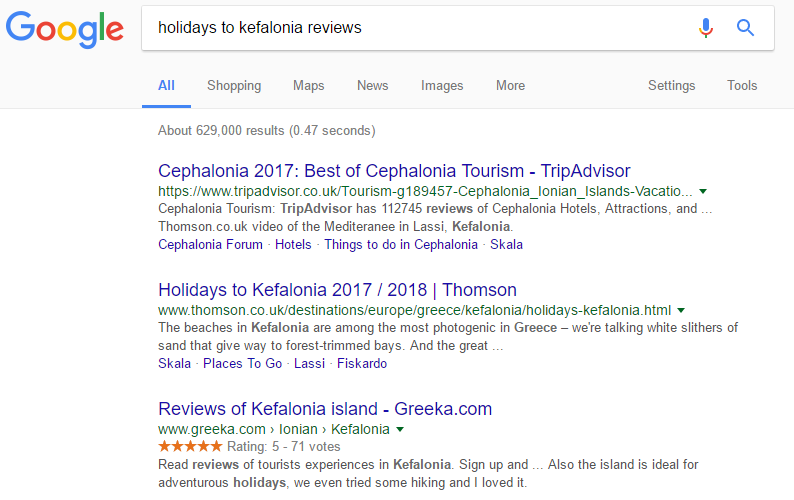
As you can see here, your eyes are instantly drawn to the listing that stands out from the others with the star ratings. In essence Review Rich Snippets require each individual Review to be marked up along with aggregating this data into an overall review based on all the review data. This information can be from your previous customers who have been on one of your holiday packages, so it is essential to be collecting this data from your customers at the earliest available opportunity.
How to Mark Up Review Rich Snippets
There are many ways to marl up Review Rich Snippet content which gets rather technical, so we’re only going to skim over this information as we don’t want to bamboozle you with the finer technical details. For the purposes of this blog post we’ll use the Greeka.com website as an example and take a look at what they have done to implement Review Rich Snippets on their travel website.
Firstly what you’ll notice when you visit their website is a listing of review information as you would expect to see as a user;
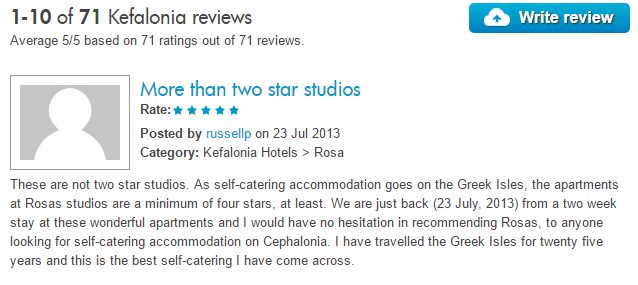
What’s important to note here is two pieces of information. Firstly, you will see the overall reviews listing at the very top which states that there are 71 reviews in total with the average being 5/5 for the reviews that have been left. Then beneath that you’ll notice an individual review that has been left by a customer. As a user, you’ll never notice Review Rich Snippets are there which is exactly why they exist. Review Rich Snippets for travel websites are in the code in the background which is telling Google that there are reviews associated with this specific item such as a holiday package, a resort, a restaurant or a specific hotel for example.
Here’s what this looks like in the background, the code below relates to the aggregate reviews which are what is showing on Google;

What you’ll notice is that there has been specific pieces of code wrapped around the content on the page which state that the destination has an average review of 5/5 from 71 people. When you read through the code you’ll notice there are specific pieces of information such as ‘best’ and ‘average’ and ‘votes’ etc. It is this information and more that Google is using to generate the visible star ratings on the Google search results that customers see when they are searching for travel companies.
Likewise you’ll also notice when reading through the code on the page that each individual review also has specific Review Rich Snippet data marked up around it too as you can see in the image below;
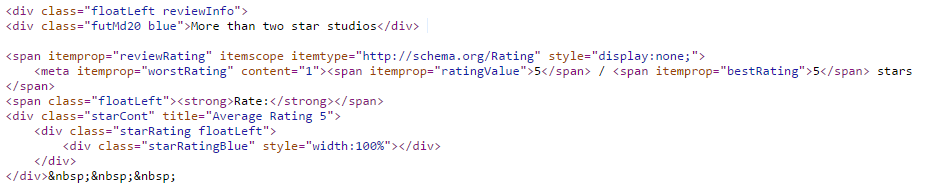
With information such as ‘reviewRating’ and ‘worstRating’ and ‘ratingValue’ for example being some of the key pieces of information Google requires to be able to see how the overall review ratings have been calculated.
Ok, that’s enough code for now. In essence, to get Review Rich Snippets and star ratings showing on Google it is important that you implement the code correctly which ties in closely with the technology that is powering your website. There is no one-size-fits-all approach here as every website is different.
If you’d like to implement Review Rich Snippets on your travel company website then get in touch and we’ll work closely with you to implement Review Rich Snippets so you can stand out from your competitors and boost website traffic and sales.
by Michael Cropper | Apr 7, 2017 | Developer, Technical |
By default MySQL FULLTEXT search will not search for words that are less than 4 characters in length. For many things this can be great as many words less than 4 characters are generally stop words such and often aren’t valuable, for example words such as, the, and, if, on, etc. Although this isn’t always the case and in certain circumstances small words are actually really important. For example, let’s say you’re looking for a new developer job using any of the following technologies, ios, php, C#, .Net, ASP, etc. In these cases, the default MySQL FULLTEXT search default minimum characters actually prohibit results being found, which isn’t a great user experience. As such, you may want to update your MySQL FULLTEXT search functionality to enable smaller words to be searched for while quality results are being identified.
Edit My.cnf File
The my.cnf file on your web server generally sits under /etc/my.cnf and allows you to customise your MySQL configuration. You can edit this file by logging into your web server using SSH, navigate to the correct folder and run the command pico my.cnf which will allow you to edit the file.
Now you need to add the following line of code at the bottom of the fie which will allow MySQL FULLTEXT search to search for words with a minimum word length of 2 characters, ft_min_word_len=2
Once you have completed this, save the file.
Restart MySQL
Next you need to restart the MySQL service using the following command, service mysql restart which will ensure that the MySQL service will use the new configuration data once it has restarted. Should you experience a problem restarting MySQL, then remove the code you just added in the my.cnf file or comment out the code with a # at the start of the line. If you’re not aware, the following commands also exist which can come in handy should the MySQL service not restart smoothly, service mysql stop and service mysql start.
Rebuild All MySQL FULLTEXT Indexes
Finally you need to rebuild all your MySQL FULLTEXT indexes that you are using on your database. If you only need the smaller words to be searched on specific tables, then you clearly don’t need to rebuild the ones that aren’t relevant, although it can be handy as this could save you hours of debugging further down the line if different tables are using different minimum word lengths. Login to your phpMyAdmin if you’re running this on your web server to access the MySQL database then run the following command on which ever table you want to update, REPAIR TABLE <TableName> QUICK;
All done! Now your MySQL FULLTEXT Search will be able to search on smaller words than previously.
Some additional resources that can come in handy include official documentation about how to fine tune MySQL FULLTEXT searches.
by Michael Cropper | Mar 28, 2017 | Client Friendly, News |
Digital technologies, online marketing and cyber security is at the forefront of the world we live in for businesses looking to connect with their customers, grow their market share and keep customer data secure from cyber criminals. What this means is that many of the services we offer can often be confusing to businesses who aren’t heavily involved in this work on a day to day basis. That’s why we’ve hugely simplified our service offering to help businesses like yourself understand what we actually do and most importantly, how we can help your business grow.
Sectors We Help
We work with businesses of many varying shapes and sizes. We understand the following industries through and through which means that if you are working in one of these industries, then we can help your company with digital services;

What We Actually Do
In essence, we do three core activities, we build things, we make them perform with digital marketing and we keep your customers data secure online.

Quality Services
As can be seen as you browse around the website, high quality work with a results driven focus is at the forefront of what we do as we work in partnership with companies like yourselves who are ready to take your business to the next level. We don’t built cheap websites and we don’t offer cheap discount services because quite simply, you get what you pay for when working with cutting edge technology for your business. We pick up a lot of projects when others have failed to deliver.
Ready to take your business to the next level? Then drop me an email directly, michael.cropper@contradodigital.com. I’d be happy to meet for a no obligation consultation and talk through where you are looking to take your business over the next 12 months and how we can help you along that journey.
Speak soon
Michael Cropper
Managing Director
by Michael Cropper | Feb 17, 2017 | Security |
For those of you using Microsoft Exchange for your email platform, be aware of the latest phishing email going around telling you that you;
“Your email have exceeded maximum disk quota allocated, we require re-activation to continue using mail service…. Our system will automatically purge out mail that have exceeded quota, to avoid this please kindly follow our instruction.”
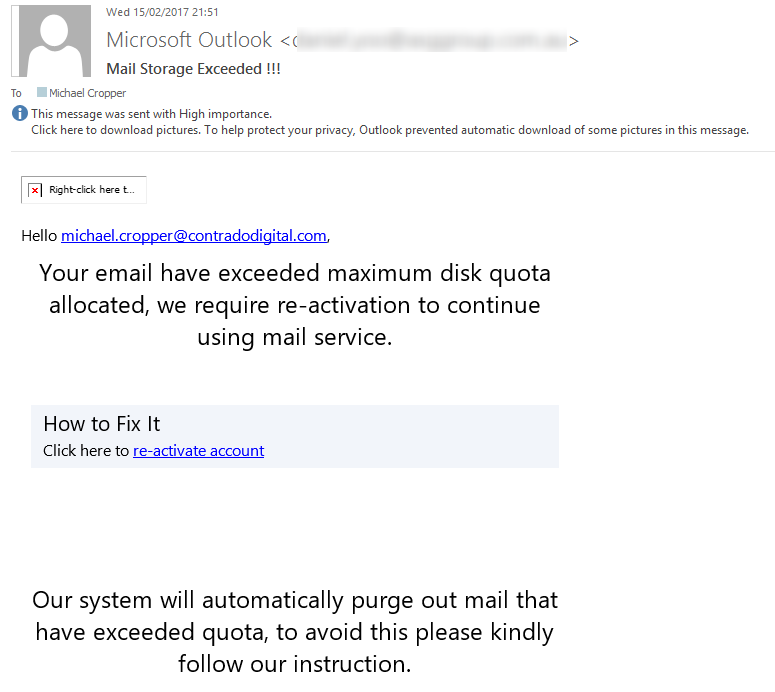
As always, if any email looks suspicious, never click on any links that you see. In this particular case, the email ‘from’ address which has been blurred out above is clearly not from Microsoft, it was from an IT company based in Australia. It is likely they have been hacked their self then their web server was used as a way to attack more businesses. While the ‘from’ email address can be easily faked, when the from email address is clearly not from where you would expect, this is a clear sign that this email is fake. In addition to this, when you hover over the link in the email, the link URL is to a strange website with a lot of random characters which is another clear sign that this email is a phishing scam.
Always keep an eye out for phishing scams like this
by Michael Cropper | Feb 14, 2017 | Client Friendly, Security, SEO, WordPress |
You may have recently received an email from Google Search Console warning you that your website is being flagged as Non-Secure Collection of Passwords as can be seen below;
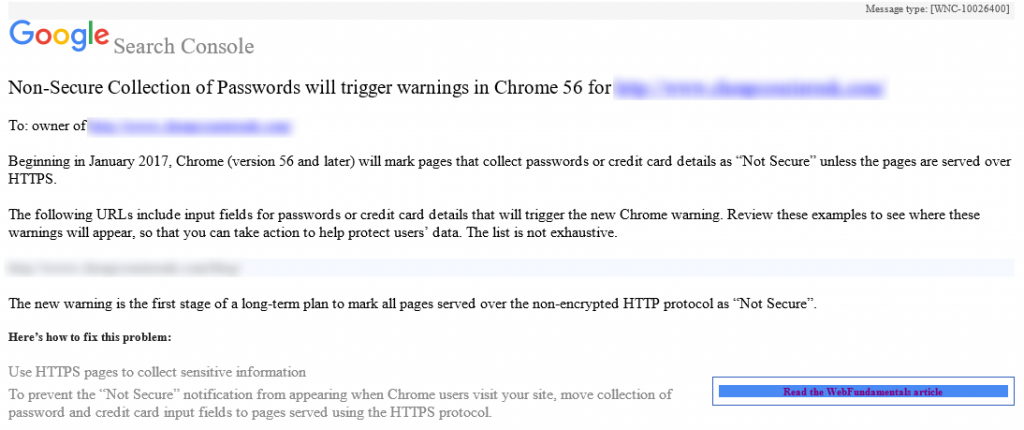
If you have been sent a message like this, you need to act before it is too late. You have received this message because your website is running over HTTP instead of HTTPS on pages that you collect sensitive information. Whenever either you or your users enter sensitive information on any website using HTTP, i.e. http://www.contradodigital.com/wp-login.php then this information can be seen in transit by anyone listening in on the network.
What you need to do
The solution to resolving these warnings is actually relatively simple. If you want to have a go at this yourself, then make sure you claim your free SSL certificate and update your website accordingly. If you need any help implementing this then get in touch and we can help you with the process.
