by Michael Cropper | Nov 11, 2016 | Client Friendly, Security |
You may have seen the news about a Linux vulnerability branded ‘Dirty COW’, which affects many Linux servers. An overview of the vulnerability is below and what you need to do.
What is Dirty COW?
Dirty COW is a new Linux vulnerability referred to technically as CVE-2016-5195. The name came from the fact that it exploits a mechanism called ‘copy-on-write’ and is known as a privilege escalation bug. This means that if attackers manage to get a foot inside your system they can then use Dirty COW to take total control, so it’s crucial to protect yourself. The bug has only recently came to fruition but has been around for nine years – which means it’s likely that many Linux servers have been affected.
What do you need to do?
Install the latest Linux patches available on your Linux web server. Speak to your web hosting company to get this updated. Clients hosting with us, our web servers have been patched as soon as the vulnerability was made public.
We strongly recommend running a manual server check if an automatic patch isn’t available to you. If you have any questions regarding the vulnerability or your solution please contact me and I can talk you through the solution.
For those interested in the more technical details behind the exploit, read all about Dirty COW.
by Michael Cropper | Nov 8, 2016 | Client Friendly, Security |
Unless you have been living in a cave over these last couple of weeks, you’ll probably have heard about the cyberattack that broke the internet for a few hours on several occasions. So what actually happened? It all starts with the DNS.
DNS stands for Domain Name System, in non-technical terms this is the technology that turns www.contradodigital.com into the servers IP address where your website files are hosted, for example, 178.238.139.113. There are many providers of DNS technology in use on the internet, with many providers using managed services of larger companies who have invested millions in the underlying hardware and infrastructure which enables the internet to work seamlessly. One of these companies providing DNS is called Dyn and here is where the cyberattack happened.
When the attack was happening, internet users in the following areas highlighted in the image below were unable to access many popular websites including websites like Twitter, SoundCloud, Spotify, Shopify and many more.
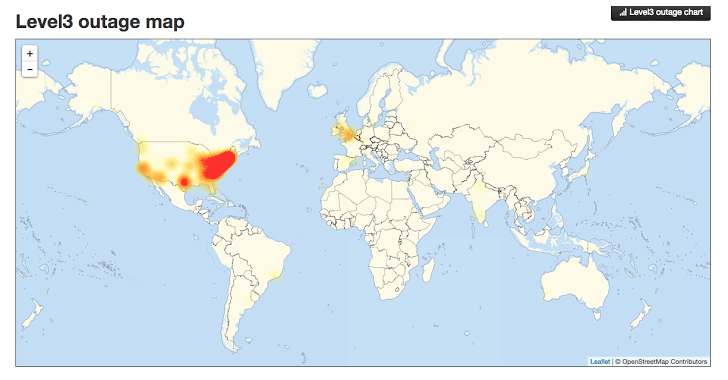
Image source: http://thehackernews.com/2016/10/dyn-dns-ddos.html
This is a significant part of the US and UK when customers and businesses could not access websites, meaning a significant drop in ecommerce sales for many organisations and a huge drop in productivity for those companies working in digital. For a system as large as the internet, which has been build with redundancy in mind, an attack of this scale is one of the worst we have seen to date and the seriousness of this means that businesses need to really step up in their cyber security efforts both large and small.
To read up more about the specifics of what a DDoS attack is and how this all happened, visit the Dyn website who have provided a write up on what happened.
Ultimately this attack was caused by hackers exploiting internet connected smart devices such as web cams and the likes. With the enormous rise in smart and internet connected devices available on the consumer market now, it is devices like this which are being exploited by hackers. When the software has been designed badly or built with un-updatable code or has been built with security holes in the code, it is this what is being exploited. Specifically using the Mirai software.
Distributed Denial of Service attacks are notoriously difficult to protect against, particularly on this scale with over 300,000 devices attacking a system. This is on the macro scale though and this really does just go to show that no matter how big you are attacks can happen to anyone. The even more worrying aspect is that this code has now been released open source so that the code is available to anyone wanting to exploit the same loophole.
The reality is that smaller and medium sized businesses are never reported on in the news. We deal with several hacked websites per month when businesses have failed to protect their self against cyberattacks. As a business owner you need to take cybersecurity seriously, and that means more than simply installing an antivirus and firewall on your laptops.
Picture this. You own a hotel. Imagine every door, windows, emergency exit and air vents into the building are ways of an attacker getting in. Not imagine your antivirus and firewall are your receptionists, blocking unwanted visitors in the building by locking the front door. Now imagine that all of the other doors, windows and vents in the entire building are left wide open for attackers to exploit. This is the reality that most businesses are dealing with without even realising. The software equivalent of this is that websites and web servers run outdated code, aren’t updated and active add security holes through using inefficient technologies and people to build systems. I cannot stress this enough, take cyber security seriously before you become the next victim. Sticking your head in the sand thinking that you will be fine will ultimately result in your business becoming the next headline. Be proactive.
Take advantage of our Free Digital Disaster Recovery Audit and test yourself on our Digital Evolution Score Card to see how advanced you are as an organisation and hence capable of dealing with problems. Better still, get in touch and we’ll talk you through the various options available for protecting your business, website and digital assets from cyberattacks.
by Michael Cropper | Nov 2, 2016 | Client Friendly, Events |

Great to see everyone at the last event. Summary notes for reference.
Hope to see you at the next event – https://www.contradodigital.com/event/digital-forum-7th-december-2016/ Book now to avoid disappointment.
by Michael Cropper | Oct 19, 2016 | Developer |
This question comes up a lot about how to redirect an entire website from HTTP to HTTPS on WordPress. It’s actually quite simple to do within the .htaccess file too. Before we jump into the solution, firstly, don’t go playing around with this unless you know what you are doing. Getting anything wrong in your .htaccess file can bring your entire website down. We’ve a whole host of guides on how to implement SSL yourself if you know what you are doing, so take a look at our guide on how to Claim your Free SSL Certificate. Ok, so let’s take a look at the simple task of redirecting your entire website from HTTP to HTTPS on WordPress.
Simply add the following two lines of code to your .htaccess file;
RewriteCond %{SERVER_PORT} 80

RewriteRule ^(.*)$ https://www.contradodigital.com/$1 [R=301,L]
Obviously make sure you change the domain name above to your own domain where you want to make the change.
Specifically add them here;
# BEGIN WordPress

<IfModule mod_rewrite.c>

RewriteEngine On

RewriteBase /

RewriteCond %{SERVER_PORT} 80

RewriteRule ^(.*)$ https://www.contradodigital.com/$1 [R=301,L]

RewriteRule ^index\.php$ - [L]

RewriteCond %{REQUEST_FILENAME} !-f

RewriteCond %{REQUEST_FILENAME} !-d

RewriteRule . /index.php [L]

</IfModule>

# END WordPress
The RewriteRule is redirecting anything on HTTP, i.e. Port 80, to HTTPS, i.e. Port 443. This will guarantee that should anyone access your website using HTTP then they will automatically be redirected to the secure version of your website on HTTPS which is the best practice thing to do.
Struggling with implementing HTTPS on your own website? Get in touch and I’m sure it’s something we can help with. As of January 2017, Google is going to be flagging websites as “insecure” that aren’t using HTTPS, so make sure you’ve implemented this in plenty of time to avoid any potential issues.

by Michael Cropper | Oct 19, 2016 | WordPress |
It’s taken a good few months of organising everything in the background and we’re finally here. Blackburn WordPress User Group, BeeWUG is now officially starting which will be running on the first Wednesday evening every month in…. Blackburn at the College who are kindly supporting the local WordPress community.
BeeWUG is a free community event open to everyone wanting to learn more about WordPress. Whether you have an interest in WordPress, are using WordPress professionally or just want to come along and meet some great people, get involved. Look forward to seeing you there.
Head over to the BeeWUG website to find out full details and book onto the next free event which is on Wednesday 2nd November: https://beewug.uk/2016/10/17/beewug-2nd-november-2016/
Book directly onto the event here: http://www.meetup.com/Blackburn-WordPress-Meetup/events/234930231/
Follow us socially to keep up to date;
https://twitter.com/BeeWUG
https://www.facebook.com/BeeWUG/
https://www.linkedin.com/groups/8551580
And make sure you sign up to the mailing list on the BeeWUG website.
