by Michael Cropper | Mar 24, 2015 | SEO |
We recently migrated over to a UK leading web hosting infrastructure which involved migrating a large number of websites from one web server to another, and we did this with zero downtime. Which meant that the business websites involved never suffered from lost traffic, sales or enquiries. This is not as straight forward as it sounds on the face of things and requires planning and careful implementation to ensure all data, databases, files, settings, configurations and more are transferred with ease. As this is a common problem for people I thought it would be good to document the steps we took which served us well. Depending on the server technology you are moving from and to will depend on how simple (or difficult) this will be for you to implement. To Buy Server, you have to understand these guidelines are generic so you should be able to take what you need from these and see how this fits in with your technology.

DNS Records
Depending on where your DNS records are setup, if you are using your current DNS records, if you are using new DNS records or something else – will fully depend on if this is relevant for you.
If your current name servers are set to your old hosting provider such as ns1.your-web-host.com and ns2.your-web-host.com then this makes life a little simpler for you. When the time is right, you can simply point your domain names at the new web server by changing the name servers to ns1.your-new-web-host.com and ns2.your-new-web-host.com. That said, many people prefer branded name servers, such as the ones we run for ns3.contradodigital.com and ns4.contradodigital.com. This causes a few more challenges when migrating branded name servers.
If you are wanting to migrate branded name servers then you need to set up an interim stage. For us, our old branded name servers were set up as ns1.contradodigital.com and ns2.contradodigital.com which pointed to the old DNS server (a specific IP address) which then handled the traffic to websites with these name servers and pointed this traffic to the correct web server. If we were to simply migrate the DNS server IP address for ns1.contradodigital.com and ns2.contradodigital.com over to the new DNS server, this would take time to propagate, up to 48 hours which could cause inconsistent behaviour for users accessing websites listed.
Instead, by setting up new name servers which point to the new DNS server we can have ns3.contradodigital.com and ns4.contradodigital.com which can then propagate throughout the Domain Name System until we are ready to officially migrate the websites over. Once we are confident that the new name servers have propagated (see http://dnswatch.info to check) we can then begin the migration.
Beyond this, if you have any A, TXT, MX records or other that are configured on your old server, then make sure these are migrated too.
Transfer Data
Getting all of your data, files, databases, settings and more from your old web server over to your new website can be a challenge. Thankfully for us, we use a leading web server management system, cPanel which comes with a handy little transfer tool. This allows the old and new servers to talk to each other and automatically migrate everything over. This setup does require that you have SSH Root access to both servers, which you may or may not have depending on the old technology you are using.
If you are migrating between different web server control panels then this is going to be a much more manual process and often requires a detailed checklist to make sure you have transferred everything correctly and it has been implemented correctly on your new system.
It is important to reiterate this, but make sure you have transferred absolutely everything on your web server. To give you an idea this could include; files, redirects, email forwarders, distribution groups, emails, databases, FTP accounts, user logins, server logs (if needed) and more. Depending on how much of the functionality you use on your old and new webserver will depend on the areas that you need to check over. Always by over cautious to make sure you have checked everything since if you miss anything then you are unlikely to be able to recover this once you have cancelled the subscription on your old web server.
Website Migration
Once you have successfully migrated all of your data, it’s time to start migrating your websites to run from the new server and get rid of the old server. To start things off, start with a non-descript website if possible to make sure that the process has worked for your individual settings. The details above are specific to what we did and may or may not work for you. The final step is to switch your name servers so your domain names will be looking at your new web server instead of your old one.
Once you have updated the name servers for the test domain, then you can check that everything is working correctly before migrating the remaining domains on the system. This process will allow you to migrate your web servers seamlessly with zero downtime. This is a little more challenging for large scale ecommerce websites due to data continuity related to transactional data, but this is a little outside the scope of this blog post as this again depends on the technology being used related to the ecommerce setup.
Nuances
A few other points to note about web server migration is that you can trip up if you are migrating to servers with different versions of software running (PHP for example), different file systems, different operating systems, different access rights and more. When upgrading your web server, you are likely moving away from technology that isn’t suitable for your needs anymore or is limiting in some way. This causes a few problems naturally which may need to be overcome. You may also have some specific technology, non-standard and inaccessible server settings configured on your old server which can easily be missed during the migration. To avoid tripping up on some of these issues, it is always recommended to speak with your current web host to understand the full technical setup and software that is installed to make sure you have everything installed on the new server that is needed to support the websites and web applications that you are running.
Summary
The information outlined worked for us. It may not work for you. Understand the technology you are working with, in terms of what you are moving from and what you are moving to. If you are in any doubt, get in touch and we can help you with this process. Working with industry leading web hosting solutions means that we have a lot of experience working with great solutions, and also very poor solutions that people are migrating away from.
by Michael Cropper | Mar 23, 2015 | SEO |
Deadline: 21st April 2015
What: Google will prioritise websites accessible on mobile devices in the search results and demote websites that aren’t
Source: http://googlewebmastercentral.blogspot.co.uk/2015/02/finding-more-mobile-friendly-search.html

We are not far off now when it comes to a significant changes that is coming up on Google. Over recent years we have been recommending responsive websites which are accessible on all devices (mobile, tablet and desktop) which is why all our websites are responsive and built with a mobile first approach to suit the needs of the ‘always-on’ customer. While current website design clients have had mobile websites delivered, there are many websites and business owners who simply aren’t ready for this change and could face penalties from Google by not keeping up with the market.
As of 21st April 2015, Google will be increasing the importance of mobile friendly websites when ranking websites in the search results. This is a global change and Google is stating that this is going to have a significant impact in the search results. Is your website ready for this change? If you are unsure, then the first thing you need to do is visit these pages;
Once you have tested several pages on your website, then you will have a better idea about how mobile friendly your website actually is. Unless you have recently implemented a responsive website, then the likely chances are that you aren’t ready and you need to look at reskinning your website so that it is responsive. Depending on the technology you are using will depend on how easy or difficult this process actually is.
There are many differences when it comes to mobile websites and many nuances related to search engine optimisation which can impact the success (or failure) rate of the project. Simply having a website that works on multiple devices often isn’t enough and can actually harm the traffic to your website if you get this wrong.
You will be glad to know that we have been through this process many times before so understand the pitfalls, technical challenges and important areas to focus on. If you are serious about your business online, then it is essential that your website is updated before this time to avoid losing traffic and ultimately sales through your website.
Would you like to find out more about how this change impacts your website? Then get in touch and we will happily review your website to see what changes need to be made before this deadline. Make sure your website is suitable for the current and future needs of your customers to avoid losing sales.
by Michael Cropper | Mar 23, 2015 | SEO |
Deadline: 21st April 2015
What: Google will prioritise websites accessible on mobile devices in the search results and demote websites that aren’t
Source: http://googlewebmastercentral.blogspot.co.uk/2015/02/finding-more-mobile-friendly-search.html
We are not far off now when it comes to a significant changes that is coming up on Google. Over recent years we have been recommending responsive websites which are accessible on all devices (mobile, tablet and desktop) which is why all our websites are responsive and built with a mobile first approach to suit the needs of the ‘always-on’ customer. While current website design clients have had mobile websites delivered, there are many websites and business owners who simply aren’t ready for this change and could face penalties from Google by not keeping up with the market.
As of 21st April 2015, Google will be increasing the importance of mobile friendly websites when ranking websites in the search results. This is a global change and Google is stating that this is going to have a significant impact in the search results. Is your website ready for this change? If you are unsure, then the first thing you need to do is visit these pages;
Once you have tested several pages on your website, then you will have a better idea about how mobile friendly your website actually is. Unless you have recently implemented a responsive website, then the likely chances are that you aren’t ready and you need to look at reskinning your website so that it is responsive. Depending on the technology you are using will depend on how easy or difficult this process actually is.
There are many differences when it comes to mobile websites and many nuances related to search engine optimisation which can impact the success (or failure) rate of the project. Simply having a website that works on multiple devices often isn’t enough and can actually harm the traffic to your website if you get this wrong.
You will be glad to know that we have been through this process many times before so understand the pitfalls, technical challenges and important areas to focus on. If you are serious about your business online, then it is essential that your website is updated before this time to avoid losing traffic and ultimately sales through your website.
Would you like to find out more about how this change impacts your website? Then get in touch and we will happily review your website to see what changes need to be made before this deadline. Make sure your website is suitable for the current and future needs of your customers to avoid losing sales.
by Michael Cropper | Mar 23, 2015 | SEO |
Following on from our success last year we have continued this theme into the New Year as we have been shortlisted in the finals for the prestigious Hive Business Awards in Blackburn with Darwen in the following categories;
- Creative Agency Award
- International Achievement Award
- Young Entrepreneur Award

The Hive Business Awards have been designed to celebrate the success of businesses based in Blackburn with Darwen. Blackburn and Darwen have a fantastic history and is still home to world leading brands such as Graham & Brown and Crown Paints, so it is fantastic to celebrate achievement from local ambitious companies.
Within the awards we have been shortlisted for (full finalists here) we are in the run up alongside leading Blackburn companies employing in access 300 staff and operating on a global scale. For a small business less than 2 years old, this is a fantastic achievement for us and really celebrates the work that we do and the ambitions we have as a business.
All of this is following on from our recent success in the Red Rose Awards, The Bibas, the Prolific North Awards and the Chartered Institute of Marketing Northern Awards.
We are always looking to work with ambitious and forward thinking companies. If this sounds like you, then get in touch and lets have a coffee.
by Michael Cropper | Mar 22, 2015 | SEO |
You would have thought that a company the size of PayPal would have this problem solved, but they haven’t. So here is the solution to a problem that affects many businesses and website owners as they start to scale their payment solutions. Before we jump into the solution, to recap for those not too familiar with PayPal and IPN, let’s take a look at what this is and where the problem actually lies.
PayPal IPN
PayPal has functionality called Instant Payment Notification (IPN) which will automatically inform your website, web application or other URL when ‘something’ happens. Within your PayPal business account you manually set a single PayPal IPN URL which is a page on your website. This page on your website then listens for information from PayPal when any transaction related changes are made.
To understand more about PayPal IPN and its purpose, this information extracted from the PayPal website helps to explain this;
Instant Payment Notification (IPN) notifies merchants almost instantly about transaction events, such as:
- Payments received, including Express Checkout, and Adaptive Payments.
- Credit card authorizations.
- eCheck payments and related pending, completed, or denied status events.
- Recurring payments and subscription actions.
- Chargebacks, disputes, reversals, and refunds.
Merchants can act based on the information they receive. For example, they can:
- Update their inventory.
- Email a purchase confirmation.
- Trigger order fulfillment.
- Enable download of digital media.
- Update their customer list.
- Email a shipping notification.
- Issue a refund.
- Update accounting-related information.
Source, https://developer.paypal.com/docs/classic/products/instant-payment-notification/
At first glance if you haven’t used this before, this sounds seriously awesome. And you know what, it is. But there are a couple of problems with this which can cause problems and that comes down to the PayPal IPN URL that you specify. More information about PayPal Instant Payment Notification can be found here and here.
Problems with PayPal IPN and why it may not be working
By default, the PayPal IPN URL is set at the PayPal account level. Another point to note at this stage is that you are only allowed one personal PayPal account per bank account and one business PayPal account per bank account. More information about this can be found here, here and here. In addition to this, many systems that utilise PayPal for their payment gateway are legacy 3rd party systems which are difficult, if not impossible, to customise. And herein lies the problem.
When using industry leading software that utilises PayPal as the payment gateway, this software will generally work out of the box and override the account level IPN URL to use a different IPN URL. This means that when a payment is made through this system, then PayPal will inform the IPN URL that is sent to PayPal as part of the transaction, rather than the IPN URL that is contained within the PayPal account. This is great and is how most systems should function, or at least have the flexibility to function in this way.
If you are using just a single system, then there isn’t really a problem here. The problem comes as you start to scale your business, websites and web applications while looking to keep financial management simple by using a single payment gateway for all of those systems. While we would always prefer to work with leading software and systems, the reality of website and web application development means that this is not always the case and we often deal with legacy systems or more basic functional systems that perform different tasks within a business.
An important point to note here is that while you can override the PayPal IPN URL if you are using standard payments and systems, you cannot override the PayPal IPN URL if you are using recurring payments. When speaking with PayPal about this issue, apparently this is something they are aware of and are working on which should be live ‘shortly’. We will see.
The problem here is that if you have multiple systems that don’t have the functionality or flexibility to override the PayPal IPN URL then this leave you with a bit of a problem. Because you can’t go creating another PayPal account as this is against PayPal’s guidelines, and you can’t go customising the systems as they aren’t capable of doing so. So you have either two solutions, either use different payment gateways for different systems which means that your payment information is going to be all over the place and difficult to manage, or you could hack a solution together that works.
Solution to Multiple PayPal IPN URLs
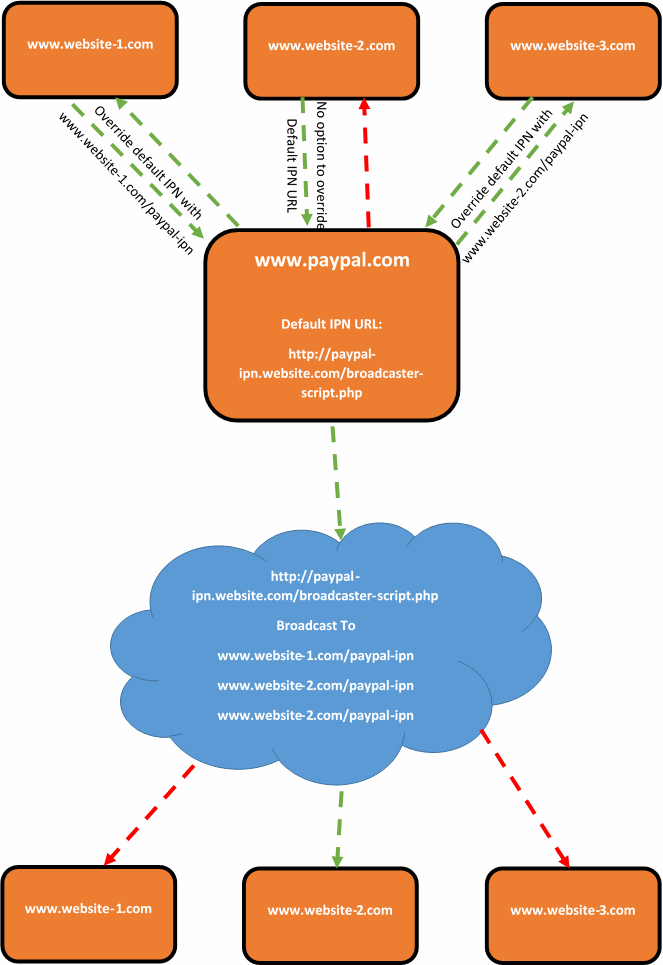
Thankfully, there is a solution. It is not a very elegant one, and one that I would personally prefer to avoid. Although there are no perfect systems, so this is a solution to one of those imperfect systems. The solution is to create a broadcasting script which acts as the default PayPal IPN URL. For example, this could sit on your website at www.your-website.com/paypal-ipn-listener-broascaster.php.
The purpose of the broadcaster script is so that your Instant Payment Notification messages can be picked up in a single location and forwarded on to wherever you like. This could be a single URL or multiple URLs. As the IPN messages contain transactional details and references, if another website, web application or system picks up on a message about a transaction that it knows nothing about, then it will simply ignore this message. So if you have 5 systems receiving messages from the broadcaster script, 4 of the systems are going to ignore the message and one of the systems will be able to tie this message to the specific transaction back to the correct piece of information and take the next steps required.
What this also means that if you start using systems that are capable of overriding the PayPal IPN URL, or PayPal get around to implementing the official solution for multiple IPN URLs within the account, then this solution does not interfere with this.
This can be a little difficult to picture, so here is a brief representation of what happens;
Summary
While you more than happy to use multiple payment gateways when looking to scale systems, many businesses want to keep things simple and use a single payment gateway for multiple systems. If the payment gateway that you have chosen is PayPal and you are looking to solve the problem related having multiple Instant Payment Notification (IPN) URLs, then it would be recommended to look at creating some kind of broadcast script that will handle all messages from PayPal and forward them on to where you would like. Depending on the software, programming languages and more that you are using, the implementation will clearly differ. If you need any help in relation to this, then get in touch.
by Michael Cropper | Mar 18, 2015 | Digital Marketing, SEO |
Selecting the right digital agency partner can determine how successful your digital marketing campaigns are…or aren’t. Many businesses often work with who they like personally rather than the agency that can deliver the best results for their business to meet their growth ambitions. We enjoy working with ambitious companies who understand the value of selecting the right agency for the right reasons.
You will no doubt have heard the famous saying, “If you pay peanuts, you get monkeys” and this is even more true within the digital world whereby every recent graduate who can use Facebook is now apparently a digital guru. Let’s be serious here and make smart decisions when selecting the right partner to work with and always remember;
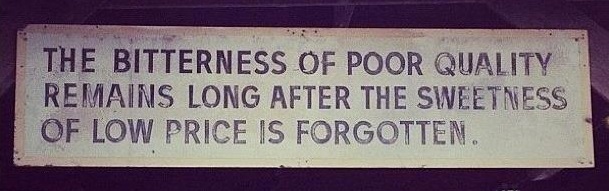
The work that we do doesn’t come cheap and we make no excuses for that. We work extremely closely with our clients to look at the options that work for their business. With a no-nonsense approach to digital marketing, you can be confident that we don’t try and baffle you with digital jargon because we have no need to try and impress you with waffle. Instead, we let our results speak for their self. And it’s ok, because not everyone is a perfect fit for us either. We often actively turn clients away because they simply aren’t ready to work with us and if we did take them on board we would be in a situation whereby results would be difficult to deliver and not provide a positive return on investment. This is not a good solution for either part involved which is why we are always honest with businesses we speak with.
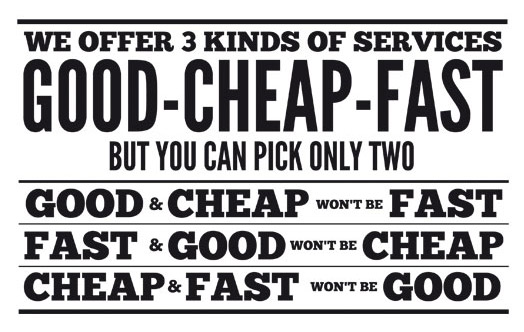
When you are selecting the right digital agency to work with it is important to look at what you actually want to achieve. This is significantly different than what you want them to do. If you want a digital agency to “Do that Twitter thing” for you, then you may not be the right type of business to work with us. Instead, you may be better off employing an apprentice who can quite happily play around on social media all day and look busy. Compare this to if you are looking for a digital agency to “Significantly increase social media engagement from current fans along with increasing targeted fans by 20% in 6 months”, then this is when we would step in and create a serious strategy to grow your business. And again, it’s ok if you are in the former category. Every business needs to go through a series of stages as they grow and always remember;
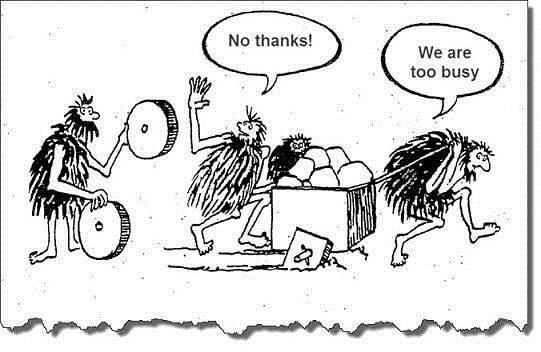
The final point to make about the importance of selecting the right digital agency is to make sure you have the right people in place to get you to where you need to be. You wouldn’t employ a book keeper to fulfil the role of a Financial Director would you? No, you wouldn’t. The same is true with people working in the digital industry. Just because someone can use Facebook doesn’t make them good at digital. Just because someone can build a pretty website doesn’t mean they know how to generate serious results in terms of website traffic increases and revenue increases. And again, it’s ok if you choose to employ a book keeper to fulfil the role of a Financial Director. This isn’t where we fit in, instead, go and employ a recent graduate at a lower salary until you are ready to seriously invest in digital. When you are ready to get serious results for your business, let’s have a coffee and see how we can help your business fulfil its potential. Many businesses simply aren’t ready to hear about the right solutions, they are too busy doing what they have always done or taking the advice of people with less experience because there is a huge lack of understanding for most businesses around what digital actually is. So remember, when you are ready for the right solutions for your business, we are the ones holding the wheels and we are ready to chat whenever you are;
Already in a position to talk seriously about digital? Then get in touch and let’s meet up to see how we can help your business grow with the right people, the right technology at the right time.
