by Michael Cropper | Feb 1, 2015 | SEO |

High quality web hosting is the lifeblood of business websites which is why we’ve selected UKFast as our hosting partner. Based in Manchester with a team of over 140 people and some of the most highly qualified hosting specialists and engineers in the market, they were the natural choice for us.

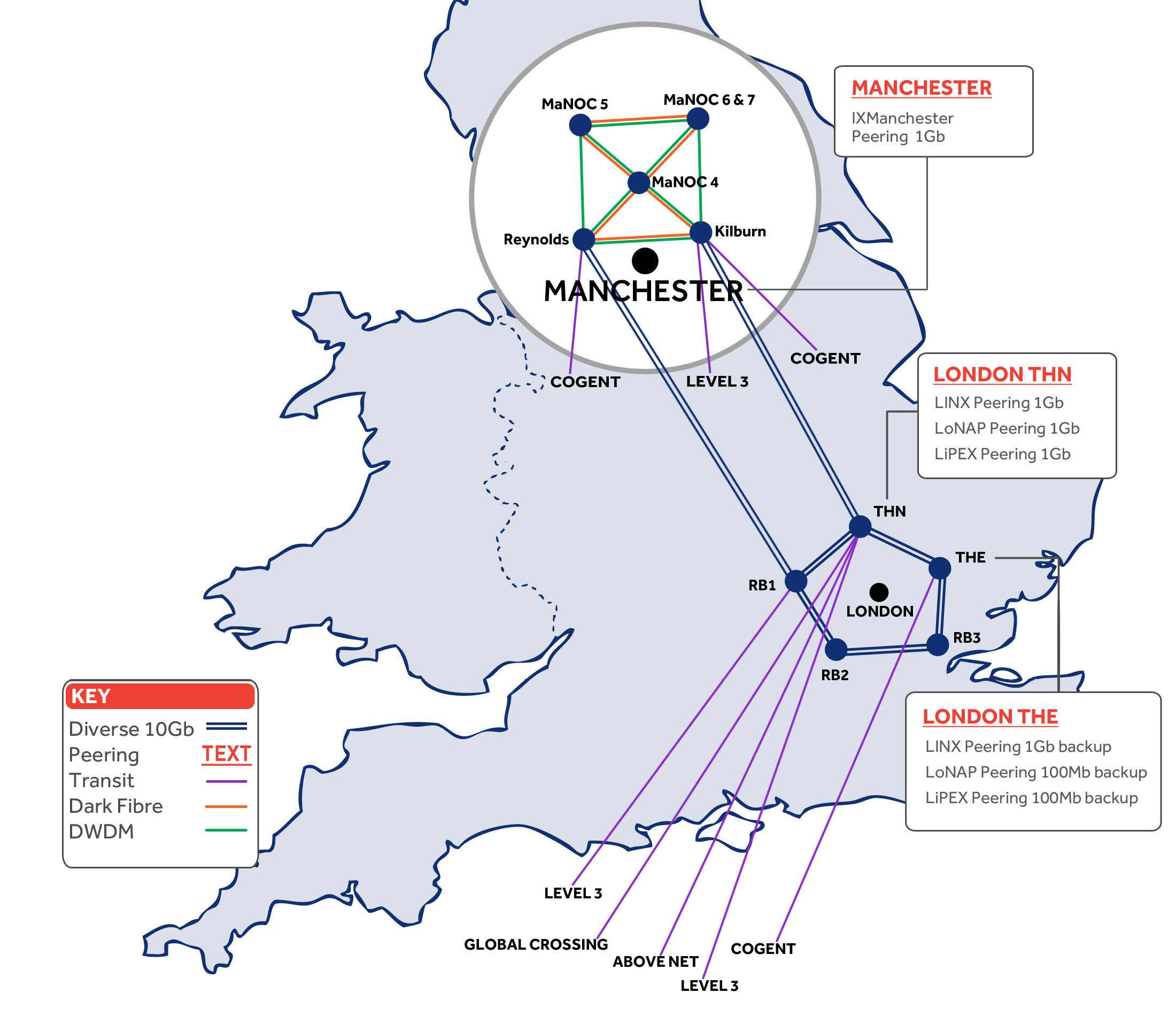
What this means for businesses like Jimmy John Shark is that we can work with you to migrate your web server away from any poor performing systems you have in place currently and over to one of the most robust infrastructures in the UK. We take web hosting seriously which is why we selected UKFast as our hosting partner. Their hosting infrastructure is highly redundant, meaning that your website will be constantly available with downtime kept to an absolute minimum. The robust infrastructure can be seen here;
To learn more about the web hosting solutions we can offer for your business, head over to the web hosting page. Here you will find out about why our hosting solutions are some of the best in the industry.
by Michael Cropper | Feb 1, 2015 | News |
High quality web hosting is the lifeblood of business websites which is why we’ve selected UKFast as our hosting partner. Based in Manchester with a team of over 140 people and some of the most highly qualified hosting specialists and engineers in the market, they were the natural choice for us.
What this means for businesses like yourself is that we can work with you to migrate your web server away from any poor performing systems you have in place currently and over to one of the most robust infrastructures in the UK. We take web hosting seriously which is why we selected UKFast as our hosting partner. Their hosting infrastructure is highly redundant, meaning that your website will be constantly available with downtime kept to an absolute minimum. The robust infrastructure can be seen here;
To learn more about the web hosting solutions we can offer for your business, head over to the web hosting page. Here you will find out about why our hosting solutions are some of the best in the industry.
by Michael Cropper | Jan 25, 2015 | SEO |
We have been seeing a large rise in referrer spam in Google Analytics which is causing problems for a lot of website owners. There is also a lot of misinformation on the web about how to resolve these issues which we will look to clear up in the blog post and the subsequent resources we have created to block spam bots in Google Analytics. This blog post will look at what causes referral spam in Google Analytics.

What is a Referrer
A referrer is a HTTP Header that is sent to a website when a user clicks on a link from one website to another. For example, within your web analytics software such as Google Analytics, you can see what other websites (the referrer) are driving traffic to your website which can be useful to track how popular your website content it around the web.
The referrer is extremely valuable although due to its nature, it is possible to abuse this information and trick web analytics software into thinking a genuine user has performed an action on an external website to visit your website. When in fact this was just completed by a software script to mess with your analytics data, often to place links into your web analytics platform designed to make users take a look at those which can often be a virus or an affiliate link to a popular website so that they can earn money the next time you purchase something from that website.
How Referrer Spam Works
It depends. Referrer spam comes in two main forms, particularly when related to Google Analytics. Sometimes the script will actually visit your website and execute the JavaScript files for Google Analytics, which then sends the data into Google Analytics. Whereas other times data is just sent directly into Google Analytics without the script ever visiting your website. Depending on what is happening within your own analytics software will depend on how you deal with the spam and remove it.
What actually happens with all types of referral spam is that the HTTP Referrer header information is faked. When creating scripts to spam people, to explain this simply, you say what the URL is and what the HTTP Referrer header information is. For example;
URL: www.contradodigital.com
HTTP Referrer: www.another-website.com
So when Google Analytics receives this information, the www.another-website.com shows as a referral website visit which is why it then appears within the Google Analytics reports. The finer details are a little more complex than this in the background, but this gives you a basic understanding of what is happening.
Referral Spam that Visits your Website
One way referral spam gets into your Google Analytics reports is when a spam bot actually visits your website and loads the Google Analytics JavaScript.
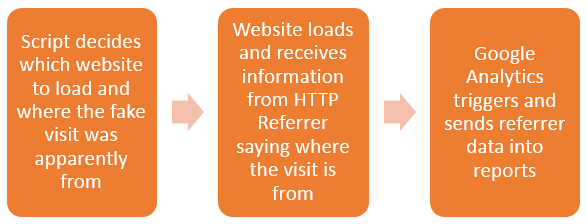
From Google’s point of view, the data that has been received for the HTTP Referrer is genuine and there is no way of determining any difference. Hence why this data is sent straight into Google Analytics just like a valid website visitor’s data would be sent into Google Analytics.
This type of referrer spam is actually reasonably simple to block using the .htaccess file. Read up on the finer details on the resources page about how to stop this. Essentially, you can block certain website visits if they have come from a certain source. For example, you could block anyone trying to access your website if they have come from www.google.com. But you wouldn’t do that, that would be insane. Instead, you can identify the spam domains and block access from these.
Referral Spam that Sends Data Directly into Google Analytics
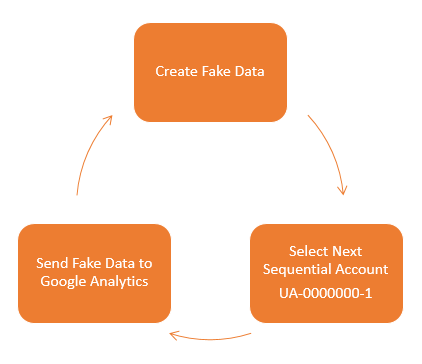
Other types of referral spam will send data directly into your Google Analytics account without ever visiting your website. Which makes dealing with this type of referral spam a little different. How this actually works is that a script sends the data directly to Google Analytics and associates this with your account. Your account has an ID number which looks like, UA-00000001-1, then another website owner has an account like UA-00000002-1 and so on.
So how these types of scripts work is that they simply send the fake data directly to Google and the different accounts, essentially looping through the account numbers hundreds of thousands of times so their referral spam ends up in as many different accounts as possible. The data that is sent through into Google Analytics by spammers can be customised to whatever they like, which is a little annoying for website owners and a continual job to keep up to date with this.
What this means is that you need to take a different approach to block this type of spam from Google Analytics. This needs to be implemented directly within Google Analytics. There are two things that you can do within Google Analytics which are blocking spam bots that Google is aware of and also blocking individual referral domains that aren’t being blocked by default. There is a full guide on how to block this type of referral spam over on our resources page. If you have any specific queries about how to deal with referral spam within your own Google Analytics account then get in touch and we can take a look at what the solution will be for you. If you are interested in reading the highly technical details behind what is happening, then this post explains this in great detail.
by Michael Cropper | Jan 25, 2015 | Data and Analytics, Developer, Tracking |
We have been seeing a large rise in referrer spam in Google Analytics which is causing problems for a lot of website owners. There is also a lot of misinformation on the web about how to resolve these issues which we will look to clear up in the blog post and the subsequent resources we have created to block spam bots in Google Analytics. This blog post will look at what causes referral spam in Google Analytics.
What is a Referrer
A referrer is a HTTP Header that is sent to a website when a user clicks on a link from one website to another. For example, within your web analytics software such as Google Analytics, you can see what other websites (the referrer) are driving traffic to your website which can be useful to track how popular your website content it around the web.
The referrer is extremely valuable although due to its nature, it is possible to abuse this information and trick web analytics software into thinking a genuine user has performed an action on an external website to visit your website. When in fact this was just completed by a software script to mess with your analytics data, often to place links into your web analytics platform designed to make users take a look at those which can often be a virus or an affiliate link to a popular website so that they can earn money the next time you purchase something from that website.
How Referrer Spam Works
It depends. Referrer spam comes in two main forms, particularly when related to Google Analytics. Sometimes the script will actually visit your website and execute the JavaScript files for Google Analytics, which then sends the data into Google Analytics. Whereas other times data is just sent directly into Google Analytics without the script ever visiting your website. Depending on what is happening within your own analytics software will depend on how you deal with the spam and remove it.
What actually happens with all types of referral spam is that the HTTP Referrer header information is faked. When creating scripts to spam people, to explain this simply, you say what the URL is and what the HTTP Referrer header information is. For example;
URL: www.contradodigital.com
HTTP Referrer: www.another-website.com
So when Google Analytics receives this information, the www.another-website.com shows as a referral website visit which is why it then appears within the Google Analytics reports. The finer details are a little more complex than this in the background, but this gives you a basic understanding of what is happening.
Referral Spam that Visits your Website
One way referral spam gets into your Google Analytics reports is when a spam bot actually visits your website and loads the Google Analytics JavaScript.
From Google’s point of view, the data that has been received for the HTTP Referrer is genuine and there is no way of determining any difference. Hence why this data is sent straight into Google Analytics just like a valid website visitor’s data would be sent into Google Analytics.
This type of referrer spam is actually reasonably simple to block using the .htaccess file. Read up on the finer details on the resources page about how to stop this. Essentially, you can block certain website visits if they have come from a certain source. For example, you could block anyone trying to access your website if they have come from www.google.com. But you wouldn’t do that, that would be insane. Instead, you can identify the spam domains and block access from these.
Referral Spam that Sends Data Directly into Google Analytics
Other types of referral spam will send data directly into your Google Analytics account without ever visiting your website. Which makes dealing with this type of referral spam a little different. How this actually works is that a script sends the data directly to Google Analytics and associates this with your account. Your account has an ID number which looks like, UA-00000001-1, then another website owner has an account like UA-00000002-1 and so on.
So how these types of scripts work is that they simply send the fake data directly to Google and the different accounts, essentially looping through the account numbers hundreds of thousands of times so their referral spam ends up in as many different accounts as possible. The data that is sent through into Google Analytics by spammers can be customised to whatever they like, which is a little annoying for website owners and a continual job to keep up to date with this.
What this means is that you need to take a different approach to block this type of spam from Google Analytics. This needs to be implemented directly within Google Analytics. There are two things that you can do within Google Analytics which are blocking spam bots that Google is aware of and also blocking individual referral domains that aren’t being blocked by default. There is a full guide on how to block this type of referral spam over on our resources page. If you have any specific queries about how to deal with referral spam within your own Google Analytics account then get in touch and we can take a look at what the solution will be for you. If you are interested in reading the highly technical details behind what is happening, then this post explains this in great detail.
by Michael Cropper | Jan 22, 2015 | Uncategorized @en-us |
You may have heard about how Google has been dishing out unnatural link warnings over the past couple of years as they released their algorithm update, Google Penguin. We recently had the pleasure of resolving a resolving one of these warnings for a client who came to us with this problem – which had been generated as a result of previous shoddy work from an old supplier. Here is what we have learnt from this process and how these warnings often aren’t actually as bad to resolve as one may initially think, if you understand how Google is thinking. Firstly though, let’s take a look at what Google Penguin is and where these unnatural link warnings come about.
Google Penguin
So Google Penguin is an algorithm update that Google announced a couple of yea
rs ago. The algorithm was brought about to penalise websites who were building links from low quality websites to their own website with the aim of increasing their visibility within the search engines. Basically to manipulate their SEO efforts.
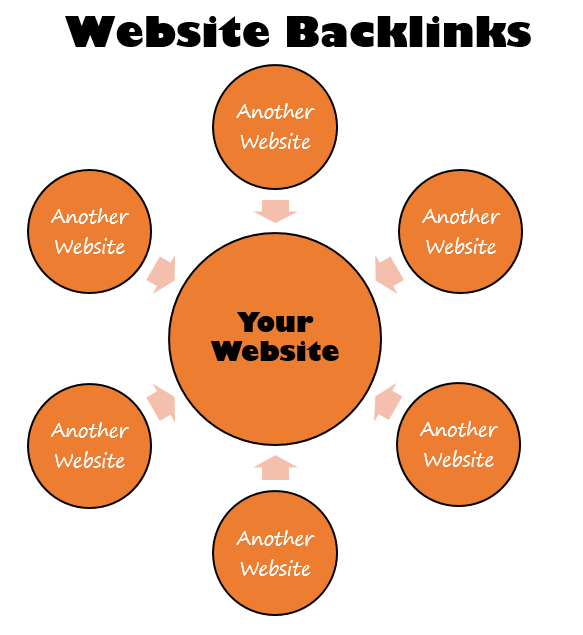
Google is determined to stop people and businesses gaming their algorithm and instead looks to reward websites who generate high quality and natural links from relevant websites. There is a clear reason why businesses have attempted this previously and that is because more visibility in the search engines ultimately leads to more traffic and sales.
After Google launched their Penguin algorithm, they started to send webmasters notifications and warnings via Google Webmaster Tools informing them that they needed to clear up their act. In a lot of cases, this was accompanied by a penalty in the search results leading to less visibility, less traffic and ultimately less sales. Yes, in the online world it seems that Google is indeed the judge, jury and executioner.
Unnatural Link Warnings
Well at least Google was kind enough to let people know which links pointing to their website were deemed to be low quality and causing the penalty and link warning, right? Well, no. That would be too easy! Google was a pain and gave virtually zero guidance as to what was causing the problem. So we had to investigate and start digging deep. We were looking for links that would be deemed to be seen as low quality by Google. Digging deep through thousands of backlinks across a large number of domains was the time consuming solution in this case. Below is the type of message you will see within Google Webmaster Tools if this problem is happening on your website;
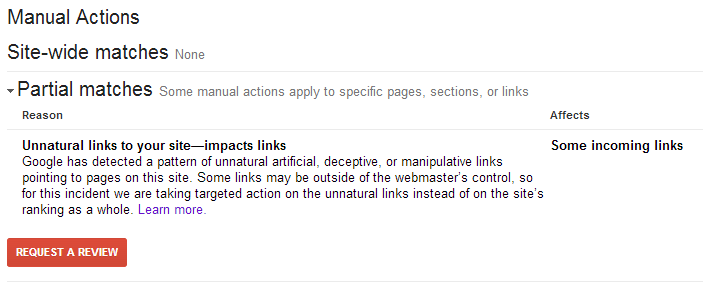
Google officially recommends that you manually email each of the website owners where the low quality links are present and ask nicely if they could remove the link from their website. This is great in theory, but in practice this is absolute nonsense. Website owners of low quality websites are simply not interested in doing anything of the sort and any attempt at doing so is a waste of time. But let’s stick with this train of thought for now though, as this is what Google wants people to do.
Unnatural Link Warning Investigations
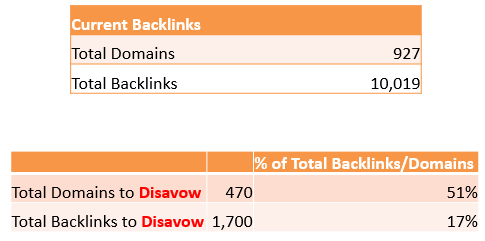
For the website in question, we identified all of the websites on the internet that were linking to the site and all of the pages. In total, this was almost 1000 domains and over 10,000 pages. Quite a few websites to crawl through to identify if the website would be deemed as ‘low quality’ by Google.
Google kindly put together a Disavow tool which is designed to inform Google which of the websites that are linking to you should be ignored during their ranking algorithm. For example, there is absolutely nothing stopping any single website owner on the planet linking to your website without your sign off. This is how the internet works, always has and always will. So the fact that Google introduced a penalty designed to penalise websites based on other peoples’ actions is a little odd to say the least and quite frankly is nothing more than Google admitting that their ‘all-knowing-algorithm’ isn’t actually as good at determining quality as they like to think, which is why they needed to enlist the help of thousands of website owners around the world. That said, it was introduced to target specific websites that were actively either selling links to websites, target low quality directory websites which offer no value to anyone along with other pointless websites on the internet that have no value to anyone.
Back to the investigation though. What we found for the client we were investigating this for was that over 51% of the websites (domains) that were linking to their website would be deemed as low quality by Google, which in total accounted for 17% of their total backlinks. This is quite a significant percentage of their backlinks that was causing the penalty. On further investigations we did find that these had clearly been built by a previous person who was aiming to game Google’s algorithm into making the client websites more visible on Google. Hence why you should never look to game Google and also why we don’t go out and build links for clients, it simply isn’t the right approach and hasn’t been for a good number of years now.
Ok, so remember that Google’s official guidelines are that you should go out and contact everyone who is linking to you and ask for that link to be removed, before submitting a Disavow file and a reconsideration request. Well, you don’t really need to do that. Just tell Google you did.
As a quick overview of the types of links we found that we needed to tell Google that they are low quality, via the Disavow file and reconsideration request. This included paid links (a big no-no), directory websites, thin affiliate websites, unrelated guest blog posts on other websites, low quality articles and even a few hacked websites. There are many other types of low quality websites that you really don’t want to be having links from, but this gives you an idea.
So once you have identified all of the websites that are linking to you that are deemed to be low quality, then Google recommends that you identify the specific pages of that website and add them into the Disavow file. Again, the reality of this is that this is a waste of time. If you have the time, energy and inclination to crawl through 10x the number of links then feel free, and while you are at it feel free to visit and make me a brew with all of the free time you have. Personally though, I like to take a more streamlined approach to achieve results. So here, we just Disavowed the whole domain.
Disavow Files and Reconsideration Requests
Knowing many other businesses who have gone through this same process, it was clear that Google very rarely used the information you gave them first time round and were generally quite unhelpful during the process. So we went through their recommendations and followed their guidelines anyway with this in mind.
Attempt 1
We created a Disavow file, submitted it to Google Webmaster Tools then wrote a lovely reconsideration request with all of the details about the history of the work and how this would never happen again to this client as they are working with a great company now (aka. us). Sob-story and all. We also told them that we had painstakingly taken weeks to contact each any every website owner to remove the links and they simply hadn’t got back to us (we hadn’t actually done this, they just needed to hear this).
Result? No surprise, they gave the helpful information that “there are still some low quality backlinks that you need to remove”. We were expecting this. Thanks Google, very helpful.
Attempt 2
So we added a few more domains (around 20) into the Disavow file, followed the same process as before.
Result? Same again. Nothing.
Attempt 3
So we added a few more (around 5) into the Disavow file for a third time, repeated the process including the ‘begging letter’ aka the Reconsideration Request. This time talking about how we had spent an awful lot of time to do this costing a considerable amount of resources to go and how they weren’t being that useful.
One thing to note is that we did leave a week or two in between each time so that it would at least appear to Google that we had been working very hard between submitting the reconsideration requests.
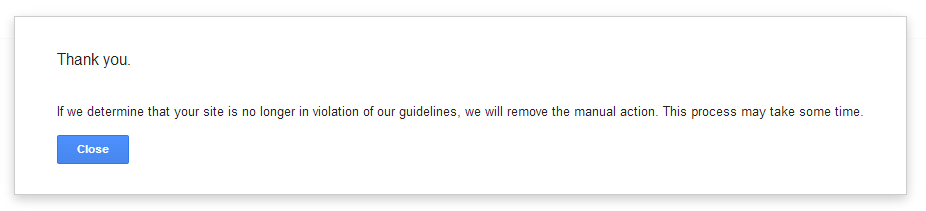
Result? Yes! We had this lovely message from Google;
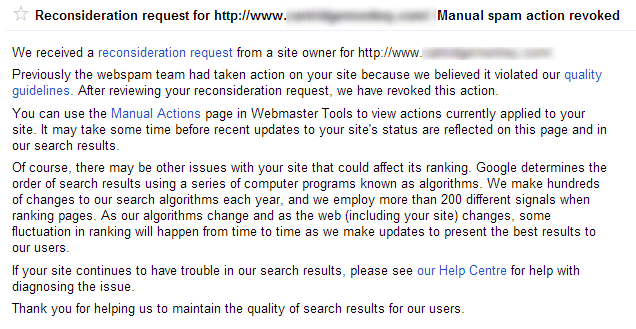
So what did we learn?
Be patient. Tell Google what they want to hear. Don’t waste your time on contacting website owners. Disavow the whole domain if it looks suspicious, life is too short to worry about individual pages.
Not sure if your current SEO activities are working? Then get in touch and speak with one of our professionals who will be able to help support the growth of your business online for the long term. Working with the Disavow file and reconsideration requests within Google Webmaster Tools can be a risky business if you don’t know what you are doing. You could end up telling Google to ignore some very powerful links to your website which would do even more harm, lower your visibility on Google and decrease your sales. Don’t play around with this unless you are confident about what you are doing. Better yet, leave it to the experts, get in touch to find out more.