by Michael Cropper | Jan 14, 2012 | SEO |
As an SEO working in house or agency side there will be a time when you have to assess a website after it has been re-designed to ensure the rankings remain steady. I have put this SEO checklist together to help with this process and to ensure some of the obvious checks aren’t overlooked.
Throughout my career as an SEO I have been through a lot of full website redesigns and each has gone smoothly without impacting the rankings, some of which included a full change of URL structure across hundreds of thousands of pages. This basic SEO checklist has helped the rankings remain steady throughout the various website redesigns, so hopefully they will be of some use to you as well.
I have created a Google Doc listing all of these checks so that you can go through them one by one and tick off each page when checking through the new website. I find this process to be extremely valuable and systematic to ensure all of the key SEO areas of the site haven’t been accidentally damaged during a redesign.
Google Doc: SEO Checklist for Website Redesign (Please save a copy for yourself)
Here is a quick screenshot of the SEO checklist, but I do recommend reading the comments below as they explain what each section on the spreadsheet means.
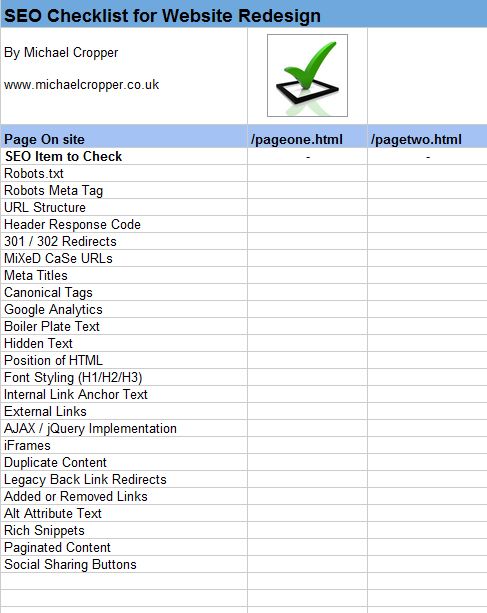
SEO Checklist
Robots.txt
Ensure the robots.txt hasn’t accidentally noindexed the entire site. If the site was using the robots.txt file prior to the redesign, then check this is still the same as it was previously (unless it was wrong in the first place!). It is also possible that certain pages or directories may have been accidentally noindexed so keep an eye out for this too.
Meta Robots Tag
Following on from the above, it is also important to check all of the main pages throughout the site to ensure a “index, follow” tag hasn’t accidentally changed to “noindex, follow” as this would be really bad. The two characters that can bring your site to its knees, ‘no’.
URL Structure
Very important to check that the URL structure throughout the website hasn’t changed for some reason. When developing code for large scale websites it can be very useful to append certain identifiers to make URLs map to certain scripts which then parse the URL and get the information from a database. For example www.website.com/pageone-identifier.html where any URLs containing ‘identifier.html’ would be passed through to a certain script which would get the content for ‘pageone’.
So keep a close eye out for any changes that could have been done here. Even adding one single character to a URL or making one of the characters uppercase will impact your rankings, since as far as Google is concerned those are totally brand new URLs which have no relation on the old ones.
If it is required that the URLs change as part of the site redesign, and this can happen, then it is important that the old URLs are 301 redirected to their new URLs so that the site is still benefiting from any back links that have been generated to those pages. I have worked on websites where it was required that hundreds of thousands of URLs needed changing as part of the redesign and can confirm that as long as all of the 301 redirects are in place then everything will go smoothly. Just make sure these aren’t accidentally a 302 redirect though!
On this note, it is also possible that during the redesign that a chain of redirects could emerge meaning the old URL would 301 to an intermediate URL which would then 301 to the new URL. This is to be avoided and there is generally very little need to do something like this. Use a tool such as Fiddler to see what is happening.
Header Response Codes
This one is very unlikely to crop up during a website redesign, but it is worth checking to be safe. Since header codes can be altered to say whatever you like, then it is quite possible that a 404, 500 or 503 header code could be returned whilst the page content is still being displayed.
If something like this did happen I would find it difficult to believe this got accidentally introduced since it would take someone to actually program this into the code to be altered.
As I say, very unlikely to happen, but worth checking since things may look ok on the surface but underneath the site is actually telling Google to go away.
301 and 302 Redirects
This check partially follows on from checking the URL structure, since if something has been altered it is important to be using 301 redirects instead of 302 redirects. 301 redirects pass all of the Google Juice to your new pages, where as 302 redirects don’t.
It is also possible that during a website redesign that redirects could have been randomly introduced in the site. In Microsoft ASP and ASP.Net, the command ‘Response.Redirect()’ uses a 302 redirect by default which can cause a few issues. So if your site is being designed in either of those languages then this may be a thing to be aware of.
Mixed Case URLs
Generally mIxeD cAse URLs work on database driven websites which isn’t great for SEO since that is creating an awful lot of duplicate content for Google to hopefully handle correctly.
It can be useful to check all of the URLs on the website to see if they also work when replacing a lower case character with an upper case character. Personally I prefer to 301 all upper case URLs to their lower case versions to avoid any potential duplicate content where as showing a 404 page would also suffice.
Unique Meta Titles
It is quite possible during a website redesign that all of those fullyoptimised meta titles that you worked so hard to create have suddenly disappeared. Luckily you have kept a record of what they were (haven’t you?) so you don’t need to worry too much there. Best to check over all of the pages on the site to make sure some of your top performing pages haven’t accidentally lost their meta titles.
Canonical Tags
This is one of the areas where I have seen the most issues during a website redesign and an area I would pay most attention to when doing your SEO checks. One area where the canonical tag implementation can fail drastically is when a script in the background can be accessed viamultiple URLs, for example www.website.com/search?product=something and www.website.com/catalogue/something.
It is extremely important that this doesn’t get messed up since it can mean you are telling Google that the correct page is actually a copy of a page that is on a sloppy URL (such as a search URL) or worse, that it is a copy of a page that doesn’t actually exist.
Also keep an eye on what the correct version of the URL should be. Should it have a trailing slash or not? Whilst Google is pretty good at realising a URL with/without a trailing slash is ultimately the same content, I would still prefer to explicitly tell it so (or even 301 to the correct version).
I have seen it happen where the canonical was set incorrectly which happened to be a search URL, so the page still displayed the same content and luckily Google just began showing the search URL in the search results instead of the friendly URL. Whilst this ins’t great it is good to know that Google does handle this correctly without any negative impact. I would still prefer to get things right first time though.
One final thing to test with canonical tags is how the tag behaves when adding a parameter to the end of the URL which could be a page number such as ?page=2, although I will cover pagination in more detail later.
Google Analytics Implementation
Quite a simple check is this one, but if Google Analytics has been missed off during the website redesign then you aren’t going to be aware of other mistakes that may have happened either.
Boiler Plate Text
Another quick check, but it is important that large chunks of boiler plate text haven’t been randomly added throughout the website. I haven’t come across any times where this has happened but worth keeping an eye out for.
Hidden Text
It is a common technique to use ‘display:none’ then expand the section of text when someone clicks on a ‘view more’ link or similar. So one thing to watch out for is trying to limit the use of this where possible. It is a technique that Google are reasonably good at identifying when it is used for spam and when it is used for genuine purposes but personally I would aim to have things visible on the page both from an SEO point and a user experience point.
In addition hidden text can be found during a website redesign if there has been Multivariate Testing installed at the time. Since some MVT packages actually hide sections of the page and display them only to certain users then this is something to watch out for if using MVT.
Order of HTML
This is a bit of an old skool obvious thing to watch out for, but make sure that all of your important content is as high up in the HTML as possible. Don’t go filling the top of your HTML with crap, instead get all of yourmain content up there. It is possible to do clever CSS trickery by floating columns in a table left or right so that within the HTML the important items are at the top of the page but for the user the item is visually in a different area.
Font Styling
Since heading tags are designed for headings (no surprise there!) then you will find that it is quite common for developers to use them a lot which is great for the user. SEO wise though we want to be making sure that odd titles aren’t being wrapped in heading tags, such as “Look Here” in a H1. Instead we need to be making sure areas that need to look like a H1 are styled using CSS and not heading tags.
Internal Link Anchor Text
Quick run through the main pages on the site to ensure the internal anchor text hasn’t been drastically altered. We wouldn’t want to be telling Google that every page on the site is about ‘click here’.
External Links
Quick check for external links and to make sure they have the‘nofollow’ attribute on any links that you don’t want to pass any Google Juice.
AJAX and jQuery Implementations
Google has been indexing pages controlled by JavaScript for a while now, although I always prefer to make sure there is a clickable link in place so that Google can definitely find all the pages on the website. It is possible to mark up links so that a user with JavaScript turned on will still get the cool user experience and at the same time have a clickable link for when a user (or a search engine) doesn’t have JavaScript turned on.
IFrames
I have never come across a website that has found a good reason to be using iFrames so I don’t think this will happen much. But best to double check nothing has been put into iFrames (or normal frames for that matter) since Google finds it more difficult to stitch things together.
Duplicate Content
It is possible that duplicate content has been added as part of a website redesign so that more content is easily accessible for the user. SEO wise though we all know that duplicate content is a bad thing for Google. So always have a quick check for any possible pieces of content that have been duplicated across several pages.
Legacy Back Link Redirects
This is one of the areas that is often forgotten about during a website redesign since it is not something that is visible on the front end and often the redirects were put in place a long time ago and have been forgotten about.
Legacy back links can be a great source of getting additional Google Juice instead of funneling it all to a 404 page. So when the website is redesigned then it is important to be able to check that these redirects are still in place.
An example of where this is extremely important is if the whole websites URL structure changed at some point in the past as in the example earlier. If those redirects were forgotten to be carried across then you could potentially be loosing all of your Google Juice from links that got built up to your old URLs for the past X years.
Added Or Removed Links
Check to make sure no large chunks of links have either been added or removed from your key pages. It is possible that the new logic in the website can not put all of the link in places where they used to go. If this happened then you may find that a lot of your site is no longer crawlable. Whilst Google still knows of these links, it is like telling Google that those pages are not important any more.
Alt Attribute Text
This is a basic really and whilst some SEOs say that it is important and some say it isn’t. Personally I would rather put something in and it be ignored by Google than exclude something with the possibility that it may not be helping. Check to see if all important images have relevantALT attribute text, so not something like ‘Picture’.
Rich Snippets Markup
If you are using any of the Rich Snippets markup that Google offer then you will already know how long it can take before Google decide to pull their finger out and show them in the search results. So if you have got them in there already then please make sure you check they are correct before launching a new redesign of the page. If you lose them now then it may be several months until they reappear, if at all.
The same goes for the new authorship markup.
Paginated Content
A lot of larger websites have paginated content for product listings so check that all of the paginated pages are crawlable via a static link, check they are all indexable (ie, they aren’t ‘noindexed’) and check that their canonical tag has been implemented correctly. Too often the paginated pages can end up messing up the canonical tag implementation which will ultimately chop off a lot of pages from your site for Google.
In addition, the new “rel=next” and “rel=prev” markup from Google should be there. If it hasn’t been marked up yet, then what are you waiting for? If you have already marked this up then best to make sure it is still there.
Social Sharing Buttons
Ensure any social sharing buttons that were on the old site are still on the new website. Social is extremely important for SEO these days so it is important to make these buttons as prominent as possible.
Summary
I am sure there are a lot more site specific things to check when undergoing a site redesign, but above are some of the key areas I tend to focus on. I hope they are of some use to people going through the process and make sure to check any other items that you have developed previously.
Once you have put your brand new site live, then keep a close eye onGoogle Webmaster Tools to spot errors that may have been missed. Google Webmaster Tools can be a great source of fast information to identify problems, for example if you suddenly see a massive amount of URLs that are ‘restricted by robots.txt’ then the site may have been accidentally ‘noindexed’
by Michael Cropper | Jan 14, 2012 | SEO |
There is a lot of different discussions around the web about whether you should use a Country Code Top Level Domain (ccTLD) or a Directory when scaling a website up into multiple languages or countries, so I am going to give an overview of the pros and cons for each method.
The main question many people ask is that when moving into a new market is which should be used to get the maximum benefit? A country code top level domain or a directory?
Country Code Top Level Domain (ccTLD)
A country code top level domain is a domain that is bound to a specific country, such as .uk for United Kingdom, .au for Australia, .cx for Christmas Islands, .fr for France, .th for Thailand etc.
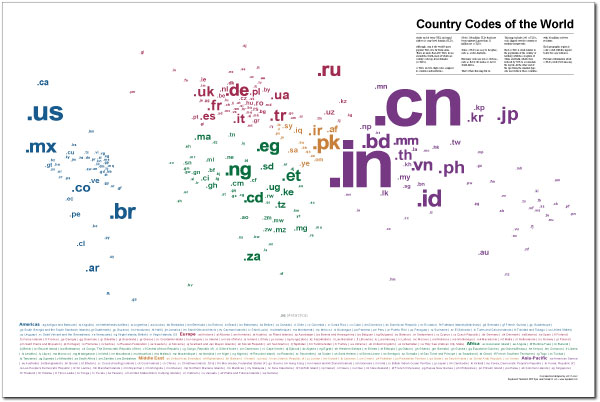
Pros of Country Code Top Level Domains
- Clear signal to Google who the website is targeting. There is no ambiguity, when Google looks at your website www.example.com.au it is clear that the website is targeting Australian users. Usually in Google Webmaster Tools you can set which country you want your website to target, when your website is on a generic top level domain such as .com. Although when your website is on a ccTLD this information is not available since Google assumes (correctly or not) that you are targeting customers within that country.
Screenshot below showing generic top level domain settings in Google Webmaster Tools where you can set the country you would like to target.
Where as when you look at the same information in Google Webmaster Tools when you are on a ccTLD such as .uk this is what you see

- Another benefit to having a ccTLD is that some users in certain countriesprefer to buy from those domains. For example people in Australia are extremely patriotic and prefer to buy from .com.au domains (company in Australia domain). Where as in somewhere like Thailand, people prefer to buy from a .com domain opposed to a .co.th (company in Thailand) domain since there can be a lot of poor quality websites on .co.th domains. So Thai people believe .com businesses will provide a better service or product. This isn’t always the case and there will always be people with different preferences, so when moving into a new market it is essential to do your own research into what would work best for your business.
- It is a lot easier for a user to link to www.website.co.th than it is for a user to link to www.website.com/th/. By making this process simpler then it could lead to an increase in natural links for your website.
- By having several country code top level domains it is possible to occupy more of the search results pages for branded search queries. For example if someone searched for “your brand” then it is possible that your .co.uk website, .com website and .co.th websites could all rank. Google is no where near perfect when it comes to language differentiation although it is getting better.
Cons of Country Code Top Level Domains
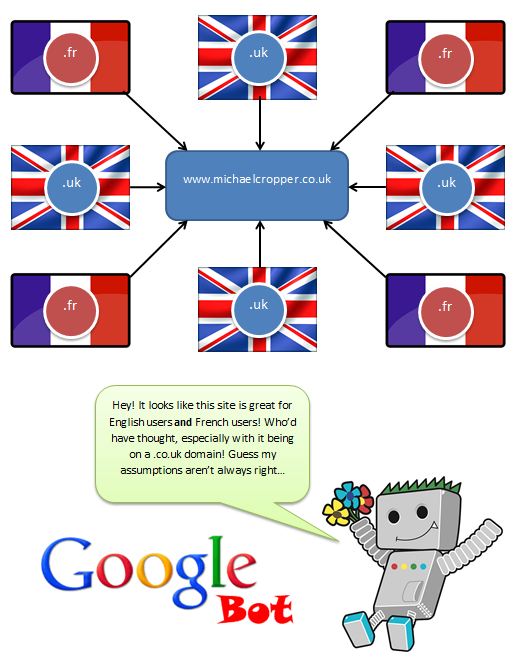
- The obvious one here is that it kind of limits where you can operateyour business. If you are on a .co.uk domain, then it is unlikely that you are going to rank well in other markets due to how Google perceives ccTLDs as shown above. That said, if you have plenty of local links say from .fr domains, then Google isn’t going to totally ignore them. It is likely going to ignore the ccTLD and change its mind and say ‘even though the domain is a .co.uk domain, this website has lots of links from .fr domains, so it must be relevant for French users too’ as shown in the image below. I have seen a lot of random and non relevant websites on other ccTLDs rank in strange places in the past, but I would put that down to Google’s poor algorithm.
- One potential pitfall of using a country code top level domain is that all of the links from your main aren’t fully being utilised and there is no history to your new domain. That said, what most larger websites tend to do is link all of their ccTLD domains together so that each page in a different language links to all of the other languages, so www.website.com/en/pageone.html would also link through to www.website.com/fr/pageone.html, or www.website.co.th/pageone.html and www.website.com.au/pageone.html would like together and vice versa.
- To successfully launch a new language / localised website then it is important to consider what marketing budget is available to really push the new website. It does require significant effort to launch a new website into another market so think carefully about the options. If the website is simply being translated in the hope that some traffic will magically appear then a ccTLD is probably not the best option, instead just use the main domain with the new languages in a directory.
Language Directories
The second option when scaling a site up into multiple languages is to use a directory for each language such as www.website.com/fr/ for France (or French) and www.website.com/th/ for Thailand (or Thai). One important point to think about here is if you are targeting a certain country or a certain language, or both?
Taking French as an example, if you are only targeting France as a country then you will be missing out on a massive market from other French speaking countries and this can be quite big. There are 28 countries around the world where French is a national language which include: Belgium, Benin, Burkina-Faso, Burundi, Cameroon, Canada, Central African Republic, Chad, Comoros, Democratic Republic of Congo, Djibouti, France, Gabon, Guinea, Haiti, Ivory Coast, Luxembourg, Madagascar, Mali, Monaco, Niger, Republic of Congo, Rwanda, Senegal, Seychelles, Switzerland, Togo and Vanuatu.
Another option here is to target both language and country by providing a full localised directory such as www.website.com/ca-fr/ for Canadian people who speak French and www.website.com/be-fr/ for Belgium people who speak French.
Pros of Language Directories
- One of the main pros to having all new languages in a directory is that all of the inbound links to your website will flow through to the new language pages. That said, this would also happen when linking your different ccTLDs together correctly although is it not fully known if both of these methods would pass the same amount of Google Juice through.
Cons of Language Directories
- One of the potential pitfalls of having languages in a directory opposed to on a ccTLD is that Google could confuse the site as being a total mess in multiple languages. Although this isn’t likely to happen and you can set each directory to be targeting a specific country within Google Webmaster Tools as shown above.
- It is possible that for branded search queries that you will find your main pages ranking in the incorrect language which isn’t a great user experience. For example if someone is searching for “your brand” from France then it is very likely that the main English website will rank since the English page has far more Google Juice strength and it can be difficult to get this correct.
- The issue of what content you should display on the ROOT of the domain, www.website.com? Should it be English or one of the other languages? Then this takes you into the realm of potentially redirecting users either based on the IP address or on their language settings from the browser. Bearing in mind that the incorrect language could also show as a snippet in the search results which would dramatically reduce the click through rate.
- If you are thinking of automatic redirects for users then you may havepotential Google Bot issues with cloaking. There is no clear info from Google as to what is best here and they have even totally contradicted their self several times on this issue. There is also the possibility that if the automatic redirects haven’t been set up correctly that you could accidentally block Google from accessing most of your website. For example since Google Bot always crawls from America then you wouldn’t want to be redirecting Google Bot to the English page all of the time since it would never discover any of the other content!
- People within the market you are entering are likely to link to the main website and not the localised directory, for example you will find a lot of people would link to www.website.com opposed to www.website.com/th-th/ which could hinder how well the language directories rank within the local search engines.
Summary
There is no quick win to breaking into a new market and there are a lot of pros and cons to each of the different methods, country code top level domains and directories. Personally I would prefer to use ccTLDs where possible if there is going to be a real push into that market.
If you are just thinking about translating and not promoting then it is a waste of money, similar to buying a phone and expecting it to ring on its own! Nothing worth while is easy, so it is going to take considerable effort to break into the market.
You may have noticed that I have not mentioned the option for sub-domains within this post and that is because I don’t like sub-domains  But if you are interested then I am sure you can pull some of the above points for/against sub-domains too.
Hopefully this has provided you a wide range of information on the topic and will help you decide what is best for your website.
Here is a summary table outlining all of the different points listed above
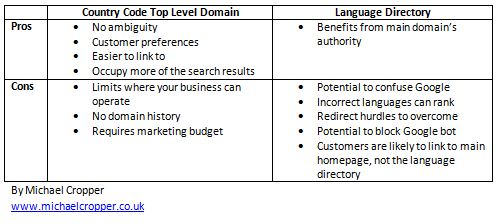
by Michael Cropper | Jan 14, 2012 | SEO |
Whilst I would love to think I knew the full 200+ signals being used in Google’s ranking algorithm, I don’t think I would quite get to 200 on my own. I am asking for help from the SEO community in this post to share their knowledge on how Google rank websites.
This post is designed to list all of the possible data sources / signals Google could be using as part of their ranking algorithm. My feeling is that if they have access to data, then they will be using it in someway or another. Weather this is to help boost websites or to flag websites as spam and demote them. We aren’t going to be discussing the actual weight Google is giving to each of the different signals (that can be for another post ), just to see if we can get all 200 (or more) signals theycould be using.
I have broken down the main areas to help categorise the different signals. Anyone who can add to this list will get a link back to their blog (as long as you don’t have a spammy website!) since this is my way of saying thanks for contributing.
Anyone wishing to contribute can add a comment to this blog post and I will update the blog post. When commenting please state;
- What piece of information Google could be using
- How they would judge / rank this information (I.e. how does this show quality or not?)
- Where they would get this data from
- Any relevant official sources of information to support your theory
A few of the easy ones have already been put in I want this post to be generated by the SEO community to see how many we can get between us all.
So lets get started then!
On Site Signals
- Meta title
- H1 & heading tags
- Keywords within the text
- Amount of useful text when subtracting templated information and adverts
- Phone number, which signifies that the website is a genuine business
- Amount of unique images which cannot be found anywhere else
- Amount of unique high quality content
- Is there regular fresh content appearing on the website?
- Internal linking
- Site speed
- Image ALT attribute
- Amount of adverts on the page & how much useful content is left once the adverts are removed
- Video markup
- Microformats and rich snippets such as hreview or hrecipe
- IP C class and location of server
- Content above the fold VS content below the fold
- Top level domain
- How long the domain has been owned by the current owner, not just how long the domain has been registered to ‘someone’
- Keyword over usage or keyword stuffing (negative factor)
- Cloaking (negative factor)
- Hidden text (negative factor)
- Duplicated content from external websites
- 301 redirect flags such as redirect chains (301 –> 301 –> 301 –> Final destination), redirect loops or redirects ending on a 404 page.
- Keyword rich URLs opposed to page numbers or product ID’s
- Number of crawl errors found when crawling the site
- Does the HTML conform to W3C standards
Off Site Signals
- Anchor text for inbound links
- Number of linking root domains
- PageRank from inbound links
- Followed / Nofollowed attributes on inbound links
- Number of mentions (ie, ‘website.com’ without an actual link)
- Total number of external links in addition to linking root domains
- Surrounding text on external links
- IP C class of linking websites
- Existence of a Google places profile
- Link profile of competitor websites
- Age of the back link
- Link growth rate and how fast links to certain pages have gained links
- Evidence of paid links
- Selling ‘followed’ links to other websites (negative factor)
- History of comment spamming on forums, blogs or other link spam (negative factor)
Brand Signals
- Does the website have a brand logo which appears throughout the website?
- Does the brand logo appear anywhere else on the web?
- Does the website send out branded emails to its customers? This data could be gathered by analysing gMail accounts.
- How many gMail accounts are receiving, opening and engaging with emails sent from this brand website?
- Does the website have a LinkedIn company page with real people working at the company?
- Search volume for branded keywords and brand name
- Presence of a physical address on the website
- Age of the domain
- Number of branded external links
Social Signals
- Does the website have a Twitter account?
- Does the website have a Google+ brand page?
- How many Plus 1’s does the website/web page have?
- How many Facebook fans does the brand page have?
- How many people are Tweeting about the website?
- How many Twitter followers the website has
- Surrounding text of links in tweets
- Number and rate of growth for page views and replies on social media pages
- Presence of user generated content (UGC) on the website
- Growth rate of social media mentions, such as a slow growing amount of mentions or a large outbreak
Other Signals
- Is the website advertising on AdWords?
- Is the website advertising on Google Display Network?
- Is the website listed on any official business websites such as Business Link or Yell.com?
- Does the website have a physical address?
- Is there an email address where customers / website visitors can contact the owner?
- Click through rate (CTR) from the search results
- Bounce rate from the search results
- Review rating of the website / business on third party websites
- Google seller reviews for eCommerce websites
- Quantity of pages in Google’s index
- History of past penalties for this domain (negative factor)
- History of past penalties from this owner of the domain (negative factor)
- History of past penalties for other domains from the same owner (negative factor)
- Amount of time spent on the page / site
- Number of page views per visit
Please add your comments so we can get this list full. I would be surprised if we couldn’t fill this list with all the knowledge out in the SEO industry.
Contributors
Michael Cropper – SEO and Internet Geek (1, 2, 3, 4, 5, 6, 7, 8, 41, 42, 43, 44, 45, 81, 82, 83, 84, 85, 121, 122, 123, 124, 125, 161, 162, 163, 164, 165)
Felix Lueneberger (9, 10, 11, 12, 13, 14, 15, 16, 17, 46, 47, 48, 49, 50, 86, 87, 88, 89, 126, 127, 128, 129, 130, 166, 167, 168, 169, 170)
John – Forest Software (18, 51, 52, 53)
Sean – http://01100111011001010110010101101011.co.uk (19, 54, 55, 20, 21, 22, 171, 172, 173, 23)
Jeremy Quinn (24)
Brahmadas from SEOZooms (25, 26, 174, 175)
by Michael Cropper | Jan 14, 2012 | SEO |
Here I am going got talk through some of the Excel plugins I have found very useful for SEO tasks. Best thing I can advise is to get them installed and give them a go for yourself. The three plugins to look through today are;
- Regular expressions plugin for Excel
- SEO Tools plugin for Excel
- Excellent Analytics plugin for Excel
Regular Expressions Plugin for Excel
Link: Regex Plugin Excel
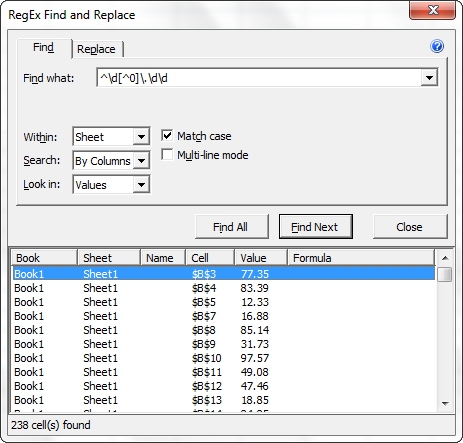
This can be a great plugin when working with large data sets within Excel as it allows you to use all of your normal regular expressions to find the data you need. See this site for a regular expressions cheat sheetfor reference, alternatively if you aren’t too familiar with regular expressions then I suggest reading the following tutorial.
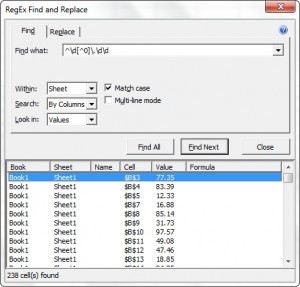
There is not much more to say about the regular expressions plugin for Excel apart from that you can filter out a lot more than you can using the normal string matches which Excel has be default. It can be a lot easier to get the information you require.
SEO Tools Plugin for Excel
I briefly mentioned this in an earlier post about why programming is an essential SEO skill but I wanted to expand on the amazing excel plugin which is SEO Tools by Neils Bosma and why you need to be using this if you aren’t already.
Below is a screenshot of the additional tab you get in Excel once you have installed the plugin (60 second install, follow the instructions in the ‘read me’ file!)
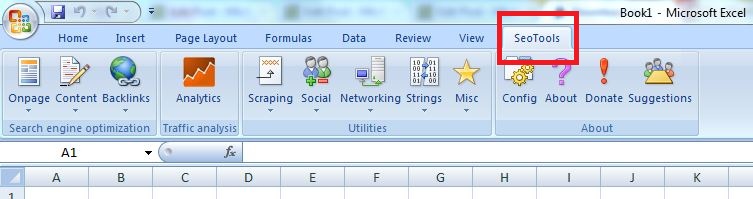
So what are some of the cool things you can do with SEO Tools once it is installed? Well an awful lot actually.
Check the HTTP Status of pages
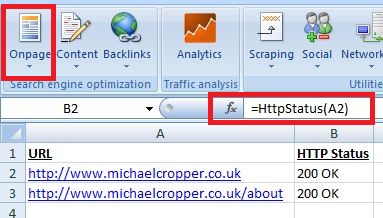
Simply add a lot of different URLs in column A then use the function=HttpStatus(A2) to find out if it is returning a 200, 404, 503 etc. This can be a really useful tool for both SEO since Google Webmaster Tools reports on errors for your site for a long time, often when these pages are actually no longer showing any errors. So it can be a good method to list all of the URLs which Google Webmaster Tools is showing as errors and double checking these to spot the real pages that are showing as errors.
To find this function you can simple click on the ‘onpage’ button highlighted and select the HttpStatus() option from the list
Filter through back link targets
Lets say you have a list of websites / webpages you want to target for back links but it isn’t easy to figure out which ones to target first. From a large list, it is important to be able to filter through these to identify the best websites to contact first. There is no point in contacting poor quality websites first!
Maybe you want to prioritise websites to contact who have “SEO” in their meta title and have a page rank of at least 1

Identify popular content on competitor websites
How about trying to identify which content is the best on competitor websites? Maybe a competitor has a blog or a content section which you can easily scrape all of their URLs from. Simply go to Google, view 100 results and search for “site:blog.website.com” then use Scrape Similar to get all of the URLs where you can paste these into Excel.
Once you have all of these URLs then you can check how popular they have been on the social media channels. In the screenshot below I have pulled a few of my blog posts and identified how many tweets they have had recently using the =TwitterCount(A2) function from SEO Tools.

Whilst I am not a massive fan of copying off competitors (I believe you should be doing your own thing far better so they are copying off you!) this can be a useful tool to get a rough idea of different content that people are interested in. It could even be a good guide to identifying your own ‘linkable content’ since Google Analytics can only show the amount of traffic that each of the pages gets.
So looking at the above screenshot, if those websites were for competitors then I would think about doing a post about how to see competitors social media link statistics since this has gained the most traction.
Website Scraping with XPathOnURL
This is one of the most powerful bits of SEO Tools and one of the best bits with this Excel plugin. I am not going to go into too much detail here about XPathOnURL since this is a full blog post on its own. To give you an idea of what it can do though it basically scrapes certain bits of the HTML that you need such as “get me all the links on this page” which would translate to “get me all the HREF attributes within all of the <a> tags on the page”.
This tool can be extremely useful when scraping websites for certain pieces of content / information etc. Have a play, see what you can do.
Excellent Analytics
Link: Excellent Analytics
This can be a really useful Excel plugin for SEO since it allows you to export all the data you need from Google Analytics straight into Excel. So no more exporting large data sets then matching up the relevant data with a =VLOOKUP() function instead, just get the precise data you need from GA straight into the adjacent column in Excel where your other data is.
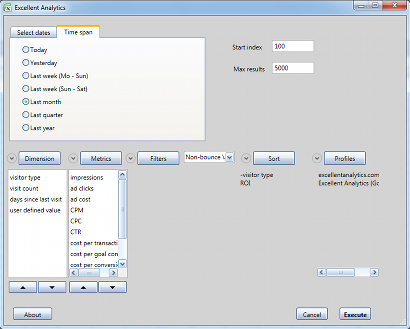
I am not going to cover this in a large amount since it is quite self explanatory, it pulls in data from Google Analytics based on all the normal segments, filters and visitor data you are used to using via the normal Google Analytics dashboard. Simply link up your GA account with the plugin and away you go. Below is a screenshot showing one of the user interfaces.
On larger websites which 10’s of millions of page views per month you may have noticed how slow Google Analytics is to do anything, so this can help speed this process up for extracting the data you need.
Summary
These are the three essential Excel plugins SEO I use on a regular basis. I have found them to be real time savers for various tasks as outlined above so go and give them a go.
If you have any other excel plugins that you use for SEO then please leave a comment.
by Michael Cropper | Jan 14, 2012 | SEO |
Here I am going to show you how easy it is to create your own embed code for either your widgets or infographics you have created. They are an essential tool if you want to help build natural links.
This is what the final piece of code looks like to a user, with the images / info graphic / widget above and the text to embed this below.

Click below to embed the above image into your website
So how do you do that? Well it is quite simple really, just a few bits of HTML and JavaScript will enable you to create a box with your embed code in so people can place your images / infographics / widgets on their site with that all important link back to your website as the original source.
The first step is to include the image on the page you are wanting the embed code to be one. Once you have done that you simply add the code below to your HTML and tweak the relevant bits which will be explained in a moment.
Complete Embed code:
<textarea style=”height: 44px; width: 300px; margin: 2px;” onclick=”this.focus(); this.select(); _gaq.push([‘_trackEvent’, ‘Infographic’, ‘Click’, ‘guerilla-marketing-infographic’]);” rows=”2″>
<img src=http://www.michaelcropper.co.uk/wp-content/uploads/2011/09/guerilla-marketing-at-its-best-in-manchester.jpg width=300 height=300 />
<br>
View full image
<a href=http://www.michaelcropper.co.uk/wp-content/uploads/2011/09/guerilla-marketing-at-its-best-in-manchester.jpg title=”Guerilla Marketing Manchester” style=”color:#0000FF;text-align:left”> Guerilla Marketing Manchester</a>
</textarea>
So if we take a look through each of the different sections to explain what each part does.
Step 1 – Create a text box
Create a text box on the screen which is 44 pixels high, 300 pixels wide and has a bit of a margin. This section also has some JavaScript so when a user clicks (onclick section) the text box then the text is highlighted (this.focus(); this.select() section) which makes it easier for the user to then right click and copy the text. In addition, the code below also has an event tracking Google Analytics tag which means that when someone clicks the text box an event is fired off to the Google Analytics account you have installed on the page which says “someone has clicked an ‘infographic’ which is called ‘guerilla-marketing-infographic’ “
Below the code is what the code actually creates, the text box (although yours will be empty to begin with until the next step.
<textarea style=”height: 44px; width: 300px; margin: 2px;” onclick=”this.focus(); this.select(); _gaq.push([‘_trackEvent’, ‘Infographic’, ‘Click’, ‘guerilla-marketing-infographic’]);” rows=”2″>

If interested, read full details about Google Analytics event tracking, but in summary is _gaq.push([‘_trackEvent’, ‘category‘, ‘action‘, ‘label‘]);where you can choose the category, action and label you want to use.
Step 2 – Add the Image
You’ve got something to embed right? Well this is the next step, place the HTML code of your original image / infographic / widget in between the <textarea> and </textarea> tags. One key thing to note though is that you need to replace HTML characters such as < and > with their HTML code equivalent. Take a look through a full list of HTML codes for reference. It can be a bit of a pain to do this, but hopefully you don’t have much to include here!
<img src=http://www.michaelcropper.co.uk/wp-content/uploads/2011/09/guerilla-marketing-at-its-best-in-manchester.jpg width=300 height=300 />
Step 3 – Add the Link Back to You
Here is the most important part, adding a link back to your website as the original source of the content. Same rules apply as in step 2 where by you need to replace the HTML characters with their HTML codes. The great thing here is that you can choose the anchor text which is used when people are linking back to you.
View full image
<a href=http://www.michaelcropper.co.uk/wp-content/uploads/2011/09/guerilla-marketing-at-its-best-in-manchester.jpg title=”Guerilla Marketing Manchester” style=”color:#0000FF;text-align:left”> Guerilla Marketing Manchester</a>
I have seen some people include cheeky links within this section previously which link back to one of their key pages they want to rank with the best anchor text. Whilst this isn’t a bad idea, personally I would only add it where relevant. A lot of people will likely remove the link anyways, but it is certainly worth a try
Step 4 – Drive Traffic to Share Your Content
Now comes the easy bit! Go out there and tell people about the great content you have just created. If the content truly is great then it is going to make people want to embed this item in their own websites and tell their friends about it naturally.
Here is what the final piece will look like when a user embeds the code in their own website:

So there we go, simple as that! Now time to go and create some great content and promote it well. For anyone who is interested in what the massive gorilla is, then have a read of my guerilla marketing Manchesterpost.
Here is one we use in our info graphic series for A day out on the District line in London. Great option for promoting some great content.
Note: You may also need to wrap ” ” quotes around some of the HTML tags within the embed code itself. Strangely when I was creating this post additional quotation marks were being added around the IMG SRC and A HREF attributes causing invalid URLs, so if you come across this then just tweak accordingly.
by Michael Cropper | Jan 14, 2012 | SEO |
There have been hundreds if not thousands of blog posts on SEO tools before, so I am not going to waffle on about why you should use each one. The main reason for this blog post is more of a reference manual for me ????
These are the tools that I have found invaluable being an SEO so I hope they are of some use for anyone reading too.
Google Webmaster Tools
Link: Google Webmaster Tools
Great SEO tool to easily spot duplicate content, duplicate title tags, malware on the site, HTML issues and URLs Google has found that are either 404’ing or 500/503’ing.
This is a great starting point to diagnose websites to see what is potentially going wrong with them and it can also be a great way to spot malformed back links that you can 301 to the correct place.
Google Analytics
Link: Google Analytics
What a powerful SEO tool. I am not going to go into details about why this is so amazing, but if you are not using this (or an equivalent analytics package) then you need to get this installed and find out for yourself why it is so amazing.
Microsoft Excel

You need to make sure you have the full version of Excel and not just the free version that is available since there are a lot of additional features you will need to use such as advanced filtering and customising your Excel with some nice plugins.
When using Excel I also have additional plugins installed which help with more advanced functions and save a lot of time. I did another blog post about essential Excel plugins for SEO recently which goes into more detail about these three plugins.
- Regexp Plugin
- SEO Tools
- Excellent Analytics
Google Docs
Link: Google Docs
The main reason I use Google Docs is for their spreadsheets. This can be a great way to share certain bits of information between a team of people, may that be list of websites that have been contacted for links if there are teams of link builders or it can also be used for more creative reasons such as the ImportXML function that is available.
I tend to use this in addition to Excel since there are some things that Google Docs can do better than Excel, the main one being that Excel is limited to importing only one XML feed URL per document (without a lot of effort tweaking things and writing Macros at least) whereas Google Docs has a nice limit of 50 XML feed URLs that can be pulled in within one spreadsheet, which can be great when scraping content from other websites.
Open Site Explorer
Link: Open Site Explorer
I briefly mentioned this earlier, but this tool was created by SEOmoz and is based on their Link Scape index. Basically SEOmoz have Link Scape which crawls the web just like any other search engine would do and then indexes the information. From this information they then provide all of the juicy statistics that SEOs like to get their Excel spreadsheets on.
Go and have a play with what is available, but to get the full data set then you need to sign up to become a Pro Member which is well worth it for anyone doing a lot of SEO.
One thing to bear in mind is that it does provide a lot of data and one could argue that it is just data and only useful if there can be some actionable insights that can be gained. I have seen a lot of SEOs in the past creating reports, pie charts, graphs of all this wonderful data and comparing it with competitors without anything coming from this. So just make sure you know why you are gathering and analysing all of the data before you get started or you will just end up with a buffet of pie charts in Excel!
Fiddler
Link: Fiddler
Fantastic piece of software whereby Internet Explorer and Chrome internet traffic is piped through the program (automatically) and you can clearly see every request/response that is happening along with all the HTTP header information and the time taken to download each of the different items on the page. Really useful program which I use on a regular basis.
If you are using this software and Firefox as your browser, then you need to configure Firefox to go through the program. It is a bit more hassle than it is worth to be honest, best to just use IE/Chrome which automatically pipes through Fiddler if it is installed.
Xenu
Link: Xenu
Nice scraping tool where you can simply enter in a domain, press go and receive a list of all of the URLs on the website. This works by spidering the website to identify all of the pages.
Screaming Frog
Link: Screaming Frog
Similar to Xenu where you can enter a domain and scrape all of the URLs on the site. The free version is limited to 500 URLs that you can scrape though, so good for small projects but probably not the best choice for larger projects.
Simple Sitemap Generator

Link: Simple Sitemap Generator
This is a tool which I built to help speed up the process of quickly generating an XML sitemap. The tool isn’t like other XML sitemap tools as it doesn’t crawl the website to identify all the URLs as there are other tools which do this already such as Xenu. Simply paste in a list of up to 50,000 URLs into the XML sitemap tool then click on generate to get your fully search engine friendly XML sitemap in no time at all.
Useful SEO Blogs
Matt Cutts Blog
Link: http://www.mattcutts.com/blog/
Matt Cutts is one of the original engineers at Google and is the regarded as ‘the face of Google’. Want some information straight from the horses mouth about new developments? Then look no further. He doesn’t update his blog very often, but it is generally some good information when he does.
SEOmoz’s Blog
Link: http://www.seomoz.org/blog
SEOmoz’s blog is a great place to keep a close eye on for lots of useful SEO industry news. They also have a lot of guest blog posters who can provide some good content. In addition, they have a ‘Whiteboard Friday’ video every (you guessed it) Friday which is a must watch every week.
Google’s Official Blogs
There are quite a few official Google blogs for different areas so I will list some of the ones I find most useful. If the one you are looking for isn’t listed below try searching Google’s full blog directory. There are a lot of industry related blogs within the full directory so see if there is one for your industry.
Google Analytics Blog
Google Mobile Blog
Google Webmaster Central Blog – News on crawling and indexing websites
Google Inside Search Blog – The official Google search blog
Google Inside AdWords Blog
Google General Blog – Insights from Googlers into products, technology and the Google culture.
SEO By The Sea
Link: SEO by the sea
SEO by the sea is a great blog which tends to publish less mainstream topics which can be very useful. For example a recent post was about the 10 most important SEO patents and phrase based indexing which is well worth a read.
Stone Temple
Link: Stone Temple
Stone Temple’s blog is run by Eric Enge who tends to focus on interviews with high profile people within the search industry, such as Matt Cutts and Vanessa Fox. The interviews he does can be really insightful hearing all of the great information from the source instead of being paraphrased in blog posts as sometimes happens. Well worth keeping an eye out on.
Google Webmaster Central’s YouTube Channel
Link: Google Webmaster Help YouTube
Keep a close eye out on what content is uploaded to this channel, it is one of Google’s main way of communicating new information and answering webmaster questions related to SEO.
It is good to subscribe to this channel so you are instantly updated when new videos are uploaded.
SEO Plugins for Google Chrome
Awesome Screenshot
Link: Awesome Screenshot
Great tool for capturing the whole of the page and not just the visual section. In addition, there is a nice simple editor to adding highlights and shapes to the screenshot you have just taken which saves a little bit of time editing it in another piece of software.
Nofollow Spotter
Link: Nofollow Spotter
Handy little tool to quickly identify any possible errors on the page, such as if everything is nofollowed by mistake. I usually always have this turned on whilst working as it is speeds up the checking process instead of having to run through the HTML.
Firebug
Link: Firebug
What a fantastic tool for quickly viewing certain parts of the HTML. In addition it can tell you the different header codes which are happening for each requested item on the page. Firebug also allows you to edit the HTML inline so you can add/delete certain parts of the page which can be useful when debugging something.
Google Analytics Debugger
Link: Google Analytics debugger
Extremely handy tool when wanting to test your new implementation of Google Analytics and to make sure everything is sent across to Google correctly. When using this tool you will see a ‘tracking beacon sent!’ message when everything has gone correctly.
Note, press ‘CTRL + Shift + J’ to activate.
Scrape Similar
Link: Scrape Similar
Great tool for easily and quickly scraping content from websites you are viewing. This can be useful to scrape a lot of URLs from Google or to scrape a lot of information from websites with a lot of listings on one page such as products or prices etc. Quickly copy this information into Excel then you can use it to compare with other data.
XPath Helper
Link: XPath Helper
Extremely useful tool for quickly getting the XPath of some content you want on the page. Press CTRL + Shift + X to activate while hovering over the content on the page you want to scrape. To change the content you can either edit the XPath directly within the tool or you can hold Shift down and hover over the content you want.

User-Agent Switcher
Link: User-Agent Switcher
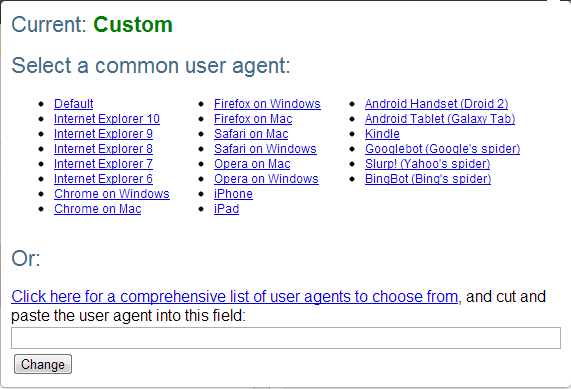 This tool can be really useful to see how a website behaves when being accessed from different devices or browsers. Some websites, do some really crazy stuff in the background and this can help understand what is happening so you can recommend the correct solutions.
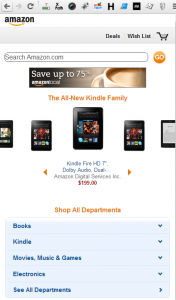
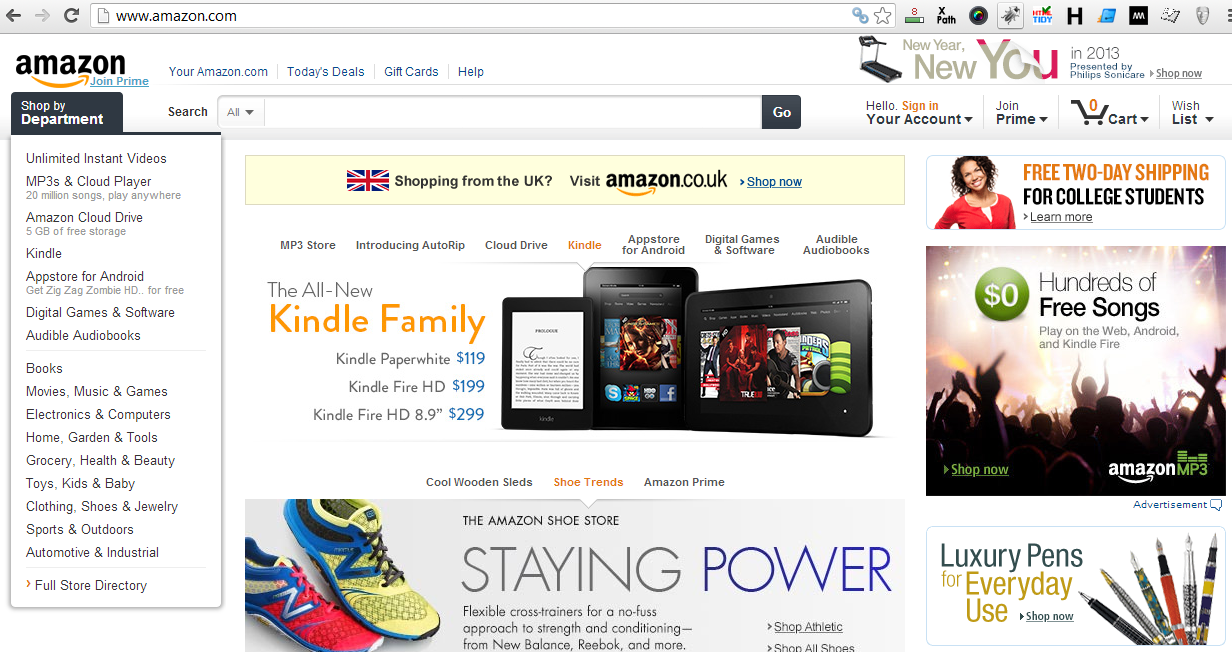
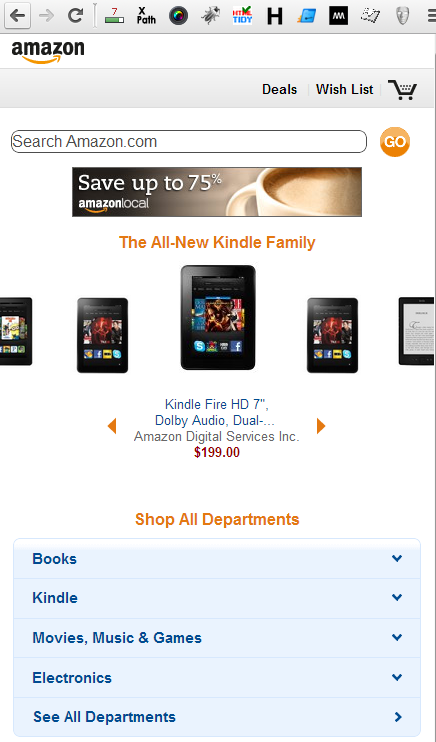
As the simplest example, you can select to view the website where using the default user-agent for your Chrome browser, and you can compare this with how it looks when you change the user-agent to an iPhone which you can see below. Since the recommendations will be slightly different depending on how things are technically set up, it is important to understand these areas.
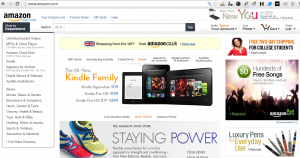
Above: Amazon website while accessing via normal User-Agent
Below: Amazon website using iPhone User-Agent
Redirect Path
Link: Redirect Path

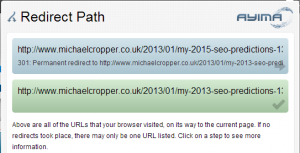
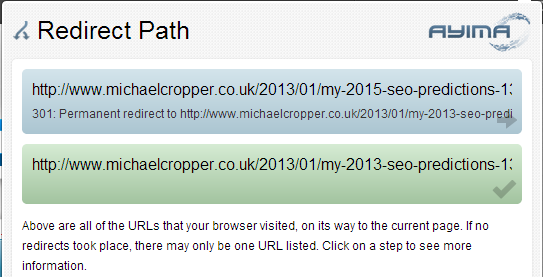
This is a great little tool that shows you the full redirect path in a really user friendly way. There are other tools that give you much more details, such as the Live HTTP Headers plugin for Firefox (mentioned below) if you want to dig deeper – but this tool is great for quick snapshots of information and it clearly displays within your toolbar when a redirect has happened (in case you blinked!).
Below is an example of how this displays the redirect path when a redirect(s) has happened;
SEO Plugins for Firefox
Firebug
Link: Firebug
As already talked about above, this is Firebug for Firefox.
Netcraft Toolbar
Link: Netcraft toolbar
Handy little toolbar showing different stats about the website including its age and where it is hosted. It is not something that I use every day but it is a handy tool when assessing lots of different websites.
Live HTTP Headers
Link: Live HTTP headers
Extremely useful tool for seeing what header code is being returned on a certain page, it can also help identify any 301 redirect chains.
Fire FTP
Link: Fire FTP
You may come across a time where your FTP access is limited on an internal network due to ‘security reasons’ so this is a great way to get around that. Simply install the Firefox plugin and away you go, your own basic FTP client bypassing any restrictions.
Server Spy
Link: Server Spy
Handy little tool to show what brand of HTTP server the website is running, such as IIS or Apache
People to follow on Twitter
Check out who I am following and follow them too Be wary of people talking bollocks though, always best to use your own judgement and not to take everything as fact. Test for yourself, but Twitter is a great source of information in the SEO area.
@MickCropper
by Michael Cropper | Jan 14, 2012 | SEO |
Recently I have had a few people ask me about how to get your own personalised image when commenting on blog posts so I thought I would write a bit of information on how to do this, as it is extremely simple. Below is a screenshot of what your blog comments will look like once you have completed the simple steps outlined in this blow post.
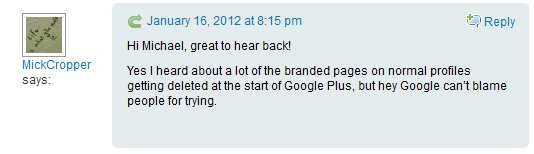
All you need to do so that your image will show next to all blog comments is to sign up to Gravatar (aka Globally Recognised Avatar – see where the name came from?). Within Gravatar you can personalise the image you would like to display and it is as simple as that!
Then next time you leave a comment on a blog post, the email address you have to enter when submitting a comment will be referenced with Gravatar and your image pulled in from there. Simple.
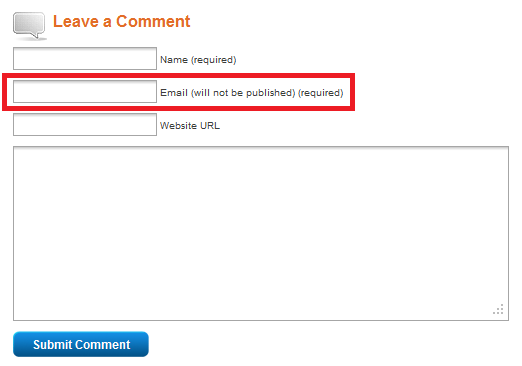
This technique works when commenting on all WordPress blogs and many other large blogs around the web. Great for branding yourself when commenting on blog posts.
So there you have it, a quick process which shows you how to get personalised images on blog comments.
by Michael Cropper | Dec 14, 2011 | SEO |
With all the recent Panda issues that Google has caused throughout 2011, they have recently announced a new tag that will help websites recover from a Panda penalty when they believe they have been incorrectly punished (aka Pandalised)
All you need to do to implement this ‘quick fix’ is to add the following meta tag to your website across all pages that have been impacted, between the <head> and </head> tags within your HTML. The next time Google crawls your website and can see the ‘no Panda penalty’ meta tag it will update its index accordingly and you should begin to see your rankings improve again.
<meta name=”panda” content=”no-penalty”/>
Here is what happened when I introduced this onto a site I have been working on. Sorry I cannot provide the website URL, so you will have to take my word for it.
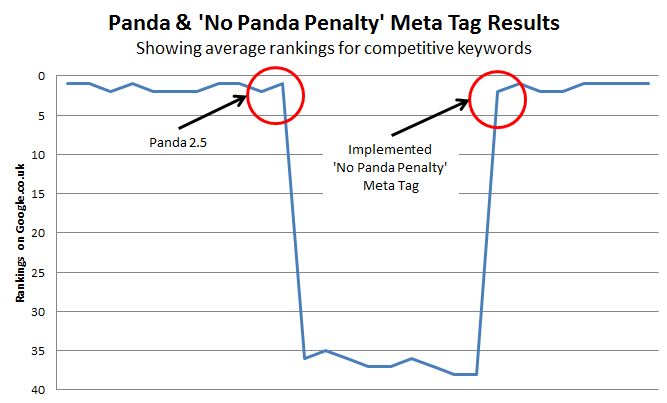
Wow! A full recovery from a simply one line change in the code.
Well if you have got this far reading the post, let me just add a small disclaimer. This post is a JOKE, so don’t go running to your developers asking them to implement this!
There have been a lot of stupid posts around the web recently about how websites have recovered from Panda by making silly little changes. Upon further looking at these they turn out to either be nothing valid since the site returned at another Panda update (ie, it was a tweak in the algorithm that caused the positive change opposed to any work they have done), or they won’t provide details about the website in question and the specific details/data behind their claim.
Sorry if I got your hopes up here about the ‘quick fix’ for Panda, but the reality is that to get your rankings back then you need significantly better content throughout your website. Check out the recent epic blog post I did about how to recover from Google Panda for some real advice.
by Michael Cropper | Dec 14, 2011 | SEO, Social Media |
One of my pet hates about websites is when they make it difficult or impossible to share their content on social media. Please webmasters & companies, come into the 21st century and understand how important sharing content is. Lets take a look through a few different websites and what sharing options they have on their site.
Websites With Poor Social Sharing Options
PC World
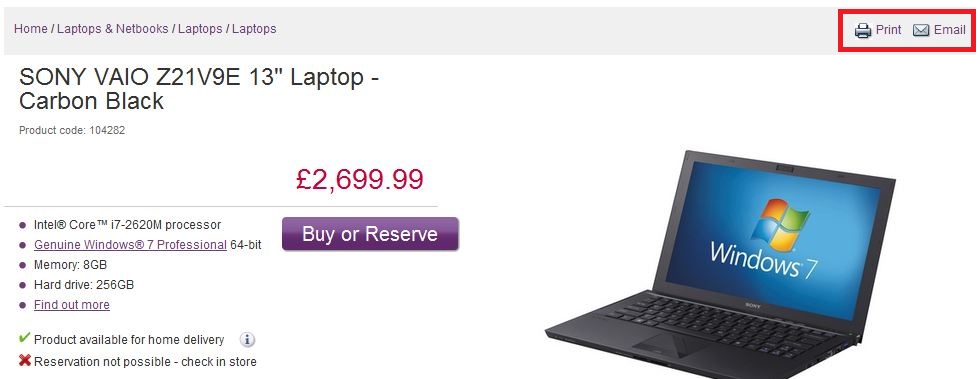
Looking at the product pages on PC World, the only options for a user are either to print or email the page. They are missing a massive opportunity by not including some of the more social buttons such as AddThis, Facebook Like button or the Tweet button.

Expedia
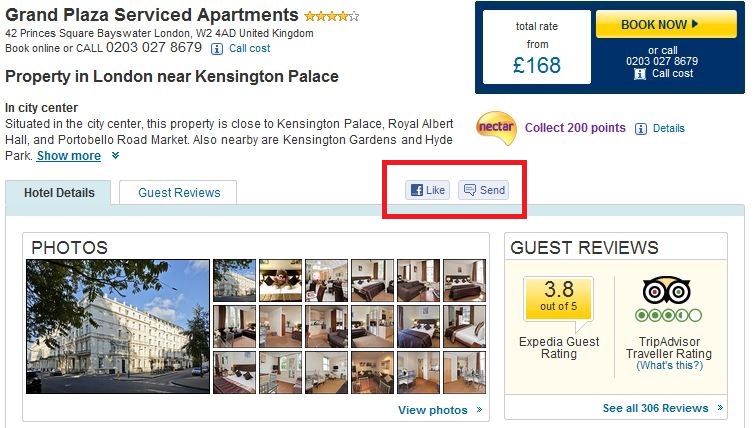
Expedia do a little better than PC World since they offer the ability to Like / Send buttons from Facebook, although what about if I want to share the content on Twitter or StumbleUpon?
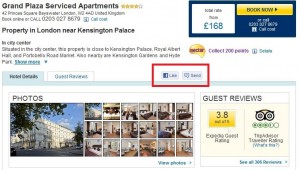
JJB Sports
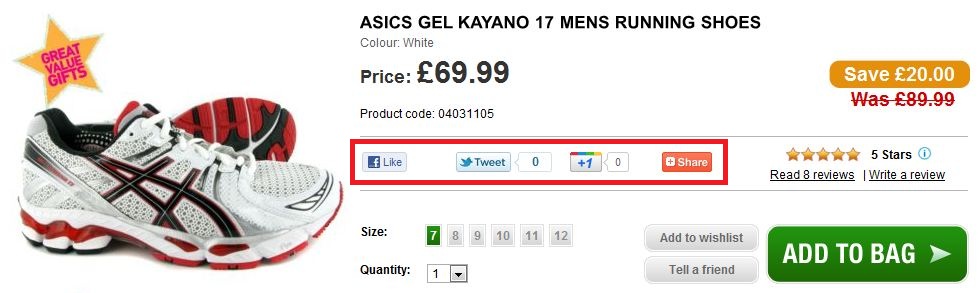
JJB Sports have a better implementation of social sharing buttons than the previous websites listed as you can see below. They have included the AddThis button, Tweet button, Google Plus One button and the Facebook Like button. It doesn’t appear to have gained much traction so far since most of the products I viewed had no social shares, although I did only look through a handful of random product pages.

Google
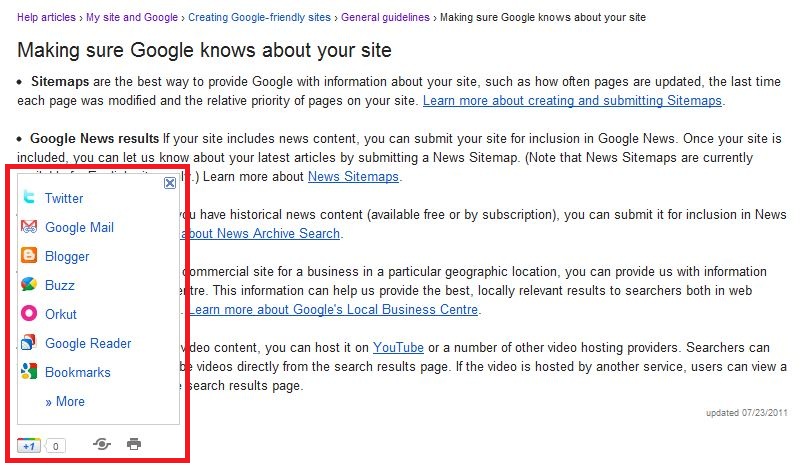
With Google having recently launched their own social media platform, Google Plus, their Plus One button has been showing up everywhere and almost forcing people to begin to Plus One different websites. Here is an example of one of their Google Webmaster Guidelines posts and you can see that they have actually been nice to the other platforms (for a change!) and given users the ability to share the content on a range of platforms.
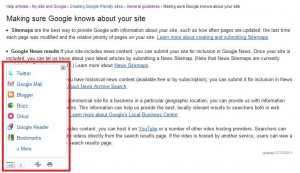
They have also integrated the Plus One button into the search results to try and get more people to use it, although more recently this has disappeared and will only appear when you mouse over a listing.

Whether you agree with how Google is pushing their own services or not, this is a good implementation of social sharing.
Website With Great Social Sharing Options
Now we can take a look at some websites who have nailed social sharing on the site, so much so that the number of shares their content gets of phenomenal.
SEO Book
SEO Book do a fantastic job of making social sharing buttons very visible, which is one of the reasons why their content is shared a lot. Below is an image of their recent blog posts and you can see it has had over 700 social shares, and likely many more which aren’t directly listed.
Search Engine Land
Search Engine Land do a good job of social sharing buttons as well, with the main sharing buttons placed above the story then additional sharing buttons offered by Share This at the end of the article. This way, the most frequently used buttons are easily identifiable without cluttering the page and the additional less used ones are still available.
Main social sharing buttons;
Other social sharing buttons at bottom of page;
Search Engine Round Table
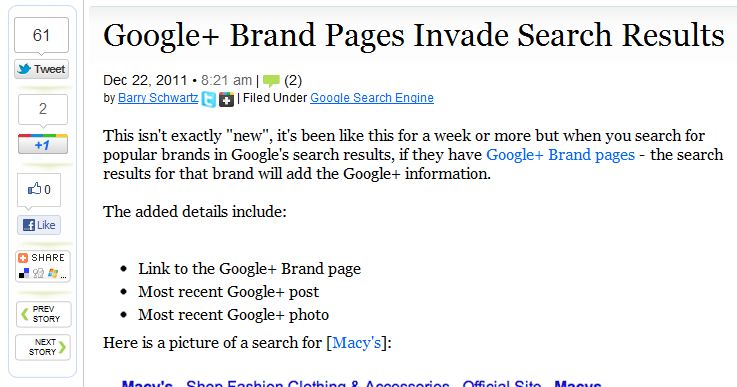
Search Engine Round Table also do a great job of social sharing in a very similar way to how SEO Book implement it. They also list the main social sharing buttons with the additional option to share more content via theAdd This button. The screenshot below was taken approximately 6 hours after the content was put online, so not bad to generate 60+ social shares within that time. I certainly couldn’t build that many links manually in such a short space of time!
Hotels-London
Over at Hotels-London.co.uk we have recently introduced some fantastic (if I do say so myself!) social sharing options so a user can easily see how to share the content throughout the site. The image below is a toolbar which is always visible at the bottom of every page and allows customers to create nice friendly shortlists and view recently viewed hotels. Go check it out, its ace

We also have the Add This button installed throughout the site in prominent places which allows the user to share via other popular social services.

Why Add Social Buttons?
If you website doesn’t excel at social sharing or you are still in doubt about why you need to be using social sharing buttons then here are some obvious tips about why you need to be promoting them;
- Social sharing helps promote your brand to more people FOR FREE. When a user shares the content on Facebook or Twitter, this content (and your brand) is then seen by all of their friends, family, followers and fans. Imagine the cost of trying to advertise to all of these people…
- By allowing people to share your content, they are likely going to come back and visit your website again. I personally use Twitter as a ‘read later’ list when I re-tweet random things that I spot. Other people will email things to their self for reading later at, generally when they spot something interesting (such as a nice holiday!) in works time and don’t want to get caught by their manager browsing this.
- Social signals help your SEO efforts!
- Social involves real people in the real world who are going to share and talk about your brand with other real people. The more real people you can get involved with your brand the better. This will ultimately lead to more sales, as long as people are talking about you for the right reasons!
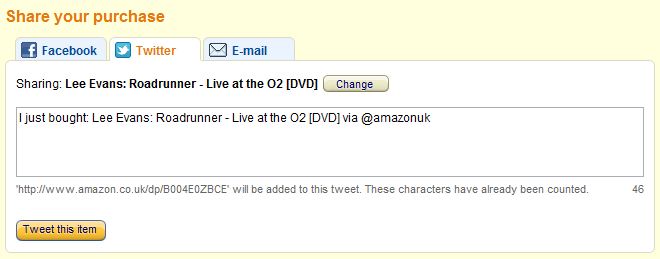
- When someone has just purchased a product, left a review or commented on some content then they like to brag about it. Let them tell their friends about it, it will ultimately result in more people coming to your website.
Here is a great example illustrating the last point. The example is when you have purchased an item on Amazon.
When it comes to link building, there are a couple of options
Option 1: Manually build low quantity and quality of links
Option 2: Build and promote great content which will attract natural links.
I certainly know which I would prefer to do. Get the great content and promote well, since this starts the ball rolling for content to be seen by many more people when it is shared over social media.
I hope this gives you something to go off and some good examples about the different options available. Most importantly is just getting something there at least, you can always improve on it later. For example, the Add This button takes literally less than 5 minutes to set up and install site wide. Just get it done.
by Michael Cropper | Dec 14, 2011 | SEO |
As a search engine optimiser you will come across programming every day in one way or another and while it isn’t a must have skill for a lot of roles, I believe it is essential to be able to program and have a good understanding of programming in general.
Some SEO roles require you to get hands on with the code and make the changes straight away, where as within other roles the actual hands on work is completed by the technical team/department.
Either way here are a few reasons why I believe programming is an essential skill to have.
Improve Working Relationship with Developers
If you can speak the language of the developers then it goes a long way to building trust with them. It is important for developers to feel that the work they are doing is contributing to the wider business objectives, so by being able to speak in technical terms means you can bridge that gap between business requirements and technical implementations. I am not saying everyone needs to be an expert programmer or website developer but it is important to understand how things work.
If you don’t understand how things work then how can you go about making things better?
Working on several large scale multi-national travel websites has taught me that changes to the site are much easier to make once you understand how the site has been built. If you want to change the H1 or Meta Title on a selection of pages, then if you understand that the pages are built based on templates then this can help you devise a solution with the development team which allows you to make the required changes. Possibly some kind of mini content management system would be useful?

Understanding how to program also means that you don’t go asking for changes that are either impossible to achieve, that take a long time to implement and provide little or no return on investment.
For technical people, getting things right first time and developing code properly is what drives them. For non-technical people, they are at the opposite end of the spectrum and are only interested in the end product. To achieve a successful product it is important for all parties to work together and ensure that code is developed in a robust way and in a way that meets the original specification.
Whether you lean a bit of Java, PHP, C# or ASP.Net, it doesn’t matter since it gives you an understanding of how things work. It will help you have a real conversation about a technical problem and enable you to understand why seemingly simple changes can actually take a few days work. On the plus side, learning to program is fun too!
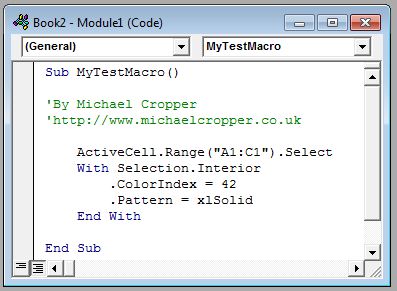
Ability to use Macros in Excel
If you can program, then you will soon be able to pick up the programming language in Excel, VBA (Visual Basic for Applications). With this you can quickly develop tools which will make your job and your life much easier by automating the regular tasks or pulling in the required information quickly.
There are alternatives to using Macros in Excel, such as using Microsoft Access, but my preferred method is still traditional programming as it offers much more flexibility since you can integrate this information within a database.
Website Scraping
As a search engine optimiser I have no doubt that at some point in your career you have needed to scrape a lot of information from a certain website. Weather that be for price comparison, scraping data from the HTML or just playing around for fun. Website scraping can be done at a basic level using tools such as SEO Tools for Excel, but if you want the more juicy data then you really want to be able to put this into a database and either use on your own website or use it for further research.

To Spot The Rodney McKay
If you don’t anything about programming then when you get told by the technical team that something can’t be done because “the CSS file is located on an external server” you will have no knowledge to be able to question what has been said. You will find a Rodney McKay in every organisation who will say everything is impossible to fix, so they seem like a savior when they solve the problem that didn’t really exist in the first place!
Knowing your onions and being able to question things is extremely important.

Using APIs For Extra Data
There is a lot of data analysis within the SEO industry and some of this can include pulling in data from external sources such as Open Site Explorer via their API, Application Programming Interface. Some other APIs that you will no doubt use at some point will be the free Google APIs.
Whether that is using the KML API which is used for creating cool Google Maps visualisations or using the YouTube API to automatically post new content to YouTube when you add it to your website.
APIs can be an extremely powerful tool to use when joining bits of information together and connecting online applications and will certainly help your normal SEO efforts by taking the manual work out of things.

Summary
Take what you will from this long winded rant about programming, but I can strongly suggest learning to program and learning more about how ecommerce websites work in general. All of this knowledge is never lost and it will help you bridge the gap between marketing, external demand (ie search volumes on Google) and the technical team.






Thanks a lot Mick!
No problem:-)
Nice checklist.
I would like to keep this table on my post notes, will really helpful for any post that i update.
Glad you found it useful. Feel free to keep that on your post for reference
Great check list,. I found the checklist what i needed.