The concept of a “Proxy” is often hugely misunderstood by people who know a little about these things, which results in a large amount of confusion for others who know less than those who know a little. It doesn’t help as the term “Proxy” is often used interchangeably with Reverse Proxy. While they have similar names, they serve completely different purposes. We’ll do another blog post soon on what a Reverse Proxy is. But before we do that, let’s take a look at a basic Network Firewall Proxy. What is it and why is it used?
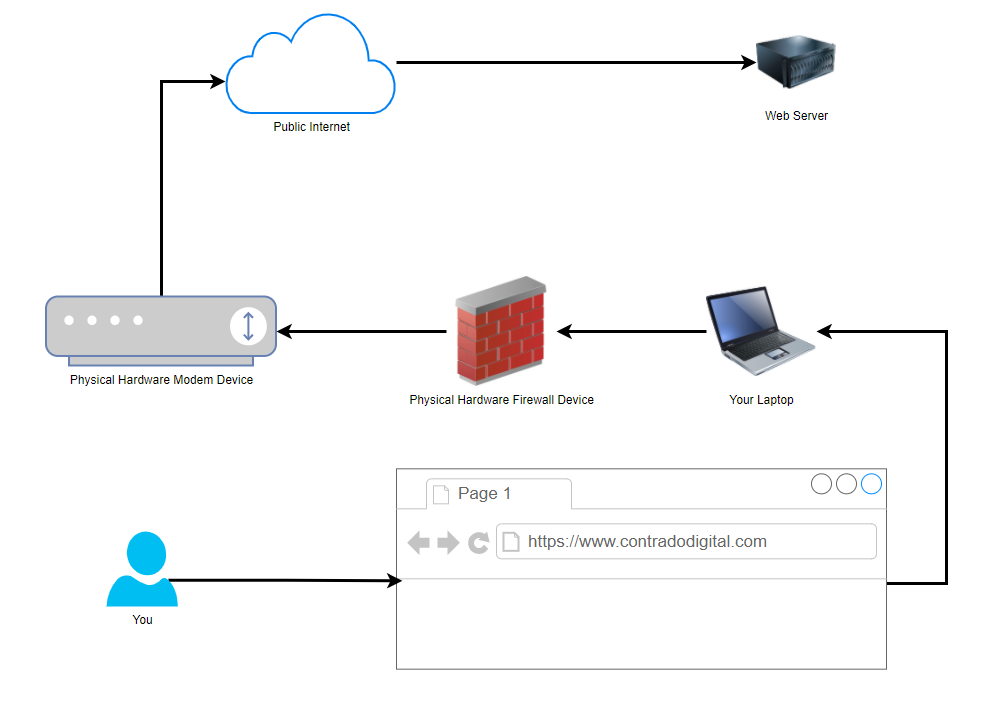
Basic Network Physical Hardware Setup
Ok, so this is a hugely simplified diagram to illustrate the point. Let’s look at the physical hardware involved. It helps to get the point across about what a proxy is and most importantly how traffic is routed from A to Z when using these types of technologies.
You type the website into your web browser on your computer and that is how the traffic is ends up at the web server where the website lives. Some of underlying routing between the Public Internet and the Web Server have been omitted for simplicity in this diagram as we are focusing on the Network Firewall Proxy at the moment.
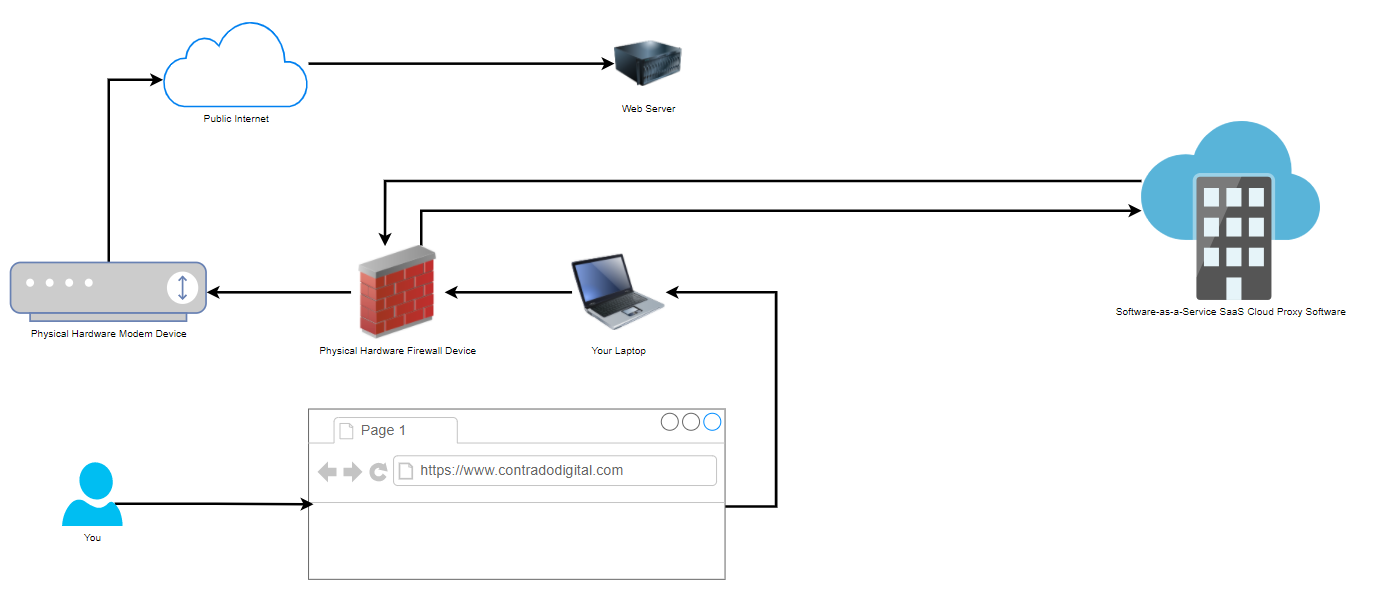
Physical Network Setup with Proxy Used
Now when we compare the above basic setup with the setup when you are using a Proxy, also known as a Proxy Server (generally something you manage) or Proxy Service (generally something you pay as a subscription fee for someone else to manage and you just plug into), you can see how there is just one additional step involved in the routing of how the network traffic gets from your computer to where it needs to get to on the internet.
That really is the only difference when you are using a Network Firewall Proxy VS not using one. As I mentioned at the start, don’t get this concept confused with things such as a Reverse Proxy which is completely different. Fundamentally, a Reverse Proxy does a similar ‘thing’, i.e. going via a middle man, but the architecture is significantly different and the tools used are significantly different. So despite their similar names, treat them as completely different things.
How to Configure a Network Firewall Proxy on your Hardware Firewall
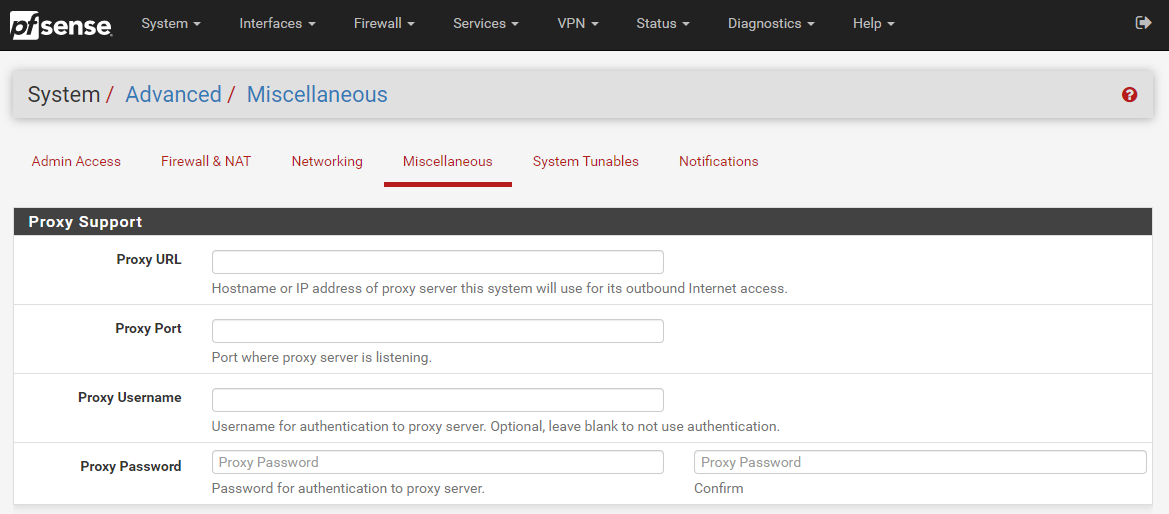
Well as the section heading kind of suggests, you do this on your hardware firewall. To help you visualise this, let’s look at a hardware based pfSense firewall device which is capable of configuring a Network Firewall Proxy, here is what that looks like in the settings;
The above image shows you how you can easily configure a Proxy within your pfSense Firewall so that you can achieve this middle man setup as outlined in an earlier diagram. This Proxy could be one that you host yourself or one that is an external Software-as-a-Service SaaS Cloud Proxy that you subscribe to. Either way, pfSense gives you the options you need.
Why Use a Network Firewall Proxy?
You may be asking yourself right now why we even bother to use a Network Firewall Proxy. Well, you tend to find that it is fairly common practice in large enterprises as they like to monitor the network traffic to see what people are doing on the network. The physical hardware firewall just isn’t capable of doing the job easily as this is purely at the hardware level which is very low level and hence low levels of user functionality.
To put it into context, while modern websites are often updated multiple times per day, you’ll tend to find the software on a physical firewall is updated once every few years, and even still this is really just to patch any critical security vulnerabilities that have been discovered, not to improve the user experience of people using this device. Hence why Software-as-a-Service SaaS Proxy Services have become so popular.
Generally in the enterprise world, Proxys are used as one type security mechanism to protect both users and the corporate network from attack. While there are positives to this there can be drawbacks too. For example, let’s say you are accessing a trusted source such as Microsoft Office 365 online platform, https://www.office.com, why on earth would you run that through a Proxy service as you know full well that this is a trusted source. Let’s be honest, if Microsoft has a security incident that relates to how users are accessing their cloud services, we’re all f****d, and using a Proxy or not using a Proxy is going to be the least of all our issues. So we have to be sensible about how we use Proxy services.
This extra leg in the network journey adds latency (aka. It’s slower) for users. Slowness results in lack of productivity and lack of profitability as a business. Which is where the next topic comes into play around a Proxy Bypass.
Proxy Bypass
Here is where things get a little more nuanced. The name Proxy Bypass does exactly that, it allows you to configure things which are required to run through your Proxy, and things that should not run through your Proxy. There are many valid reasons why you need to implement Proxy Bypass to filter some parts of your internet traffic to go through the Proxy and others to not go through the Proxy.
You’ll find that some Proxy services (internal or external) are quite frankly a bit rubbish and don’t perform properly. Take for example any modern technology that does SSL validation at the client side, some Proxy services actively strip out SSL certificates in-transit and replace them with their own on different legs of the journey. Naturally with modern technology, they can detect this interference, so when the final Request-Response comes back to the client machine, it distrusts the response and bins it off – and rightfully so. This can cause a lot of problems for software developers who are utilising modern development technologies to pull in packages and dependencies from remote sources as part of their systems using things such as Maven, Gradle, NPM, Git and more.
Corporate networks acting as a Man-in-the-Middle Attack is not great. While, yes, there are corporate security controls that need to be adhered to, but at the same time, this means that when SSL is being decrypted on-route, that things such as passwords and credit card details can be read in plain text if one were to wish to do so. This is a very fine line between corporate security and employee/user privacy.
Summary
Hopefully that is a good summary of what a Network Firewall Proxy is and now you know not to confuse it with a Reverse Proxy. There are many different types of Proxys out there, from large enterprise class systems to self-hosted open source systems too.
I wanted to write a quick blog post highlighting the importance of choosing the right IT hardware, in this example, the type of hard disk drive. It’s often difficult to find reliable information online around performance of IT hardware, and if you can find it, you probably find it near impossible to understand. You’re not alone, even people experienced in IT find this frustrating, so as an average user, this can be even more challenging.
What is a Solid State Drive SSD?
Before we jump in to look at the performance difference (and a little spoiler, its enormous), let’s take a look at what the physical differences are between a Solid State Drive SSD and a Standard Hard Drive HDD. They sound similar, but they are worlds apart.
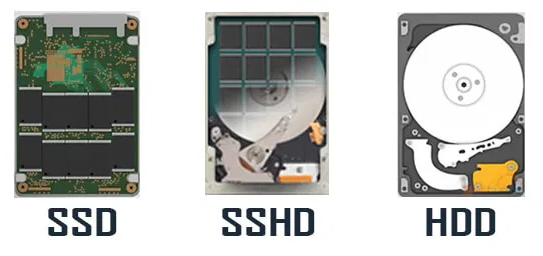
Fundamentally the core difference is how the data is stored. Ignore the physical shape or connectors on the device as that isn’t important, both Solid State Drives SSDs and Standard Hard Drives HDDs come with the same variety of connectors (SATA, IDE, USB, PATA, etc.) and come in the same variety of sizes (3.5” and 2.5”) with varying availability depending on your use case and other hardware factors. Then you have Solid State Hybrid Drives SSHDs which are a halfway house so they contain in the physical device part Solid State Drive SSD and part Standard Hard Drive HDD.
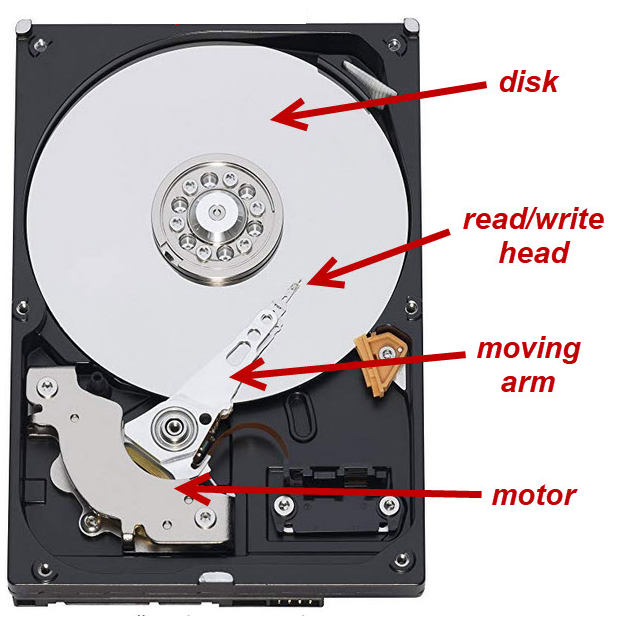
As you can see on the right, the Standard Hard Disk HDD, this contains what looks like a CD/DVD, it’s made of different material but conceptually it’s a very similar thing. It spins, so is a mechanical device and has a little arm that moves backwards and forwards to position itself in the right place to read the data on the disk.
As this is mechanical it has a natural limit to how fast the moving arm and the spinning disk can actually move. It’s one of the reasons why Standard Hard Drives HDDs have a fairly short shelf life and why you’ll find these types of hard drives start making wearing noises and clunking noises as they start to reach the end of their life. In the exact same way your car does when the wheel bearings start to go.
Inside a Solid State Drive SSD
When you compare a Standard Hard Disk HDD to a Solid State Drive SSD, this is completely different. You’ll find no moving parts inside a Solid State Drive SSD. This is one of the reasons why they are so fast, the limitation comes down to how fast electricity flows through the electrical circuit. On top of this, Solid State Drives SSDs are made from the same material as your RAM (Random Access Memory) which is lightning fast.
All those little black chips, that’s where your data lives. As you can see, no spinning disk.
Inside a Solid State Hybrid Drive SSHD
And for completeness, the Solid State Hybrid Drive SSHD. As you can see, it’s basically a mixture of the two types of technology crammed into the same physical space.
Ok, we’ve gone a bit off topic here, but context is important to set the scene. Back to the main point of this blog post, the performance difference between Solid State Drives SSDs and Standard Hard Drives HDDs.
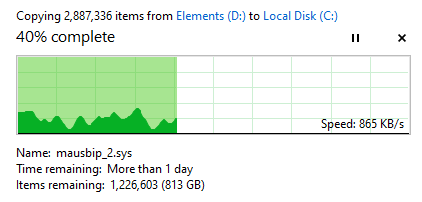
Working on a recent upgrade project which included some data migration I wanted to see the performance difference in actual numbers. We’re always told that Solid State Drives SSDs are faster than Standard Hard Drives HDDs, but what does that mean in number? Well, here’s what the performance difference looks like when transferring around 3,000,000 files from a Standard Hard Drive HDD over to a Solid State Drive SSD. I’ve included a few snapshots of the performance at different time points so you can see this isn’t a random performance spike.
Guess which row is the Solid State Drive SSD and which is the Standard Hard Drive HDD…..
But, why should you care? You aren’t moving 3,000,000 files on a daily basis. Does this really matter?
Well, yes, it does. And let’s put this into perspective. Everything you do on your computer on a daily basis and things that all your staff are doing every day is reliant on the performance of your IT hardware. Poor IT hardware performance results in wasted time for you and your staff. All those micro delays mount up. Everything from opening a Microsoft Word document, editing a Microsoft Excel document, creating a Microsoft PowerPoint presentation, reading your emails, having that Microsoft Teams video conference call and working in all of your business critical apps every day.
On top of this, what about all of your servers, web servers and core IT infrastructure. Are your customers accessing your website that is running on a Standard Hard Drive HDD which is significantly lower performance than a Solid State Drive SSD? This can directly influence your sales on your website if you are running an ecommerce website. All this matters.
Imagine two professional joiners and needing to fit a new staircase. One joiner only has in their toolbox a set of screwdrivers from a Christmas cracker;
Of the two joiners, who do you think is the best equipped to complete the job? Not only complete the job, but complete the job to a high quality and in the fastest time possible.
This comes down to performance not just of the hardware, this is performance of your business. And performance of your business is one factor that determines how competitive you are in your industry. Do you think companies like Google, Facebook and Apple are running on poor performing IT hardware?
This is what this looks like in practice. This is a great visualisation that I’ve been sent recently which highlights what this means for your business.
Summary of video for the time it takes to do the same activity;
Poor performance: 60 seconds
High performance: 4 seconds
That’s all for now. Hopefully this highlights the importance of investing in the right IT hardware. If you’d like any support with this for your business, drop us an email and we can be on hand to guide you through this process.
IT and project delivery rarely have a positive connection in peoples minds in companies both large and small. It’s almost the norm these days that IT projects always delivery late and over budget. But this doesn’t have to be the case. When you have the right people, processes and governance in place within your IT department, delivering projects becomes a breeze. One specific aspect we’re going to look at in this blog post is around achieving more by doing less. By that I mean how we can increase the throughput of delivery to deliver value to the business faster with the same amount of resource and the same amount of project demands.
Seems impossible, right? Well, no. It all comes down to process, communication and managing dependencies. Let’s dig into this a little more, firstly with an analogy for building a house.
Let’s say you are a housing developer and you have an estate of 100 houses to build. You know that you have 100 houses to build and you know the resources you have on your team for building those houses. Let’s say this breaks down as follows for 100x staff;
1x Site Manager
2x Quantity Surveyors
2x Project Managers / Construction Managers
15x Groundworks People
50x Brick layers
10x Electricians
10x Plumbers
5x Plasterers
4x Roofers
1x Carpet Fitters
So looking at that split, it sounds fairly sensible for a split of resources to enable delivery of 100x houses. For argument’s sake, let’s say that we have all materials on site at the start of the process to enable us to build the 100x houses without worrying around delivery timelines from suppliers. Before we set the team running ahead with building the units, we need to have a plan, and a plan isn’t purely to build the houses in the fastest time possible. A plan needs to understand resource dependencies, and in this case, this is people. The same as in IT.
Before jumping into the details of what this means. We have to think back to what this means for a business and why project delivery is so important. It comes down to two factors;
Capital tied up in Work-in-Progress, meaning that this is an opportunity cost as this limits what we can invest in elsewhere and often can result in having to source additional finance to support investments, when in fact with a change of approach that may not be needed.
Lost revenue for every day something is not delivered. In this case for houses, that is the profit that could be gained today by selling or renting a completed house VS waiting 3 or 6 months for that profit to be released.
The same is true in IT. All IT projects deliver value to the business, enabling the business to move faster, be more agile, and keep ahead of the competition. Delays in delivery in IT result in the company becoming a laggard in the industry.
So, let’s get back to the plan for building 100 houses. In a nut shell, we have three core approaches;
Delivery Plan 1 – Big Bang: We build all 100 houses, then start to sell them
Delivery Plan 2 – Phased Delivery: We build the houses in batches of 25 so we can release 4x lots for sale at one time. This tends to be how the majority of housing developments work.
Delivery Plan 3 – Agile Delivery: We build and sell the houses one by one as they become available.
Taking into account the considerations around having capital tied up and lost revenue, let’s visualize what this means in practice. For the purpose of illustration we’re going to assume;
Every property is rented
Every house takes 1 week to build end to end
Every house generates a rental income of £750 per month
The house is rented out the day it is completed
What this looks like in numbers;
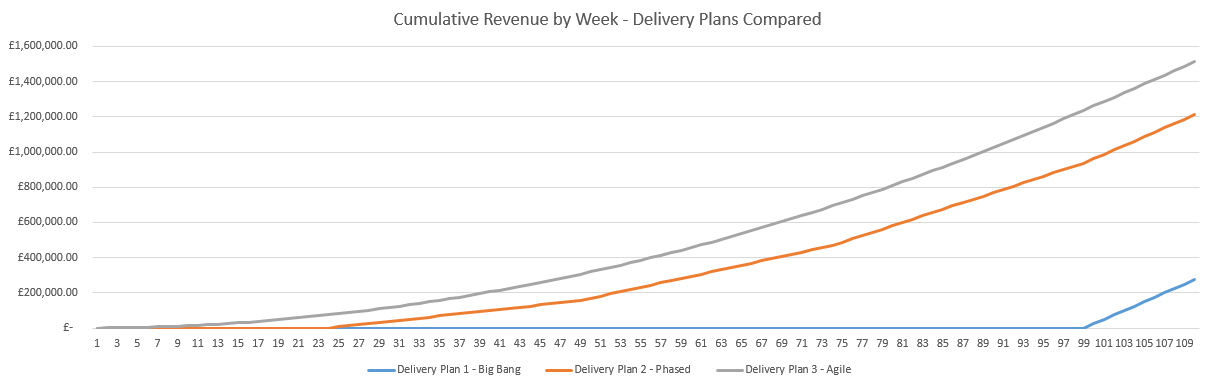
As we can see from the above graph, the Agile delivery plan, selling 1 house at a time, results in a higher cumulative revenue by the end of the 110 weeks. But this is not just a small difference, this is a significant performance improvement.
Delivery Plan 2 – Phase is 341% more efficient than Delivery Plan 1 – Big Bang. Delivering £937,500 revenue and releasing that working capital to the business in the 12 months.
Delivery Plan 3 – Agile is 25% more efficient than Plan 2 – Phased. Delivering an additional £300,000 revenue and releasing that working capital to the business in the 12 months.
When compared to the least VS worst efficient delivery method for providing value, Delivery Plan 3 – Agile is 450% more efficient than Delivery Plan 1 – Big Bang. Delivering an additional £1,237,500 revenue and releasing that working capital to the business in the 12 months.
Meaning you can delivery 4.5x the value to the business without changing either budgets or people resources available.
Now we know things aren’t always as smooth as this in reality, there are a lot of nuances which get in the way of this perfect scenario. And this brings us onto the main point of this blog post around achieving more by doing less. It’s kind of a given these days that Agile is the way forward for the vast majority of IT projects, or a combination of a more Waterfall-Agile (aka. Wagile) delivery for hugely complex projects that have a lot of dependencies both in and outside of IT.
There are always blockers throughout any process, whether that is building houses or delivery IT projects. Taking the house building example, let’s say for arguments sake that it takes a carpet fitter 2 weeks to fit carpets throughout an entire house. Regardless of which delivery method you choose, you ultimately have a bottle neck and this bottle neck gets compounded the more efficient your overall delivery method is (Big Bang –> Agile). In the Agile example, you are already 1 week over estimate (100% over planned time for delivery) by the time you deliver your first property because of the bottle neck with the carpet fitter. Not great. But, that’s still more efficient than Deliver Plan 2 – Phased because you’ve still sold one house in 2 weeks rather than none.
So how does this apply to IT project delivery?
Hopefully the analogies above has put things into context and you can relate to the elements within IT. The reality for something like IT is that it gets even more complex from the overly simplified example above.
Imagine you have 100x IT projects that you need to deliver and 100x IT staff. The nuances of skills, specialties and experience of staff will hugely vary which can result in issues cropping up that should never have been an issue if the right processes were in place an dependency on a few key resources where they only know how a certain system or technology works. Rarely in IT are we building things from scratch, we’re often either extending or upgrading current functionality and/or integrating with these systems.
Imagine having to re-build a wall on a house because it was done wrong on the first attempt and because that work wasn’t managed properly and peer reviewed for quality. This is what happens in IT on a near daily basis in many organisations, albeit it’s not quite a visible as this. It’s more like having to rebuild a server, refactor poorly written and unsupportable code etc. Ultimately, it’s all waste that needs to be removed.
What this often results in is a situation whereby multiple projects that are running in parallel agile delivery methods end up stuck on the same bottle necks with resources who are either specialized in a specific technology or only have access to that system and this can add weeks and months onto the delivery of a project which is ineffective.
Take the simple example, if we have 21x staff and 4x projects to deliver. We could split this up as;
Parallel Projects: 4x Projects of 5x staff and 1x shared resources with specialist skills
Sequential Projects: 1x Project of 21x staff including the specialist resource
Let’s say that each project takes a total of 4 weeks to deliver.
Given that, in the Parallel Projects delivery method each of the 4x projects will be complete in 4 weeks, so we can deliver 4x projects in 4x weeks, but, only at the end of the 4 weeks.
When compared with the Sequential Projects delivery method, we’d deliver 1x project per week for each of the 4x weeks. Delivering value faster and without blockers. The reality is though that while the 20x staff working on these 4x projects are wanting to get them over the line, the specialist resource is likely working across 20x, 30x, 50x other projects too where they are required only for a small part of the project. So this person/area soon becomes a significant blocker on many different projects resulting in large delays across the entire IT department.
So what’s the solution?
The reality is that this is a complex beast to manage but there are a set of guiding principles that can significantly enhance IT project delivery to increase the throughput of work to delivery more by doing less. These principles are;
Identify common blockers on projects, and put in place measures to ensure that no longer becomes a blocker. Whether that is training and upskilling other staff, putting in place processes to ensure less experienced staff can still do work in this area as long as it is peer reviewed by an experienced member of staff etc.
Significantly reduce parallel work streams, you can’t effectively split your workforce more than 25% across active projects, i.e. 100x active projects would require 500x staff. If you’ve only got 100x staff, you need to manage the active projects to around 25x projects at any point in time so you have 5x people per project so you can focus. The rest go into the backlog to be worked on in suitable priority. You will always find that you’ll need that 6th person at some point, and you want them to be available when you need them, not to delay the 5x people working full time on that project. It is not IT’s job to prioritise projects based on either opinion, seniority of who asked for it, or whoever shouts the loudest. Put in place a process where the business has a forum to collaborate with senior stakeholders so they can inform IT what the IT priorities are then IT can focus on getting things delivered. Also keep in mind that you should probably split this as 50% Projects, 25% Business-as-Usual (BAU) support and 25% Internal IT Improvement Projects (as often these underlying issues cause delays on all projects so they need to be resolved).
Arrange staff into project delivery squads that can be focused on the delivery of a single project without distractions.
Documented processes are absolutely key to getting this right, and making sure that staff are fully aware of the processes. Far too often processes are informal and/or misunderstood which causes confusion for staff. Basic governance is key.
Tooling, training and peer review help to spread skills and knowledge throughout the delivery squads to reduce dependencies on single people and increase productivity. Build this into the processes.
Ok, this is a bit of a play on words to help people understand how technology components are connected together. As the old song goes, the toe bone connected to the foot bone, etc. in the Dem Bones song. We’ll skip over the anatomical inaccuracies of those words… the point is, things are connected.
In the world of technology, things are more connected than you can ever imagine under the hood, it’s no wonder why people struggle to grasp the concepts of how the pieces of the puzzle fit together and why some things work in one area and the same thing doesn’t work in another area. It all comes down to connectivity and how technology components are ultimately built on top of other technology components to perform the features you see as a technical user.
{Insert Latest Technology Trend Here} is the Future – Implement it now!
Is it? Is it really? Is it really anything new under the hood? And if it truly is, can you draw a diagram to explain how and why it is better than the plethora of other options that are already available and have been available for years? If you can’t, you need to go back to the drawing board to start to understand how things plug in, work together and how the entire technology stack is built on the foundations of those technologies that have come before.
Take Docker as a prime example. I’m picking on Docker a little here as I’m getting a little bored of discussions about how Docker is the future of the universe. In reality, it’s not really that different than technology that has been around for over a decade other than the added ability to create cross-node Docker clusters through the likes of Kubernetes and some pre-packaged (aka. inflexible) ‘fake’ images – yeah, that’s pretty cool, but really? Is it actually necessary for the 95% of systems out there? In any real world situation, you’d just beef up a VM and ensure there is decent resources, proper failover and redundancy in place – job done. Unless you’re working for the likes of Google and Facebook, you should probably take a pragmatic approach and achieve the same result with 5% of the effort required.
Look, I’m not against these technologies, they’re great. But. You have to have the resource, technical capability in the specific software and technical understanding of the full technology stack to understand how everything fits together, and that comes with a cost. This isn’t something that comes overnight for anyone, so you’ve either got to be prepared to put in a lot of effort training and developing your staff, or get your cheque book open with your quill ink pen at hand ready to start writing some fairly hefty payments to get the staff/contractors in you need to develop this type of setup.
Your {Insert Latest Technology Trend Here} Bone is Connected To Your…
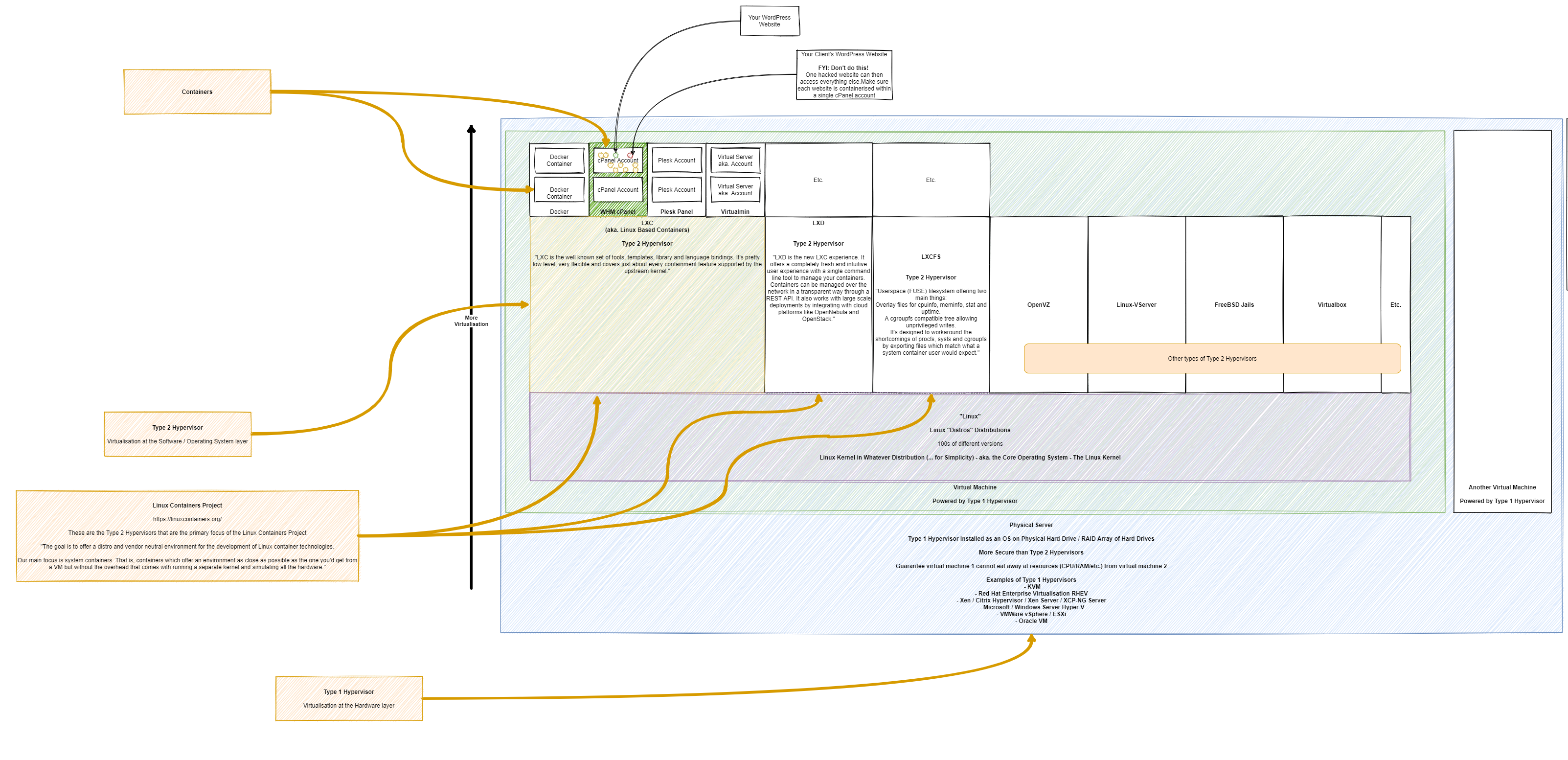
Taking a look at WordPress specifically as this came up in a recent conversation to help to illustrate how all this fits together. Basically this fairly large diagram below (click/right click and open in new tab, to open in full screen to view!) helps to highlight how the different types of technologies fit together in the technology stack. WordPress is simply the one that is highlighted throughout the diagram with the others less of a focus to help to illustrate the point.
What you will notice in the diagram below is how there are so many flavours of technology at the same technology stack layer that you need to understand how they are aligned. There is an enormous amount of similarity between a lot of the common technologies that are branded as {Insert Latest Technology Trend Here} – So when you get into the detail and discussions, you need to make sure your discussion point holds weight and this only comes with a solid understanding of how the technology stack works.
Basically at the simplest level…. Your Physical Hardware is connected to the Type 1 Hypervisor … is connected to the Type 2 Hypervisor … is connected to your application. Simple, right? Well, as you’ve probably realised when reading the docs from all the software providers at the different layers of the technology stack, it’s not always that clear what sits where.
The core concepts of the different layers are as follows…
Physical Hardware Virtualisation – Single Virtual Machines
This layer basically securely segregates your hardware resources into logical units that have defined boundaries. Think of this in the same concept of a piece of land with houses on. Once you’ve built one house (aka. a Virtual Machine) then that house cannot suddenly decide to take resources from the second house since it is not allowed to access that space.
Type 2 Hypervisor Technology –aka. Landlord / Owner Controlled
Imagine this as a property you own, whether you live in the property or rent it out. As the ultimate owner of the property, you decide what can or cannot be done within the physical space. You determine the boundaries of which the tenant can operate. You may decide that there can only be one tenant in this location, it may be your own organisation, or you may open this out to other organisations, either way – this is your choice. By this very definition, in technical terms, you get to decide what software can or cannot operate in this environment – aka. Shoes off in the house rules etc.
As you’ll see in the diagram, there is a wide variety of software that allows you to configure these Type 2 Hypervisor technologies to suit your needs – each with their own specific pieces of functionality.
Type 2 Hypervisor Technology – Account Specific
This is the next layer which determines what specific accounts can or cannot do. For example, taking the landlord example a little further, let’s say you have a house (aka. the Type 2 Hypervisor Technology) and you can then decide if Tenant 1 in Room X is allowed to ‘keep pets’ VS Tenant 2 in Room Y is not allowed to ‘keep pets’. That is the level of control that is capable with technology layers.
Hence why the security element is explained as such, anything within this layer is the security of the owner of this element. For example, imagine a tenant who is the owner of a rental room in a house. If this tenant decided host a dinner party of well-rounded guests, then all of a sudden decided to also invite around a rowdy crowd of guests (aka. bad actors in the web space, sending spam or receiving lots of spam traffic), then this is clearly going to interrupt the evening. The reality of web hosting is no different. Disruption results is lower performance for other websites hosted within this layer.
If you need the security of performance, you need to be moving to a service / subscription / plan with your provider that can accommodate you needs which will naturally come with an additional price tag. Hopefully that explains why – In summary, it’s because you are reserving an amount of hardware resources (CPU, RAM, HDD) to secure the performance needed of your server to keep the lights on for your end customers to do business with you.
Summary
Hopefully the diagram above helps to convey some of the common technologies and where they sit in the layers. When I say layers here, I’m not talking about the traditional OSI Layer Model as quite frankly that has been broken for years – Another blow post to follow on what I believe this should look like in the modern world.
It’s also important to understand these layers and how they blend with the cloud technology providers. A lot of the time this type of information is abstracted from you to “help” (but it rarely does from an understanding perspective…). Regardless of where the technology stack ultimately lives, it’s important to understand these building blocks.
Cloud is the Future!
As the saying goes, the cloud is just someone else’s computer. And that goes for the likes of Amazon Web Services (AWS), Microsoft Azure or Google Cloud Platform (GCP). All they have under the hood is some fancy bit of tech to easily create the different bits of the diagram above, and many more elements too that are not in that diagram. By the way, there are some pretty awesome open source versions of the cloud tech they are using, or derivatives of it – but I’ll leave that for another blog post!
This blog post isn’t about cloud VS non-cloud, I’ll do a blog post in a while about how the cloud is doomed for failure in the next 5 – 10 years once people realise the true cost involved, but that’s for another time. This is when open source cloud platforms will really start to come into their own and usage really starts to grow in a hockey stick manner.
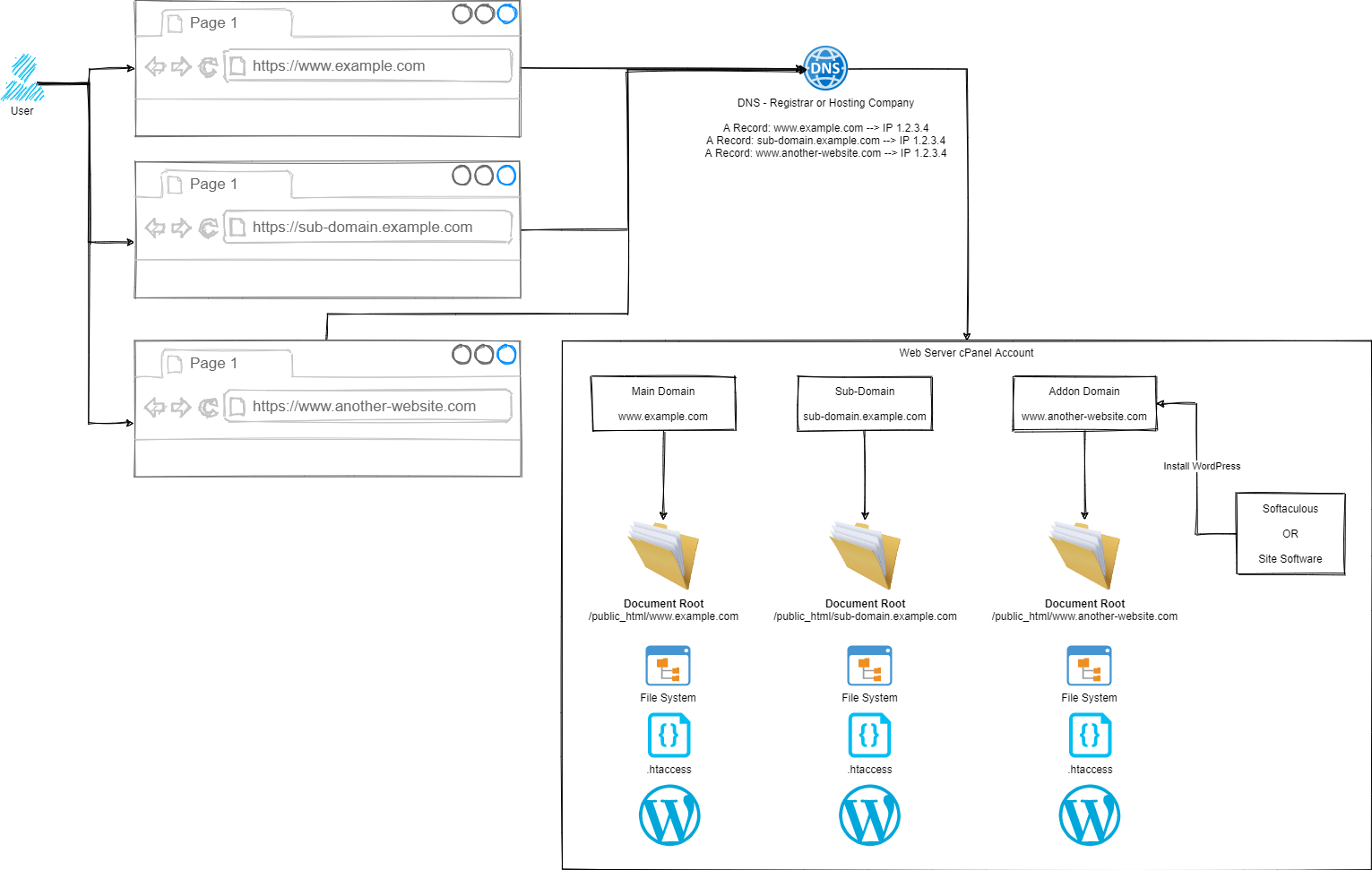
Ok so this was an interesting question that came through recently when I was asked about why someone couldn’t access files via a nice URL that they could see on the cPanel File Explorer and what they needed to do so they could access the files. There was a couple of very interesting technical scenarios that had been done as a workaround, but fundamentally this was due to a lack of understanding of how routing works from Point A, the user in the web browser typing in a URL, through to Point Z, the technical gubbins deciding on what content to serve.
So we went back to the drawing board to show how the different parts of the process work.
Simple, right?
Ok, let’s break this out into the few core areas and let’s discuss how the different parts fit together.
Step 1 – User Accessing Domain / URL in Web Browser
Hopefully this bit is fairly self-explanatory, the user types in something into their web browser, and this magically returns the correct information.
Step 2 – DNS
This is often a step that a lot of people misunderstand, and with good reason – it’s not a straight forward topic to understand. I’ll to a more detailed blog post about DNS at some point in the future as it is a hugely misunderstood topic.
Ultimately though, the DNS translates the user friendly domain / URL from Step 1 into an IP address which is the server where your website(s) live.
Step 3 – cPanel Routing
Ok, this is a little over simplified as there are quite a few steps between Step 2 and Step 3, but for the purpose of the average user of cPanel, this is sufficient to explain how this works. If you are a more advanced user such as a user working with WHM cPanel or an infrastructure engineer working at the physical hardware layer you’ll understand there is a lot more in between. This blog post is not designed to cover those details as they don’t apply to the average cPanel user.
Ultimately all we care about as a standard cPanel user is that Step 1 and Step 2 magically route through to my cPanel account.
From here, this is where we have full control over how a website URL route through to the correct files on your cPanel account. It doesn’t matter if the site is categorised as a Main Domain, Sub-Domain or Addon Domain in cPanel terminology. All we really care about are two concepts;
Domain
Document Root
Hopefully the Domain is obvious what we are talking about here, the www.example.com, sub-domain.example.com or www.another-website.com.
What confuses a lot of people is the concept of a Document Root. This is not just cPanel terminology, this is terminology used across a wide range of software and applications. In a nutshell, it simply means where the starting point is for documents related to this ‘thing’.
So let’s put that into context.
For a Main Domain such as www.example.com, the Document Root is likely set to /public_html/www.example.com/ by default.
For an Sub-Domain such as sub-domain.example.com, the Document Root is likely set to /public_html/sub-domain.example.com/
For an Addon Domain such as www.another-website.com, the Document Root is likely set to /public_html/www.another-website.com/
And it really is as simple as that. It’s all about how you’ve got things configured within cPanel which determines how these things actually work. There are configuration screens within cPanel where you can manage Addon Domains and Sub-Domains, so you can technically configure these however you want. It would always be recommended to keep things sensible when doing this as mis-configurations can result in a lot of unexpected results.
Word of Caution
While you can do this within cPanel, you probably shouldn’t for security reasons. You need to understand that in the scenario whereby a single website or sub-domain or addon domain contained within the single cPanel account gets hacked, this can spread with ease to every other website hosted within this single cPanel account.
If you are containing multiple websites within a single cPanel account, you need to accept this risk and be prepared for the worst case scenario. If these are all your own websites and you fully manage and control them, then this significantly reduces the risk – assuming you know what you are doing. But please, never host multiple websites within a single cPanel account where there are multiple website administrators such as hosting websites for clients, friends, family, contacts, charitable organisations etc. You need to ensure that each of those websites is as an absolute minimum set up as a separate cPanel account as you cannot trust the actions of other website administrators to meet your security standards.