by Michael Cropper | Apr 22, 2015 | Events |
We recently attended the Cyber Security Conference which was looking at the enormous problem that is cyber security, or should I say cyber crime. Cyber security is a bigger issue than most businesses realise, with central government classifying cyber security as a Tier 1 threat, the same level as terrorism. Yet we will see many businesses not taking adequate steps to secure their businesses. At Contrado Digital, our focus is on digital marketing, websites and other online topics. These naturally are open to many of the issues related to cyber security which often aren’t in the realms of the traditional IT Support type companies who manage the physical security related to network routing and more. There is naturally a cross over between the two areas, which is why we have started to cover this area a little more recently as it is an area that is not understood that well by most businesses, particularly those within the SME bracket.

Security Investment
One phrase that you should really think about is this; Good security will cost you, bad security will cost you more. This is one that resonated with me at the conference as I can relate to this on many occasions when businesses have come to us with problems related to security. On many occasions we hear businesses say things along the lines of “We don’t have access to our own website, webserver or social media accounts and the web developer has gone AWOL, what can we do?” This is security and is a big risk for your business.
Coming back to the phrase, good security will cost you, bad security will cost you more, what can you realistically do in this situation? Well, you have to start again in many instances which is a much more costly approach than simply getting the right processes and training in place within your business from the start. This specific example is the reason why we have put together a free resource for keeping tracking of your digital assets with our Digital Assets Tracker document.
Going beyond the basics, it is hugely important to look at the training requirements within your organisation and invest in a creating a security culture. To the point whereby local IT support company Holker IT have recently launched a campaign to educate businesses with their Think Before You Click campaign. So many issues related to security are human error due to lack of knowledge, so make sure your staff have been trained up and are aware of the latest security threats that could cause a serious problem for your business.
Planning for Problems
No system is infallible, this is an unfortunate fact of life when dealing with computer systems, programs, hardware and processes reliant on human input. So what are your plans for when something does happen? What, you don’t have any? Far too many businesses don’t have any serious plans in place for when cyber security issues arise and simply have the opinion that it will never happen to them. I’m sure the people involved with the recent celebrity scandal thought the same…
The reality is that something will happen and you need to plan for when this does and put in procedures that can mitigate against issues. This broadly falls into three categories;
- How will you deter it?
- How will you detect it?
- How will you respond to it?
Thinking through the potential problems that could occur and planning for this will mean you have a much more secure business, lower your chances of financial and reputational damage along with allowing you to focus on what is important, growing your business.
Let’s look at a few examples to put things into perspective.
Distributed Denial of Service (DDoS) Attack
A cyber criminal has decided to attack your website with a Distributed Denial of Service attack (DDoS) and your website is no longer accessible. Read up about an example a while ago that we had to deal with. This was only a small scale attack in the grand scheme of things, what if it had been bigger?
How will you deter it? – While you cannot control if someone has decided they are going to attack your website, you can put in place measures to pro-actively block attacks. For example, with WordPress, there are plugins such as Limit Login Attempts and Akismet that will help to deter DDoS attacks which should be installed along with other professional security plugins which we also use.
How will you detect it? – What systems have you got in place to detect when this is happening? Or do you simply find out when you happen to check your website and realise that it is not working? How many enquiries or lost ecommerce sales have you had during this time? Any reputable web hosting company will have pro-active monitoring in place to alert you to when your server falls over due to hugely increased loads, allowing you to respond in a timely manner and deal with the issue promptly.
How will you respond to it? – What are you actually going to do to stop the attack? Simply sit it out and watch it unfold until it hopefully stops? If your web server has already fallen over, then there is little you can do until you can gain access again. Depending on the technical configurations you have in place along with the nature of the attack, it may be possible to divert traffic to another server, allowing you to get access to your main server and implement security changes such as blocking all traffic from a certain IP address or a group of IP addresses. Then once the change has been made, you can redirect all traffic back to your main server which should reduce the load and allow your websites to function normally again. Again, certain hosting companies pro-actively monitor for DDoS attacks and intervene by automatically blocking suspicious traffic on the network level before they even get to your web server which is great.
WordPress Brute Force Password Hacking
A cyber criminal has decided to hack into your website by guessing your administrator password. They have wrote a basic computer programme which loops through common passwords before running through a password generator script in a logical order to find your password.
How will you deter it? – There are plugins available for WordPress which will automatically block anyone who attempts to login to your website using the ‘Admin’ username which is the WordPress default. You should always be using a unique Administrator username which isn’t ‘Admin’ or ‘Administrator’. Pick something unique for you which is hard to guess. This means that any hacker has to guess both the username and password which is exponentially more difficult. In addition, certain plugins will automatically block IP addresses from accessing your website if they guess any password incorrectly a set number of times.
How will you detect it? – There are plugins available for WordPress that will automatically send you an email when an IP address has been blocked from logging in to your website due to too many failed login attempts. This can alert you to a problem and can help to highlight the start/stop of any attack that is happening.
How will you respond to it? – Responding to a hacking attempt which is aiming to guess your password is about being pro-active. If you have a password which is ‘password123’ then this isn’t the most secure password in the world and could be cracked by a computer programme within minutes. Always make sure you are using strong usernames and passwords for your WordPress websites to avoid vulnerabilities.
WordPress Plugin Vulnerability Exploits
A cyber criminal has noticed that you are running your website from the world’s most popular content management system WordPress and has decided that you are a good target. They know that many WordPress website owners don’t update their plugins and patch security holes regularly so have decided that you would be a good target for hacking into. After all, they already have a list of what has been patched by comparing the older versions of plugins to the latest versions of plugins so they have an easy shopping list of exploits to try and hack into your website with.
How will you deter it? – What activities are you doing to avoid leaving your WordPress website open to vulnerability exploits? You are keeping all of your plugins, themes and WordPress core up to date, right? This is the absolute minimum that you should be doing to avoid cyber criminals taking over your website. You really need to be thinking about subscribing to a service that will detect threats in real time which will keep you much safer.
How will you detect it? – How will you detect if your website has been exploited? Often many website owners and businesses have no idea that their website has been infected by some malicious code that has been placed there which could be hiding in the background working away. When a cyber criminal exploits a vulnerability in your website, this usually isn’t about changing the visual appearance of your website, this is usually about hiding code away so that you think everything is fine. Again, there are many services available that will scan your core WordPress files for vulnerability exploits and raise a flag if a piece of unexpected code is found which is likely to be an exploit.
How will you respond to it? – Now you have managed to detect the problem, getting rid of the problem can be a whole other challenge. Depending on the complexity of the hijacked code will determine how easy or difficult this is to get rid of. Prevention is always better than dealing with these types of problems when they occur since many sophisticated pieces of code will hide their self from your view and only show to search engines and only under certain circumstances.
Summary Planning
The three examples above are just the basics when it comes to protecting your website from attacks. The real focus should be about planning for problems so your website doesn’t become one of the statistics around hacked websites.
Do not think that this will never happen to you, it will. Cyber criminals often don’t care about you or your website specifically, they simply create computer programmes which crawl the internet (in the same way Google does) to find all target websites (i.e. WordPress and others). Once they have found their targets, they simply automatically test each website for known vulnerabilities. At this level, which isn’t hard to achieve, hacking is basically a spectator sport. Press ‘go’ on your script and you just sit back and wait for a report to be generated for every websites in your target list (bearing in mind that WordPress powers over 23% of websites on the entire internet….that’s a lot of targets…) with a list of which vulnerabilities they are open to.
You cannot rely on any kind of enforcement here to get you out of a sticky situation. The unfortunate reality is that you are on your own (or getting help from us…). There are so many potential problems beyond the three examples above that people need to protect their website from this is an area that needs serious attention. With many hacking attempts coming from over-seas, there is very little jurisdiction that can help dealing with problems after they have occurred.
Thankfully we offer WordPress Security services which are designed to keep your website safe and secure so that you are prepared and don’t fall victim. Always think about any potential problem in relation to your own website and business; How will you deter it? How will you detect it? How will you respond to it? Reactive approaches are too late. Proactivity is key.
Scale of the Problem
A recent report from Trustwaves in the form of their Global Security Report found some interesting statistics including;
- 45% of data thefts are for non-payment card data
- Ecommerce made up 54% of assets targeted
- Point of sale (POS) breaches accounted for 33% of investigations they did
- Retail was the top compromised industry- likely due to the nature of data they keep about customers in databases
- 85% of the exploits detected were from 3rd party plugins
- Weak passwords contributed to 31% of breaches
- 96% of investigated applications had one or more serious security vulnerabilities
- Ecommerce and website breaches rose by 5% since 2012 – I believe this figure is hugely understated
- The average number of vulnerabilities identified per application was 14
- 100% of mobile applications tested contained at least one vulnerability
- 71% of victims did not detect the breach their self
- The average number of days from initial intrusion to detection was a whopping 87 days
When terms such as application, website, ecommerce etc. are used. This is often the same underlying programming languages and exploits that are being used in different ways. Do not think that these problems are isolated to a specific area.
Going beyond simply looking at the enormous numbers behind these problems. There are services available online including Shodan which has a fantastic blog covering lots of ‘interesting’ topics. The service classifies itself as ‘The search engine for internet-connected devices’. I.e. Internet of Things, Webcams, Buildings, Websites, Refrigerators, Power Plants and more. I’m not going to talk about the technologies behind how all of this works here as this gets a little geeky. What is important is that for only $9 / month, you can literally search the world of internet connected devices for vulnerabilities.
So again, are you confident that you are protected and have the right procedures in place?
Physical Hardware
There was a lot of talk at the conference along the lines of physical hardware security and network security. A little beyond our area of expertise, but a couple of interesting points around this which may resonate;
- You need solutions at the network security level, not just software solutions. For example if you have a multi-site office, it was recommended that you look at using MPLS to protect your data in transit.
- Your home broadband provider can see what devices you have connected to your router. If you regularly work from home or you have a home based business, you may prefer to keep your business hardware private from prying eyes. It was recommended to always have an additional router between the router provided by your ISP and your devices so that wandering eyes cannot see what is connected to your network from further afield. For example, imagine a call centre employee noticing that your house appears to have 15 iPads, 3 iMacs, 12 iPhones and 4 smart TVs all connected to the router you were provided (yes, you have a big house…). This would certainly be more of a target for thieves. Whereas if they only saw that 1 additional router was connected to the network then they would simply look elsewhere.
Information Governance Programme
While this may sound like the setup for much larger multi-national organisations, it is important to recognise the importance for all businesses large and small. Larger organisations often rely on smaller organisations as part of their supply chain in one way, shape or form which are often a target for attackers due to the often more relaxed approach to information security.
Recently central government made the new Cyber Essentials certification a mandatory requirement for anyone bidding for central government contracts which highlights the importance. From many speakers at the event from mammoth organisations and senior positions in government were reiterating the importance of security throughout the entire supply chain. To the point whereby many large organisations are putting together training programmes for their supply chain to educate them about the standards that they expect.
Information governance is not just data, it is a lot more than that. It includes areas such as;
- Information risk management
- Information management
- Intellectual property
- Knowledge management
- ICT
All of which touch on some of the terms that you may be more familiar with; SaaS (Software as a Service), BYOD (Bring Your Own Devices), cloud, virtualisation, employees, customers, contractors, outsourced people/companies. Looking at this in more technical terms to see what areas are often attacked when you look at data assets;
- Data at rest – For example data in the many databases you use within your business across multiple systems
- Data in use – For example data that is stored in caches, security certificates, data in RAM
- Data in motion – For example networked systems
A professor from Lancaster University talked through a range of the options hackers have to access systems ranging from the obvious technical areas such as HTTP, downloads/uploads, SQL injection to the ones people often don’t think about as much such as FTP clients, emails/webmail, instant messaging, peer-2-peer, file sharing, HTTPS, STFP, SSH, VPN, protocol tunnelling including DNS, HTTP, ICMP, Box, Dropbox, image steganography, VOIP, routing control packets and more. Some of these you will likely never have heard of if you aren’t that technical, but I guarantee that you will be using them in some way without even realising.
The graphic below from Lancaster University highlights some of the common methods used;
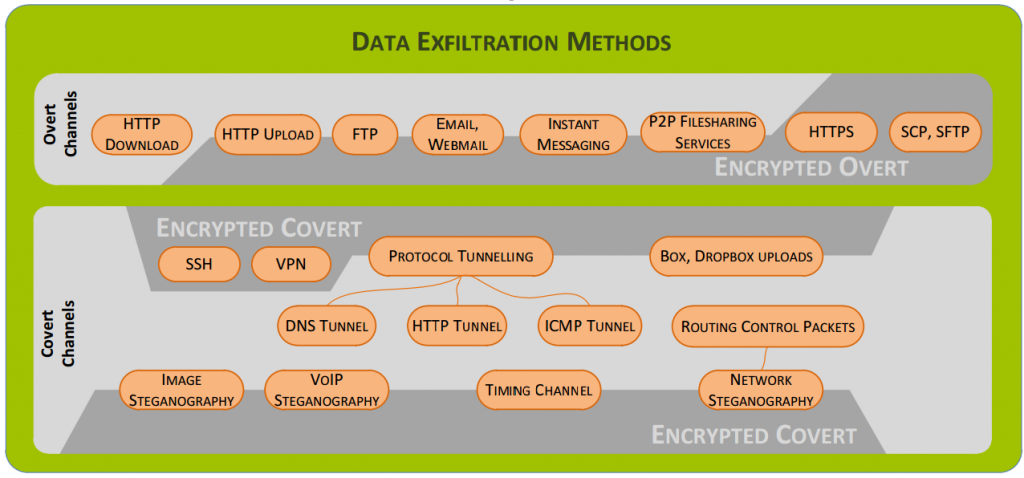
Again, all of these acronyms above are used by the many of the technologies that you use on a daily basis without even realising.
Summary
Cyber security is a serious problem. These are just some of the highlights from the excellent conference. Many other topics were discussed, although I feel that the people speaking about the more exciting topics would prefer if some of this information wasn’t boasted about so this has been left out for obvious reasons.
By far, the largest problem around cyber security at the moment which was reiterated by all at the event was around lack of education of the real problem that is out there. Many businesses simply have the opinion that it will never happen to them, or they are too small for people to care. This is simply not the case and I hope this blog post covering a small selection of the many exciting topics discussed will help to highlight some of the issues and what businesses can do to protect their-self online.
If you would like to discuss any website security related issues then get in touch or see how our website security audit could help. There are many aspects related to cyber security and we are by no means an expert on every aspect. With dealing predominantly with websites and online ‘things’ this is where our focus lies including details around specific technologies and systems. If you ask us about something that is a little outside of the scope of our expertise, then we can certainly put you in touch with one of our many contacts that are more suitable to support your business.
Resources, Sources and Further Reading
UK National Security Strategy: https://www.gov.uk/government/uploads/system/uploads/attachment_data/file/61936/national-security-strategy.pdf
UK Cyber Security Strategy: https://www.gov.uk/government/uploads/system/uploads/attachment_data/file/60961/uk-cyber-security-strategy-final.pdf
HMG Security Policy Framework: https://www.gov.uk/government/uploads/system/uploads/attachment_data/file/316182/Security_Policy_Framework_-_web_-_April_2014.pdf
Introduction to Cyber Security course from the Open University: http://www.open.edu/openlearn/futurelearn/cyber-security
Cyber Streetwise: https://www.cyberstreetwise.com/
10 Steps to Cyber Security: http://www.gchq.gov.uk/press_and_media/news_and_features/Pages/Relaunch-10-Steps-to-Cyber-Security.aspx
Competitive analysis of the UK cyber security sector: https://www.gov.uk/government/uploads/system/uploads/attachment_data/file/259500/bis-13-1231-competitive-analysis-of-the-uk-cyber-security-sector.pdf
Information Security Breaches Survey 2014: http://www.pwc.co.uk/assets/pdf/cyber-security-2014-technical-report.pdf
by Michael Cropper | Mar 24, 2015 | Events |
We recently attended the Manchester Digital #DigitalRevolution conference hosted at AutoTrader in Manchester. The event, as usual, was another fantastic event full of insights from the digital world and how things are significantly changing for businesses of all shapes and sizes.
With the recent announcement of a £4,00,000 fund for Manchester to support the launch of Tech North, this is a clear commitment how the world is changing and how every businesses needs to adopt digital technologies throughout every aspect of their business. While this isn’t a huge sum of money, it is a great start and builds upon the work from many other digital organisations, groups and partners within the Greater Manchester region.
We first heard from a panel of speakers who took a step back in time to look at where we have come from and how we have got where we are now. Taking Google as the example in comparison to the dominant search engines of the time, Alta Vista and Lycos (if you can remember those!) and looking at how Google managed to gain such an enormous market share. Current data puts Google’s market share in the up at almost 90% which is unbelievable. The one thing they did though is make their search engine easy to use for people. While all other search engines at the time kept adding more features, functionality, content, widgets and other clutter to their homepage, Google kept things simple and just allowed people to search. After all, that is what their entire business model is built on so why get in the way of people searching? In addition to this, Google’s AdWords platform was, and still is, industry leading. To the point whereby there is no real competition to this for targeting potential customers searching for your products or services.
The discussions soon turned to the skills gap that every business currently faces related to digital technology. A topic of conversation at every Manchester Digital event. The point was made about continual learning and about how essential this is for anyone and any business touching on digital. If you don’t move, you get left behind. It really is as simple as this. Whether this is related to personal career development or as a business. The build it once and forget about it approach is not suitable and if this is still your approach, you will soon (if not already) be in a position whereby your website and digital assets are out of date. We take continual learning extremely seriously which is why we are always getting out and about to industry related events, conferences and exhibitions along with sharing our insights on our client friendly blog and our developer blog.
On a personal level for your staff, are you investing enough in their skills and career development? Most companies within the SME bracket aren’t. I’m sure you have heard the saying “What if we invest in training and people leave….What if we don’t invest in training and they stay….” This couldn’t be truer with how fast the digital world moves. We run regular digital training events and also run bespoke training sessions for your individual business needs which cover many of the topics and more listed on our events page.
Next it was reiterated about utilising all of the digital marketing opportunities open to your business, SEO, PPC, Email Marketing, Social Media, PR, Branding, Marketing and more. Simply doing things in silos isn’t going to cut it, there needs to be an integrated marketing approach across all channels.
It was also predicted that by 2020 we will have homes with no computers. To the point whereby regular devices around us would allow us to connect with the digital services seamlessly. We have already seen the proliferation of smartphones and how this has changed customers’ lives. Only last year, the BBC announced over 50% of their traffic to iPlayer and recently announced that now over 65% of traffic to the BBC website is now using a mobile or tablet device. This is an enormous change in a very short space of time. Which is one of the reasons why Google recently announced that they are going to be giving a boost in the search engines for mobile friendly websites and penalising websites that aren’t mobile friendly. This point was stressed to the point whereby if your website isn’t being built with a mobile first approach then it is soon going to be obsolete if people simply cannot use key functionality on your website. People are inherently lazy and don’t want to go back to their laptop or desktop computer to complete a task.
Another prediction, which I personally don’t agree with, but it was predicted that Facebook would lose 80% of their users within 5 years. We will see how accurate this prediction was. With over 1 billion monthly active users on Facebook globally, I can’t imagine this changing so dramatically.
Going back to the point about continually investing in all digital areas of your business, we were reminded about how giants can fall with examples cited including Nokia and Blackberry. Continual innovation of your digital assets, products and services is essential to survive.
Discussions soon turned to educational establishments, with a bit of unfair bashing as we are starting to see many leading organisations such as MMU and Salford University running courses designed for the needs of the digital world. That said, there are still many educational establishments who are still running marketing courses that don’t even touch on the digital world, which are totally pointless in this modern day and age we live in.
Google’s recent 5 predictions were highlighted on the day which I’ll expand on a little to put them into context;
- Acceleration of everything: This needs no further explanation. The rate of change for digital technologies shows no sign of slowing
- Ubiquitous internet: Internet is soon going to be available anywhere and everywhere. People expect this. Manchester city centre now offers free WiFi, most bars/cafes/restaurants offer free WiFi. This significantly changes how people behave, to the point that they have access to everything from anywhere. This does raise some serious security related issues which we will cover in more detail in another blog post as it is a serious area businesses need to consider and plan for.
- Any and all screens are a gateway: The idea of a computer has gone. Anything can be a computer these days to the point whereby screens and devices are simply a gateway for you to access anything you need online.
- Everyone is informed: No longer does information or knowledge have to sit in silos. The Government Dashboard is a prime example of the UK Government leading the way in this area.
- Internet of Things: This is going to change the world we live in
The idea around watching YouTube on the TV, Game of Thrones on the PC, playing games on a mobile device and watching iPlayer on a tablet is natural to the younger generations. There are no longer clear boundaries of what activities you perform on different devices. KPMG put together a global report that looks at The Changing Landscape of Disruptive Technologies [PDF] which is well worth a read through the key statistics and findings. Putting this into perspective, a piece of technology launched a few years ago from NEC was brought up. The technology turns traditional billboards into smart billboards whereby content is personalised to you as a person. The billboards can understand your gender, approximate age, facial recognition and more. Personalised advertising using traditional methods. More information can be found here and here. While I’m not too sure this will come to fruition on the masses, it is never the less interesting technology and shows where the future is heading.
Next we looked at open data and the importance of sharing data across towns, cities and countries. Leeds have the fantastic Leeds Data Mill which shares over 140 open data sets within the city. With data sets ranging from locations of parks, fire stations and more, it is a good starting point to a fully open data platform for anyone to access.
All in all, another insightful event discussing lots of topics that businesses of all types need to take advantage of. With endless changes in the digital world, it can be confusing for a lot of businesses to see how these apply to your own situation. We speak with a lot of companies in very similar situations, whereby they are a little confused about where to start. Let’s meet up for a coffee to see how we can help your business.
by Michael Cropper | Mar 24, 2015 | SEO |
We recently attended the Manchester Digital #DigitalRevolution conference hosted at AutoTrader in Manchester. The event, as usual, was another fantastic event full of insights from the digital world and how things are significantly changing for businesses of all shapes and sizes.
With the recent announcement of a £4,00,000 fund for Manchester to support the launch of Tech North, this is a clear commitment how the world is changing and how every businesses needs to adopt digital technologies throughout every aspect of their business. While this isn’t a huge sum of money, it is a great start and builds upon the work from many other digital organisations, groups and partners within the Greater Manchester region.
We first heard from a panel of speakers who took a step back in time to look at where we have come from and how we have got where we are now. Taking Google as the example in comparison to the dominant search engines of the time, Alta Vista and Lycos (if you can remember those!) and looking at how Google managed to gain such an enormous market share. Current data puts Google’s market share in the up at almost 90% which is unbelievable. The one thing they did though is make their search engine easy to use for people. While all other search engines at the time kept adding more features, functionality, content, widgets and other clutter to their homepage, Google kept things simple and just allowed people to search. After all, that is what their entire business model is built on so why get in the way of people searching? In addition to this, Google’s AdWords platform was, and still is, industry leading. To the point whereby there is no real competition to this for targeting potential customers searching for your products or services.
The discussions soon turned to the skills gap that every business currently faces related to digital technology. A topic of conversation at every Manchester Digital event. The point was made about continual learning and about how essential this is for anyone and any business touching on digital. If you don’t move, you get left behind. It really is as simple as this. Whether this is related to personal career development or as a business. The build it once and forget about it approach is not suitable and if this is still your approach, you will soon (if not already) be in a position whereby your website and digital assets are out of date. We take continual learning extremely seriously which is why we are always getting out and about to industry related events, conferences and exhibitions along with sharing our insights on our client friendly blog and our developer blog.
On a personal level for your staff, are you investing enough in their skills and career development? Most companies within the SME bracket aren’t. I’m sure you have heard the saying “What if we invest in training and people leave….What if we don’t invest in training and they stay….” This couldn’t be truer with how fast the digital world moves. We run regular digital training events and also run bespoke training sessions for your individual business needs which cover many of the topics and more listed on our events page.
Next it was reiterated about utilising all of the digital marketing opportunities open to your business, SEO, PPC, Email Marketing, Social Media, PR, Branding, Marketing and more. Simply doing things in silos isn’t going to cut it, there needs to be an integrated marketing approach across all channels.
It was also predicted that by 2020 we will have homes with no computers. To the point whereby regular devices around us would allow us to connect with the digital services seamlessly. We have already seen the proliferation of smartphones and how this has changed customers’ lives. Only last year, the BBC announced over 50% of their traffic to iPlayer and recently announced that now over 65% of traffic to the BBC website is now using a mobile or tablet device. This is an enormous change in a very short space of time. Which is one of the reasons why Google recently announced that they are going to be giving a boost in the search engines for mobile friendly websites and penalising websites that aren’t mobile friendly. This point was stressed to the point whereby if your website isn’t being built with a mobile first approach then it is soon going to be obsolete if people simply cannot use key functionality on your website. People are inherently lazy and don’t want to go back to their laptop or desktop computer to complete a task.
Another prediction, which I personally don’t agree with, but it was predicted that Facebook would lose 80% of their users within 5 years. We will see how accurate this prediction was. With over 1 billion monthly active users on Facebook globally, I can’t imagine this changing so dramatically.
Going back to the point about continually investing in all digital areas of your business, we were reminded about how giants can fall with examples cited including Nokia and Blackberry. Continual innovation of your digital assets, products and services is essential to survive.
Discussions soon turned to educational establishments, with a bit of unfair bashing as we are starting to see many leading organisations such as MMU and Salford University running courses designed for the needs of the digital world. That said, there are still many educational establishments who are still running marketing courses that don’t even touch on the digital world, which are totally pointless in this modern day and age we live in.
Google’s recent 5 predictions were highlighted on the day which I’ll expand on a little to put them into context;
- Acceleration of everything: This needs no further explanation. The rate of change for digital technologies shows no sign of slowing
- Ubiquitous internet: Internet is soon going to be available anywhere and everywhere. People expect this. Manchester city centre now offers free WiFi, most bars/cafes/restaurants offer free WiFi. This significantly changes how people behave, to the point that they have access to everything from anywhere. This does raise some serious security related issues which we will cover in more detail in another blog post as it is a serious area businesses need to consider and plan for.
- Any and all screens are a gateway: The idea of a computer has gone. Anything can be a computer these days to the point whereby screens and devices are simply a gateway for you to access anything you need online.
- Everyone is informed: No longer does information or knowledge have to sit in silos. The Government Dashboard is a prime example of the UK Government leading the way in this area.
- Internet of Things: This is going to change the world we live in
The idea around watching YouTube on the TV, Game of Thrones on the PC, playing games on a mobile device and watching iPlayer on a tablet is natural to the younger generations. There are no longer clear boundaries of what activities you perform on different devices. KPMG put together a global report that looks at The Changing Landscape of Disruptive Technologies [PDF] which is well worth a read through the key statistics and findings. Putting this into perspective, a piece of technology launched a few years ago from NEC was brought up. The technology turns traditional billboards into smart billboards whereby content is personalised to you as a person. The billboards can understand your gender, approximate age, facial recognition and more. Personalised advertising using traditional methods. More information can be found here and here. While I’m not too sure this will come to fruition on the masses, it is never the less interesting technology and shows where the future is heading.
Next we looked at open data and the importance of sharing data across towns, cities and countries. Leeds have the fantastic Leeds Data Mill which shares over 140 open data sets within the city. With data sets ranging from locations of parks, fire stations and more, it is a good starting point to a fully open data platform for anyone to access.
All in all, another insightful event discussing lots of topics that businesses of all types need to take advantage of. With endless changes in the digital world, it can be confusing for a lot of businesses to see how these apply to your own situation. We speak with a lot of companies in very similar situations, whereby they are a little confused about where to start. Let’s meet up for a coffee to see how we can help your business.
by Michael Cropper | Mar 24, 2015 | SEO |
We recently migrated over to a UK leading web hosting infrastructure which involved migrating a large number of websites from one web server to another, and we did this with zero downtime. Which meant that the business websites involved never suffered from lost traffic, sales or enquiries. This is not as straight forward as it sounds on the face of things and requires planning and careful implementation to ensure all data, databases, files, settings, configurations and more are transferred with ease. As this is a common problem for people I thought it would be good to document the steps we took which served us well. Depending on the server technology you are moving from and to will depend on how simple (or difficult) this will be for you to implement. To Buy Server, you have to understand these guidelines are generic so you should be able to take what you need from these and see how this fits in with your technology.

DNS Records
Depending on where your DNS records are setup, if you are using your current DNS records, if you are using new DNS records or something else – will fully depend on if this is relevant for you.
If your current name servers are set to your old hosting provider such as ns1.your-web-host.com and ns2.your-web-host.com then this makes life a little simpler for you. When the time is right, you can simply point your domain names at the new web server by changing the name servers to ns1.your-new-web-host.com and ns2.your-new-web-host.com. That said, many people prefer branded name servers, such as the ones we run for ns3.contradodigital.com and ns4.contradodigital.com. This causes a few more challenges when migrating branded name servers.
If you are wanting to migrate branded name servers then you need to set up an interim stage. For us, our old branded name servers were set up as ns1.contradodigital.com and ns2.contradodigital.com which pointed to the old DNS server (a specific IP address) which then handled the traffic to websites with these name servers and pointed this traffic to the correct web server. If we were to simply migrate the DNS server IP address for ns1.contradodigital.com and ns2.contradodigital.com over to the new DNS server, this would take time to propagate, up to 48 hours which could cause inconsistent behaviour for users accessing websites listed.
Instead, by setting up new name servers which point to the new DNS server we can have ns3.contradodigital.com and ns4.contradodigital.com which can then propagate throughout the Domain Name System until we are ready to officially migrate the websites over. Once we are confident that the new name servers have propagated (see http://dnswatch.info to check) we can then begin the migration.
Beyond this, if you have any A, TXT, MX records or other that are configured on your old server, then make sure these are migrated too.
Transfer Data
Getting all of your data, files, databases, settings and more from your old web server over to your new website can be a challenge. Thankfully for us, we use a leading web server management system, cPanel which comes with a handy little transfer tool. This allows the old and new servers to talk to each other and automatically migrate everything over. This setup does require that you have SSH Root access to both servers, which you may or may not have depending on the old technology you are using.
If you are migrating between different web server control panels then this is going to be a much more manual process and often requires a detailed checklist to make sure you have transferred everything correctly and it has been implemented correctly on your new system.
It is important to reiterate this, but make sure you have transferred absolutely everything on your web server. To give you an idea this could include; files, redirects, email forwarders, distribution groups, emails, databases, FTP accounts, user logins, server logs (if needed) and more. Depending on how much of the functionality you use on your old and new webserver will depend on the areas that you need to check over. Always by over cautious to make sure you have checked everything since if you miss anything then you are unlikely to be able to recover this once you have cancelled the subscription on your old web server.
Website Migration
Once you have successfully migrated all of your data, it’s time to start migrating your websites to run from the new server and get rid of the old server. To start things off, start with a non-descript website if possible to make sure that the process has worked for your individual settings. The details above are specific to what we did and may or may not work for you. The final step is to switch your name servers so your domain names will be looking at your new web server instead of your old one.
Once you have updated the name servers for the test domain, then you can check that everything is working correctly before migrating the remaining domains on the system. This process will allow you to migrate your web servers seamlessly with zero downtime. This is a little more challenging for large scale ecommerce websites due to data continuity related to transactional data, but this is a little outside the scope of this blog post as this again depends on the technology being used related to the ecommerce setup.
Nuances
A few other points to note about web server migration is that you can trip up if you are migrating to servers with different versions of software running (PHP for example), different file systems, different operating systems, different access rights and more. When upgrading your web server, you are likely moving away from technology that isn’t suitable for your needs anymore or is limiting in some way. This causes a few problems naturally which may need to be overcome. You may also have some specific technology, non-standard and inaccessible server settings configured on your old server which can easily be missed during the migration. To avoid tripping up on some of these issues, it is always recommended to speak with your current web host to understand the full technical setup and software that is installed to make sure you have everything installed on the new server that is needed to support the websites and web applications that you are running.
Summary
The information outlined worked for us. It may not work for you. Understand the technology you are working with, in terms of what you are moving from and what you are moving to. If you are in any doubt, get in touch and we can help you with this process. Working with industry leading web hosting solutions means that we have a lot of experience working with great solutions, and also very poor solutions that people are migrating away from.
by Michael Cropper | Mar 24, 2015 | Developer |
We recently migrated over to a UK leading web hosting infrastructure which involved migrating a large number of websites from one web server to another, and we did this with zero downtime. Which meant that the business websites involved never suffered from lost traffic, sales or enquiries. This is not as straight forward as it sounds on the face of things and requires planning and careful implementation to ensure all data, databases, files, settings, configurations and more are transferred with ease. As this is a common problem for people I thought it would be good to document the steps we took which served us well. Depending on the server technology you are moving from and to will depend on how simple (or difficult) this will be for you to implement. These guidelines are generic so you should be able to take what you need from these and see how this fits in with your technology.
DNS Records
Depending on where your DNS records are setup, if you are using your current DNS records, if you are using new DNS records or something else – will fully depend on if this is relevant for you.
If your current name servers are set to your old hosting provider such as ns1.your-web-host.com and ns2.your-web-host.com then this makes life a little simpler for you. When the time is right, you can simply point your domain names at the new web server by changing the name servers to ns1.your-new-web-host.com and ns2.your-new-web-host.com. That said, many people prefer branded name servers, such as the ones we run for ns3.contradodigital.com and ns4.contradodigital.com. This causes a few more challenges when migrating branded name servers.
If you are wanting to migrate branded name servers then you need to set up an interim stage. For us, our old branded name servers were set up as ns1.contradodigital.com and ns2.contradodigital.com which pointed to the old DNS server (a specific IP address) which then handled the traffic to websites with these name servers and pointed this traffic to the correct web server. If we were to simply migrate the DNS server IP address for ns1.contradodigital.com and ns2.contradodigital.com over to the new DNS server, this would take time to propagate, up to 48 hours which could cause inconsistent behaviour for users accessing websites listed.
Instead, by setting up new name servers which point to the new DNS server we can have ns3.contradodigital.com and ns4.contradodigital.com which can then propagate throughout the Domain Name System until we are ready to officially migrate the websites over. Once we are confident that the new name servers have propagated (see http://dnswatch.info to check) we can then begin the migration.
Beyond this, if you have any A, TXT, MX records or other that are configured on your old server, then make sure these are migrated too.
Transfer Data
Getting all of your data, files, databases, settings and more from your old web server over to your new website can be a challenge. Thankfully for us, we use a leading web server management system, cPanel which comes with a handy little transfer tool. This allows the old and new servers to talk to each other and automatically migrate everything over. This setup does require that you have SSH Root access to both servers, which you may or may not have depending on the old technology you are using.
If you are migrating between different web server control panels then this is going to be a much more manual process and often requires a detailed checklist to make sure you have transferred everything correctly and it has been implemented correctly on your new system.
It is important to reiterate this, but make sure you have transferred absolutely everything on your web server. To give you an idea this could include; files, redirects, email forwarders, distribution groups, emails, databases, FTP accounts, user logins, server logs (if needed) and more. Depending on how much of the functionality you use on your old and new webserver will depend on the areas that you need to check over. Always by over cautious to make sure you have checked everything since if you miss anything then you are unlikely to be able to recover this once you have cancelled the subscription on your old web server.
Website Migration
Once you have successfully migrated all of your data, it’s time to start migrating your websites to run from the new server and get rid of the old server. To start things off, start with a non-descript website if possible to make sure that the process has worked for your individual settings. The details above are specific to what we did and may or may not work for you. The final step is to switch your name servers so your domain names will be looking at your new web server instead of your old one.
Once you have updated the name servers for the test domain, then you can check that everything is working correctly before migrating the remaining domains on the system. This process will allow you to migrate your web servers seamlessly with zero downtime. This is a little more challenging for large scale ecommerce websites due to data continuity related to transactional data, but this is a little outside the scope of this blog post as this again depends on the technology being used related to the ecommerce setup.
Nuances
A few other points to note about web server migration is that you can trip up if you are migrating to servers with different versions of software running (PHP for example), different file systems, different operating systems, different access rights and more. When upgrading your web server, you are likely moving away from technology that isn’t suitable for your needs anymore or is limiting in some way. This causes a few problems naturally which may need to be overcome. You may also have some specific technology, non-standard and inaccessible server settings configured on your old server which can easily be missed during the migration. To avoid tripping up on some of these issues, it is always recommended to speak with your current web host to understand the full technical setup and software that is installed to make sure you have everything installed on the new server that is needed to support the websites and web applications that you are running.
Summary
The information outlined worked for us. It may not work for you. Understand the technology you are working with, in terms of what you are moving from and what you are moving to. If you are in any doubt, get in touch and we can help you with this process. Working with industry leading web hosting solutions means that we have a lot of experience working with great solutions, and also very poor solutions that people are migrating away from.
