by Michael Cropper | Jul 25, 2016 | Client Friendly, Security |
Beware of the latest phishing email scam that is going around imitating a PayPal policy update. While PayPal often do send out similar emails, their terms and conditions are written as such that any updates are accepted by default so you never have to accept any new terms and conditions they announce.
The email;

While this email looks genuine on quick glance, when you hover over the links, you notice that they do not go to www.paypal.com or www.paypal.co.uk, instead they go elsewhere to a phishing website. Thankfully if you did click the link in the email accidentally, if you are using a modern web browser, you are alerted to this attack;
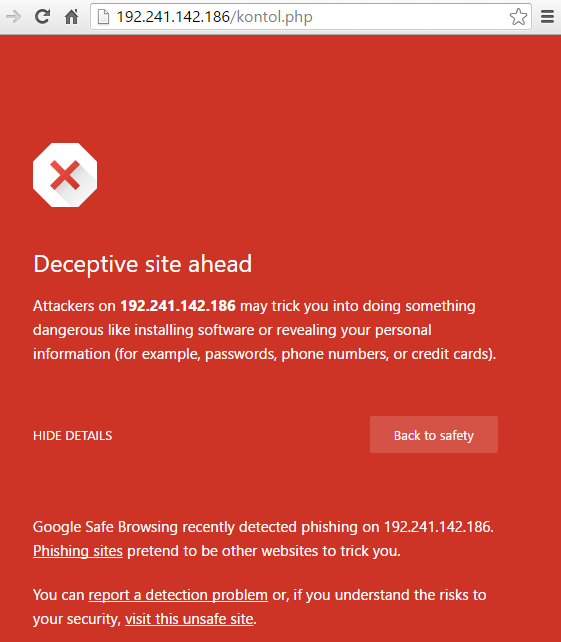
Another key aspect to notice in the original email is the recipient details which clearly don’t look genuine. While many aspects of this data can be easily faked, when the scammer hasn’t bothered to fake this data, it is easy to spot these kind of attacks;

As always, never click on suspicious links in emails and instead visit the website directly where you will find a notification if this is a genuine email.
by Michael Cropper | Jul 5, 2016 | Developer, WordPress |
By default, WooCommerce displays Product Category content above the products which are listed. Which is fine in many cases, although when you want to add in more than a couple of hundred words here, the Product Category page on WooCommerce soon pushes all of the actual products below the fold which isn’t that useful for a user. As such, you may want to add more content beneath the product listings to allow you to add more content to the page for users.
Firstly, whenever you are editing WooCommerce template files, make sure you are doing this correctly via your Child Theme to override WooCommerce template files. The file you need to edit (at the time of writing, this may change…) is archive-product.php. Copy this file from your /Plugins/WooCommece/Templates/ folder into your /Theme-Child/woocommerce/ folder.
Add Custom Field
To start with, the first thing to do is to use the Advanced Custom Fields plugin to add a custom field which is triggered only when: Taxonomy Term, is equal to, Product Categories. See the ‘Location’ heading when adding the custom fields. Let’s assume you’ve added a WYSYWIG editor for the purposes of this guide. You can add any type of field you like here which is handy.
Once set this Custom Field up correctly, you will now see this field display in the Product Category admin screen where you can add additional content to this section. Once you have added content here, the next step is to display this content to the user on the front end of the website.
Display Custom Field Content – archive-product.php
Back to the archive-product.php file. Add the following piece of code beneath where you see the code;
<?php

/*** woocommerce_after_shop_loop hook.

** @hooked woocommerce_pagination - 10

*/

do_action( 'woocommerce_after_shop_loop' );

?>
Add this code to display the custom field;
<?php

$term_id = get_queried_object()->term_id;

$post_id = 'product_cat_'.$term_id;

$custom_field = get_field('woocommerce_product_category_page_bottom_description', $post_id); // My Advanced Custom Field Variable

?>

<br>

<div><?php echo $custom_field; ?> </div> <?php // Get Advanced Custom Field Value ?>
The ‘woocommerce_product_category_page_bottom_description’ text above is what your Custom Field is named as that you created previously. If you have used a different name, replace this here.
Display Custom Field Content – functions.php
Alternatively if you would prefer not to edit child-WooCommerce files, then you can add the following code to your function.php in your Child Theme which will add the following action onto the ‘woocommerce_after_shop_loop’ hook;
function action_woocommerce_after_shop_loop() {

$term_id = get_queried_object()->term_id;

$post_id = 'product_cat_'.$term_id;

$custom_field = get_field('woocommerce_product_category_page_bottom_description', $post_id); // My Advanced Custom Field Variable

echo $custom_field;

};

add_action( 'woocommerce_after_shop_loop', 'action_woocommerce_after_shop_loop', 10, 2 );
Display
View the Product Category page and you’ll soon have added this extra piece of information to your Product Category page which you can use as you like. This will display the content beneath the paginated links. Place the above content elsewhere to suit your needs if you want something different.
by Michael Cropper | Jul 1, 2016 | Client Friendly, WordPress |
Most WordPress websites that come our way do so in quite a bad state, for many different reasons. The process that we often then begin is one of getting everything working properly as it should. Part of this process is replacing the often extremely poorly built theme that is currently in place with one of the market leading options available. I can count on one hand the number of Theme companies I would trust to develop a high quality theme that is suitable for business use, and none of them are from Theme marketplaces. But let’s look at Divi first.
Divi is a Theme created by Elegant Themes and is currently the market leading WordPress Theme for a number of reasons;
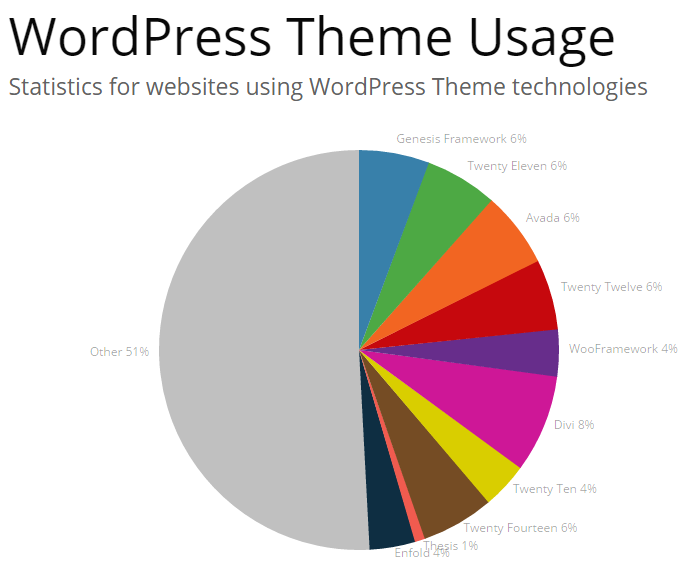
Remembering that the WordPress platform powers over 25% of websites on the entire internet, the fact that Divi powers 8% of WordPress websites just goes to show it’s popularity, it is the single leading Theme in use on WordPress to date. But why is it so popular? We’ll let’s take a look at why we recommend Divi to businesses for the majority of projects.
Ease of Use, Flexibility & Fully Responsive
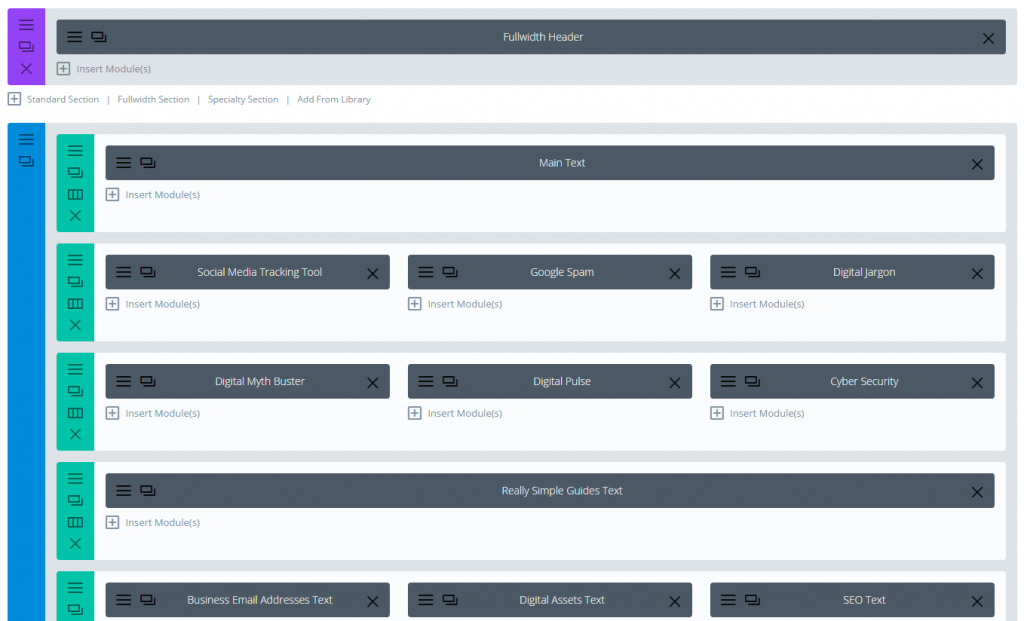
Divi is simply awesome. The flexibility to control the destiny of your website once set up correctly is immense. Not only is it possible to customise the look and feel of your website with a myriad of options, this is all fully responsive so every aspect of your website works across devices seamlessly.
Quality Code Base & Regular Updates
This is one of the biggest reasons why Divi is a popular choice for us, it is built extremely well. What this means in practice is that it is extensible, secure and it maintained on a regular basis. When Themes have been built extremely poorly (sure they may look nice, but if they haven’t been built well..) then you have a serious problem as you run into problem after problem after problem. Using an industry leading theme such as Divi means that you essentially have a team of developers working behind the scenes for you continually improving your website which is awesome. New features and bug fixes are released on a very regular basis at least monthly and often more.
Putting Businesses in Control
Most importantly though Divi gives you control of your own website as a business. Most WordPress themes are so inflexible for a user or require a developer to make even the simplest of changes that this can be a costly exercise for businesses to keep paying for updates. Once set up correctly, you have full control over virtually every aspect of your website with ease which can be extended as needed over time with additional content, features & functionality without the endless costs involved paying someone to keep updating your website.
All of this allows you to run your business as you choose without relying on a web developer for everything and slowing you down. Quite frankly too, we don’t particularly want to be making small tweaks on your website that you should really be doing yourself. It is not a cost effective method for you and it isn’t exactly a challenging task for us to do, we prefer to be working on the more advanced aspects of building your business further by integrating more technology to boost your revenue. When you work with industry leading technology, things just start to work for you and give you the flexibility to take your business in any direction you choose.
Is Divi perfect? Not by a long shot, there are many niggles which are annoying as there are with all technologies in one way or another. Is Divi the right choice for all projects? Certainly not. Divi works extremely well in many situations, although has its limits based on what you may be trying to achieve.
by Michael Cropper | Jun 27, 2016 | Client Friendly, Future |
Productivity is a key challenge within the UK. Only last year UK productivity widened to the worst since records began. UK workers produce significantly less per hour than the G7 average. Based on the results of the recent EU referendum, the productivity gap should be more of a concern to businesses than ever before. To compete on a global scale, now more than ever, businesses need to assess their own levels of productivity and seek to improve every aspect of their business. Digital technologies, automation and smart systems can significantly help businesses of all spaces, sizes and industries to enormously improve productivity. Essentially, achieve significantly more with less.
Below are our top 5 tips to boost the productivity of your business with digital technologies.
Boost the Productivity of your Social Media
Most businesses employ a junior member of staff to manage their social media channels for their businesses, or even teams of people or even external social media agencies to manage their social media. In this day and age, this is an extremely costly and inefficient way of managing your social media channels. Technology could automate many aspects of your social media activities while remaining relevant for your audience and continually increasing your engagement levels over time.
Firstly, start to automate a significant amount of your social media activities using a suite of technology solutions. We help organisations automate their social media activities so that it takes no longer than 60 seconds per day to manage. Stop wasting time manually posting content to social media and instead boost your productivity through automation technology.
Boost the Productivity of your Website
Most businesses are still using out of date technology for their website which is inefficient, inflexible and insecure. This ultimately results in your activities surrounding your website being more focused around firefighting opposed to building and growing the strength of your digital presence.
Firstly, start to get the right technology in place as a solid foundation for growth. These days, there are a small few recommended options for your website technologies to provide a solid foundation for growth. If your website is either a static system you build over 2 years ago and haven’t touched or it is more of a pain than a pleasure to work with, then you need to get the right technology foundations in place for your business to begin to boost productivity within your organisation.
Boost the Productivity of your Sales & Marketing
Are you still employing teams of sales people, travelling around the country to sell your products and services to potential customers? This is an extremely inefficient and expensive way to do things. In the internet age, potential customers get extremely turned off by pushy sales people. Instead, potential customers want to work with industry leading organisations who are using digital technologies throughout their organisation.
Firstly, start to change the way your sales and marketing processes work. Still printing glossy brochures which end up as a foot stool under someone’s desk? Then start to engage with your potential customers through your website with content they are interested in reading. It is this type of content that is highly valuable throughout the sales process and can add a unique twist when marketing your businesses to stand out from the crowd. Using digital platforms throughout your sales & marketing processes will significantly help to boost the productivity within your business.
Boost the Productivity of your Office Activities
What are you doing on a day to day basis that is taking you time to do? Manually inputting data from one system to another, or dare I say, from paper? Automate it. Struggling to find information between multiple systems? Bring them all together under a single unified system with technology. Still using paper based forms within your businesses? Digitise them.
Firstly, start to take some time and critically think about what you are doing throughout the day. If you are doing a task more than once, then ask an expert about how you could automate this task. You will save yourself enormous amounts of time on a daily basis, freeing you up to do even more productive activities.
Boost the Productivity of your Legacy Systems
Many businesses are still shackled to legacy systems throughout their organisation. Whether this is technology focused or systems/processes focused based on ‘how things are done around here’. The reality is that you need to bring all of your legacy systems up to date using the right underlying technologies. If you don’t you risk not simply getting left behind, but becoming obsolete as a business.
Technology startups around the world are popping up on a daily basis which are replacing entire industries. Xero has made traditional accountancy practices obsolete. TendoJobs.com is revolutionising the recruitment world by putting the power back in the hands of employers and job hunters. Along with the usual suspects including Uber, Airbnb, etc. The point being, that once your systems are up to date, it is now time to start truly innovating within your businesses to boost productivity enormously.
Summary
Boosting productivity within your organisation is an extremely efficient way to utilise the resources within your organisation in the best possible way. It is only through effective use of digital technologies that your businesses will be able to compete over the next few years, so the sooner you start the better. If you are unsure where to begin, get in touch and one of our digital experts will happily guide you through the process and show you how your organisation can begin to truly transform and embrace digital technologies.
by Michael Cropper | Jun 23, 2016 | Client Friendly, Security |
Another phishing email pretending to be from Amazon for customers who have apparently ordered a “Fire TV Print HD at £89.97”. This is a scam trying to make people click on the link which says “Click Here” which takes you to your Amazon account, or so you think.
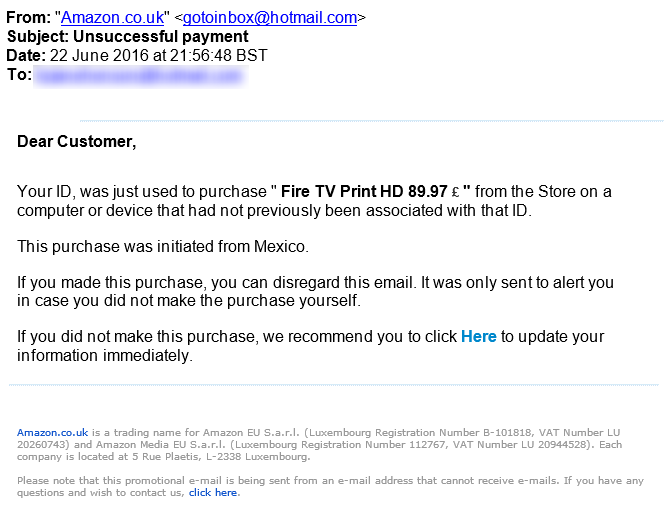
The Click Here link actually takes you through to one website,
http://www.example.de/images/stories//simpleslideshow/connect.php
Which then redirects you through to a hacked website at,
http://www.hacked-website.com/media/system/js/amazon/ap/signin/5241578b7731d8059db390278df93858/login.php?/ap/signin_encoding=UTF8-URL=https://www.amazon.com
The above two main domain names have been masked for security purposes and the hacked website owner has been contacted.
When a user ends up on the hacked website, they are presented with the usual looking Amazon sign-in page which could easily catch a few users out;
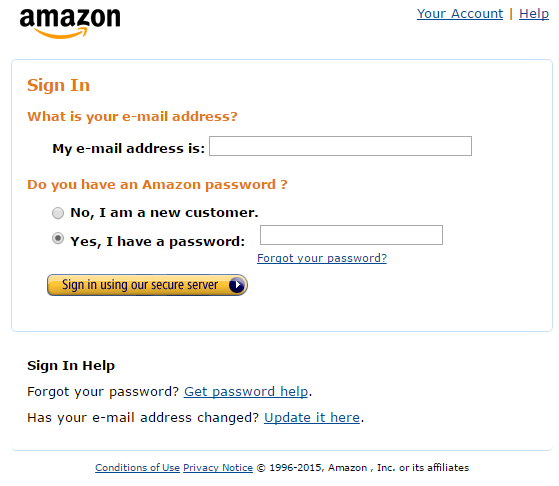
Be aware that phishing attacks like this can take many forms. The from email address in this instance (while this can be easily spoofed) is wrong and it set to a Hotmail address. Likewise, the £ sign in the price is at the wrong end, clearly the phishing attackers have never visited the UK as we have the currency symbol before the numbers. And finally, the most important point, is that the link behind the “Click Here” link is not going to Amazon.co.uk or Amazon.com. And to Amazon, you are more than a “Customer” you have a first and last name which they will always address you with.
Whenever you receive emails like this, you are always best to visit the account directly through your web browser and do not click on any links in the emails. If the email is genuine, you will also have a notification waiting in your account too which you can action from there.
