by Michael Cropper | Oct 31, 2013 | SEO |

Where: Media City UK
When: 29th October 2013
The #SocialMediaWhatsTrending event held at Media City UK was designed to gather industry experts together and look at ways where social media is changing the way people connect with businesses. The BBC Academy College of Journalism and BBC North designed the conference to bring together practitioners in journalism and content making from the digital world.
I’m sure a lot more people would have liked to attend the event, so hopefully we can cover some of the main bits here. Throughout the day there were two lots of sessions running. I was in the main session throughout the day so if anyone attended the breakout sessions, then please leave your feedback on those in the comments section.
Session 1 – Online Privacy, Freedom & Security (in the Era of Transparency)
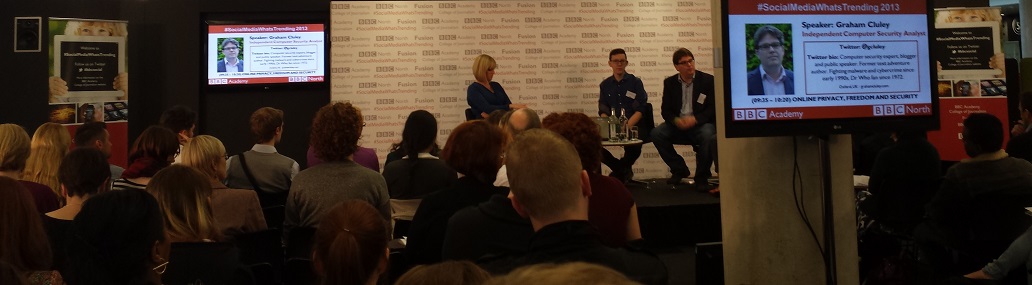
The first session was chaired by Stephanie McGovern, the BBC Breakfast Business Presenter, with the panellists including; James Ball, The Guardian Data Journalist, Graham Culey, an Independent Computer Security Analyst along with Martha Gill, Journalist at The Telegraph and New Statesman.
Overall the session was really insightful, especially to find that The Guardian only receives around 1.5 – 2% of their traffic from Twitter. James Ball made a good point about how journalists are in a difficult situation since on one hand it is extremely important to protect their sources, although with the increasing usage of new technology this can lead to you compromising your sources without even realising.
Session 2 – Editorial Leadership, Social Media & Breaking News
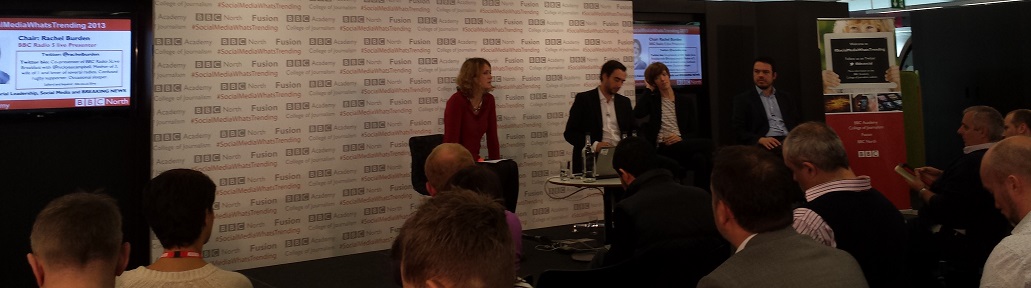
The second session was chaired by Rachel Burden, BBC Radio 5 Live, with the panellists including; Anna Doble the Head of Online at Channel 4 News, Tim Gatt the ITV News Digital Output Editor along with Chris Hamilton the BBC News Social Media Editor.
Throughout the session, Tim Gatt gave a fantastic insight into the performance of the ITV News website which gets over 4 million visitors per month, 50% of which is from Twitter and Facebook. In addition, he revealed that ITV Evening News gets between 4 – 6 million viewers per night.
After which, Aziz Rashid the Head of BBC North West pointed out that this is beaten by BBC Regional News every night. Not that it is a competition…
Anna Doble gave an interest insight into how the Channel 4 News Google+ followers are actually far more engaged with Channel 4 compared with other social channels. This is an interesting topic since it was also debated at another session as to which is more important, a high number of followers or a highly engaged but lower number of followers.
Chris Hamilton is quite excited about the future of Facebook, particularly with the introduction of the Facebook Insights API and Graph Search. If you aren’t sure what they are, in short, the Facebook Insights API allows developers to pull aggregated demographic information from Facebook which can be used to better understand your audiences. Likewise, Facebook’s Graph Search allows users to easily find people who are interested in different topics, as an example you could search for “Developers in Blackburn who like Star Wars”. Ok maybe that is a bad example, as I’m sure that would include most developers, but hopefully this highlights what this is. The point Chris was making is that this really does allow businesses to find trending information that is happening right now, which has previously been left to the realms of Twitter.
Session 3 – Flagship Entertainment “Capturing the nation” – The Battle for the Biggest Audience
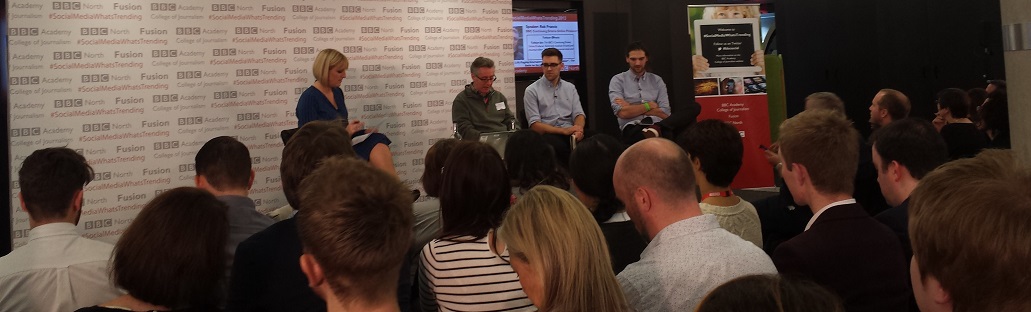
The third session was chaired by Stephanie McGovern the BBC Breakfast Business Presenter with panellists including; Rob Francis the BBC Continuing Drama Online Producer, James Cooper the X-Factor Senior Interactive Producer and Thom Gulseven the Channel 4 Senior Online Producer.
This again was an insightful session with interesting findings about the X-Factor around website traffic. James mentioned that while the website traffic from traditional sources was decreasing, this was being replaced by increases in traffic to the website which is being fuelled by the X-Factor 5th Judge App which has been downloaded more than 1 million times.
When James was asked if the 5th Judge App was leading to less people picking up the phone to vote, he didn’t have the figures. Although he did say that they are introducing a pay-in-app option, which one can only infer that this is the case and X-Factor are aiming to increase revenue via the mobile app.
The topic of engagement VS follower numbers came up and while Thom Gulseven would prefer a much more engaged audience on social channels, James believes that the large number of followers is still vitally important especially from a commercial point of view. Ultimately advertisers want to know how many people are going to be seeing their branding messages.
Another interesting piece of data that Thom mentioned was that around 50% of viewers watch Made in Chelsea ‘On Demand’ which is a staggering amount. This really does just show how the behaviour is changing for how people consume content. This leads nicely onto the keynote speaker of the day, Ben Cooper who talked about the shift away from different devices towards providing content on ‘All Screens’ at times when people want to watch things.
Session 4 – Keynote Speaker – All Screens
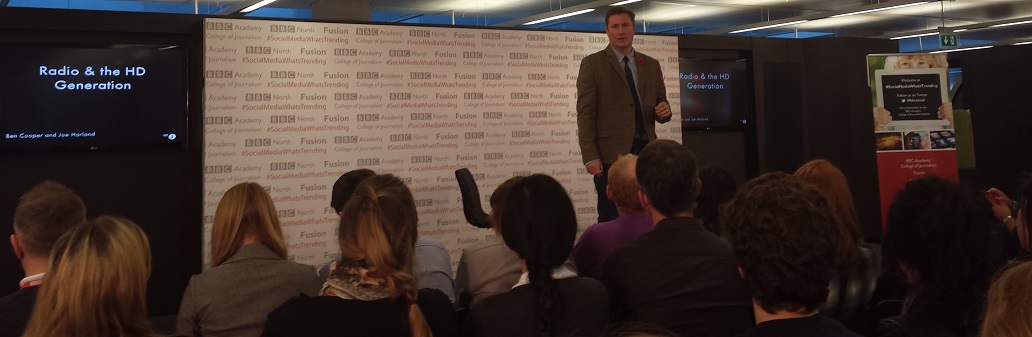
The keynote speaker for the day was Ben Cooper the BBC Radio 1 & BBC Radio 1 Xtra Controller. Through his talk he really emphasised the importance of knowing your audience and what they want. This understanding is changing the way content is being created at the BBC and how it is then shared with the world.
One example Ben gave was how they have added an extra dimension to radio by adding 6 cameras per radio studio which is allowing them to create even more content with little extra effort involved. This extra dimensions is paving the way for engaging with different audiences who may not have listed live to a show previously. An example of this was the recent interview with Kanye West which has been viewed on YouTube over 1.5 million times within the space of 6 weeks since being uploaded.
One really interesting point mentioned is about how the BBC are looking to incorporate Radio 1 into the iPlayer platform instead of using YouTube. This is really interesting since this is starting to move the power of short form video away from the Google owned YouTube platform back to the BBC.
As part of the ‘All Screens’ topic, Ben mentioned that 33% of people use music streaming services simply because they can access them via a mobile device. Around this topic, there is always the debate if music streaming services are going to replace radio and Ben simply doesn’t believe this to be true. Radio has much more of a personality and allows listeners to connect with the presenter at a level that streaming services simply can’t offer. What I believe will be interesting in the future is how the two of these merge together. Are we going to start to see more homemade live streaming radio stations curated by amateur DJs which can build up a following of their own – all powered by a streaming service in the background? It is going to be interesting to see either way.
A few other interesting facts about Radio 1 is that the website gets approximately 3 million unique visits per week, the YouTube channel is the most popular radio station on YouTube with over 680,000 subscribers along with a fact that 9 people every second are watching a Radio 1 video on YouTube. On top of this, 10.8 million people listen to Radio 1 each week for an average of 6 hours. Ben mentioned that this is down from a previous average of 12 hours per week, but I would question if this is simply because audiences are simply consuming the content in different ways and the BBC hasn’t managed to integrate these new data sources to fully understand how people are consuming content.
Session 5 – Investigative Journalism & New Technologies

The next session started with Tim Pool, a VICE Journalist and Producer who is really breaking the boundaries of journalism by using new and exciting technologies. These technologies include live video streaming, Google Glass and drones with video camera attached.
An interesting point made by Tim is how he has had to use this technology in the past to get past the police who were blocking him from legally filming. The situation he described was how the police were lined up in a row blocking journalists’ access to an area so they couldn’t film. This is where the use of drones came in, Tim simply flew a drone over the police to start filming what he was legally allowed to.
Following on from Tim was a panel chaired by Cat Lewis the CEO and Executive Producer at Nine Lives Media with panellists including; Ian Katz the BBC Newsnight Editor and Alex Miller the VICE UK Editor in Chief. Throughout the discussion it was interesting to hear about the different rules that each company needs to follow along with how online criticism is dealt with.
On the BBC side, everything has to follow extremely strict guidelines whereas at VICE, things are a little more relaxed which allows them to put an interesting twist on their reporting. Due to the different approaches, the way criticism is dealt with also changes. If a slip is made by a BBC presenter then the usual ‘we are very sorry’ comes out, whereas if a similar thing were to happen with VICE, then this would be a more relaxed approach and often the readers would understand that actually, what was said wasn’t said in a negative light.
Session 6 – Sport, Social Media & ROI with Audiences

The final session of the day was chaired by Ben Gallop the BBC Sports Head of Interactive & Formula 1 with panellists including; Scott Davies the VP EMEA of Never.no, Chris Nield the Social Media Executive at Manchester City FC along with Dan Walker the BBC Sports Presenter.
This final session raised some interesting points about how to handle trolls online, with the panel having different methods of dealing with this. One can simply ignore the trolls and get on with your day, whereas others have found that retweeting hate messages to their followers allows their followers to deal with the problem on their behalf. There is no sure fire answer here to the problem trolls cause online, so I’m sure we are going to see a lot more debates about this topic in the future.
An interesting statistic from Ben Gallop was that 40% of all tweets are about sport. I’m not sure where that figure has come from and it isn’t one that I am sure is 100% correct. I have found a study that 40% of tweets are ‘babble’, which depending on how you read that could be sports or not.
Ben did go on to say that the BBC Sports website is the largest in the UK in terms of audience and that around 4 – 5 million people watch Match of the Day each week. On a social media point, it was interesting to find out that approximately twice as many people are tweeting about Match of the Day compared to Strictly Come Dancing, even though Strictly has double the audience. This again comes down to the point raised earlier about engagement.
Dan Walker gave an interesting insight into how they managed to interview Mario Balotelli. He notoriously doesn’t do interviews with people, although Dan found out that he was a huge fan of Noel Gallagher and that Noel also liked to dedicate a song to Mario at different gigs. It took 6 months to plan but eventually Dan managed to organise an interview of Mario with Noel. This just goes to show the importance of creating unique and engaging content and that it takes time and effort to do this.
Summary
Overall the #SocialMediaWhatsTrending event was a fantastic day with lots of knowledgeable speakers. It was great to find out about the juicy bits of data from some of the most well-known websites and brands in the UK. If you ever want to reference and of this information quickly, we have put together this infographic on the subject which summarises the whole day into nice bite sized chunks;

Click for full infographic
Want to embed this infographic on your website? Simply copy and paste the code below.
Halloween Fun
Where would we be without a bit of Halloween fun? Here is the BBC’s attempt at pumpkin carving, which one do you like the best?

by Michael Cropper | Oct 7, 2013 | News, SEO |
As Google turned 15 last month, you may have heard about a change with their algorithm that was announced a couple of weeks ago called Hummingbird. What you may not be too familiar with is what this actually is and what this means for your business. Hopefully after reading this blog post you will be up to speed with this change and how it impacts things. After all, this change was the first time since 2001 where the whole algorithm was rewritten so dramatically.

Image courtesy of Search Engine Land
What is Hummingbird?
Hummingbird is the name that has been given to Google’s latest algorithm change which is all about being “precise and fast”. More importantly, Hummingbird is designed to understand the meaning behind the words people are searching for, especially with more complex queries. One example given included how they could understand where you live if you searched for “Pizza shops near my home”, if you have shared that location data with Google.
With Google looking at the meaning behind the words and whole phrases being searched for, this means that pages that contain information that specifically answers the users query are more likely to rank higher than pages that simply contain the words on the page. This is only a good thing and it once again highlights the need to focus on awesome content that answers user’s queries in the best way possible.
Google stated that a search for “Pizza Hut calories per slice” used to bring up a website that simply contained that information on. Now what they are aiming to achieve with the Hummingbird algorithm is to understand that the two words “Pizza Hut” actually relate to the brand, so that information would be used to find information on the Pizza Hut website about “calories per slice”. When I have just performed this search, the other websites still are outranking Pizza Hut which goes to show that the algorithm still has a long way to go to fully understand entities within a semantic search environment.
Another example of how Hummingbird is understanding entities better is when you search for “Blackpool Tower VS Eiffel Tower” and you are presented with a nice comparison of the two;
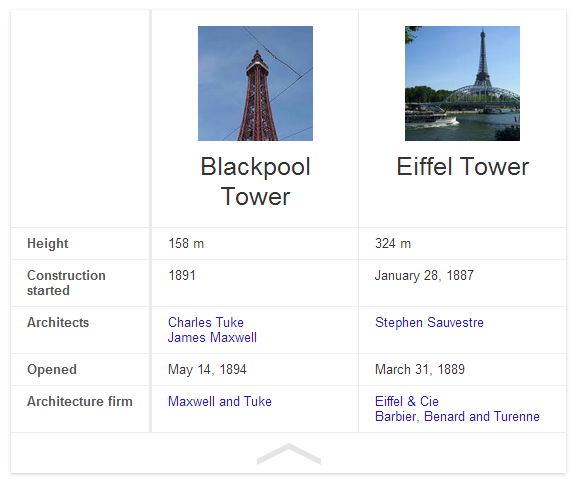
Previously this search query would likely have just presented a page that contains a bit of information about the two different topics which may or may not have had the answer a user was looking for.
Do you need to change anything?
With the new Hummingbird algorithm being out in the wild, the one question on everyone’s mind is whether they need to change anything they are doing. In summary, no. The best practice still remains true which is to build amazing, original, high quality, sharable and linkable content for your customers.
Hummingbird is all about how Google understands information that is already out there. So all of the important signals that we know Google is using are still as important with Hummingbird in place.
With Hummingbird being all about how Google understands content better, this once again should take the focus away from specific keywords and to a place that is all about users and providing them with the answers they need. Put yourself in your customer’s shoes and understand what types of things they are seeking answers for. Identify those needs and problems and help provide solutions and answers to them.
Should you worry about a Hummingbird penalty?
No. Hummingbird is simply changing the way Google understands your content. Based on this understanding they are able to provide better search results to users searching on Google for complex queries. With previous animal named algorithm updates, Panda and Penguin, it is rightfully so that people would ask this question. With this change being launched over a month ago unofficially, if you have noticed a change then it isn’t likely to do with the algorithm but it is more likely due to one of the other 200 signals that Google uses within their ranking algorithm.
Looking through various Google Analytics account and rank tracking data, we haven’t seen any changes related to the Hummingbird algorithm change.
What is the real reason behind the change?
More and more people are searching on Google from mobile devices and this search behaviour isn’t just standard text based. With the advent of voice search on Google (both from your mobile device and from normal desktop search) this is driving more complex queries which needed a change in thinking for how Google answers those queries.
Previously Google was all about the words on a page without any real understanding behind them. They understood that if a page mentioned “Britney” that it was also likely to mention “Spears” but they didn’t understand that “Britney Spears” was a person. Back in May, Google announced Knowledge Graph which is all about understanding entities and real world things in greater detail. Hummingbird is the logical next step to this.
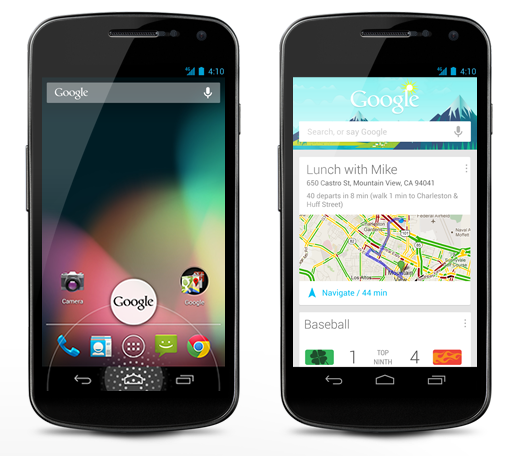
Looking at a conversational search example, the aim is to allow users to simply talk to their device in a conversational way and to get back useful information throughout this process without being explicit each time.
Being able to understand potentially lengthy conversations means that Google needs to really understand the meaning of the words behind the query to be able to serve the best possible information to the user. It is going to be interesting to see how this develops over time and how user’s behaviour starts to change with new technology such as this.
Google Voice Search
Additional video
Since posting this blog post I have re-stumbled upon an old video from a few months ago where Matt Cutts (Head of Web Spam at Google) talks about the change in behaviour they are seeing with people searching on mobile phones. Specifically to a more conversational style search;
Future opportunities
With Hummingbird being all about how Google understands content, the biggest tip that we can give at the minute is to start taking Schema.org markup seriously. If you don’t already know, Schema.org markup is simply a way to markup your content into some kind of structured way that search engines can understand more easily.
Google already supports several Schema.org tags and this list is only going to grow over time. Some Schema.org tags already give you direct benefit within the search results, such as review rich snippets standing out, although there are others that haven’t been announced yet. Implementing these now won’t gain you any extra benefit in the short term, although it will certainly put you in the right position for when Google does look at these additional tags.
As can be seen from a lot of the major changes recently (knowledge graph, conversational search, Hummingbird) it is clear that Google is always looking to understand the world we live in more.
by Michael Cropper | Aug 14, 2013 | SEO |
The data we often have access to via either internal reporting tools or web analytics tools such as Google Analytics is great, but those tools never highlight where the opportunities lie. Instead they simply report on what is currently happening or what has happened in the past, which is extremely important, but it isn’t going to help show you a path to further growth.
There are high end tools available on the market which highlight trends and opportunities within your industry although these are often out of reach for most companies due to the price. Thankfully, there is another way to identify annual search trends within your market with a bit of research.
The two main methods of researching how people are searching online for your products and services throughout the year include Google Trends and the new Google Keyword Planner tool which is starting to roll out and replace the old Keyword Tool.
Gathering Annual Search Trends from Google Trends
Google already provides trending data through Google Trends which allows you to see how different keywords are being searched for throughout the year. Google Trends is an ideal tool for a quick snapshot to see how people are searching, although it doesn’t really provide great insights when you want to dig a little deeper and use this data for planning.
The main limitations with Google Trends is that all of the data is indexed against each other between 0 and 100. What this means is that if you are looking at a single keyword such as “Halloween” then you can see that this keyword increases in popularity up until the end of October when people stop searching for Halloween related items.
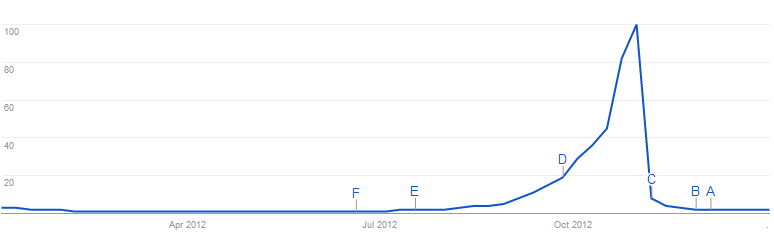
Halloween annual search trends on Google.co.uk
No surprise there then, this follows what you would expect to see as a popular date in the calendar approaches. The same trend can be seen when searching for “Easter” and “Christmas”, the difference being that when you are comparing these against each other the data shows which keyword is the most popular;
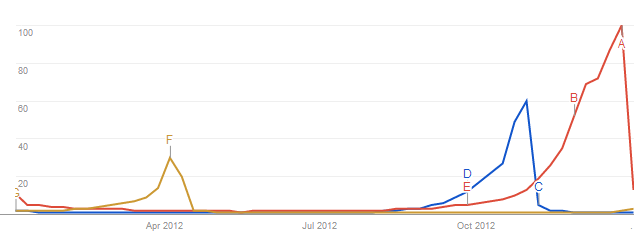
Annual search trends on Google.co.uk for Easter, Halloween and Christmas
Again, no real surprise about when those keywords are searched for. As mentioned previously, all of the data on the graph is indexed against each other from 0 to 100, so “Christmas” in this instance is more popular and is useful to see like this, but the data doesn’t say how many people are searching for the specific keyword.
Google Trends is also indexed as a whole against the total number of people searching on Google. What this means is that if more people are searching on Google, and the same amount of people are searching for your brand online then this would result in an apparent decrease in searches on Google for your brand – when in reality this is not the case.
Below is a graph to illustrate how your branded searches are increasing over time;
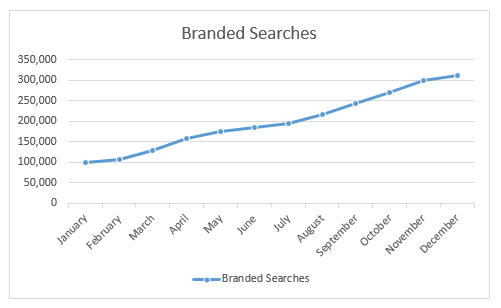
Actual branded searches over time
Below shows a graph to illustrate how the total number of searches on Google has increased over time;
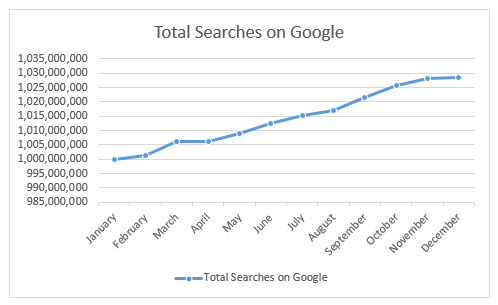
Total searches on Google.co.uk over time
As you can see there is an increase in both of these pieces of data. What this means for Google Trends reporting is that since more people are searching online then the increased branded searches is indexed against the growth in overall searches. So the data is benchmarked against the total number of searches to show how the keyword has performed either ahead or below the market as a whole. What this means is that the increase may not be as much as reality when looking at the data through Google trends which can be quite misleading;
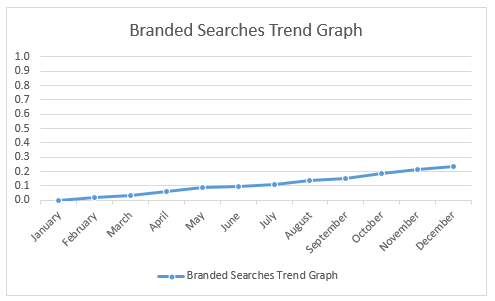
How Google Trends would display branded searches over time
As I say, the tool is great for quick snapshots of data, but it is always worth understanding how the tool works before using this data in your decisions. As with all data, there are discrepancies and things to bear in mind.
With this in mind, the next tool to look at gathering some more accurate data is from the newly updated Google Keyword Tool, the Google Keyword Planner tool which gives you more accurate numbers in terms of how many people are searching for specific keywords opposed to just trending data that is indexed against the total number of searches on Google.
Gathering Awesome Annual Search Trends Data through the Google Keyword Planner Tool
Recently Google announced they are launching a new Keyword Planner tool and one of the more interesting updates as part of this is that the tool will now allow you to download trending data for your keywords over the past 12 months. This is something that was previously restricted to accessing via their AdWords API, so this change now makes this data accessible to everyone without having to need to pay for access through the API.
So let’s dig into some of this data starting off with the obvious ones again as outlined earlier, “Easter”, “Halloween” and “Christmas”;
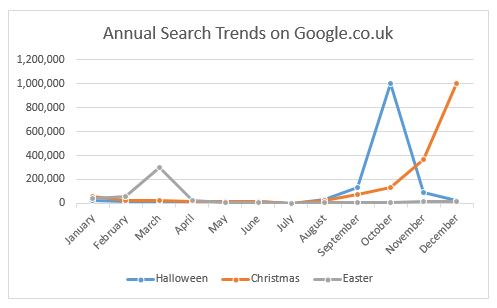
Annual search trends on Google.co.uk for Easter, Halloween and Christmas
As you can see above, this data is more interesting and insightful than the Google Trends data above since it clearly shows how many people are searching for the different keywords each month. Knowing the amount of people searching, opposed to their relative popularity, can help build a picture of which keywords are more popular and by how much in terms of real people searching.
You may also note that this data for “Halloween” and “Christmas” both have high searches in the relevant months, which differs from the data from Google Trends graph isn’t shown earlier. This discrepancy is due to the indexing that happens on Google Trends as explained earlier.
As always, the data is never 100% accurate although it is far more accurate than the Google Trends data.
Insights into Product Search Trends
Ok so the examples given so far are nice to highlight the type of data that is accessible for viewing annual search trends using different tools, but what about more commercially focused keywords. Well from here on we are going to look at the Google Keyword Planner data since this is far more insightful and we are going to look at a few different industries to see how these differ.
Budget Travel
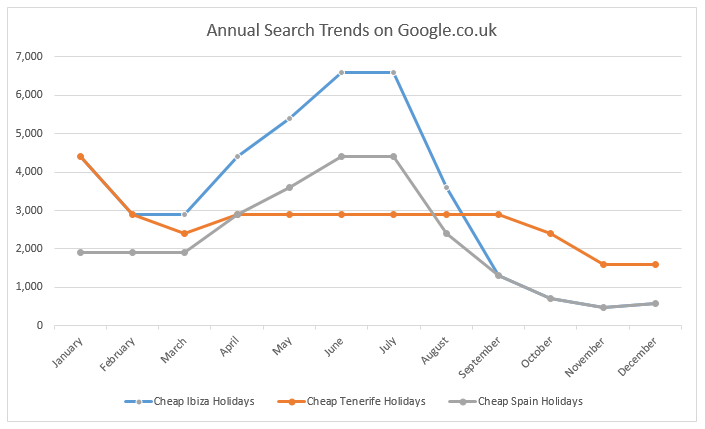
Below is a graph for three keywords related to budget travel, which shows how the searches for the different destinations differ throughout the year and where they lie in terms of actual numbers of people searching;
Budget travel annual search trends on Google.co.uk
What is interesting when looking at this data is that you can easily plan your marketing activities around these times. The above data suggests the most popular time people are searching for “Cheap Tenerife Holidays” is in January, whereas there are more people searching for “Cheap Ibiza Holidays” in the summer months.
The question is, does this tie up with what traffic your website is getting for these keywords throughout the year? And most importantly, if not, then what additional activities can be done to capture some of these searches.
Luxury Travel
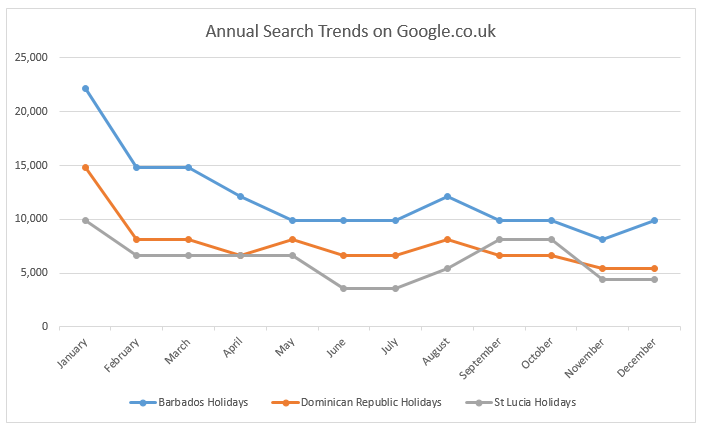
Below is a graph for three keywords related to luxury travel, which shows how the searches for the different destinations differ throughout the year and where they lie in terms of actual numbers of people searching;
Luxury travel annual search trends on Google.co.uk
Again this highlights some interesting data that people are searching more luxury destinations in January to March along with a spike for St Lucia around September and October time.
Gadgets
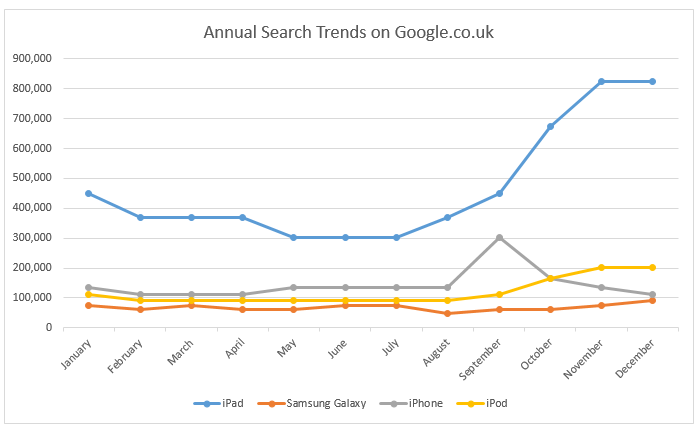
Moving over to the technology and gadgets area, it is interesting to see how people are searching for these types of keywords throughout the year. One item to note here is that the annual search trends are based on the previous 12 months of data that Google makes accessible, so as you can see the spike in September for “iPhone” related queries, this was due to the launch event in September for the new iPhone 5.
Gadgets annual search trends on Google.co.uk
Branded Queries
Now taking this annual search trends one step further, how about taking a look at what your competitors were doing last year. By understanding previous trends this will help you plan marketing campaigns around your competitors (preferably before they run theirs). Go and take a look at the new Keyword Planner tool from Google to see how your competitors are being searched for online throughout the year, I’m sure you will find some interesting data.
Having this data allows your business to move from a reactive approach to competitors and annual market trends to a proactive approach where you can plan key activities throughout the year to capture the maximum amount of traffic possible.
Spotting Opportunities & Gaps
The next steps is to compare the market trends to see how well your actual traffic lines up with this. If there is a large discrepancy then you could be missing out on huge amounts of people searching throughout the year. Get in touch to find out more about how we can help to plan your organic search campaigns throughout the year to maximise the number of people searching for your products and services online.
The new tool can take a while to get used to since some of the functionality has been moved around within the interface, but it is quick enough to pick up. Once you know how to use the tool the data that is present is awesome. As you can tell, I am a bit of a data geek so I love sifting through data like this to find the nuggets of information and how they can then be used to feed into marketing campaigns and Search Engine Optimisation work.
Notes
All of the historical data within the Keyword Planner tool from Google is for Exact Match data. This blog post helps you to understand the match types within Google.
Sources
https://support.google.com/adwords/answer/3141229
http://adwords.blogspot.co.uk/2013/05/introducing-keyword-planner-combining.html
by Michael Cropper | Aug 14, 2013 | SEO |
The data we often have access to via either internal reporting tools or web analytics tools such as Google Analytics is great, but those tools never highlight where the opportunities lie. Instead they simply report on what is currently happening or what has happened in the past, which is extremely important, but it isn’t going to help show you a path to further growth.
There are high end tools available on the market which highlight trends and opportunities within your industry although these are often out of reach for most companies due to the price. Thankfully, there is another way to identify annual search trends within your market with a bit of research.
The two main methods of researching how people are searching online for your products and services throughout the year include Google Trends and the new Google Keyword Planner tool which is starting to roll out and replace the old Keyword Tool.
Gathering Annual Search Trends from Google Trends
Google already provides trending data through Google Trends which allows you to see how different keywords are being searched for throughout the year. Google Trends is an ideal tool for a quick snapshot to see how people are searching, although it doesn’t really provide great insights when you want to dig a little deeper and use this data for planning.
The main limitations with Google Trends is that all of the data is indexed against each other between 0 and 100. What this means is that if you are looking at a single keyword such as “Halloween” then you can see that this keyword increases in popularity up until the end of October when people stop searching for Halloween related items.
Halloween annual search trends on Google.co.uk
No surprise there then, this follows what you would expect to see as a popular date in the calendar approaches. The same trend can be seen when searching for “Easter” and “Christmas”, the difference being that when you are comparing these against each other the data shows which keyword is the most popular;
Annual search trends on Google.co.uk for Easter, Halloween and Christmas
Again, no real surprise about when those keywords are searched for. As mentioned previously, all of the data on the graph is indexed against each other from 0 to 100, so “Christmas” in this instance is more popular and is useful to see like this, but the data doesn’t say how many people are searching for the specific keyword.
Google Trends is also indexed as a whole against the total number of people searching on Google. What this means is that if more people are searching on Google, and the same amount of people are searching for your brand online then this would result in an apparent decrease in searches on Google for your brand – when in reality this is not the case.
Below is a graph to illustrate how your branded searches are increasing over time;
Actual branded searches over time
Below shows a graph to illustrate how the total number of searches on Google has increased over time;
Total searches on Google.co.uk over time
As you can see there is an increase in both of these pieces of data. What this means for Google Trends reporting is that since more people are searching online then the increased branded searches is indexed against the growth in overall searches. So the data is benchmarked against the total number of searches to show how the keyword has performed either ahead or below the market as a whole. What this means is that the increase may not be as much as reality when looking at the data through Google trends which can be quite misleading;
How Google Trends would display branded searches over time
As I say, the tool is great for quick snapshots of data, but it is always worth understanding how the tool works before using this data in your decisions. As with all data, there are discrepancies and things to bear in mind.
With this in mind, the next tool to look at gathering some more accurate data is from the newly updated Google Keyword Tool, the Google Keyword Planner tool which gives you more accurate numbers in terms of how many people are searching for specific keywords opposed to just trending data that is indexed against the total number of searches on Google.
Gathering Awesome Annual Search Trends Data through the Google Keyword Planner Tool
Recently Google announced they are launching a new Keyword Planner tool and one of the more interesting updates as part of this is that the tool will now allow you to download trending data for your keywords over the past 12 months. This is something that was previously restricted to accessing via their AdWords API, so this change now makes this data accessible to everyone without having to need to pay for access through the API.
So let’s dig into some of this data starting off with the obvious ones again as outlined earlier, “Easter”, “Halloween” and “Christmas”;
Annual search trends on Google.co.uk for Easter, Halloween and Christmas
As you can see above, this data is more interesting and insightful than the Google Trends data above since it clearly shows how many people are searching for the different keywords each month. Knowing the amount of people searching, opposed to their relative popularity, can help build a picture of which keywords are more popular and by how much in terms of real people searching.
You may also note that this data for “Halloween” and “Christmas” both have high searches in the relevant months, which differs from the data from Google Trends graph isn’t shown earlier. This discrepancy is due to the indexing that happens on Google Trends as explained earlier.
As always, the data is never 100% accurate although it is far more accurate than the Google Trends data.
Insights into Product Search Trends
Ok so the examples given so far are nice to highlight the type of data that is accessible for viewing annual search trends using different tools, but what about more commercially focused keywords. Well from here on we are going to look at the Google Keyword Planner data since this is far more insightful and we are going to look at a few different industries to see how these differ.
Budget Travel
Below is a graph for three keywords related to budget travel, which shows how the searches for the different destinations differ throughout the year and where they lie in terms of actual numbers of people searching;
Budget travel annual search trends on Google.co.uk
What is interesting when looking at this data is that you can easily plan your marketing activities around these times. The above data suggests the most popular time people are searching for “Cheap Tenerife Holidays” is in January, whereas there are more people searching for “Cheap Ibiza Holidays” in the summer months.
The question is, does this tie up with what traffic your website is getting for these keywords throughout the year? And most importantly, if not, then what additional activities can be done to capture some of these searches.
Luxury Travel
Below is a graph for three keywords related to luxury travel, which shows how the searches for the different destinations differ throughout the year and where they lie in terms of actual numbers of people searching;
Luxury travel annual search trends on Google.co.uk
Again this highlights some interesting data that people are searching more luxury destinations in January to March along with a spike for St Lucia around September and October time.
Gadgets
Moving over to the technology and gadgets area, it is interesting to see how people are searching for these types of keywords throughout the year. One item to note here is that the annual search trends are based on the previous 12 months of data that Google makes accessible, so as you can see the spike in September for “iPhone” related queries, this was due to the launch event in September for the new iPhone 5.
Gadgets annual search trends on Google.co.uk
Branded Queries
Now taking this annual search trends one step further, how about taking a look at what your competitors were doing last year. By understanding previous trends this will help you plan marketing campaigns around your competitors (preferably before they run theirs). Go and take a look at the new Keyword Planner tool from Google to see how your competitors are being searched for online throughout the year, I’m sure you will find some interesting data.
Having this data allows your business to move from a reactive approach to competitors and annual market trends to a proactive approach where you can plan key activities throughout the year to capture the maximum amount of traffic possible.
Spotting Opportunities & Gaps
The next steps is to compare the market trends to see how well your actual traffic lines up with this. If there is a large discrepancy then you could be missing out on huge amounts of people searching throughout the year. Get in touch to find out more about how we can help to plan your organic search campaigns throughout the year to maximise the number of people searching for your products and services online.
The new tool can take a while to get used to since some of the functionality has been moved around within the interface, but it is quick enough to pick up. Once you know how to use the tool the data that is present is awesome. As you can tell, I am a bit of a data geek so I love sifting through data like this to find the nuggets of information and how they can then be used to feed into marketing campaigns and Search Engine Optimisation work.
Notes
All of the historical data within the Keyword Planner tool from Google is for Exact Match data. This blog post helps you to understand the match types within Google.
Sources
https://support.google.com/adwords/answer/3141229
http://adwords.blogspot.co.uk/2013/05/introducing-keyword-planner-combining.html
by Michael Cropper | Aug 9, 2013 | SEO |
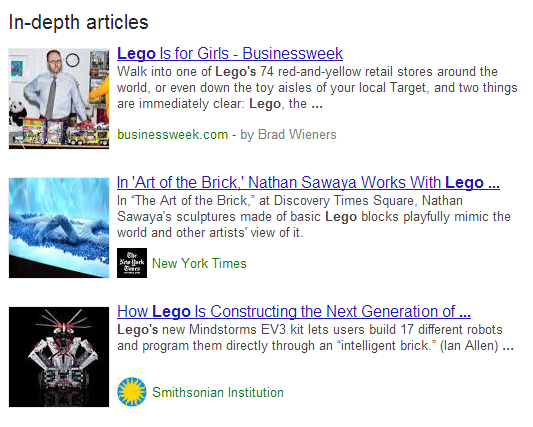
This week Google announced a new feature on their search results pages, ‘In-Depth Articles’. From now on, when you search on Google.com (in English) for broad queries, people or organisations then you are more likely to see an extra section present within the search results titled In-Depth Articles as can be seen below when searching for “Lego”;
Google search for “Lego”
What this means for brands is that there is a huge opportunity to stand out in the search results from your competitors.
When do In-Depth Articles display?
When an important and broad phrase is searched for, In-Depth articles are triggered to display high quality content that covers the topic in detail which allow you to find out more about the subject area. A few examples of when Google triggers In-Depth Articles include searches such as;
Population Growth
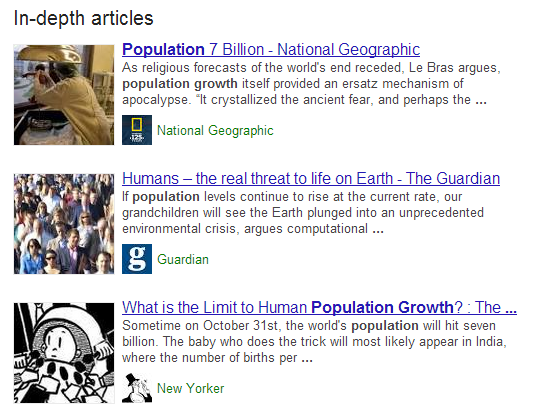
Google search for “Population Growth”
Death Penalty

Google Search for “Capital Punishment”
E-Waste
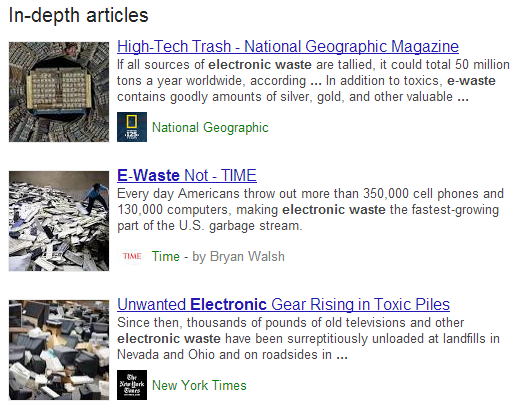
Google search for “e-waste”
Censorship

Google search for “Censorship”
Android

Google search for “Android”
Barack Obama

Google Search for “Barack Obama”
David Cameron
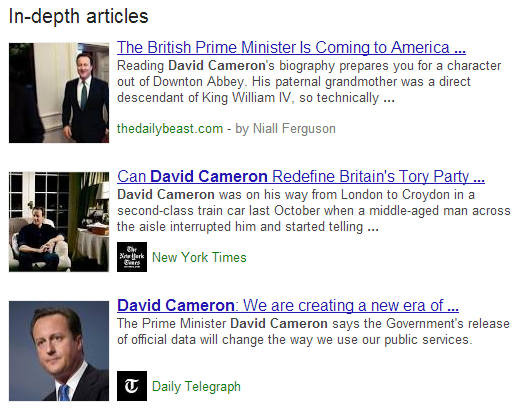
Google search for “David Cameron”
Just in the interest of fairness, looking at a search for Nick Clegg didn’t produce any In-Depth Articles, so make what you will of that;
Nick Clegg
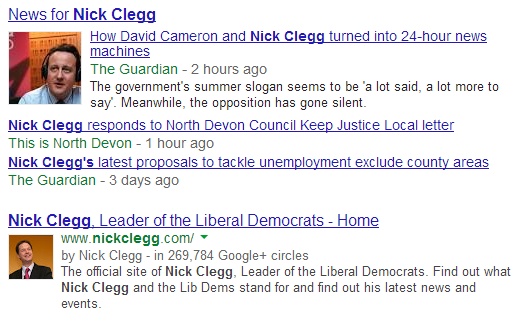
Google search for “Nick Clegg”
How to display In-Depth Articles for your website
Google selects websites and content pieces to display within In-Depth Articles based on algorithmic signals, which means there are ways to help guide Google to choosing your content. Below outlines the key requirements that can help Google select your content to be displayed within the new In-Depth Articles section within the search results.
Schema.org Article Markup
Schema.org Article Markup can be summed up as special tags and attributes (i.e. pieces of code) that you add into your content that is designed to help search engines understand the content easier. Without going into the technical details of this implementation, there are key facts that Google is wanting to know about for inclusion within In-Depth Articles;
- What is your article headline?
- What is your summary or alternative headline?
- What image best represents your article?
- What is the description of your article?
- When was your article published?
- What content is the main body of the article?
By implementing the correct markup on your articles, this helps Google to index the content much easier which can provide a positive signal to Google for including your articles within the In-Depth Articles section.
Authorship Markup
Authorship markup has been designed to display a photograph of the author who wrote the article within Google’s search results pages as can be seen below;
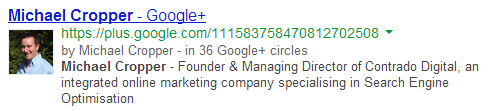
Google Authorship displaying within search results
To allow Google to understand who the author is for certain articles there are a few key steps required which include having a Google+ profile with your photo as a good recognisable headshot as can be seen in the screenshot above.
In addition, you then need to either verify that you are an author of that content by linking your content to your Google+ profile using a verified email address, or, setting up authorship by linking your content to your Google+ profile.
Again, there are no guarantees that Google will show the authorship information for your website, but by having this in place it will give positive signals to Google.
Pagination & Canonicalisation
Some publishers display content that is split between multiple pages. In these cases, it is important to use all of the guidelines in addition to using correct Canonicalization along with Rel=Next and Rel=Prev markup.
The implementation of this is really important to get correct, not just for being included within In-Depth Articles, but also for allowing search engines to easily understand the content throughout your website. Below is a visual representation of how to implement without going into the technical details of this;
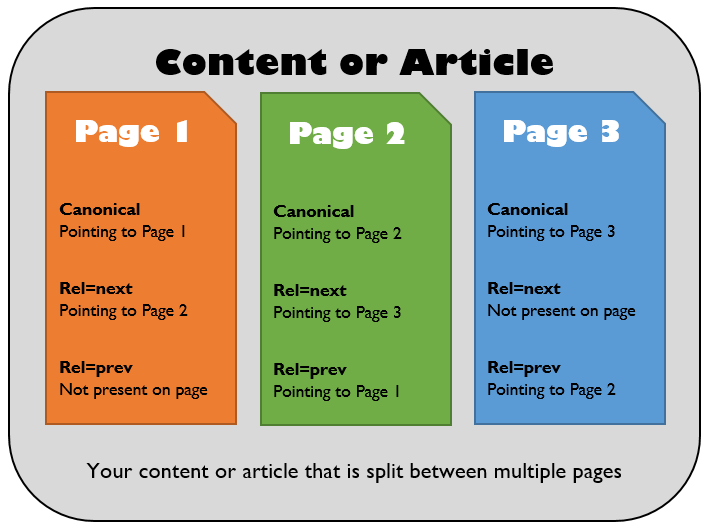
Technical implementation of multi-page content for inclusion in In-Depth Articles
Website Logo
Another step in the process to be included within the new In-Depth Articles section includes specifying to Google which logo you would like to use to represent your business. You may have noticed organisation information being listed on the right hand side when searching for branded queries as can be seen below when searching for “Lego”;
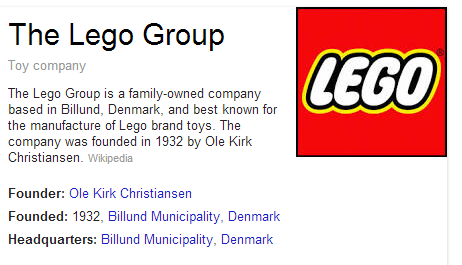
Lego organisation markup for inclusion on Google
To be both visible within the right hand side of the search results along with being included within the new In-Depth Articles section you need to inform Google which logo to use to represent your business. To do this, there are two options which are either creating a Google+ Page and linking it to your website along with choosing an official logo or icon as the default image, or, using Organisation markup on your website which specifies to search engines which image on your website is the logo.
Implementing this markup is in the exact same way as with the Schme.org Article markup outlined above, whereby special tags and attributes are wrapped around your content within the source code of your website.
One thing to bear in mind is that it can take a while for logo changes to be reflected within Google’s search results, so this one may need a little more patience than the other areas.
Paid Content
Some publisher websites are paid for and subscription based which means that often search engines cannot index the content. To allow search engines to include your content within the new In-Depth Articles section then it is recommended to implement a First Click Free policy whereby users can see one page of content before they have to subscribe. This change will also allow search engines to easily index your content.
Create Awesome Content
This should go without saying, but to be included within In-Depth Articles your content must be….In depth. So go and create some seriously awesome content then implement the above changes to your website and Google+ profile.
Summary
While the In-Depth Articles update is starting as a trial on Google.com in the English language only, it will likely be rolling out to the rest of the world over time as most official changes by Google do. This gives UK publishers and brands the time to prepare for this change by implementing the changes required.
Google does state that you must be a “well known” publisher to be included within the new In-Depth articles section, so implementing this on a much smaller website will unlikely work initially, although there is no harm in trying.
Implementing all of the above changes is no guarantee for being included within In-Depth Articles, as with all changes by Google the final decision as to whether you are or aren’t included lies with Google. These changes can help improve your chances of appearing within In-Depth articles though, so if you fall into the category of a well known publisher and the above changes are implemented then this is highly likely that you will be included.
If you need any help taking advantage of these new changes then get in touch and we can help guide you through the process.
Sources
http://insidesearch.blogspot.co.uk/2013/08/discover-great-in-depth-articles-on.html
https://support.google.com/webmasters/answer/3280182
http://googlewebmastercentral.blogspot.co.uk/2013/08/in-depth-articles-in-search-results.html
by Michael Cropper | Jul 5, 2013 | SEO |
We are delighted to announce the launch of our integrated online marketing agency Contrado Digital, specialists in Search Engine Optimisation.
We launched Contrado Digital because we believe the key to successful Search Engine Optimisation is about integrating Search throughout your organisation. We have found that by breaking down the silos and joining teams together this helps achieve awesome results.
Who’s Behind Contrado Digital?

Michael Cropper
Founder & Managing Director
Contrado Digital has been launched by Michael Cropper who has vast experience working across a range of industries including Luxury Travel, Budget Travel, Charity, Transport, Building, Trade Insulation and Ink & Toner. Michael has helped consistently deliver results on both the client side and the agency side throughout his career and decided it was time to branch out and help more businesses succeed online.
We work with a team of search specialists, infographic designers, content writers and web developers to help deliver the best results possible for your business.
Watch this space as the Contrado Digital team grows – we have big plans for the next 12 months and are always looking for great people to work with us!
Why Integrated Online Marketing?
The online environment is more competitive now than it has ever been, with more businesses aiming to capture the billions of people searching online every day for different products and services. We believe that to succeed long term online is ultimately about improving your whole business so search engines see that you are an authority in your industry.

Size of Google’s Index Back in 2008
Integrating Search throughout your organisation leads to a deeper understanding of your customers. This leads to better products and services being tailored to what your customers want and need.
Integrating Search throughout your organisation helps teams working together to achieve a common goal – increased traffic and sales from Organic Search.
It’s all well and good saying these things, but what about a few examples to illustrate how integrated online marketing can help your business grow.
Example 1 – Call Centre Support / Live Chat Functionality
Do you run a call centre or live chat to support customer queries? Have you ever thought about how Search can be integrated into this area?
What areas or topics are customers continually asking you about? What are their common queries or questions about your products or services? Continually reviewing this can be a fantastic source of information which can help feed into your content plan on your website.
If customers keep asking common questions about a product, then create some content on the website that answers their question. This will lead to a happier customer who now has the information they needed sooner. It will also lead to higher quality content being displayed on your website, which we all know is what search engines are looking for. As an added bonus, this is also likely to reduce call centre costs.
Example 2 – In-Store Staff

Bridge the gap between offline and online
Do you have physical stores on the high street or branches customers can visit? Have you ever thought about how Search can be integrated into this area?
Your staff are interacting with customers on a daily basis and will gather a phenomenal amount of information within this time about what customers are looking for when purchasing your product and service. Looking at ways to capture this information then feeding it into your website content plan can be extremely valuable.
What are your customers using the products and services for? What information do they need before making a purchasing decision? What other considerations are they making? All of this information can be understood and utilised to create content on your website. Again, this additional content that helps your customers is also going to help drive additional traffic to your website from Organic Search.
How about your in-store staff encouraging customers to engage online. Encourage them to ‘check-in’ to your store. Encourage customers to review your business after they have made a purchase. Encourage customers to share information socially once they have just made a purchase. The opportunities to integrate offline with online are endless and can seriously help your Search Engine Optimisation strategy.
Example 3 – Marketing Efforts
Do you regularly run TV campaigns, special promotions or competitions to engage your customers? Have you ever thought about how Search can be integrated into this area?
If you are running a TV campaign, then why not integrate this ad on a page on your website then promote this page socially. This will not only increase the reach of the campaign but also help drive additional social shares and backlinks to your website. To generate additional traffic, you could also promote this on YouTube to capture the huge audience that visits the website daily.
If you are running a competition then instead of running the competition on a social platform, why not look at setting the competition up on your website. By promoting the competition page on your website this will help increase the number of backlinks, increase social shares and drive additional referral traffic to your website.
If you are creating a promotional page for a marketing campaign, then why not see if there are any specific keywords that could be targeted on the page. This small tweak can lead to additional organic traffic landing on the promotional page which may even perform better than other channels.
Integrated Online Marketing
Hopefully that gives a few examples of how Search can be integrated throughout your organisation. to help drive awesome results for your business. Integration takes time, effort, collaboration and creativity to make things work better.
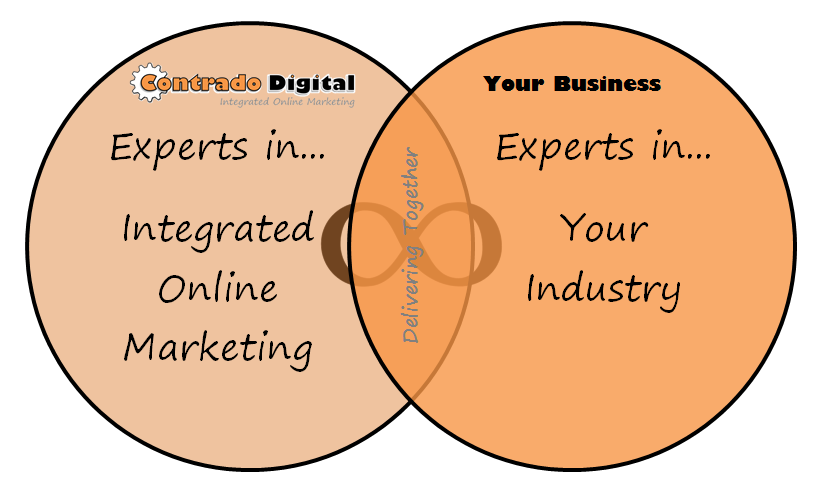
What Does Contrado Mean?
Contrado is Latin for “to deliver together” and is the foundation of how we work and our beliefs. We work with your organisation to deliver results together. You are experts in what you do and we like to think we know a thing or two about what we do. Together we can deliver results to help grow your business online.
The phrase “to deliver together” also links with integrated online marketing. Successfully integrating marketing and business activities ultimately means working together towards a common goal. This is something we strongly believe in and have seen time and time again how this process helps achieve awesome results.
Stay in Touch
Keep in touch with us socially on Twitter, Facebook, Google+, LinkedIn and subscribe to our Newsletter to stay up to date with all the latest news and trends in Search Engine Optimisation and the Digital Industry.
Looking to find out more sooner? Then get in touch to see how we can help grow your business online.

