HTML5 is one of the subjects that is going to gain more importance within the SEO area over the coming months and years with more people choosing to adopt the technology. So this is a guide to introduce you to HTML5 from an SEO point.
Firstly, if we look at what is HTML5 and who has adopted HTML5. Then we can look at the new HTML5 tags and finally what HTML5 means for SEO.
What is HTML5?
HTML5 is a better version of HTML4 (no surprises there!). HTML5 has been designed to standardise multimedia formats so they can be consistently understood by computers (i.e browsers). HTML5 makes it easy to include interactive multimedia elements within your website without the need for external plugins, such as Flash.
Whilst HTML5 is an evolving process with new features planning on being added over the coming months (and likely years), it makes sense to at least begin understanding the benefits of HTML5 sooner rather than later.
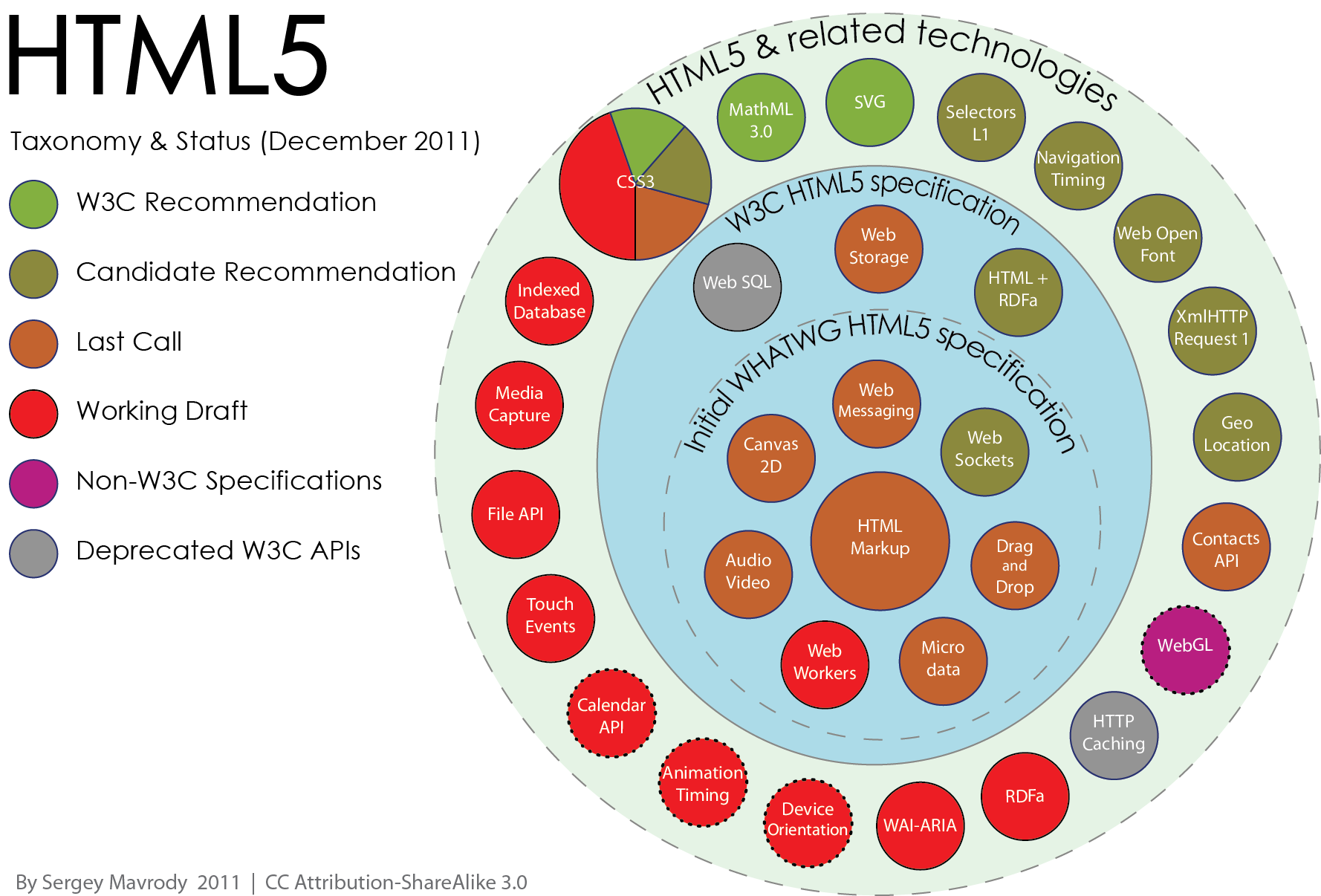
Below is a nice HTML5 infographic which you can see on Wikipedia’s page on HTML5. It gives a good idea about what s currently within the HTML specification and the status of other HTML5 ideas which are still on the drawing board.
There are some new cool features within HTML5 such as the
Who is already adopting HTML5?
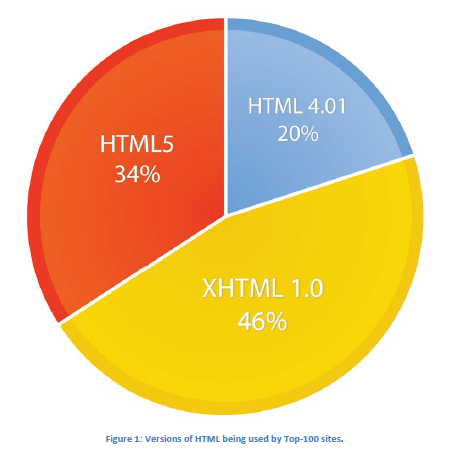
Lots of people! BinVisions produced a report in October 2011 which accessed some of the top websites to see who was and who wasn’t adopting HTML5 as a new technology and found the following for the top 100 websites;
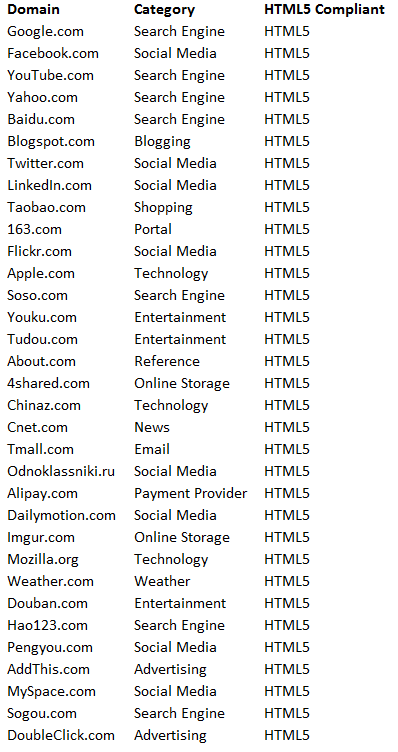
As you can see from the image above, only 34 out of the top 100 websites have fully adopted HTML5. These 34 websites are;
For a full breakdown of who is / isn’t using HTML5 yet then download BinVision’s PDF report (direct link to PDF doc).
New HTML5 Tags
If you are not familiar with HTML5 then I can recommend running through W3School’s HTML5 tutorial as it contains a bit more background than what is going to be covered in this post.
New HTML5 Tags;
<canvas> – This is similar to the <textarea> tag, but cooler. When linked up with JavaScript it allows you to draw different things on the canvas. This can be really useful when wanting to make your pages more interactive without
<video> – This tag is designed to replace typical Flash plugins to play videos.
<audio> – This tag is exactly the same as the video tag
Content specific HML5 tags;
<article>/strong> – Main content on the page
<section> – Main content on the page
<header> – Header (not the) part of your document, for example maybe your company logo would go in here
<footer> – Footer section of your page, for example you may want to put your footer links within here (although you could use the element for that as well)
<nav> – For your navigation menus on your site.
<hgroup>– This tag is designed to group normal heading tags together ( <h2>etc), for example if you have multiple headings within your article or content.
<aside> – For content which is not the main content on the page.
<summary> – This defines a visible heading for a <details> element (only works in Google Chrome!)
<details> – This is for additional details that a user can view or hide (only works in Google Chrome!)
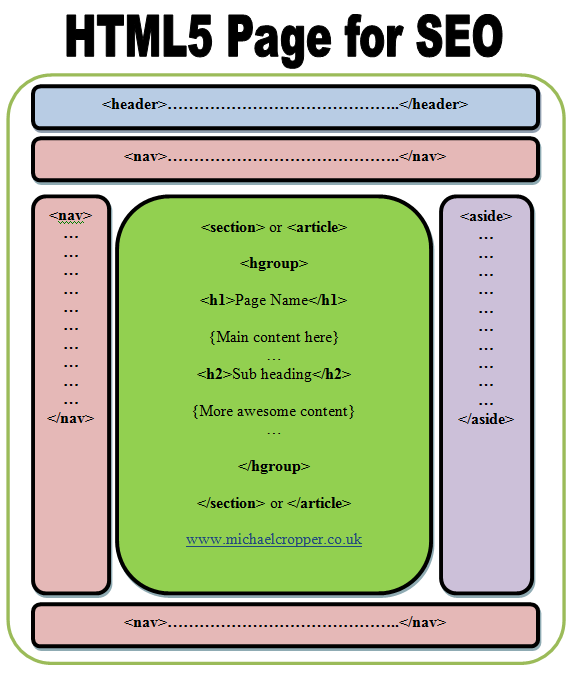
The new content specific tags listed above are a little easier to explain with a graphic which shows HTML5 SEO best practices;
When reading through the tutorials available online, the tags are a little ambigious so the information I have documented above is just my take on this. Please do have a read yourself and see if you come to the same conclusions (or not!).
HTML5 SEO Benefits
In short, there are none. You are not going to get better rankings with your website by simply marking up your content in HTML5 over HTML4 or even HTML1. In the same sense, there is no harm to marking up your content with HTML5 SEO wise as you can see from the quotes listed below.
What does Google say about HTML5?
Not much really as there have been no official blog posts released on the subject. That said, John Mueller from Google has commented on several threads about HTML5 which provides an insight into the pros and cons.
“In general, our crawlers are used to not being able to parse all HTML markup – be it from broken HTML, embedded XML
content or from the new HTML5 tags. Our general strategy is to wait to see how content is marked up on the web in practice and to adapt to that.
If we find that more and more content uses HTML5 markup, that this markup can give us additional information, and that it doesn’t cause problems if webmasters incorrectly use it (which is always a problem in the beginning), then over time we’ll attempt to work that into our algorithms.
With that in mind, I definitely wouldn’t want to stand in the way of your implementing parts of your site with HTML5, but I also wouldn’t expect to see special treatment of your content due to the HTML5 markup at the moment. HTML5 is still very much a work in progress, so it’s great to see bleeding-edge sites making use of the new possibilities “
From 17th October 2010
Then a day later in 2010, Google was asked the question “Does semantic HTML5 matter to Google yet?” and again John was on hand to provide a few more nice snippets of information;
John Mueller – Google Webmaster Trends Analyst
“In general, we work hard to understand as much of the web as possible, but I have a feeling that HTML5 markup is not yet as widely in use (and in use correctly) that it would make sense for us to use it as a means of understanding content better. As HTML5 gains in popularity and as we recognize specific markup elements that provide value to our indexing system, this is likely to change, but at the moment I would not assume that you would have an advantage by using HTML5 instead of older variants.
Returning different content to search engine crawlers as you would to similar users would be considered cloaking and against our Webmaster Guidelines. I would not recommend treating search engine crawlers different than you would similar users.
Personally, I would recommend using HTML5 where you think that it already makes sense, perhaps reverting to HTML4 if you can determine that the browser won’t support the elements of HTML5 that you use properly. While this will not result in an advantage for your content in our search results, it generally wouldn’t be disadvantageous either. “
From 18th October 2010
Another one of the questions which keeps cropping up is about having multiple H1’s on a page due to the new HTML5 markup and it this is good or bad for SEO. Well here is what John said on the matter;
“Having multiple h1 tags on a page is fine. Matt also talked about this – not in the context of HTML5, but in a more general sense”
From 18th October 2010
For reference, here is the video John was referring to;
But can we really rely on information from over 18 months ago? 18 months online is like a lifetime, so I decided to see if I could get some more clarity on the issue with regards to how Google treats HTML5 with SEO in 2012.
“In short: our systems are pretty good at parsing the common kinds of HTML-like markup, including the various flavors of HTML and XHTML. As far as I know, our crawling and indexing systems currently don’t do anything special for HTML5, so there is no “bonus” for using HTML5 constructs, but similarly also generally no downside.
That said, most of the pages with HTML5 markup that I’ve seen tend to be very clean – with little “cruft” and unnecessary elements. While having clean markup isn’t something that our algorithms explicitly look for, we occasionally see pages that are almost unparseable.
Also, clean markup makes it much easier to maintain the website, easier to add new elements like microformats, and frequently makes the pages more portable across a variety of browsers and devices. So with that in mind, there’s nothing holding you back (from a search point of view) from creating an awesome site in HTML5 :-)”
From 21st March 2012
On that note, time to get crating some awesome websites
Ian Hickson – Research and Standards Development at Google and Specification Editor at WHATWG
I would have been very surprised if Google didn’t handle HTML5 since Google Chrome supports all the new features of HTML5 (the only browser that does at the moment!). PlusIan Hickson who works at Google within the Research and Standards Development field has been acting as the specification editor atWHATWG (The Web Hypertext Application Technology Working Group ) who have been developing the new HTML5 standard.
Issues with HTML5
As with most new technologies, cross browser compatibility issues are always an issue. When reading through the HTML5 tutorial from W3Schools there are plenty of examples about what does and doesn’t work based on different browser types and versions.
So whilst HTML5 is the cool new technology on the block, it may not work for everyone. All of the new HTML5 markup works in Google Chrome and the other browsers will be updating in future releases.
Cool HTML5 Examples
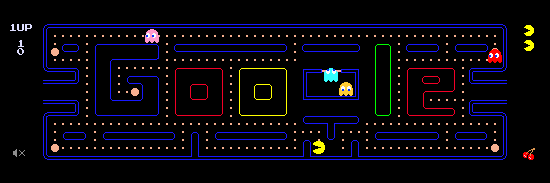
Google’s Pac-Man example
http://www.google.com/pacman/ – How is this good for SEO? It’s cool, shareable, likeable, tweetable, playable and accessible without any plugins.
Overall, HTML5 is a great new technology designed to make life easier and better for web users. Whilst I wouldn’t go and re-code the whole site into HTML5 since there is no real benefit for doing so (SEO or otherwise), instead for any new developments I would begin to adopt the new HTML5 technology.
As has been seen with other new technologies (Rich Snippets come to mind), if you can implement new technologies on the off-chance Google will give some additional bonus at some unknown point in the future then you are onto a winner. Google may never provide additional benefit to websites for designing in HTML5, but if you begin using this from now on then if they do begin to promote HTML5 websites then you will be one of the first to benefit from this.
If you are interested in looking at some cool things you can do with HTML5 then Google produced a nice Pac Man
Your best bet if you want a dummy-friendly guide for HTML5 would be to run over the tutorial at W3Schools. SEO wise, there isn’t much benefit at the moment so I wouldn’t worry too much about that side of things.
I wanted to share my thoughts on reciprocal linking and why I don’t believe it is neither a black hat technique nor a bad thing to do. I would even go as far as to encouraging reciprocal linking.
Reciprocal linking has been given a bad name in recent years with spammy websites being setup purely to game Google’s algorithm. So ‘Spammy Website A’ or ‘Spammy Directory B’ was set up which charged people £1.00 to get a lot of poor quality websites linking to your website. Then these spammy websites started to pop up everywhere and link to each other as well to try and boost their page rank.
Taking SEO out of the picture here, this is obviously not a good long term strategy to get results. There is going to be absolutely zero trafficgenerated from these links because they are crap, plain and simple. Everyone knows this and is one of the reasons why reciprocal links have been given a bad name.
On top of that, webmasters get hundreds of spammy requests asking “if you link to me I will link to you”. Again, totally pointless and there is no value here.
That said there is still value to reciprocal linking, just not in any of the ways outlined above.
Lets take a few examples of where you would want to actively target websites for a reciprocal link, obviously a one way link is better for SEO but I wouldn’t turn down a high quality reciprocal link.
Websites Designed by ‘Company A’
Have you ever noticed on websites where there is a link in the footer saying “This website was designed by Great Web Design Co.” with a link going back to their website? Thought so. This is also on a lot of WordPress themes by default linking to the designers website.
Now if the web design company decided to show a testimonial on their website to brag about some great work they have done recently, this is a great opportunity for everyone. Anyone reading the web design companies testimonials pages would come through to your website and be exposed to your brand. Is this is reciprocal link? Yes. Would I push back on this? No way, this is a great opportunity to manage those real world connections for the value of SEO.
Think about how many websites that company would have designed, all with links going back to their website no doubt, then they decide to link back to you. I would say you may be getting more SEO value from this link than they are.
Sponsorship’s
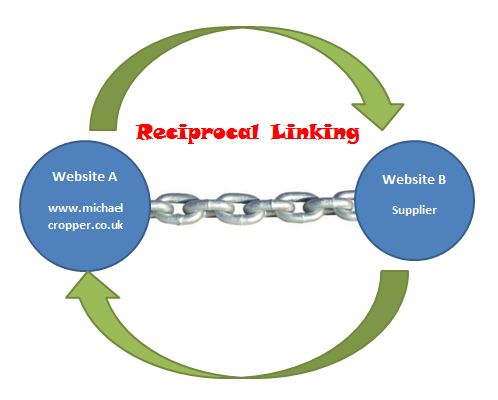
Another example of where you would find real world valid reciprocal links is when ‘Company A’ sponsors ‘Event B’ and as you would expect with any sponsorship (aka paid link – but that is another discussion ???? ) you would get a link back to your website. The image below isn’t fully accurate since Search Engine Land actually use Google Ads to power these listings which don’t pass any SEO juice to the different websites, but you get the point.
What would also likely happen in this scenario is a mention from ‘Company A’s website that they are sponsoring the event, which would link to the website in question.
Is this really a bad reciprocal link? I certainly don’t think so and would encourage people to go for these types of links since they aren’t likely to be copied by competitors.
Clients and Testimonials
Another example of real world good reciprocal links are from clients, testimonials and listings on each of the websites involved. Take for example a client linking to your website as a service provider, so something like “We use Company A for our parcel delivery”. Many companies will do this for vanity because they are working with a high profile company (this happens a lot in luxury hotels, where by they name drop expensive luxury toiletries companies when talking about their facilities in hotel rooms).
Then the same process happens in reverse, where by a certain supplier can link to their customer to say that they are the provider of ‘Product X’ for this company.
Again this can be a great way to get high profile links from places that your competitors may struggle to get them from, unless they are thinking of changing suppliers!
Summary
There are a lot of different high quality reciprocal links you can go for which are going to be extremely valuable and hard to copy by people checking your back link profile. So my advice here is to stop worryingabout how reciprocal links aren’t worth as much as one way links on this micro level and start thinking about the bigger picture. Go for the difficult links that your competitors aren’t willing to go for.
Sounds like hard work? Nothing worthwhile is easy. Pull your sleeves up and get stuck in actually doing something instead of worrying about the different values that may be assigned to different types of links. Instead just ask yourself the question ‘Is this really a good quality and worthwhile link?’ and that only takes common sense to answer.
It is extremely important to help your customers find the information they need to make an informed purchasing decision. Often I see websites who are extremely focused on pushing customers down the standard conversion funnel that has been set up within an analytics package.
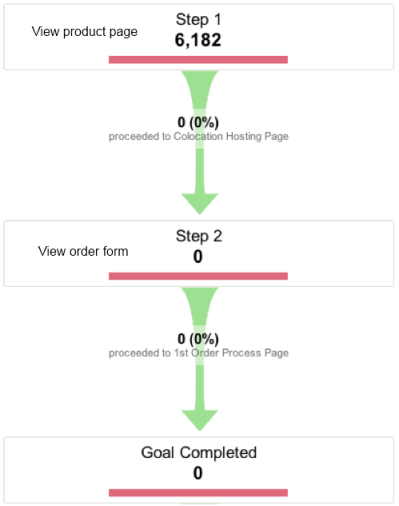
Whilst this is a nice (and essential) thing to have which allows you tobenchmark different time periods, it is also important that the majority of people will never run through your conversion funnel step by step in the way that you would like.
The general approach by many websites is to push people down the standard conversion funnel to increase the amount of people who ultimately buy. Often this includes removing any ‘distracting’ areas on the pages so that a customers focus is purely on making the final purchase.
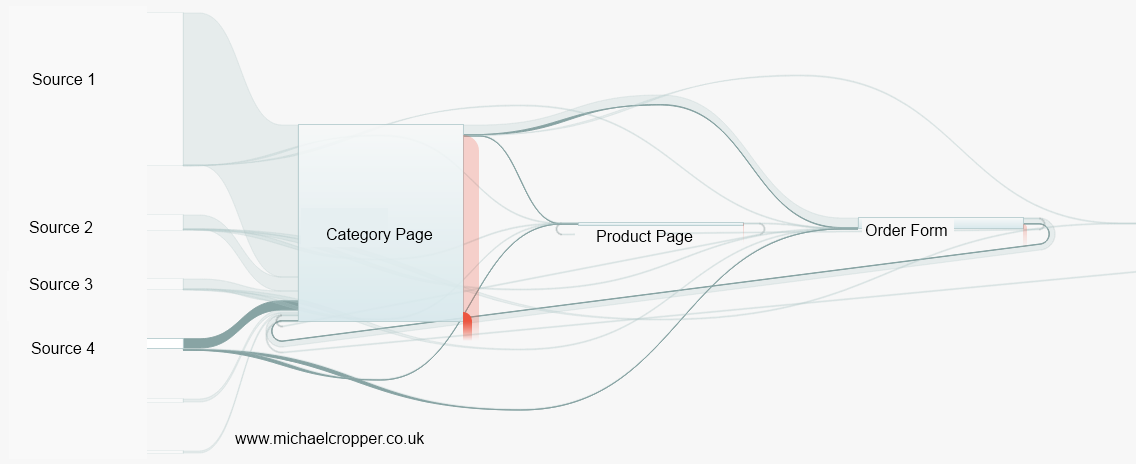
I tend to see this in a different light since most customer journeys aren’t quite as straight forward as that and can often look similar to the image below.
Whereby a customer is flicking backwards and forwards between different pages whilst trying to double check things or look for moreconfirmation that they are doing the right thing by purchasing your product.
So how can you get more people convert without forcing them down the standard sales funnel? Simple really, help them find the information they need and overcome their fears of purchasing.
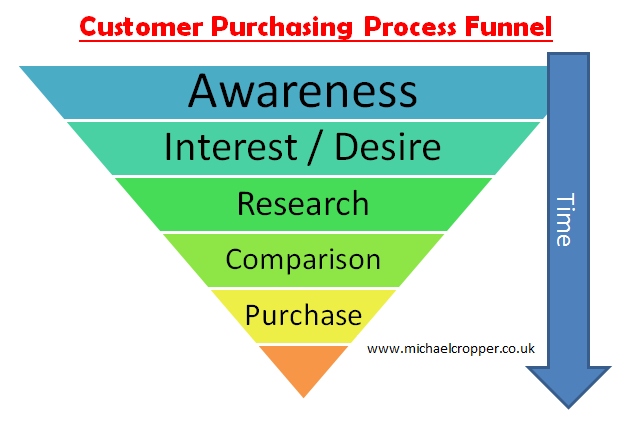
Put yourself in the customers shoes and understand what they really need when purchasing a product. Also understand where they are in the greater purchasing funnel, are they just in the research stage of their purchase or are they ready to purchase immediately?
An interesting quote from Google recently was that customers who book a hotel room check, on average, 15 other travel websites prior to making a booking. 15 other websites! Try tracking that in a normal conversion funnel. Another quote was that 70% of people who book a hotel view a map of where the hotel is located prior to booking.
When trying to increase conversion the question should be asked, “Why does someone go to 15 other websites before booking? What information is missing from our website that a customer feels they have to go elsewhere to find?” When you can answer these questions and incorporate the missing content on your website I can guarantee that your conversion will increase.
If you have great content that is not available on competitor websites then a customer is going to perceive you as the more knowledgeable brand who will provide a better service. This is going to make people want to order with you.
Summary
Stop pushing people down your standard conversion funnel. Instead start to create some great content which answers customers queries. When customers see how amazing and detailed you are at providing the answers they need then conversion will increase by default. Why would a customer buy a product from someone else who doesn’t have a great website/detailed information if the cost of the product is the same?
Yes it is important to track everything and I am not saying not to do that, but understand that the buying process does not happen by someone visiting page 1, then page 2 then purchasing. The buying process for any product is complex and you need to be offering information every step along the way.
Purchasing is a multitude of different browsers, multiple tabs, multiple devices, various research on your site and off your site, then coming to an informed decision that you are the best option for them to purchase from you. Give customers what they need at every step of the process and they will buy.
Most companies are afraid about their weak points in both their customer service and product offerings. Gaps are not anything to be afraid of but more areas for improvement.
If you know about problems with your product, then I guarantee that your customers will also find these problems too. So instead of hiding away, sticking your head in the sand and pretending they don’t exist then why not help your customers instead?
I own a Dyson DC25 vacuum cleaner and recently it got jammed in the downwards position (the position what it looks like when you are hoovering – see image below) so I couldn’t get it back to the normal upright position to store it away. A little annoying.
So I thought that there must be a solution to this somewhere online. There is always someone else who has had the same problem before any managed to fix it. I didn’t really want to be calling out a Dyson engineer to tap it in the right place and charge me a hefty fee for doing so.
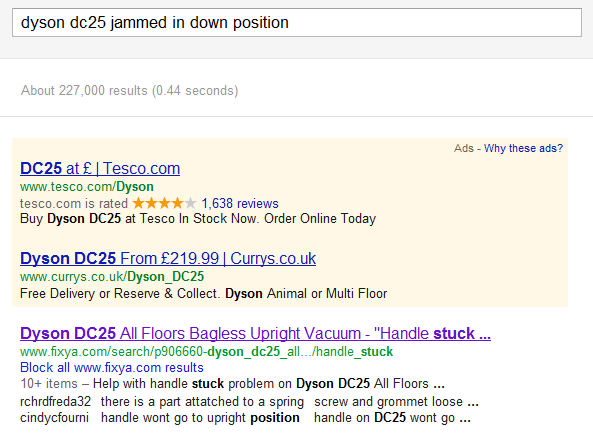
After having a good look round on their website, I came across a hugesupport section which contains videos about how to fix known problems with their products. There was a very useful video that anyone could follow to fix their jammed Dyson DC25.
The one thing that could be improved with Dyson’s videos is to include a voice overlay describing each step of the way which would be very useful for people not as confident at fixing problems. In addition, for those who can’t view the videos then a step by step instruction manual including text and images would be useful beneath the video.
This type of content is great for users of your products and subsequently great for SEO. Ask yourself the quest, what additional content could you provide to your customers to help solve their problems?
It is great to put this type of content in a very prominent position on the site since if I was looking to buy a product which is known for various faults (i.e. Dyson hoovers) then seeing all of this support material would give me confidence that if something did go wrong then I would be able to fix it myself. This information may put some people off from purchasing your product, but I am a big believer of providing easily accessible content and letting the customer make an informed decision.
It is extremely important to be able to be found for your product solutions when people are searching either on Google or on your site. If you cannot be found or you don’t offer the solutions to your products problems then your customers are going to stumble upon a forum post which is slating your product. Offer customers solutions and keep them as long term customers. If you are only interested in the short term sales for customers then they aren’t going to stick around with your brand, there are lots more competitors around.
Dyson could do with SEO’ing those great videos they have got so they can provide solutions to their customers problems faster. But it is a good start having the content to begin with, certainly some improvements required though.
Summary
Offer great content to solve your customers problems with your products. All companies will (or should!) be continuously improving their products, but as we all know not everything is perfect fist time round. So help your customers and keep them as loyal customers long term. If not, then they will go shopping elsewhere.
In addition, whilst looking round for the images for this post I came across a rather amusing blog post about Dyson Decepticons which has absolutely nothing to do with this post, but thought I would share to put a smile on your face
Spotted a great advert for McCains Jacket Potatoes today. I love guerilla marketing like this, it makes companies stand out from the crowd and get people talking about them.
The advert had a large jacked potato stuck to the inside of a bus shelter and the surrounding area actually smelt like jacket potatoes! There is no jacket potato stand close by either, it was coming from the item stuck on the bus shelter which must have been sprayed / soaked in some liquid which smells like jacket spuds.
Great marketing idea.
Update – Further information from the article Damien spotted;
“New technology will give bus users money-off vouchers and the smell of slow oven-baked potatoes with the push of a button.
The adverts are part of a campaign to launch the new frozen jacket potato product, the biggest launch by McCain Foods since McCain Oven Chips in 1979.
The bus shelter posters contain a hidden heating element which warms the 3D jacket potato picture and releases the scent when a button is pressed.
The company spent three months developing the aroma, in collaboration with a specialist scent laboratory, so that it accurately matched the scent of the product.”
3 thoughts on “Guerilla Marketing By McCains In Manchester”
I suspect that there is going to be some heating element added too (Feel the warmth…?) – Also, I wonder what the button does?


 “
“






Really nice post! You can also use this technology to make some interactive infographics such as this one:
http://www.thomson.co.uk/blog/infographic/superbowl/index.html#2008
Thanks. I am planning to move on HTML5 immediately.
I have new SEO project and your article is really helpful in my case.
I’m new to HTML 5 world and Schema.org.
Glad you found it useful Ramas
Mick,
Thank you for your time, it’s big job.
Do you have any link list where I can get good material about HTML 5, Dummy SEO Friendly?
Cheers,
Ramūnas Bruzgys
Hi Ramas,
Your best bet if you want a dummy-friendly guide for HTML5 would be to run over the tutorial at W3Schools. SEO wise, there isn’t much benefit at the moment so I wouldn’t worry too much about that side of things.
Michael
Really Nice Post.. i m planing to move html5 immediately……..