
A Mother’s Day movie, made for you

Dear Mom,
Becoming a parent has given me a new perspective on the important role you played in my life. As a small tribute to you, and all the other mothers out there, we’re launching Mother’s Day movies—a new feature in Google Photos that makes it super easy to make a movie that celebrates a mom.
Starting today, people can go to photos.google.com/mothersday, pick a mom and kids, and then Google Photos does the rest. It automatically chooses the best photos of the mother and children, and sets it all to music to make a personalized movie.
People can …Read More
Source:: A Mother’s Day movie, made for you
How Nehemiah Manufacturing Co. creates jobs—and second chances

Everyone deserves a second chance. That’s what motivated Dan Meyer and Richard Palmer when they founded Nehemiah Manufacturing Company in 2009. They wanted to bring manufacturing into the inner city of their hometown of Cincinnati, OH, and their goal was to hire people with backgrounds that would typically make it difficult for them to get a job. Some employees may have no work history or a criminal record, but Nehemiah believes they need the opportunity to prove themselves. Dan and Richard turned to the web to help their business grow, expanding Nehemiah from just 10 employees to 110 …Read More
Source:: How Nehemiah Manufacturing Co. creates jobs—and second chances
7 Twitter Accounts That Will Make You a Better Social Media Marketer
One common challenge for social media marketers is the pace—not only is it tough to stay on top of a consistent posting schedule, but social platforms seem to announce new features or changes every other week. It’s almost impossible for the stretched-thin marketer to keep up.
Fortunately, marketers can lean on subject matter experts who readily offer up their hard-earned advice, all in 140 characters or less. When it comes to stepping up your social media game, it only makes sense to turn to the platforms themselves for guidance.
That’s why we’ve taken the time to round up some of the top …Read More
Source:: 7 Twitter Accounts That Will Make You a Better Social Media Marketer
May the Fourth be with You

Step into a galaxy far, far away and celebrate May the Fourth with Google Play.
We traveled back to Jakku to find the most popular Star Wars content of all time on Google Play, including the most downloaded film, The Force Awakens; the most downloaded game, Star Wars™: Galaxy of Heroes and the most downloaded book, Aftermath: Star Wars: Journey to Star Wars: The Force Awakens. Check out the full lists below.
Source:: May the Fourth be with You
How to Turn Your Blog Posts into Lead Generating Machines
Blogging, content marketing, SEO, Google, brand building and more – We’re all told that blogging helps with all of these things, and it really does. But what if we want to turn blogging into a lead generating machine that you can highly target to your key audiences with different messages, all automatically? Imagine a mini-website-footer, that is fully customised to each of your target sectors and audiences that is filled with the key information to drive them to take the action you want on top of simply reading the blog post. Sounds pretty cool right? Well, yes, it is. And most importantly, it’s not actually that difficult to implement.
How WordPress Works
So, I’m going to assume you’re using WordPress for your blogging activities. If you’re not, have a word with yourself and get onto WordPress, seriously. There is rarely a reason to use anything other than WordPress for blogging activities in this day and age.
WordPress works in a very, well, WordPress way. So it is important to understand this in the first instance so you can understand what is actually possible. In essence, the end result for what we’re looking for is to add a bit of content at the end of every blog post, or every blog post within a specific category, or even every page on yourself. The options are virtually endless and allows you to customise what is important to you.
To get a feeling for the end result for what I’m about to show you, take a look at this blog post about How Travel Companies Can Stand Out on Googles Search Results Using Review Rich Snippets and most importantly, what you’ll notice at the end of the blog post is a small lead generation area that is designed to turn blog post readers into engaged people and potential customers at some point in the future.

Specifically what you’re seeing above, is the last paragraph of the blog post, followed by the lead generation section, followed by the author section. And you’ll also notice that this section is not present on this blog post you’re reading right now, because this post belongs to a different target market, primarily developers like yourself reading this.
So, back to WordPress. WordPress works in sections. What you see is not simply a full page of content that is being generated in a single go, what is actually happening in the background when a blog posts loads for a user is that WordPress goes away and gets the header, the main navigation, the blog post content, the author information, the footer and many more things. In the background WordPress then pieces all of this information together which is then presented to the user in what they see as just another blog post on the website.
What is important to understand here is that you can interrupt this process and do additional things which is super handy. This is when you can listen out for Hooks and apply Actions and Filters to these Hooks. In essence, an Action does something, and a Filter changes some data in transit. It’s not always quite as straight forward as that in the background, but you get the idea.
If you’re a non-technical person reading this blog post, skim over the code and don’t worry about the finer details. Simple see the type of customisations that can be added to your WordPress blog posts to target your key target markets and generate leads.
Adding Lead Generation Content to the_content()
As mentioned above, there are many Hooks throughout the WordPress codebase. One of these is called the_content() which provides, you guessed it, the content on the page. In this specific example, the blog post content. And because this Hook exists, it is possible to manipulate the data, for example by adding additional information at the start or the end of the blog post content.
What is interesting too though is that every blog post belongs to a specific Category, which again can be used to show different information at the bottom of blog posts that belong to different categories. For example, if you wanted to share different information with people reading technical information VS non-technical information or share different information to people within your different target markets, this is all possible and this is exactly what we’ve done on our website.
So, let’s jump straight in and look at the code and I’ll explain everything in a moment.
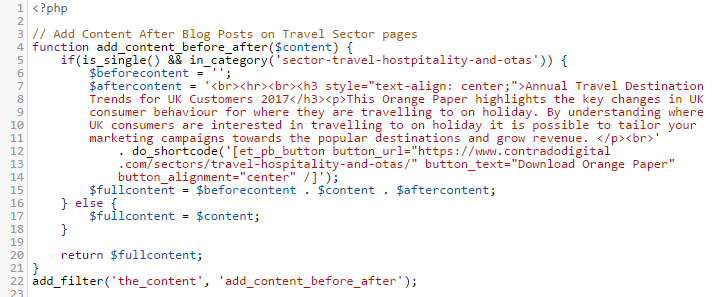
The above code is contained within the functions.php file within our Child Theme. In essence what the code is doing is listening out for whenever the_content() Hook is triggered by WordPress, i.e. when someone is looking to read a blog post, then before this information is sent to the user, it is being altered slightly. As the_content() Hook is triggered for both Posts and Pages, the if(is_single()) part is saying that only apply this lead generation content on Blog Posts, not Pages. And likewise, the in_category() part is saying only display this information within this specific category which is the URL slug of the category, not the name of the category.
The $content variable is where all the information for the content is stored. So we want to add data to the start and end of this. In this example, we’ve only added data to the end, although both have been contained to show you the logic of how to add content either before or after the_content() part. Reading through the code should be relatively self-explanatory when you compare with what you can see on the main image at the top for how this is displaying. The only thing to point out specifically is the additional do_shortcode() function which is also called which allows us to output shortcodes from here too rather than just plain text. This can be really handy if you want to add things like buttons and forms before or after the content. When you do this, note the single VS double quotes. Make sure you don’t get these in the wrong order or it won’t work.
And it really is as simple as that. Turn your blog posts and content marketing activities into lead generating machines without manually adding this information at the bottom of every blog post you write, which is extremely time consuming to change in the future as you fine tune your marketing campaigns.