by Michael Cropper | Oct 7, 2013 | Uncategorized @en-us |
As Google turned 15 last month, you may have heard about a change with their algorithm that was announced a couple of weeks ago called Hummingbird. What you may not be too familiar with is what this actually is and what this means for your business. Hopefully after reading this blog post you will be up to speed with this change and how it impacts things. After all, this change was the first time since 2001 where the whole algorithm was rewritten so dramatically.
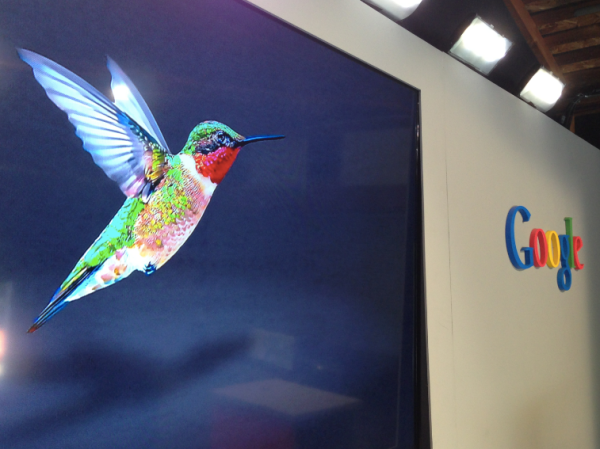
Image courtesy of Search Engine Land
What is Hummingbird?
Hummingbird is the name that has been given to Google’s latest algorithm change which is all about being “precise and fast”. More importantly, Hummingbird is designed to understand the meaning behind the words people are searching for, especially with more complex queries. One example given included how they could understand where you live if you searched for “Pizza shops near my home”, if you have shared that location data with Google.
With Google looking at the meaning behind the words and whole phrases being searched for, this means that pages that contain information that specifically answers the users query are more likely to rank higher than pages that simply contain the words on the page. This is only a good thing and it once again highlights the need to focus on awesome content that answers user’s queries in the best way possible.
Google stated that a search for “Pizza Hut calories per slice” used to bring up a website that simply contained that information on. Now what they are aiming to achieve with the Hummingbird algorithm is to understand that the two words “Pizza Hut” actually relate to the brand, so that information would be used to find information on the Pizza Hut website about “calories per slice”. When I have just performed this search, the other websites still are outranking Pizza Hut which goes to show that the algorithm still has a long way to go to fully understand entities within a semantic search environment.
Another example of how Hummingbird is understanding entities better is when you search for “Blackpool Tower VS Eiffel Tower” and you are presented with a nice comparison of the two;
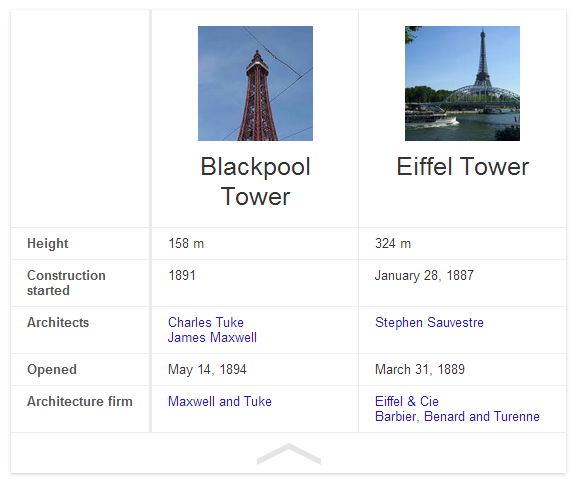
Previously this search query would likely have just presented a page that contains a bit of information about the two different topics which may or may not have had the answer a user was looking for.
Do you need to change anything?
With the new Hummingbird algorithm being out in the wild, the one question on everyone’s mind is whether they need to change anything they are doing. In summary, no. The best practice still remains true which is to build amazing, original, high quality, sharable and linkable content for your customers.
Hummingbird is all about how Google understands information that is already out there. So all of the important signals that we know Google is using are still as important with Hummingbird in place.
With Hummingbird being all about how Google understands content better, this once again should take the focus away from specific keywords and to a place that is all about users and providing them with the answers they need. Put yourself in your customer’s shoes and understand what types of things they are seeking answers for. Identify those needs and problems and help provide solutions and answers to them.
Should you worry about a Hummingbird penalty?
No. Hummingbird is simply changing the way Google understands your content. Based on this understanding they are able to provide better search results to users searching on Google for complex queries. With previous animal named algorithm updates, Panda and Penguin, it is rightfully so that people would ask this question. With this change being launched over a month ago unofficially, if you have noticed a change then it isn’t likely to do with the algorithm but it is more likely due to one of the other 200 signals that Google uses within their ranking algorithm.
Looking through various Google Analytics account and rank tracking data, we haven’t seen any changes related to the Hummingbird algorithm change.
What is the real reason behind the change?
More and more people are searching on Google from mobile devices and this search behaviour isn’t just standard text based. With the advent of voice search on Google (both from your mobile device and from normal desktop search) this is driving more complex queries which needed a change in thinking for how Google answers those queries.
Previously Google was all about the words on a page without any real understanding behind them. They understood that if a page mentioned “Britney” that it was also likely to mention “Spears” but they didn’t understand that “Britney Spears” was a person. Back in May, Google announced Knowledge Graph which is all about understanding entities and real world things in greater detail. Hummingbird is the logical next step to this.
Looking at a conversational search example, the aim is to allow users to simply talk to their device in a conversational way and to get back useful information throughout this process without being explicit each time.
Being able to understand potentially lengthy conversations means that Google needs to really understand the meaning of the words behind the query to be able to serve the best possible information to the user. It is going to be interesting to see how this develops over time and how user’s behaviour starts to change with new technology such as this.
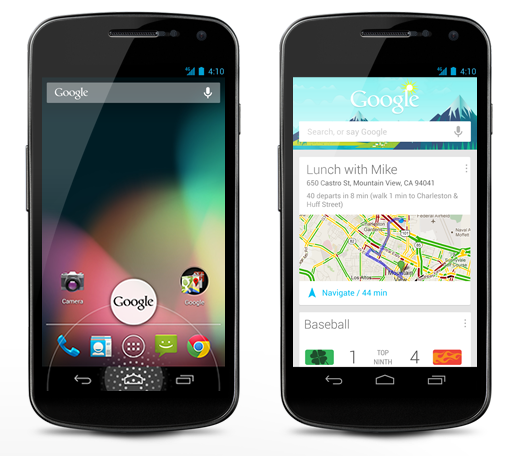
Google Voice Search
Additional video
Since posting this blog post I have re-stumbled upon an old video from a few months ago where Matt Cutts (Head of Web Spam at Google) talks about the change in behaviour they are seeing with people searching on mobile phones. Specifically to a more conversational style search;
Future opportunities
With Hummingbird being all about how Google understands content, the biggest tip that we can give at the minute is to start taking Schema.org markup seriously. If you don’t already know, Schema.org markup is simply a way to markup your content into some kind of structured way that search engines can understand more easily.
Google already supports several Schema.org tags and this list is only going to grow over time. Some Schema.org tags already give you direct benefit within the search results, such as review rich snippets standing out, although there are others that haven’t been announced yet. Implementing these now won’t gain you any extra benefit in the short term, although it will certainly put you in the right position for when Google does look at these additional tags.
As can be seen from a lot of the major changes recently (knowledge graph, conversational search, Hummingbird) it is clear that Google is always looking to understand the world we live in more.
by Michael Cropper | Aug 14, 2013 | SEO |
The data we often have access to via either internal reporting tools or web analytics tools such as Google Analytics is great, but those tools never highlight where the opportunities lie. Instead they simply report on what is currently happening or what has happened in the past, which is extremely important, but it isn’t going to help show you a path to further growth.
There are high end tools available on the market which highlight trends and opportunities within your industry although these are often out of reach for most companies due to the price. Thankfully, there is another way to identify annual search trends within your market with a bit of research.
The two main methods of researching how people are searching online for your products and services throughout the year include Google Trends and the new Google Keyword Planner tool which is starting to roll out and replace the old Keyword Tool.
Gathering Annual Search Trends from Google Trends
Google already provides trending data through Google Trends which allows you to see how different keywords are being searched for throughout the year. Google Trends is an ideal tool for a quick snapshot to see how people are searching, although it doesn’t really provide great insights when you want to dig a little deeper and use this data for planning.
The main limitations with Google Trends is that all of the data is indexed against each other between 0 and 100. What this means is that if you are looking at a single keyword such as “Halloween” then you can see that this keyword increases in popularity up until the end of October when people stop searching for Halloween related items.
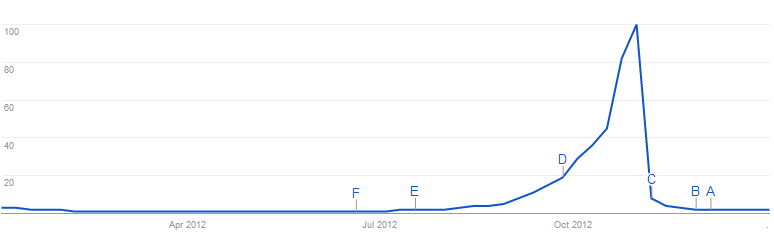
Halloween annual search trends on Google.co.uk
No surprise there then, this follows what you would expect to see as a popular date in the calendar approaches. The same trend can be seen when searching for “Easter” and “Christmas”, the difference being that when you are comparing these against each other the data shows which keyword is the most popular;
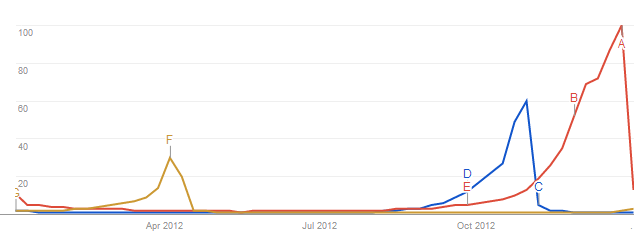
Annual search trends on Google.co.uk for Easter, Halloween and Christmas
Again, no real surprise about when those keywords are searched for. As mentioned previously, all of the data on the graph is indexed against each other from 0 to 100, so “Christmas” in this instance is more popular and is useful to see like this, but the data doesn’t say how many people are searching for the specific keyword.
Google Trends is also indexed as a whole against the total number of people searching on Google. What this means is that if more people are searching on Google, and the same amount of people are searching for your brand online then this would result in an apparent decrease in searches on Google for your brand – when in reality this is not the case.
Below is a graph to illustrate how your branded searches are increasing over time;
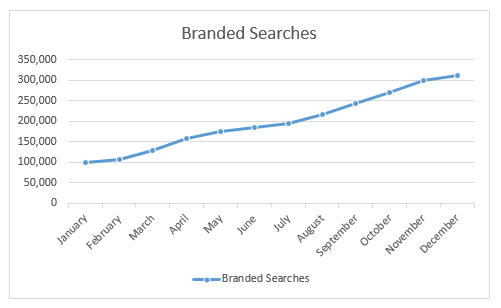
Actual branded searches over time
Below shows a graph to illustrate how the total number of searches on Google has increased over time;
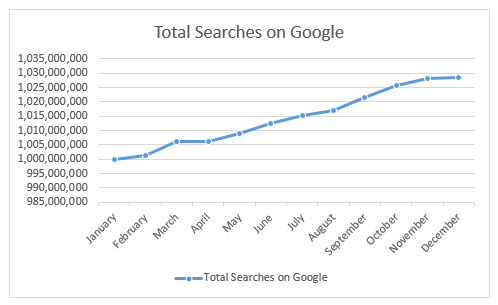
Total searches on Google.co.uk over time
As you can see there is an increase in both of these pieces of data. What this means for Google Trends reporting is that since more people are searching online then the increased branded searches is indexed against the growth in overall searches. So the data is benchmarked against the total number of searches to show how the keyword has performed either ahead or below the market as a whole. What this means is that the increase may not be as much as reality when looking at the data through Google trends which can be quite misleading;
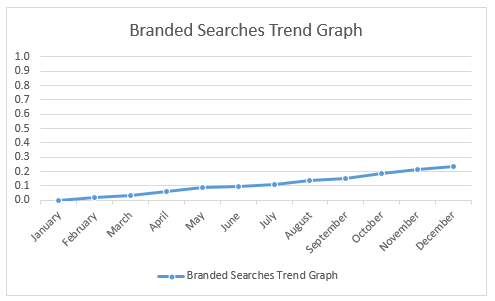
How Google Trends would display branded searches over time
As I say, the tool is great for quick snapshots of data, but it is always worth understanding how the tool works before using this data in your decisions. As with all data, there are discrepancies and things to bear in mind.
With this in mind, the next tool to look at gathering some more accurate data is from the newly updated Google Keyword Tool, the Google Keyword Planner tool which gives you more accurate numbers in terms of how many people are searching for specific keywords opposed to just trending data that is indexed against the total number of searches on Google.
Gathering Awesome Annual Search Trends Data through the Google Keyword Planner Tool
Recently Google announced they are launching a new Keyword Planner tool and one of the more interesting updates as part of this is that the tool will now allow you to download trending data for your keywords over the past 12 months. This is something that was previously restricted to accessing via their AdWords API, so this change now makes this data accessible to everyone without having to need to pay for access through the API.
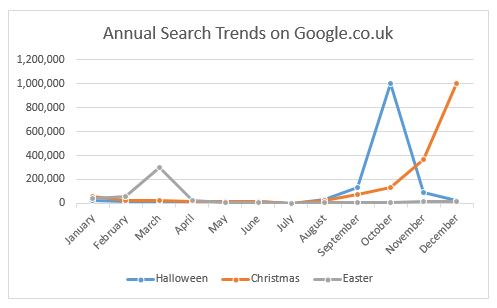
So let’s dig into some of this data starting off with the obvious ones again as outlined earlier, “Easter”, “Halloween” and “Christmas”;
Annual search trends on Google.co.uk for Easter, Halloween and Christmas
As you can see above, this data is more interesting and insightful than the Google Trends data above since it clearly shows how many people are searching for the different keywords each month. Knowing the amount of people searching, opposed to their relative popularity, can help build a picture of which keywords are more popular and by how much in terms of real people searching.
You may also note that this data for “Halloween” and “Christmas” both have high searches in the relevant months, which differs from the data from Google Trends graph isn’t shown earlier. This discrepancy is due to the indexing that happens on Google Trends as explained earlier.
As always, the data is never 100% accurate although it is far more accurate than the Google Trends data.
Insights into Product Search Trends
Ok so the examples given so far are nice to highlight the type of data that is accessible for viewing annual search trends using different tools, but what about more commercially focused keywords. Well from here on we are going to look at the Google Keyword Planner data since this is far more insightful and we are going to look at a few different industries to see how these differ.
Budget Travel
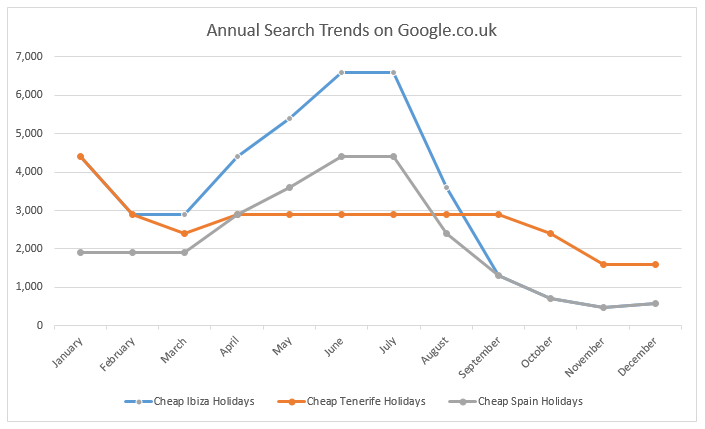
Below is a graph for three keywords related to budget travel, which shows how the searches for the different destinations differ throughout the year and where they lie in terms of actual numbers of people searching;
Budget travel annual search trends on Google.co.uk
What is interesting when looking at this data is that you can easily plan your marketing activities around these times. The above data suggests the most popular time people are searching for “Cheap Tenerife Holidays” is in January, whereas there are more people searching for “Cheap Ibiza Holidays” in the summer months.
The question is, does this tie up with what traffic your website is getting for these keywords throughout the year? And most importantly, if not, then what additional activities can be done to capture some of these searches.
Luxury Travel
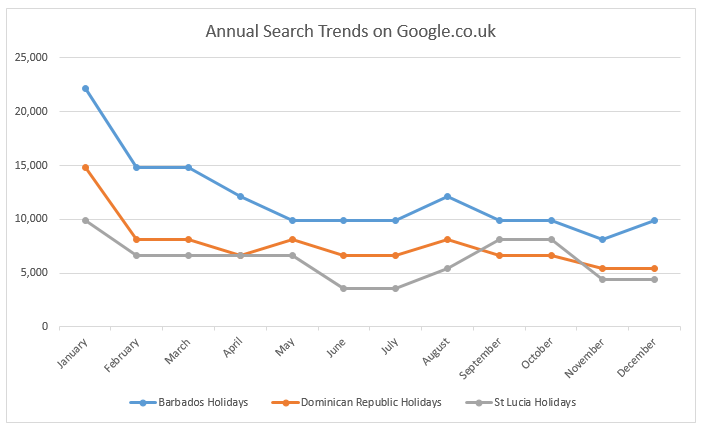
Below is a graph for three keywords related to luxury travel, which shows how the searches for the different destinations differ throughout the year and where they lie in terms of actual numbers of people searching;
Luxury travel annual search trends on Google.co.uk
Again this highlights some interesting data that people are searching more luxury destinations in January to March along with a spike for St Lucia around September and October time.
Gadgets
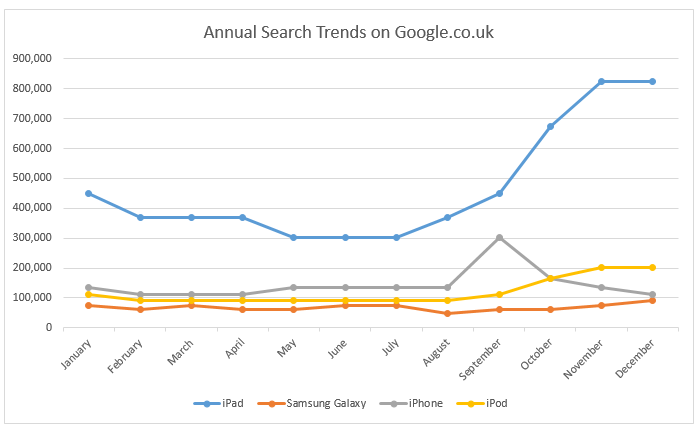
Moving over to the technology and gadgets area, it is interesting to see how people are searching for these types of keywords throughout the year. One item to note here is that the annual search trends are based on the previous 12 months of data that Google makes accessible, so as you can see the spike in September for “iPhone” related queries, this was due to the launch event in September for the new iPhone 5.
Gadgets annual search trends on Google.co.uk
Branded Queries
Now taking this annual search trends one step further, how about taking a look at what your competitors were doing last year. By understanding previous trends this will help you plan marketing campaigns around your competitors (preferably before they run theirs). Go and take a look at the new Keyword Planner tool from Google to see how your competitors are being searched for online throughout the year, I’m sure you will find some interesting data.
Having this data allows your business to move from a reactive approach to competitors and annual market trends to a proactive approach where you can plan key activities throughout the year to capture the maximum amount of traffic possible.
Spotting Opportunities & Gaps
The next steps is to compare the market trends to see how well your actual traffic lines up with this. If there is a large discrepancy then you could be missing out on huge amounts of people searching throughout the year. Get in touch to find out more about how we can help to plan your organic search campaigns throughout the year to maximise the number of people searching for your products and services online.
The new tool can take a while to get used to since some of the functionality has been moved around within the interface, but it is quick enough to pick up. Once you know how to use the tool the data that is present is awesome. As you can tell, I am a bit of a data geek so I love sifting through data like this to find the nuggets of information and how they can then be used to feed into marketing campaigns and Search Engine Optimisation work.
Notes
All of the historical data within the Keyword Planner tool from Google is for Exact Match data. This blog post helps you to understand the match types within Google.
Sources
https://support.google.com/adwords/answer/3141229
http://adwords.blogspot.co.uk/2013/05/introducing-keyword-planner-combining.html
by Michael Cropper | Aug 14, 2013 | SEO |
The data we often have access to via either internal reporting tools or web analytics tools such as Google Analytics is great, but those tools never highlight where the opportunities lie. Instead they simply report on what is currently happening or what has happened in the past, which is extremely important, but it isn’t going to help show you a path to further growth.
There are high end tools available on the market which highlight trends and opportunities within your industry although these are often out of reach for most companies due to the price. Thankfully, there is another way to identify annual search trends within your market with a bit of research.
The two main methods of researching how people are searching online for your products and services throughout the year include Google Trends and the new Google Keyword Planner tool which is starting to roll out and replace the old Keyword Tool.
Gathering Annual Search Trends from Google Trends
Google already provides trending data through Google Trends which allows you to see how different keywords are being searched for throughout the year. Google Trends is an ideal tool for a quick snapshot to see how people are searching, although it doesn’t really provide great insights when you want to dig a little deeper and use this data for planning.
The main limitations with Google Trends is that all of the data is indexed against each other between 0 and 100. What this means is that if you are looking at a single keyword such as “Halloween” then you can see that this keyword increases in popularity up until the end of October when people stop searching for Halloween related items.
Halloween annual search trends on Google.co.uk
No surprise there then, this follows what you would expect to see as a popular date in the calendar approaches. The same trend can be seen when searching for “Easter” and “Christmas”, the difference being that when you are comparing these against each other the data shows which keyword is the most popular;
Annual search trends on Google.co.uk for Easter, Halloween and Christmas
Again, no real surprise about when those keywords are searched for. As mentioned previously, all of the data on the graph is indexed against each other from 0 to 100, so “Christmas” in this instance is more popular and is useful to see like this, but the data doesn’t say how many people are searching for the specific keyword.
Google Trends is also indexed as a whole against the total number of people searching on Google. What this means is that if more people are searching on Google, and the same amount of people are searching for your brand online then this would result in an apparent decrease in searches on Google for your brand – when in reality this is not the case.
Below is a graph to illustrate how your branded searches are increasing over time;
Actual branded searches over time
Below shows a graph to illustrate how the total number of searches on Google has increased over time;
Total searches on Google.co.uk over time
As you can see there is an increase in both of these pieces of data. What this means for Google Trends reporting is that since more people are searching online then the increased branded searches is indexed against the growth in overall searches. So the data is benchmarked against the total number of searches to show how the keyword has performed either ahead or below the market as a whole. What this means is that the increase may not be as much as reality when looking at the data through Google trends which can be quite misleading;
How Google Trends would display branded searches over time
As I say, the tool is great for quick snapshots of data, but it is always worth understanding how the tool works before using this data in your decisions. As with all data, there are discrepancies and things to bear in mind.
With this in mind, the next tool to look at gathering some more accurate data is from the newly updated Google Keyword Tool, the Google Keyword Planner tool which gives you more accurate numbers in terms of how many people are searching for specific keywords opposed to just trending data that is indexed against the total number of searches on Google.
Gathering Awesome Annual Search Trends Data through the Google Keyword Planner Tool
Recently Google announced they are launching a new Keyword Planner tool and one of the more interesting updates as part of this is that the tool will now allow you to download trending data for your keywords over the past 12 months. This is something that was previously restricted to accessing via their AdWords API, so this change now makes this data accessible to everyone without having to need to pay for access through the API.
So let’s dig into some of this data starting off with the obvious ones again as outlined earlier, “Easter”, “Halloween” and “Christmas”;
Annual search trends on Google.co.uk for Easter, Halloween and Christmas
As you can see above, this data is more interesting and insightful than the Google Trends data above since it clearly shows how many people are searching for the different keywords each month. Knowing the amount of people searching, opposed to their relative popularity, can help build a picture of which keywords are more popular and by how much in terms of real people searching.
You may also note that this data for “Halloween” and “Christmas” both have high searches in the relevant months, which differs from the data from Google Trends graph isn’t shown earlier. This discrepancy is due to the indexing that happens on Google Trends as explained earlier.
As always, the data is never 100% accurate although it is far more accurate than the Google Trends data.
Insights into Product Search Trends
Ok so the examples given so far are nice to highlight the type of data that is accessible for viewing annual search trends using different tools, but what about more commercially focused keywords. Well from here on we are going to look at the Google Keyword Planner data since this is far more insightful and we are going to look at a few different industries to see how these differ.
Budget Travel
Below is a graph for three keywords related to budget travel, which shows how the searches for the different destinations differ throughout the year and where they lie in terms of actual numbers of people searching;
Budget travel annual search trends on Google.co.uk
What is interesting when looking at this data is that you can easily plan your marketing activities around these times. The above data suggests the most popular time people are searching for “Cheap Tenerife Holidays” is in January, whereas there are more people searching for “Cheap Ibiza Holidays” in the summer months.
The question is, does this tie up with what traffic your website is getting for these keywords throughout the year? And most importantly, if not, then what additional activities can be done to capture some of these searches.
Luxury Travel
Below is a graph for three keywords related to luxury travel, which shows how the searches for the different destinations differ throughout the year and where they lie in terms of actual numbers of people searching;
Luxury travel annual search trends on Google.co.uk
Again this highlights some interesting data that people are searching more luxury destinations in January to March along with a spike for St Lucia around September and October time.
Gadgets
Moving over to the technology and gadgets area, it is interesting to see how people are searching for these types of keywords throughout the year. One item to note here is that the annual search trends are based on the previous 12 months of data that Google makes accessible, so as you can see the spike in September for “iPhone” related queries, this was due to the launch event in September for the new iPhone 5.
Gadgets annual search trends on Google.co.uk
Branded Queries
Now taking this annual search trends one step further, how about taking a look at what your competitors were doing last year. By understanding previous trends this will help you plan marketing campaigns around your competitors (preferably before they run theirs). Go and take a look at the new Keyword Planner tool from Google to see how your competitors are being searched for online throughout the year, I’m sure you will find some interesting data.
Having this data allows your business to move from a reactive approach to competitors and annual market trends to a proactive approach where you can plan key activities throughout the year to capture the maximum amount of traffic possible.
Spotting Opportunities & Gaps
The next steps is to compare the market trends to see how well your actual traffic lines up with this. If there is a large discrepancy then you could be missing out on huge amounts of people searching throughout the year. Get in touch to find out more about how we can help to plan your organic search campaigns throughout the year to maximise the number of people searching for your products and services online.
The new tool can take a while to get used to since some of the functionality has been moved around within the interface, but it is quick enough to pick up. Once you know how to use the tool the data that is present is awesome. As you can tell, I am a bit of a data geek so I love sifting through data like this to find the nuggets of information and how they can then be used to feed into marketing campaigns and Search Engine Optimisation work.
Notes
All of the historical data within the Keyword Planner tool from Google is for Exact Match data. This blog post helps you to understand the match types within Google.
Sources
https://support.google.com/adwords/answer/3141229
http://adwords.blogspot.co.uk/2013/05/introducing-keyword-planner-combining.html
by Michael Cropper | Aug 9, 2013 | SEO |
This week Google announced a new feature on their search results pages, ‘In-Depth Articles’. From now on, when you search on Google.com (in English) for broad queries, people or organisations then you are more likely to see an extra section present within the search results titled In-Depth Articles as can be seen below when searching for “Lego”;
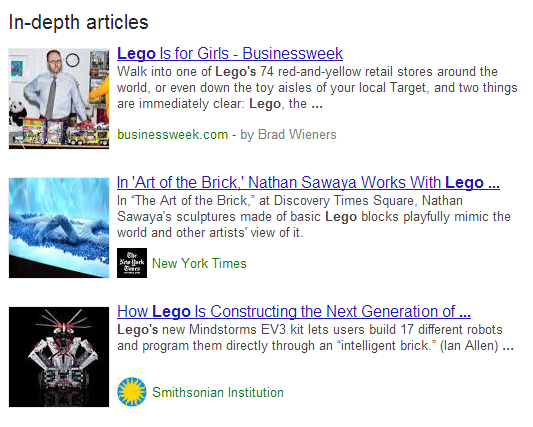
Google search for “Lego”
What this means for brands is that there is a huge opportunity to stand out in the search results from your competitors.
When do In-Depth Articles display?
When an important and broad phrase is searched for, In-Depth articles are triggered to display high quality content that covers the topic in detail which allow you to find out more about the subject area. A few examples of when Google triggers In-Depth Articles include searches such as;
Population Growth
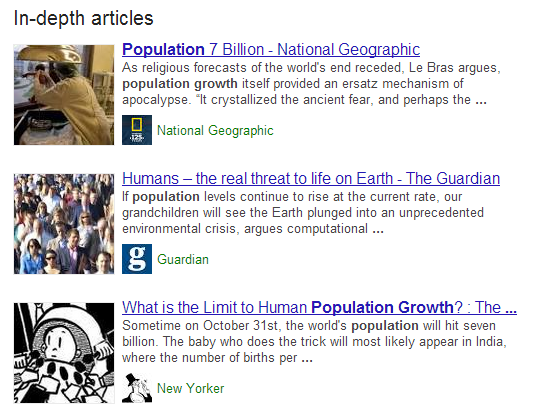
Google search for “Population Growth”
Death Penalty

Google Search for “Capital Punishment”
E-Waste
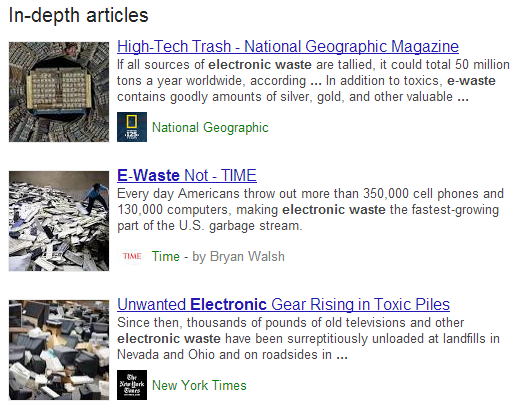
Google search for “e-waste”
Censorship
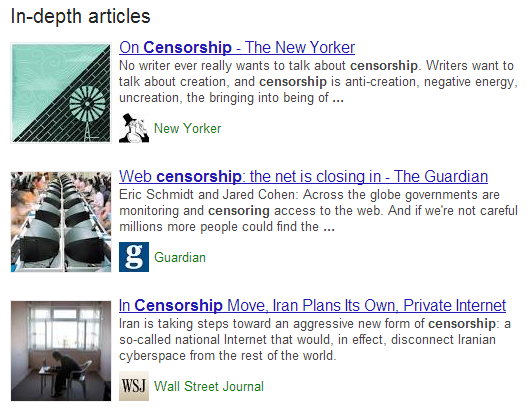
Google search for “Censorship”
Android
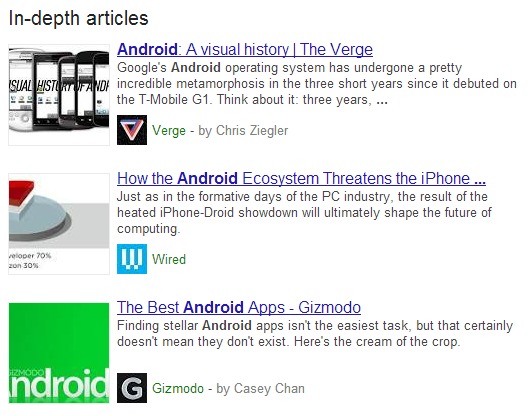
Google search for “Android”
Barack Obama
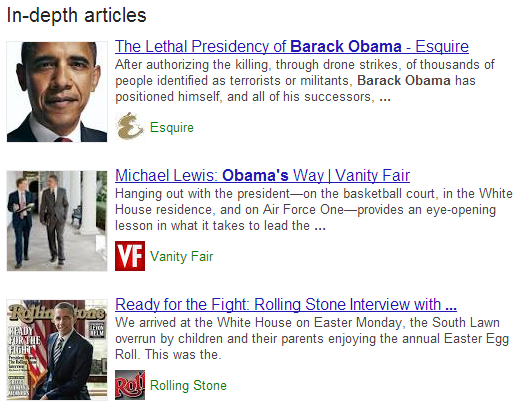
Google Search for “Barack Obama”
David Cameron
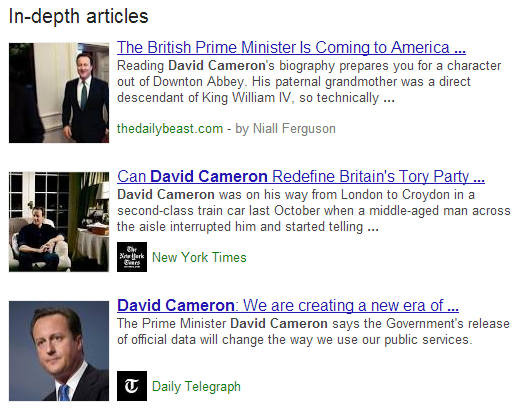
Google search for “David Cameron”
Just in the interest of fairness, looking at a search for Nick Clegg didn’t produce any In-Depth Articles, so make what you will of that;
Nick Clegg
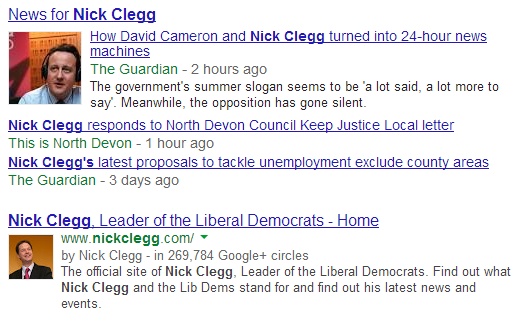
Google search for “Nick Clegg”
How to display In-Depth Articles for your website
Google selects websites and content pieces to display within In-Depth Articles based on algorithmic signals, which means there are ways to help guide Google to choosing your content. Below outlines the key requirements that can help Google select your content to be displayed within the new In-Depth Articles section within the search results.
Schema.org Article Markup
Schema.org Article Markup can be summed up as special tags and attributes (i.e. pieces of code) that you add into your content that is designed to help search engines understand the content easier. Without going into the technical details of this implementation, there are key facts that Google is wanting to know about for inclusion within In-Depth Articles;
- What is your article headline?
- What is your summary or alternative headline?
- What image best represents your article?
- What is the description of your article?
- When was your article published?
- What content is the main body of the article?
By implementing the correct markup on your articles, this helps Google to index the content much easier which can provide a positive signal to Google for including your articles within the In-Depth Articles section.
Authorship Markup
Authorship markup has been designed to display a photograph of the author who wrote the article within Google’s search results pages as can be seen below;
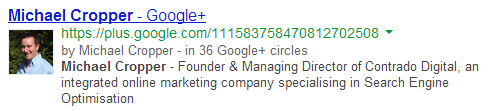
Google Authorship displaying within search results
To allow Google to understand who the author is for certain articles there are a few key steps required which include having a Google+ profile with your photo as a good recognisable headshot as can be seen in the screenshot above.
In addition, you then need to either verify that you are an author of that content by linking your content to your Google+ profile using a verified email address, or, setting up authorship by linking your content to your Google+ profile.
Again, there are no guarantees that Google will show the authorship information for your website, but by having this in place it will give positive signals to Google.
Pagination & Canonicalisation
Some publishers display content that is split between multiple pages. In these cases, it is important to use all of the guidelines in addition to using correct Canonicalization along with Rel=Next and Rel=Prev markup.
The implementation of this is really important to get correct, not just for being included within In-Depth Articles, but also for allowing search engines to easily understand the content throughout your website. Below is a visual representation of how to implement without going into the technical details of this;
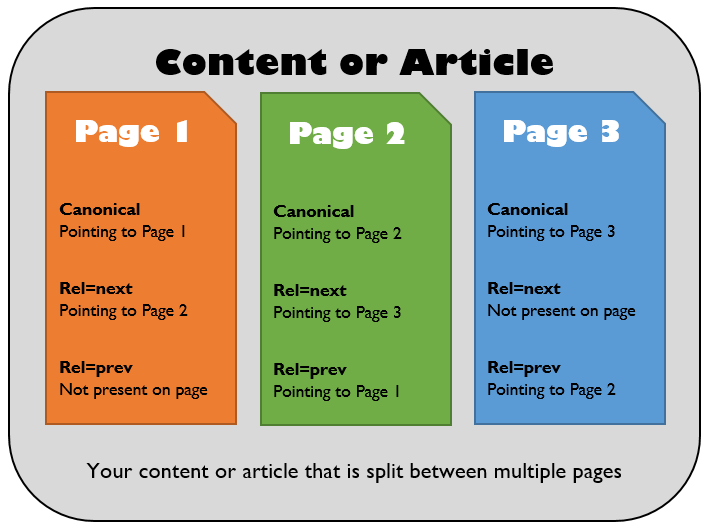
Technical implementation of multi-page content for inclusion in In-Depth Articles
Website Logo
Another step in the process to be included within the new In-Depth Articles section includes specifying to Google which logo you would like to use to represent your business. You may have noticed organisation information being listed on the right hand side when searching for branded queries as can be seen below when searching for “Lego”;
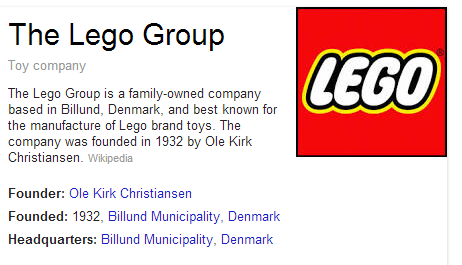
Lego organisation markup for inclusion on Google
To be both visible within the right hand side of the search results along with being included within the new In-Depth Articles section you need to inform Google which logo to use to represent your business. To do this, there are two options which are either creating a Google+ Page and linking it to your website along with choosing an official logo or icon as the default image, or, using Organisation markup on your website which specifies to search engines which image on your website is the logo.
Implementing this markup is in the exact same way as with the Schme.org Article markup outlined above, whereby special tags and attributes are wrapped around your content within the source code of your website.
One thing to bear in mind is that it can take a while for logo changes to be reflected within Google’s search results, so this one may need a little more patience than the other areas.
Paid Content
Some publisher websites are paid for and subscription based which means that often search engines cannot index the content. To allow search engines to include your content within the new In-Depth Articles section then it is recommended to implement a First Click Free policy whereby users can see one page of content before they have to subscribe. This change will also allow search engines to easily index your content.
Create Awesome Content
This should go without saying, but to be included within In-Depth Articles your content must be….In depth. So go and create some seriously awesome content then implement the above changes to your website and Google+ profile.
Summary
While the In-Depth Articles update is starting as a trial on Google.com in the English language only, it will likely be rolling out to the rest of the world over time as most official changes by Google do. This gives UK publishers and brands the time to prepare for this change by implementing the changes required.
Google does state that you must be a “well known” publisher to be included within the new In-Depth articles section, so implementing this on a much smaller website will unlikely work initially, although there is no harm in trying.
Implementing all of the above changes is no guarantee for being included within In-Depth Articles, as with all changes by Google the final decision as to whether you are or aren’t included lies with Google. These changes can help improve your chances of appearing within In-Depth articles though, so if you fall into the category of a well known publisher and the above changes are implemented then this is highly likely that you will be included.
If you need any help taking advantage of these new changes then get in touch and we can help guide you through the process.
Sources
http://insidesearch.blogspot.co.uk/2013/08/discover-great-in-depth-articles-on.html
https://support.google.com/webmasters/answer/3280182
http://googlewebmastercentral.blogspot.co.uk/2013/08/in-depth-articles-in-search-results.html
by Michael Cropper | Aug 9, 2013 | News |
This week Google announced a new feature on their search results pages, ‘In-Depth Articles’. From now on, when you search on Google.com (in English) for broad queries, people or organisations then you are more likely to see an extra section present within the search results titled In-Depth Articles as can be seen below when searching for “Lego”;
Google search for “Lego”
What this means for brands is that there is a huge opportunity to stand out in the search results from your competitors.
When do In-Depth Articles display?
When an important and broad phrase is searched for, In-Depth articles are triggered to display high quality content that covers the topic in detail which allow you to find out more about the subject area. A few examples of when Google triggers In-Depth Articles include searches such as;
Population Growth
Google search for “Population Growth”
Death Penalty
Google Search for “Capital Punishment”
E-Waste
Google search for “e-waste”
Censorship
Google search for “Censorship”
Android
Google search for “Android”
Barack Obama
Google Search for “Barack Obama”
David Cameron
Google search for “David Cameron”
Just in the interest of fairness, looking at a search for Nick Clegg didn’t produce any In-Depth Articles, so make what you will of that;
Nick Clegg
Google search for “Nick Clegg”
How to display In-Depth Articles for your website
Google selects websites and content pieces to display within In-Depth Articles based on algorithmic signals, which means there are ways to help guide Google to choosing your content. Below outlines the key requirements that can help Google select your content to be displayed within the new In-Depth Articles section within the search results.
Schema.org Article Markup
Schema.org Article Markup can be summed up as special tags and attributes (i.e. pieces of code) that you add into your content that is designed to help search engines understand the content easier. Without going into the technical details of this implementation, there are key facts that Google is wanting to know about for inclusion within In-Depth Articles;
- What is your article headline?
- What is your summary or alternative headline?
- What image best represents your article?
- What is the description of your article?
- When was your article published?
- What content is the main body of the article?
By implementing the correct markup on your articles, this helps Google to index the content much easier which can provide a positive signal to Google for including your articles within the In-Depth Articles section.
Authorship Markup
Authorship markup has been designed to display a photograph of the author who wrote the article within Google’s search results pages as can be seen below;
Google Authorship displaying within search results
To allow Google to understand who the author is for certain articles there are a few key steps required which include having a Google+ profile with your photo as a good recognisable headshot as can be seen in the screenshot above.
In addition, you then need to either verify that you are an author of that content by linking your content to your Google+ profile using a verified email address, or, setting up authorship by linking your content to your Google+ profile.
Again, there are no guarantees that Google will show the authorship information for your website, but by having this in place it will give positive signals to Google.
Pagination & Canonicalisation
Some publishers display content that is split between multiple pages. In these cases, it is important to use all of the guidelines in addition to using correct Canonicalization along with Rel=Next and Rel=Prev markup.
The implementation of this is really important to get correct, not just for being included within In-Depth Articles, but also for allowing search engines to easily understand the content throughout your website. Below is a visual representation of how to implement without going into the technical details of this;
Technical implementation of multi-page content for inclusion in In-Depth Articles
Website Logo
Another step in the process to be included within the new In-Depth Articles section includes specifying to Google which logo you would like to use to represent your business. You may have noticed organisation information being listed on the right hand side when searching for branded queries as can be seen below when searching for “Lego”;
Lego organisation markup for inclusion on Google
To be both visible within the right hand side of the search results along with being included within the new In-Depth Articles section you need to inform Google which logo to use to represent your business. To do this, there are two options which are either creating a Google+ Page and linking it to your website along with choosing an official logo or icon as the default image, or, using Organisation markup on your website which specifies to search engines which image on your website is the logo.
Implementing this markup is in the exact same way as with the Schme.org Article markup outlined above, whereby special tags and attributes are wrapped around your content within the source code of your website.
One thing to bear in mind is that it can take a while for logo changes to be reflected within Google’s search results, so this one may need a little more patience than the other areas.
Paid Content
Some publisher websites are paid for and subscription based which means that often search engines cannot index the content. To allow search engines to include your content within the new In-Depth Articles section then it is recommended to implement a First Click Free policy whereby users can see one page of content before they have to subscribe. This change will also allow search engines to easily index your content.
Create Awesome Content
This should go without saying, but to be included within In-Depth Articles your content must be….In depth. So go and create some seriously awesome content then implement the above changes to your website and Google+ profile.
Summary
While the In-Depth Articles update is starting as a trial on Google.com in the English language only, it will likely be rolling out to the rest of the world over time as most official changes by Google do. This gives UK publishers and brands the time to prepare for this change by implementing the changes required.
Google does state that you must be a “well known” publisher to be included within the new In-Depth articles section, so implementing this on a much smaller website will unlikely work initially, although there is no harm in trying.
Implementing all of the above changes is no guarantee for being included within In-Depth Articles, as with all changes by Google the final decision as to whether you are or aren’t included lies with Google. These changes can help improve your chances of appearing within In-Depth articles though, so if you fall into the category of a well known publisher and the above changes are implemented then this is highly likely that you will be included.
If you need any help taking advantage of these new changes then get in touch and we can help guide you through the process.
Sources
http://insidesearch.blogspot.co.uk/2013/08/discover-great-in-depth-articles-on.html
https://support.google.com/webmasters/answer/3280182
http://googlewebmastercentral.blogspot.co.uk/2013/08/in-depth-articles-in-search-results.html
