by Michael Cropper | Mar 23, 2015 | SEO |
Deadline: 21st April 2015
What: Google will prioritise websites accessible on mobile devices in the search results and demote websites that aren’t
Source: http://googlewebmastercentral.blogspot.co.uk/2015/02/finding-more-mobile-friendly-search.html

We are not far off now when it comes to a significant changes that is coming up on Google. Over recent years we have been recommending responsive websites which are accessible on all devices (mobile, tablet and desktop) which is why all our websites are responsive and built with a mobile first approach to suit the needs of the ‘always-on’ customer. While current website design clients have had mobile websites delivered, there are many websites and business owners who simply aren’t ready for this change and could face penalties from Google by not keeping up with the market.
As of 21st April 2015, Google will be increasing the importance of mobile friendly websites when ranking websites in the search results. This is a global change and Google is stating that this is going to have a significant impact in the search results. Is your website ready for this change? If you are unsure, then the first thing you need to do is visit these pages;
Once you have tested several pages on your website, then you will have a better idea about how mobile friendly your website actually is. Unless you have recently implemented a responsive website, then the likely chances are that you aren’t ready and you need to look at reskinning your website so that it is responsive. Depending on the technology you are using will depend on how easy or difficult this process actually is.
There are many differences when it comes to mobile websites and many nuances related to search engine optimisation which can impact the success (or failure) rate of the project. Simply having a website that works on multiple devices often isn’t enough and can actually harm the traffic to your website if you get this wrong.
You will be glad to know that we have been through this process many times before so understand the pitfalls, technical challenges and important areas to focus on. If you are serious about your business online, then it is essential that your website is updated before this time to avoid losing traffic and ultimately sales through your website.
Would you like to find out more about how this change impacts your website? Then get in touch and we will happily review your website to see what changes need to be made before this deadline. Make sure your website is suitable for the current and future needs of your customers to avoid losing sales.
by Michael Cropper | Mar 23, 2015 | SEO |
Deadline: 21st April 2015
What: Google will prioritise websites accessible on mobile devices in the search results and demote websites that aren’t
Source: http://googlewebmastercentral.blogspot.co.uk/2015/02/finding-more-mobile-friendly-search.html
We are not far off now when it comes to a significant changes that is coming up on Google. Over recent years we have been recommending responsive websites which are accessible on all devices (mobile, tablet and desktop) which is why all our websites are responsive and built with a mobile first approach to suit the needs of the ‘always-on’ customer. While current website design clients have had mobile websites delivered, there are many websites and business owners who simply aren’t ready for this change and could face penalties from Google by not keeping up with the market.
As of 21st April 2015, Google will be increasing the importance of mobile friendly websites when ranking websites in the search results. This is a global change and Google is stating that this is going to have a significant impact in the search results. Is your website ready for this change? If you are unsure, then the first thing you need to do is visit these pages;
Once you have tested several pages on your website, then you will have a better idea about how mobile friendly your website actually is. Unless you have recently implemented a responsive website, then the likely chances are that you aren’t ready and you need to look at reskinning your website so that it is responsive. Depending on the technology you are using will depend on how easy or difficult this process actually is.
There are many differences when it comes to mobile websites and many nuances related to search engine optimisation which can impact the success (or failure) rate of the project. Simply having a website that works on multiple devices often isn’t enough and can actually harm the traffic to your website if you get this wrong.
You will be glad to know that we have been through this process many times before so understand the pitfalls, technical challenges and important areas to focus on. If you are serious about your business online, then it is essential that your website is updated before this time to avoid losing traffic and ultimately sales through your website.
Would you like to find out more about how this change impacts your website? Then get in touch and we will happily review your website to see what changes need to be made before this deadline. Make sure your website is suitable for the current and future needs of your customers to avoid losing sales.
by Michael Cropper | Mar 23, 2015 | SEO |
Following on from our success last year we have continued this theme into the New Year as we have been shortlisted in the finals for the prestigious Hive Business Awards in Blackburn with Darwen in the following categories;
- Creative Agency Award
- International Achievement Award
- Young Entrepreneur Award

The Hive Business Awards have been designed to celebrate the success of businesses based in Blackburn with Darwen. Blackburn and Darwen have a fantastic history and is still home to world leading brands such as Graham & Brown and Crown Paints, so it is fantastic to celebrate achievement from local ambitious companies.
Within the awards we have been shortlisted for (full finalists here) we are in the run up alongside leading Blackburn companies employing in access 300 staff and operating on a global scale. For a small business less than 2 years old, this is a fantastic achievement for us and really celebrates the work that we do and the ambitions we have as a business.
All of this is following on from our recent success in the Red Rose Awards, The Bibas, the Prolific North Awards and the Chartered Institute of Marketing Northern Awards.
We are always looking to work with ambitious and forward thinking companies. If this sounds like you, then get in touch and lets have a coffee.
by Michael Cropper | Mar 23, 2015 | News |
Following on from our success last year we have continued this theme into the New Year as we have been shortlisted in the finals for the prestigious Hive Business Awards in Blackburn with Darwen in the following categories;
- Creative Agency Award
- International Achievement Award
- Young Entrepreneur Award
The Hive Business Awards have been designed to celebrate the success of businesses based in Blackburn with Darwen. Blackburn and Darwen have a fantastic history and is still home to world leading brands such as Graham & Brown and Crown Paints, so it is fantastic to celebrate achievement from local ambitious companies.
Within the awards we have been shortlisted for (full finalists here) we are in the run up alongside leading Blackburn companies employing in access 300 staff and operating on a global scale. For a small business less than 2 years old, this is a fantastic achievement for us and really celebrates the work that we do and the ambitions we have as a business.
All of this is following on from our recent success in the Red Rose Awards, The Bibas, the Prolific North Awards and the Chartered Institute of Marketing Northern Awards.
We are always looking to work with ambitious and forward thinking companies. If this sounds like you, then get in touch and lets have a coffee.
by Michael Cropper | Mar 22, 2015 | SEO |
You would have thought that a company the size of PayPal would have this problem solved, but they haven’t. So here is the solution to a problem that affects many businesses and website owners as they start to scale their payment solutions. Before we jump into the solution, to recap for those not too familiar with PayPal and IPN, let’s take a look at what this is and where the problem actually lies.
PayPal IPN
PayPal has functionality called Instant Payment Notification (IPN) which will automatically inform your website, web application or other URL when ‘something’ happens. Within your PayPal business account you manually set a single PayPal IPN URL which is a page on your website. This page on your website then listens for information from PayPal when any transaction related changes are made.
To understand more about PayPal IPN and its purpose, this information extracted from the PayPal website helps to explain this;
Instant Payment Notification (IPN) notifies merchants almost instantly about transaction events, such as:
- Payments received, including Express Checkout, and Adaptive Payments.
- Credit card authorizations.
- eCheck payments and related pending, completed, or denied status events.
- Recurring payments and subscription actions.
- Chargebacks, disputes, reversals, and refunds.
Merchants can act based on the information they receive. For example, they can:
- Update their inventory.
- Email a purchase confirmation.
- Trigger order fulfillment.
- Enable download of digital media.
- Update their customer list.
- Email a shipping notification.
- Issue a refund.
- Update accounting-related information.
Source, https://developer.paypal.com/docs/classic/products/instant-payment-notification/
At first glance if you haven’t used this before, this sounds seriously awesome. And you know what, it is. But there are a couple of problems with this which can cause problems and that comes down to the PayPal IPN URL that you specify. More information about PayPal Instant Payment Notification can be found here and here.
Problems with PayPal IPN and why it may not be working
By default, the PayPal IPN URL is set at the PayPal account level. Another point to note at this stage is that you are only allowed one personal PayPal account per bank account and one business PayPal account per bank account. More information about this can be found here, here and here. In addition to this, many systems that utilise PayPal for their payment gateway are legacy 3rd party systems which are difficult, if not impossible, to customise. And herein lies the problem.
When using industry leading software that utilises PayPal as the payment gateway, this software will generally work out of the box and override the account level IPN URL to use a different IPN URL. This means that when a payment is made through this system, then PayPal will inform the IPN URL that is sent to PayPal as part of the transaction, rather than the IPN URL that is contained within the PayPal account. This is great and is how most systems should function, or at least have the flexibility to function in this way.
If you are using just a single system, then there isn’t really a problem here. The problem comes as you start to scale your business, websites and web applications while looking to keep financial management simple by using a single payment gateway for all of those systems. While we would always prefer to work with leading software and systems, the reality of website and web application development means that this is not always the case and we often deal with legacy systems or more basic functional systems that perform different tasks within a business.
An important point to note here is that while you can override the PayPal IPN URL if you are using standard payments and systems, you cannot override the PayPal IPN URL if you are using recurring payments. When speaking with PayPal about this issue, apparently this is something they are aware of and are working on which should be live ‘shortly’. We will see.
The problem here is that if you have multiple systems that don’t have the functionality or flexibility to override the PayPal IPN URL then this leave you with a bit of a problem. Because you can’t go creating another PayPal account as this is against PayPal’s guidelines, and you can’t go customising the systems as they aren’t capable of doing so. So you have either two solutions, either use different payment gateways for different systems which means that your payment information is going to be all over the place and difficult to manage, or you could hack a solution together that works.
Solution to Multiple PayPal IPN URLs
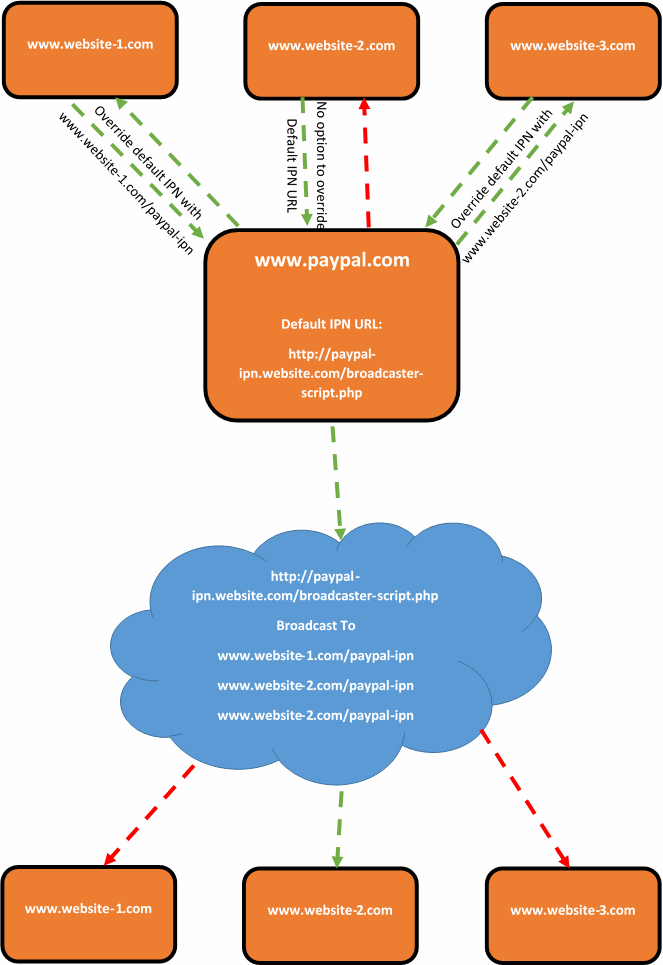
Thankfully, there is a solution. It is not a very elegant one, and one that I would personally prefer to avoid. Although there are no perfect systems, so this is a solution to one of those imperfect systems. The solution is to create a broadcasting script which acts as the default PayPal IPN URL. For example, this could sit on your website at www.your-website.com/paypal-ipn-listener-broascaster.php.
The purpose of the broadcaster script is so that your Instant Payment Notification messages can be picked up in a single location and forwarded on to wherever you like. This could be a single URL or multiple URLs. As the IPN messages contain transactional details and references, if another website, web application or system picks up on a message about a transaction that it knows nothing about, then it will simply ignore this message. So if you have 5 systems receiving messages from the broadcaster script, 4 of the systems are going to ignore the message and one of the systems will be able to tie this message to the specific transaction back to the correct piece of information and take the next steps required.
What this also means that if you start using systems that are capable of overriding the PayPal IPN URL, or PayPal get around to implementing the official solution for multiple IPN URLs within the account, then this solution does not interfere with this.
This can be a little difficult to picture, so here is a brief representation of what happens;
Summary
While you more than happy to use multiple payment gateways when looking to scale systems, many businesses want to keep things simple and use a single payment gateway for multiple systems. If the payment gateway that you have chosen is PayPal and you are looking to solve the problem related having multiple Instant Payment Notification (IPN) URLs, then it would be recommended to look at creating some kind of broadcast script that will handle all messages from PayPal and forward them on to where you would like. Depending on the software, programming languages and more that you are using, the implementation will clearly differ. If you need any help in relation to this, then get in touch.
