by Michael Cropper | Oct 24, 2015 | Developer |
Technical post for those who are looking for this information. If you’ve come across this blog post, then you probably know what this is and are just looking for a quick solution to the problem, so below is what worked for us. We needed PHP mbstring installing on the server, specifically related to a WPML (WordPress MultiLingual) setup we had in place which required this setting to work. So we needed to rebuild the default Apache & PHP settings accordingly. For reference and in case this relates to anyone else, this is the error message we were receiving which required this specific update;
Warning: filter_input(): charset `ANSI_X3.4-1968′ not supported, assuming utf-8 in /wp-content/plugins/sitepress-multilingual-cms/inc/not-compatible-plugins.php on line 32
Step 1: Login to WHM
I’m assuming you know how to do this…
Step 2: Navigate to EasyApache
Fairly straight forward;
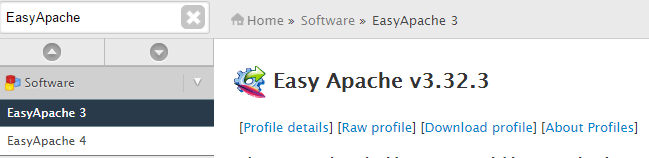
Step 3: Edit the Default Profile
Click on the gear icon;

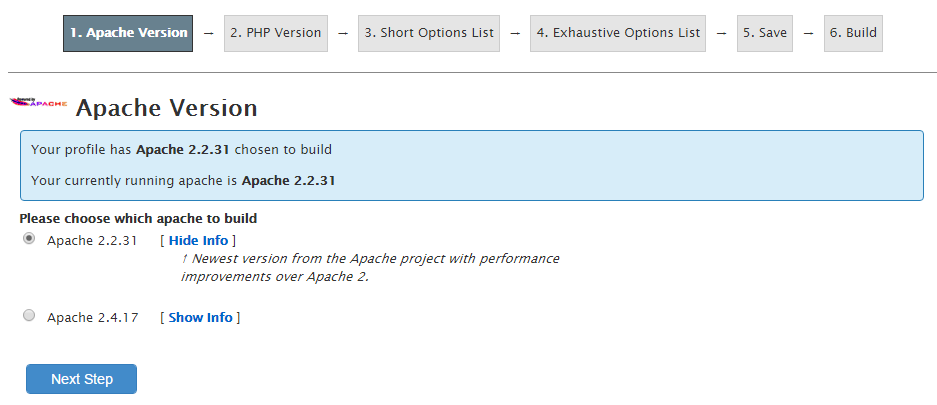
Step 4: Follow the list of Settings
Work through the list of settings clicking on “Next” until you reach the “Exhaustive Options List”. Within here you will find an option for “PHP Mbstring” which can be selected to be turned on;
Step 5: Save & Build
One you have worked through the above settings your web server will run through the whole build process and eventually complete as can be seen below;

Note
As with any web server changes, make sure you have a backup before working through this. It goes without saying, but never the less, every web server is different so please make sure you understand what you are doing before jumping in with these types of changes.
by Michael Cropper | Oct 24, 2015 | Digital Strategy |
We see a lot of WordPress websites as you can imagine with WordPress development being a core service we offer. Within these WordPress websites we see an awful lot of baggage which is limiting the growth of the website and is often caused by poor technology decisions earlier on. This post is designed to help you understand what the common issues we see are, what they mean in non-technical terms and most importantly what you can do to avoid these same problems in the future.
If you have been sent this link from a member of staff, then the likelihood is that you have unfortunately made the wrong technology decisions on your website 1-2 years ago which is now coming back to bite and it’s unfortunate that the only way of dealing with this is to bite the bullet and implement the right technology which comes at a cost. Instead of us keep explaining the variety of reasons why something cannot be implemented effectively on a website, we’ve decided to put together this guide to outline this information in more depth which can be referred to by everyone and to hopefully avoid others making the same mistakes as we see so many businesses make.
About WordPress
Ok, so you’ve decided to use WordPress for your website. Awesome! WordPress is a great choice for many businesses and is the leading content management system on the planet, powering over 23% of websites on the entire internet. There are over 30,000 free plugins available, thousands of themes and even more “WordPress Developers” who claim to be able to implement all of these things well. There are many free options and a smaller number of paid options for all of the above and herein lies the problem. The theory VS the reality are rather different and have significant implications for your business in the short, medium and long term. Here are a few common comments we often hear from businesses, again to avoid repeating ourselves on the matter, let’s just cover off a few things straight away;
“WordPress, it’s free right? So why does this cost money to do?”
Hmm. Yes, WordPress core functionality is indeed free and if you want your website to look like it was free then you are more than welcome to give this a go yourself. I’m going to tell you a little story here about a boiler person fixing a problem to highlight what you are paying for.
So you are sitting at home all cosy and all of a sudden your boiler stops working. You go to the boiler, try and re-pressure the boiler, tap on the dials a bit, press a few buttons and then you are still no wiser as to what has happened or how to fix the problem. So you decide to call out a boiler engineer. The next day the boiler engineer comes around to your house where you then explain the problem to them and it is a common problem they have dealt with many times before. By the time you have offered to make them a cup of tea, they have given the boiler a couple of taps and everything is back to normal again. They hand you an invoice for £150 for fixing the problem and just before they leave you have a question running around in your mind and decide to speak up. You say, why has this cost me £150, you’ve only been here 5 minutes? Ah, the boiler person says, it is not the time you are paying for, it is the expertise to be able to fix this problem within this small amount of time. It’s about knowing exactly where to tap on the boiler when this problem occurs. You see, you could quite happily have spent days searching around the internet trying to solve the problem for yourself or had a junior boiler engineer come around and fix the problem over 6 hours, but with me, with me you get many years of experience and vast expertise so that this problem can indeed be fixed in as little as 5 minutes. You see, anything is simple when you have the experience and knowledge to do so. The trick is, acquiring this knowledge and experience over a number of years takes a dedicated amount of time and effort.
Website development is no different.
“Why do I have to purchase this plugin, can’t you just build this yourself instead?”
Premium plugins and themes are awesome and you need to understand that this is the way the WordPress ecosystem works. It is the reason WordPress websites are so cost effective in comparison to building your own custom build technology. The difference between buying a premium plugin VS building this functionality yourself is the same difference between buying a high performance car from a showroom VS building your own car from the raw materials. You just aren’t going to do that are you now? For the cost of premium plugins, you would never even contemplate building your own functionality if you can simply purchase this and it does exactly what you need as it would cost 10-50x more to do this manually from scratch due to how complex WordPress actually is in the background to get things working correctly.
“Why do I need to pay annually for a licence for a plugin or theme?”
You want your website to be up to date and secure, right? This is what you are paying for. Premium plugin and theme developers continually keep their technology up to date, add features and functionality along with patching security holes that have been identified. When you decide to save a few pennies on your technologies, you will be bitten in no time when your website is hacked into by an automated robot. We’ve seen this happen too many times and we will quite happily help to clean this up for you when this does happen which will cost you more in the long run.
Child Themes
This has to be one of the biggest issues we see for businesses. To keep things simple and straight forward, you must use a child theme if you are making any customisations to your theme! It really is this simple.
Ok, so what is a child theme? A child theme a way of customising your WordPress website, generally by the developer who built it, whereby you can override key functionality in a safe way. As mentioned previously, security updates and feature addons to themes come out all the time, so it is important to keep these up to date. If you edit your theme directly, when you press the friendly looking “update” button, you will be left with a shocking surprise when all of your customisations have been deleted. Again, we’ve seen this happen time and time again.
What this means for business owners is that you need to check that your WordPress website is being built by a reputable developer in the first place and also that they are going to be using a child theme for any customisations that are made. If not, then when someone else takes this on, such as our self, there can be no guarantees that a theme update will not cause any issues. A simple theme update could actually cause days if not weeks worth of work to fix critical problems just to get your website looking how it was looking previously.
What often happens is that when businesses come to us, we explain that a website hasn’t been built using a child theme, that we cannot guarantee no issues and really they are going to need to redevelop the website. Which often is a little confusing to hear as they only wanted a few simple changes to be made. The reason why this is required is because if we press the nice little “update” button and cannot guarantee that updates will no break anything, then we will be left with the situation of having to clean up the mess from other developers which we are not willing to do and is something that often you would not be willing to pay for as you would see the situation that we have broken it. When in fact, the problem lies with the poor technology choices you made previously.
If your website has not been customised with a child theme, the short answer is always going to be that you need to get this redeveloped properly. Unless you are 100% confident that you or your previous web developer has not made any changes to the core theme files and that you are willing to pay extra for when things break and have to be cleaned up, then the only option is to rebuild your website. Out of experience, the simplest and most cost effective solution is to just do the right thing and get the right technology in place.
Theme Market Place Themes
This nicely brings us onto how many websites end up in this situation. Generally speaking, experienced WordPress developers do not purchase their themes from theme market places because they are often utter garbage when it comes to how they have been built, how they are maintained and most importantly how difficult they are to use from a development point and also for users. Often we find that when businesses come to us with WordPress related problem that they are struggling to make the changes that they want to the website, this is often down to either their self or their last web developer who has decided to purchase a $60 bargain basement theme from one of the theme market places because it looked pretty.
Sadly, we’ve yet to experience a good result when businesses have gone down this route. If this relates to you, do not be offended when we refuse to work with your current theme and can only help when rebuilding your website with leading technology.
We often find with themes that have been purchased from theme market places is that the theme will be bundled with a bunch of plugins, aka additional functionality, which is never a good solution. As mentioned previously, themes and plugins are being continually updated with new features and security patches. You tend to find when you purchase themes from theme market places that these themes aren’t that up to date and often when a security patch is announced then the theme author doesn’t update the theme which results in your website being vulnerable and open to being hacked.
Quite simply, plugins should not be bundled into themes. Plugins should be stand alone separate systems which users have the option of updating separately and most importantly turning on/off the functionality as they need. If you are in a situation whereby your theme has multiple plugins bundled into it, be very wary and you’re probably going to hear those words from us very soon… You’re going to need a new website.
Lack of Security Updates
We’re going to be covering this topic in much more detail in another blog post. For now though, let’s keep things simple. As WordPress powers over 23% of websites on the internet, it is naturally a target for attackers. These are often not targeted attacks but are vulnerability attacks. This means that a robot will run through all websites on the internet, identify what version of WordPress a website is running, what plugins and themes the website is running then most importantly check for known vulnerabilities for these websites and hack into them, fully automated.
Some of the largest causes of hacked WordPress websites comes down to lack of security updates. This is in the form of theme updates, plugin updates and WordPress core updates – or lack of all of these. Quite simply, you need to keep your entire WordPress website up to date to avoid being hacked into. The choice is yours.
Can’t Edit the Content Yourself
We often hear;
“Isn’t WordPress supposed to allow you to edit everything yourself?”
Well, yes, in theory. The reality of this can be very different based on how your WordPress website has been put together and most importantly what technology has been used and how good the web developer you used was.
The reality of many websites we see is that things are so difficult to edit from a novice user point of view that this results in all changes needing to be made by an expert or a web developer which is kind of missing the point of WordPress.
We see content stuffed into sections of WordPress which were never designed to hold such content, we see content that is stuffed away in PHP files which users cannot edit their self, and we see content hidden away in a complex array of plugins and hidden settings and more. Most WordPress websites have been built without the user in mind which we just cannot understand. From our perspective, we do not want to be spending time editing text content on your website. This is not a good use of your budget and quite frankly this is something you should be doing yourself, it is your website and your business. We can work on the more cool pieces of functionality and integrations that is going to grow your business.
Quite simply, if you are struggling to edit content on your WordPress website then it has probably been built extremely badly. So don’t be surprised if you soon hear us utter the words… You’re going to need a new website. As it will be much more cost effective in the long run when you can run your website as you need to.
Access Restrictions & Owning Your Own WordPress Website
We still see so many issues related to ownership of your own website. You need to have access to your WordPress login area as an Administrator, you need to have FTP access to the web server where your website lives, you need to have control panel access for your web server. To keep things simple, you need to be using our free Digital Assets Tracker to keep track of who owns what and who has access to what.
Could You Just…
Ahh… one of the common starts of sentences which really translates to “I don’t want to pay you for this, so could you just do this for free?” Sorry, no. You wouldn’t ask a car mechanic after fitting a new tyre, “Could you just wash my car too?” Website development is no different. What you may see as a simple thing to do, often actually isn’t and requires a reasonable amount of time and customisation to get right. You need to understand the time involved in aspects of work, so don’t be offended when we can’t just tweak something for free. We can quite happily provide a quote for the work and you can then make the decision to either go ahead with this work or not, this is your website after all.
Responsive
We often hear comments along the lines of;
“Can’t you just make the current website responsive?”
I’m sorry, WordPress just doesn’t work like that. The theory of WordPress means that you should just be able to place a new theme on your WordPress installation and everything looks different. The reality is hugely different. If your website isn’t responsive currently, then quite simply you are just going to need a new website built to cope with this.
Responsive web design is a whole topic in itself which we will be covering in more detail in a future blog post. What is important to understand though is that the basics of responsive web design mean that you have the same content accessible which is just presented in a slightly different way. Note the use of the word slightly here. Responsive web design is not a framework for showing users different content based on the device they are using, that is adaptive web design. Responsive web design is about re-jigging things a little based on the user’s device which is significantly different. For example, responsive web design just doesn’t work when you want things such as “I don’t want this section to display for users on mobile devices”. The technology simply isn’t designed for this, so again, don’t be disgruntled when we say that this cannot be done.
Summary
Overall this blog post is not designed to be a moan about problems we see. No. Instead this blog post is designed to help you understand where we are coming from when we say different things during discussions. Most importantly though, by understand the concepts above and how this relates to yourself, this will hopefully help you to avoid making the same mistakes as others and also be able to plan for the right technology improvements that you are going to need within your business.
by Michael Cropper | Oct 22, 2015 | SEO |
Well, what an awesome day WordCamp Manchester 2015 was! With over 150 attendees, digital experts travelling from as far away as Brighton and gallons of coffee drunk. The conference was a roaring success with many people commenting on the day about how well-organised the event was and how valuable the content from all the speakers was. All of this wouldn’t have been possible without the team of volunteers behind the scenes organising the conference over the last 6 months, it was great to be involved with this. And let’s not forget the wonderful sponsors who financially made this happen, WordCamp Manchester 2015 wouldn’t have been such a success without the support from sponsors.
Photos
We all love a good photo or two!
Tracking your Content Marketing Results Accurately
I was presenting at the conference about how businesses can track their content marketing results accurately. While the video presentations are being collated and edited together to appear on WordPress.tv, here are the sliders for reference;
Summary
Awesome day! Same time again next year? 🙂
by Michael Cropper | Oct 8, 2015 | Uncategorized @en-us |
Many small to medium sized business are afraid of social media, are unsure what they should be doing on social media and spend an awful lot of time managing social media without any idea of what they are getting back from it. We’ve already covered how to monitor your social media activities and reviewed various tools to help you manage social media effectively. Now it’s time to take this one huge step further to automate virtually 99% of your social media accounts using technology.
If you’re a business owner or aren’t that tech-savvy then some of this may be a bit over your head, so get in touch and we can look to set up the same process for you with ease and show you how to use this system. The investment in this setup using free technologies will pay for itself within a matter of weeks within your business in time saved, allowing you to spend time improving other systems and processes to become more profitable.
Before people start jumping on the bandwagon about how social media should be personal, you should spend time crafting messages and treating every account differently etc. Bear with me. The reality for many businesses is that they quite simply don’t have time to be doing the work that large brands do as large brands have teams of people managing their social media activities in the background. The reality for the majority of small to medium sized businesses is that this is left to either a single marketing manager, a junior member of the marketing team or even the managing director to manage. For all of these people, social media management is not at the top of their priority list and is an area which can be made extremely efficient with technology and automation without compromising on the quality. On the other hand, if you feel that your business needs someone to be doing everything manually, then good on you, you’re probably wasting a lot of time as this is the equivalent of still using a dustpan and brush when you could just use a Dyson or a Roomba.
Now, on to the good stuff. Personally we use a whole host of technologies, automation techniques and manual interactions to manage our social media channels which works for us. Every business is different, so take what you will from this and if this could work for you, then great, you’ll be saving hours or time per week through the use of smart technologies.
The Manual Process
Before we jump into the automation, let’s just look at the common ways people identify content to share on social media channels. They are likely subscribed to either a daily, weekly or monthly newsletter from a variety of industry magazines and websites or they use a well-crafted set of followers on social media to manage their news feed effectively. We use a mixture of both, with the main @ContradoDigital Twitter account following relevant digital accounts that share some awesome news about the world of digital. As always, not everything is relevant for what our audience wants, so we need to filter out this so that the content that is shared is highly relevant to our audience who is interested in technology, innovation, digital marketing, security and general digital news.
Based on this, we review the content that is being published around the web and any content that is relevant we also share on our social channels, both company channels and my personal channels for Twitter, LinkedIn, Facebook and Google+. We already have technology in place to automate the majority of the social media management process which saves an enormous amount of time already but we wanted to go further and really push the boundaries of what is possible.
We use Buffer to add social media updates to our queue of scheduled posts to be posted out to all social media channels along with Bitly to track the engagement from our followers to understand what content they like to read about. The last piece of the puzzle is how to automate adding content to Buffer with ease. Traditionally we would either favourite a news story on Twitter or open that news story in the browser then use the Buffer Google Chrome plugin or Buffer App on mobile to add this to the queue. While not particularly difficult to do, adding a new story to the queue could take up to 2 minutes by the time the pages have loaded and everything has been completed. 2 minutes, multiplied by 6 posts per channel per day, multiplied by 20 days per month equates to around 4 hrs per month spending time adding content to social media channels for our audience. I’d guess that this is already significantly less than what you spend managing social media channels, but we wanted to go one step further and significantly reduce this to only 60 seconds per day.
What if there was a better way…
Introducing Automation using IFTTT
If you haven’t come across If This Then That (IFTTT) before, then quite simply this piece of free technology is designed to automate almost anything you can imagine that you are doing manually. The service links together web based technologies through the use of Application Programming Interfaces (APIs) which can be simplified as systems talking to other systems.
All modern and scalable web platforms have some kind of open API built in with them as they understand how this key functionality automates the work and grows their business. It is this what we’re plugging into to join the dots and save 4 hrs per month.
The logic behind the automation is as follows;
- When a Tweet is Favorited on Twitter
- Send this to Buffer to be automatically posted out to our followers who are interested in this content
There is a little more behind the scenes which we’ll talk through in a minute, but that is the gist of the setup.
The Process for Automating 99% of Social Media Management
So let’s just jump right into how to get this set up. Once set up, you will be saving hours of time per week managing your social media activities. Most businesses spend an hr or two per day managing social media activities. We spend 60 seconds per day as we’ve implemented the right technology to become more efficient.
Bitly
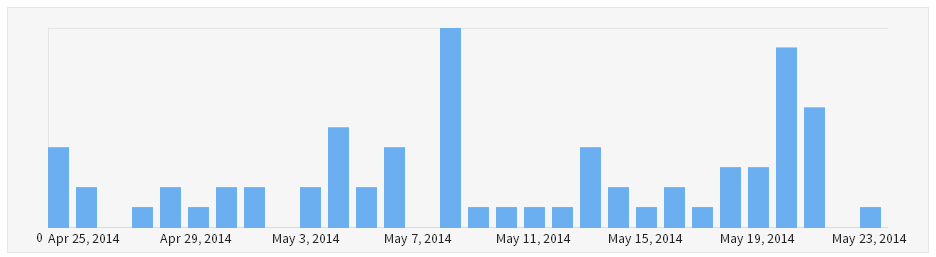
Set up a Bitly.com account if you don’t have one already. This is going to track how many people are clicking on the links that you are sharing on social media on a daily, weekly and monthly basis. Allowing you to improve performance of your social media activities over time.
Buffer
Set up a Buffer.com account if you don’t have one already. This is going to automate all of your social media posts by adding everything to a pre-scheduled queue. Allowing you to simply add a post to Buffer which will then be automatically posted to your default social media profiles that you can configure to send out an update at a set time of day/week as you choose.

Make sure you link your Buffer account with Bitly in the settings to track link clicking statistics through Bitly as we find this provides a bit more insight than Buffer. You also need to set your default social media profiles up. So if you have multiple social media profiles to manage, then set which are your default ones that you want to send updates to as these will be used with this automation setup.
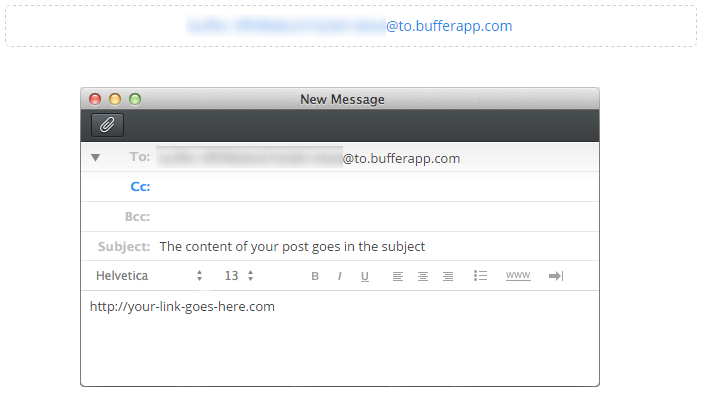
Buffer has the ability to email updates to Buffer which will be automatically added to your queue which is what we’re going to be using to automate things. Find your Buffer Secret Email Address within your account settings;
Now comes the clever part, using IFTTT.
IFTTT
Set up an IFTTT account if you don’t already have one. A component of IFTTT is that you create a Recipe which has Ingredients. Using this setup, you are essentially triggering an action to happen when something else happens beforehand.
In this example, we want to send an email to Buffer from Gmail when we Favourite a new Tweet on the @ContradoDigital Twitter account.
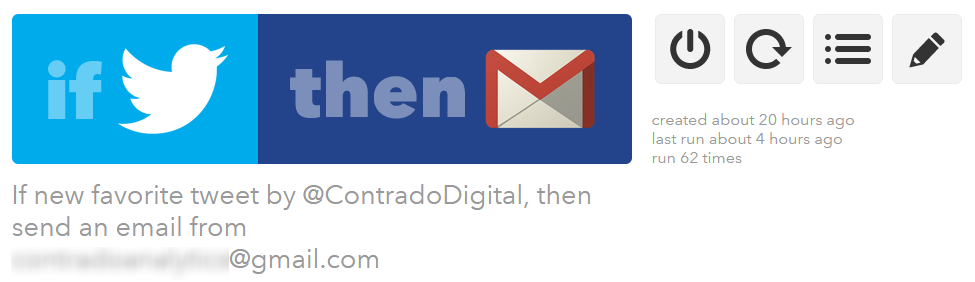
To do this, click on the “Create Recipe” button which will guide you through the process. As part of this process, IFTTT will connect with your Twitter account and your Gmail account. All fairly straight forward here. The part that you need to configure properly is what to contain in the email as there are specific shortcodes called Ingredients which need to be included so the correct information is sent over to Buffer to add everything to the right areas. Here you enter in your Buffer Secret Email Address from earlier along with the shortcode {{TEXT}} which will pull in the text from the Tweet you have just favorited and send this to buffer to use in the update;
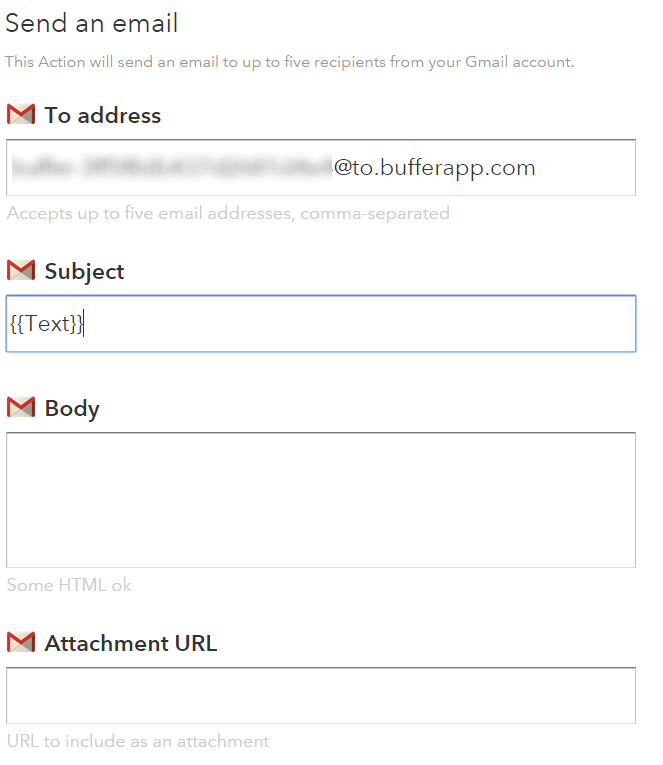
Once you’ve done this, it’s simple. Save the Recipe and start adding Tweets to your Favourites. IFTTT runs every 15 minutes or so, fully automated, so when it detects a new Tweet that you have starred then it will automatically post this out to Buffer.
All in all, meaning that we spend an average of 60 seconds per day managing our social media accounts, saving hours per month, allowing us to focus on more productive areas working with clients to implement similar technologies within their businesses to save them time and money.
If you’d like to make your social media accounts extremely efficient like we have and all of this has gone a bit over your head, then get in touch and we can look to set up the same process for you with ease. The investment in this setup using free technologies will pay for itself within a matter of weeks within your business, allowing you to spend time improving other systems and processes to become more profitable.
by Michael Cropper | Oct 8, 2015 | Uncategorized @en-us |
Many small to medium sized business are afraid of social media, are unsure what they should be doing on social media and spend an awful lot of time managing social media without any idea of what they are getting back from it. We’ve already covered how to monitor your social media activities and reviewed various tools to help you manage social media effectively. Now it’s time to take this one huge step further to automate virtually 99% of your social media accounts using technology.
If you’re a business owner or aren’t that tech-savvy then some of this may be a bit over your head, so get in touch and we can look to set up the same process for you with ease and show you how to use this system. The investment in this setup using free technologies will pay for itself within a matter of weeks within your business in time saved, allowing you to spend time improving other systems and processes to become more profitable.
Before people start jumping on the bandwagon about how social media should be personal, you should spend time crafting messages and treating every account differently etc. Bear with me. The reality for many businesses is that they quite simply don’t have time to be doing the work that large brands do as large brands have teams of people managing their social media activities in the background. The reality for the majority of small to medium sized businesses is that this is left to either a single marketing manager, a junior member of the marketing team or even the managing director to manage. For all of these people, social media management is not at the top of their priority list and is an area which can be made extremely efficient with technology and automation without compromising on the quality. On the other hand, if you feel that your business needs someone to be doing everything manually, then good on you, you’re probably wasting a lot of time as this is the equivalent of still using a dustpan and brush when you could just use a Dyson or a Roomba.
Now, on to the good stuff. Personally we use a whole host of technologies, automation techniques and manual interactions to manage our social media channels which works for us. Every business is different, so take what you will from this and if this could work for you, then great, you’ll be saving hours or time per week through the use of smart technologies.
The Manual Process
Before we jump into the automation, let’s just look at the common ways people identify content to share on social media channels. They are likely subscribed to either a daily, weekly or monthly newsletter from a variety of industry magazines and websites or they use a well-crafted set of followers on social media to manage their news feed effectively. We use a mixture of both, with the main @ContradoDigital Twitter account following relevant digital accounts that share some awesome news about the world of digital. As always, not everything is relevant for what our audience wants, so we need to filter out this so that the content that is shared is highly relevant to our audience who is interested in technology, innovation, digital marketing, security and general digital news.
Based on this, we review the content that is being published around the web and any content that is relevant we also share on our social channels, both company channels and my personal channels for Twitter, LinkedIn, Facebook and Google+. We already have technology in place to automate the majority of the social media management process which saves an enormous amount of time already but we wanted to go further and really push the boundaries of what is possible.
We use Buffer to add social media updates to our queue of scheduled posts to be posted out to all social media channels along with Bitly to track the engagement from our followers to understand what content they like to read about. The last piece of the puzzle is how to automate adding content to Buffer with ease. Traditionally we would either favourite a news story on Twitter or open that news story in the browser then use the Buffer Google Chrome plugin or Buffer App on mobile to add this to the queue. While not particularly difficult to do, adding a new story to the queue could take up to 2 minutes by the time the pages have loaded and everything has been completed. 2 minutes, multiplied by 6 posts per channel per day, multiplied by 20 days per month equates to around 4 hrs per month spending time adding content to social media channels for our audience. I’d guess that this is already significantly less than what you spend managing social media channels, but we wanted to go one step further and significantly reduce this to only 60 seconds per day.
What if there was a better way…
Introducing Automation using IFTTT
If you haven’t come across If This Then That (IFTTT) before, then quite simply this piece of free technology is designed to automate almost anything you can imagine that you are doing manually. The service links together web based technologies through the use of Application Programming Interfaces (APIs) which can be simplified as systems talking to other systems.
All modern and scalable web platforms have some kind of open API built in with them as they understand how this key functionality automates the work and grows their business. It is this what we’re plugging into to join the dots and save 4 hrs per month.
The logic behind the automation is as follows;
- When a Tweet is Favorited on Twitter
- Send this to Buffer to be automatically posted out to our followers who are interested in this content
There is a little more behind the scenes which we’ll talk through in a minute, but that is the gist of the setup.
The Process for Automating 99% of Social Media Management
So let’s just jump right into how to get this set up. Once set up, you will be saving hours of time per week managing your social media activities. Most businesses spend an hr or two per day managing social media activities. We spend 60 seconds per day as we’ve implemented the right technology to become more efficient.
Bitly
Set up a Bitly.com account if you don’t have one already. This is going to track how many people are clicking on the links that you are sharing on social media on a daily, weekly and monthly basis. Allowing you to improve performance of your social media activities over time.
Buffer
Set up a Buffer.com account if you don’t have one already. This is going to automate all of your social media posts by adding everything to a pre-scheduled queue. Allowing you to simply add a post to Buffer which will then be automatically posted to your default social media profiles that you can configure to send out an update at a set time of day/week as you choose.
Make sure you link your Buffer account with Bitly in the settings to track link clicking statistics through Bitly as we find this provides a bit more insight than Buffer. You also need to set your default social media profiles up. So if you have multiple social media profiles to manage, then set which are your default ones that you want to send updates to as these will be used with this automation setup.
Buffer has the ability to email updates to Buffer which will be automatically added to your queue which is what we’re going to be using to automate things. Find your Buffer Secret Email Address within your account settings;
Now comes the clever part, using IFTTT.
IFTTT
Set up an IFTTT account if you don’t already have one. A component of IFTTT is that you create a Recipe which has Ingredients. Using this setup, you are essentially triggering an action to happen when something else happens beforehand.
In this example, we want to send an email to Buffer from Gmail when we Favourite a new Tweet on the @ContradoDigital Twitter account.
To do this, click on the “Create Recipe” button which will guide you through the process. As part of this process, IFTTT will connect with your Twitter account and your Gmail account. All fairly straight forward here. The part that you need to configure properly is what to contain in the email as there are specific shortcodes called Ingredients which need to be included so the correct information is sent over to Buffer to add everything to the right areas. Here you enter in your Buffer Secret Email Address from earlier along with the shortcode {{TEXT}} which will pull in the text from the Tweet you have just favorited and send this to buffer to use in the update;
Once you’ve done this, it’s simple. Save the Recipe and start adding Tweets to your Favourites. IFTTT runs every 15 minutes or so, fully automated, so when it detects a new Tweet that you have starred then it will automatically post this out to Buffer.
All in all, meaning that we spend an average of 60 seconds per day managing our social media accounts, saving hours per month, allowing us to focus on more productive areas working with clients to implement similar technologies within their businesses to save them time and money.
If you’d like to make your social media accounts extremely efficient like we have and all of this has gone a bit over your head, then get in touch and we can look to set up the same process for you with ease. The investment in this setup using free technologies will pay for itself within a matter of weeks within your business, allowing you to spend time improving other systems and processes to become more profitable.